
Surfshark’s scam protection is a package of tools for spotting, flagging, or blocking suspicious texts, emails, and websites — and finally a tool for scam calls!
Each tool covers a different type of potentially fraudulent activity, from phishing attempts to text message scams, all under one subscription. How it responds depends on the scam and your device.
What does Surfshark’s scam protection include?
Surfshark’s scam protection spans four channels: calls, texts, emails, and websites, each covered by different tools.
|
Tool
|
What it addresses
|
How it responds
|
Where it works
|
|
Scam call protection
|
Suspicious calls from unknown numbers
|
Android and iOS: blocks flagged scam numbers or shows an on-screen warning, depending on your setting; |
Android and iOS
|
|
Scam text protection
|
Potentially fraudulent text messages
|
Android: warning notification and in-app dashboard; iOS: flagged texts move to the Spam or Unknown senders folder in Messages
|
Android and iOS
|
|
Email scam checker
|
Phishing emails
|
On-demand scan that flags phishing signs, malicious links, and impersonation
|
Gmail (via Chrome extension)
|
|
Web content blocker
|
Malicious sites and other website categories you choose
|
Blocks the categories you select
|
Windows, macOS, iOS, and Android
|
Scam call protection
Our scam call protection helps you spot and block suspicious incoming calls. It screens calls from unknown numbers against known patterns of scams and telemarketing. Depending on your settings, it either blocks flagged calls before they ring through or shows an on-screen warning so you can choose how to respond. It’s available on Android and iOS.
Calls were the third most frequently reported scam contact method in 2025, and 19% of those reports involved a loss. Scam calls cost Americans $1.1 billion in financial losses in 2025, or more than $3M a day. To put the numbers in perspective, that could cover 30 days of healthcare for over 1M adults.
Scam text protection
Our scam text protection helps you spot fraudulent text messages. It checks incoming texts for known scam signatures and suspicious patterns on iOS and Android. Surfshark doesn’t store your message content after the scan is complete.
What happens next depends on your device. On Android, you get a warning notification and can review the flagged text, along with the signs behind the warning, inside the Surfshark app. On iPhone, flagged texts move to the Spam or Unknown senders folder in the native Messages app, and you won’t get a notification for texts filtered this way.
Text message scams were the most frequently reported scam channel in 2025 and accounted for $639M in losses, up 36% from 2024, even though only 9% of those reports involved a loss.
Email scam checker
Our email scam checker helps you analyze suspicious emails for signs of phishing. It examines an email’s content, sender information, and other characteristics, and flags manipulation tactics and malicious links.
It’s part of the Surfshark Chrome browser extension and currently works with Gmail on the web. The result is one of three statuses: phishing email, potential signs of phishing, or no threats detected.
We analyze your emails only to run and improve the check, and we handle that data with care.
Email was the second most frequently reported scam channel in 2025: the FTC (Federal Trade Commission) logged 361,081 email reports, 14% of them with a loss, which added up to $569M.
Web content blocker
Our web content blocker helps you manage access to categories of websites, including malicious ones. You choose which categories to block, such as websites hosting malicious downloads, and the setting applies on Windows, macOS, iOS, and Android devices.
It also covers family devices that use the same Surfshark account, and on most platforms you can lock the setting with 2FA (Two-factor Authentication). It blocks only the categories you choose, without tracking your online activity.
It works by category, so it can’t catch every scam website. A few setup details also matter:
- On Android and iOS, a connected Surfshark VPN (Virtual Private Network) has to use the WireGuard or Dausos protocols;
- Sites on your Bypasser list (the sites you let skip the VPN) aren’t blocked;
- Android’s power-saving settings can shut the service down;
- On iOS 27, Wi-Fi Assist must be turned off, or the web content blocker won’t block any categories.
Websites and apps were a costly scam channel in 2025: 69% of reports citing them involved a loss, and total losses topped $1.1 billion.
Which tool fits your situation?
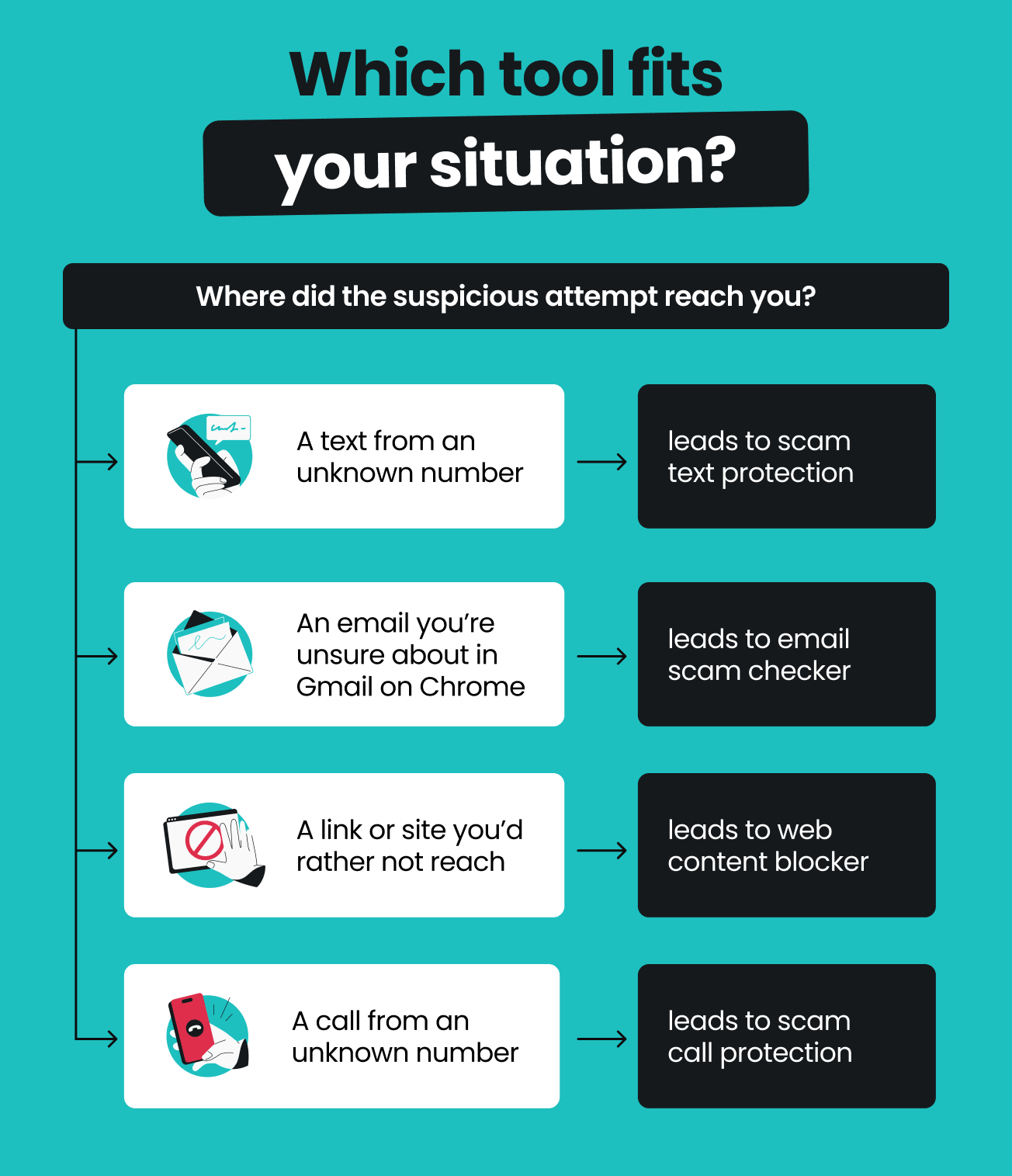
Scam attempts are becoming the norm: 51% of US respondents in a June 2026 Surfshark survey said they get a suspected scam attempt every day. Match the tool to where the attempts reach you:
- Texts from unknown numbers, such as fake delivery or toll notices: scam text protection;
- Emails you’re unsure about in Gmail on Chrome: email scam checker;
- Links and sites you’d rather not reach, for you or your family: web content blocker;
- Calls from unknown numbers: scam call protection.
Scam attempts rarely announce themselves. So pause before you tap, reply, or pay if a message pushes you to act fast, even when nothing has flagged it.
How does Surfshark’s scam protection work?
Imagine waking up in the morning to a delivery text, a bank email, and a call from an unknown number, all of which feel urgent and catch you off guard. Thankfully, Surfshark can help you spot them before they stress you out (or, worse, successfully scam you). Each reaches you through a different channel, so each needs a different check.
Scam call protection checks calls from unknown numbers for known scam patterns. Scam text protection checks texts for scam signatures and suspicious links. The email scam checker uses AI to analyze emails, and the web content blocker blocks categories of websites you pick. Depending on the tool, something may be flagged, moved to spam, or blocked.
What other Surfshark tools can help protect against scams?
Apart from scam protection tools, Surfshark offers additional security solutions to enhance your online safety. They complement scam protection rather than replace it.
- Personal data masking creates a masked email address and identity to use instead of your regular details. Sign up for a store discount with a masked email, and if that store later leaks its customer list, your main email address isn’t on it;
- Data leak monitoring checks known data leaks for exposed personal data, such as your email addresses, passwords, credit card details, and IDs, and notifies you if they appear online. Once you’re notified, you can take advised action;
- Surfshark Antivirus scans your devices for malware and spyware. It covers a different risk: malicious files that reach your device, such as a spyware-laced “free invoice template.”
Note: In some versions, personal data masking may be labeled Alternative ID and data leak monitoring may be labeled Alert.
How can you get Surfshark’s scam protection?
All scam protection tools are included in Surfshark One plans: Surfshark One and Surfshark One+. Surfshark plans also come with a 30-day money-back guarantee.
For step-by-step help, see the web content blocker and text message protection setup guides.
Conclusion: which scam protection tool should you start with?
Scam protection at Surfshark brings together several tools for different kinds of suspicious activity: unknown callers, suspicious texts, emails, and websites.
Each tool has a specific job and a tailored approach, and a few limits apply, such as the email scam checker only working in Gmail on Chrome. Start with the channel where you see the most suspicious activity, then add the rest: the tools complement each other across calls, texts, emails, and websites.
Frequently asked questions
Does Surfshark stop scam calls?
Yes, on Android and iOS. Scam call protection checks calls from unknown numbers against known scam and telemarketing patterns and, depending on your settings, blocks flagged calls or shows a warning. No tool catches every scam, though.
Does Surfshark’s scam protection work on iPhone and Android?
Mostly. Scam text and call protection and the web content blocker work for both iOS and Android users, with flagged texts handled differently on each, while the email scam checker is part of the Surfshark Chrome extension and works with Gmail.
Does Surfshark’s scam protection use AI?
In part. The email scam checker uses AI to analyze emails for phishing patterns, while scam call protection and scam text protection check calls and texts against known scam patterns, and web content blocker blocks the categories you choose.
Is scam protection included with Surfshark One?
Yes. All scam protection features are included in Surfshark One and Surfshark One+, including scam call protection, scam text protection, the email scam checker, and web content blocker. You can check the scam protection page to read more.