

Imagine someone broke into your house, hid inside your walls, and quietly watched everything you did. That’s essentially what a rootkit does to your computer.
Unlike typical viruses, rootkits are designed to stay invisible. They can remain undetected for weeks, months, or even years, giving cybercriminals control over your system while you have no idea anything is wrong.
The good news is that understanding how rootkits work makes them far easier to prevent. This guide breaks down what rootkits are, how they infect devices, the different types you should know about, and how to protect yourself.
What is a rootkit?
A rootkit is a type of malicious software designed to give attackers hidden, privileged access to your device. The rootkit definition comes from two words:
- Root: the highest-privilege administrator account on a computer system;
- Kit: the software components used to gain access to that account.
Put them together, and you get a set of tools that grants attackers unrestricted root access to everything on your device.
Attackers use rootkits because they want persistent access. Rather than pulling off a quick data grab, they want to maintain privileged access to a system for as long as possible. This lets them steal information, install other malware, or use your device as part of a larger attack.
What separates rootkits from other malware is stealth. A virus corrupts files, a Trojan pretends to be legitimate software, and spyware records your activity. A rootkit can do all of those things, but its defining characteristic is that it hides the fact that any of it is happening.
Here’s an in-depth look at how rootkits compare to other common types of malicious software:
|
Malware type
|
Primary goal
|
Visibility
|
Persistence
|
|
Rootkit
|
Hidden control and privileged access
|
Very low: actively hides files and processes
|
High: designed to maintain persistent access
|
|
Virus
|
Corrupt or destroy data
|
Moderate: often noticeable through errors, slowdowns, or file damage
|
Moderate: spreads via infected files
|
|
Trojan
|
Trick users into granting access
|
Low: disguised as legitimate software at point of infection
|
Varies: depends on payload
|
|
Spyware
|
Monitor activity and steal data
|
Low: runs silently
|
Moderate: stays active but doesn’t embed at system level
|
Further reading: For a deep dive into the differences between different kinds of malicious software, check out Surfshark’s virus vs. malware guide.
How does a rootkit work?
A rootkit attack typically follows four steps: infection, privilege escalation, concealment, and control. Here’s how each stage works.
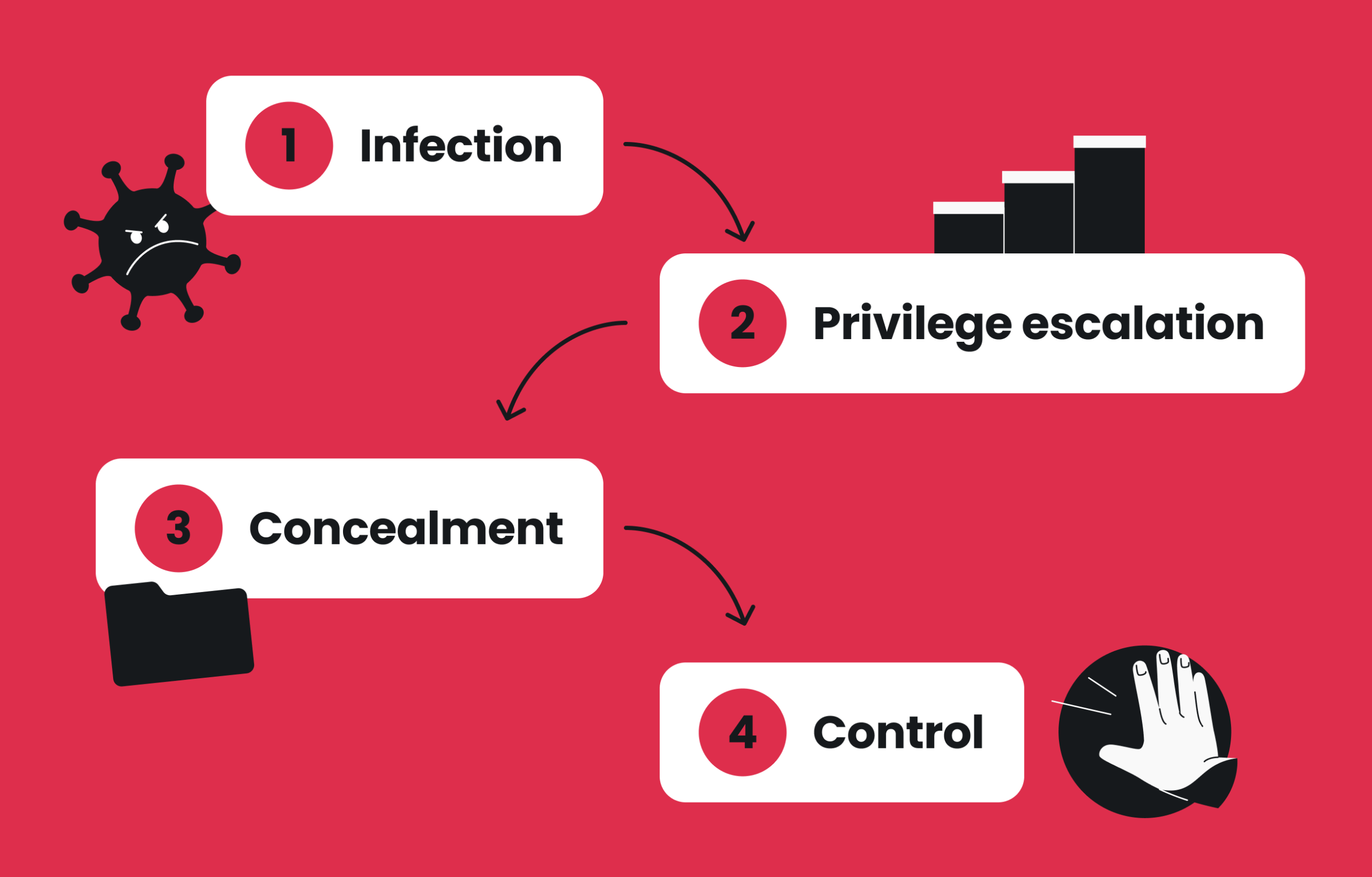
Step 1: The device becomes infected
Rootkit installation starts the same way most malware infections do. Common entry points include:
- Phishing emails: messages that trick you into clicking a malicious link or opening an infected attachment;
- Malicious downloads: cracked software, fake updates, or files from untrusted websites that bundle rootkit malware with seemingly harmless programs;
- Trojans: a rootkit Trojan disguises itself as legitimate software. Once you install it, the rootkit payload activates in the background;
- Infected USB drives: attackers sometimes leave USB drives in public places, counting on someone to plug them in;
- Software vulnerabilities: unpatched operating systems and applications can let attackers inject malicious code without any user interaction. These cases are known as drive-by downloads.
The key takeaway here is that most rootkit infections start with some form of social engineering or an unpatched system, both of which are often preventable.
Learn more: Many online threats are avoidable if you take the right precautions. Check out Surfshark’s digital security safety guide to explore more about the biggest risks and the tools you can use to stay safe.
Step 2: The rootkit gains privileged access
Once on your device, the rootkit needs to escalate its permissions.
You see, a regular user account on your computer can browse the web and open files, but it can’t change core system settings. An administrator account can do much more: install software, modify system-level code, or turn off security features. A rootkit exploits software vulnerabilities or uses the permissions you granted during installation to gain administrative privileges.
Some rootkits go even further, embedding themselves directly into the operating system’s kernel, or the core code that controls how your hardware and software communicate. The kernel manages memory, processes, and every fundamental operation your computer performs. In other words, anything with access to it has near-complete control over the system.
Step 3: The rootkit hides its activity
The rootkit’s ability to conceal its activity is what makes it especially dangerous. Once a rootkit gains control, it actively works to evade detection by:
- Hiding its own files and processes from your operating system;
- Removing itself from the list of running processes so security tools can’t see it;
- Manipulating registry keys and data structures to erase evidence of its presence;
- Maintaining persistence across reboots;
- Intercepting requests between your apps and operating system, so that when antivirus software scans for threats, it sees nothing unusual.
As a result of the above actions, your device behaves normally — even though an attacker is now controlling it.
Step 4: Attackers control the device
With privileged access and full concealment in place, attackers can now:
- Create hidden backdoors for future access;
- Log keystrokes to capture everything you type;
- Monitor your network traffic and communications;
- Install additional malware, including ransomware;
- Steal personal information like passwords and financial data;
- Use your device as part of a botnet — a network of infected devices that hackers control together to overwhelm websites, send spam, or carry out large-scale attacks.
Because the rootkit hides malicious processes from detection tools, this activity can continue for long periods without raising any alarms.
Types of rootkits
Where a rootkit resides in your system determines how deeply it can embed itself, how difficult it is to detect, and how much damage it can do.
Here are the most common types of rootkits:
User-mode rootkits
User-mode rootkits operate in the part of your OS where your normal programs run. These rootkits typically replace or modify application files and software components to control how your programs communicate with the device’s system.
Because they don’t touch the core of the OS, user-mode rootkits are the easiest type to detect with standard antivirus programs. They’re also simpler for attackers to build, which makes them one of the most common types.
Kernel-mode rootkits
A kernel-mode rootkit operates at the deepest level of the operating system, known as the kernel space. This is where your OS manages hardware, memory, and every running process. By injecting malicious code directly into the kernel, these rootkits gain complete control over system behavior.
Kernel-mode rootkits can hide processes, files, and even entire drivers from security tools. They require administrative privileges to install, and removing them is notoriously difficult. In many cases, a complete system wipe combined with an OS reinstall is the only reliable solution.
Modern operating systems include defenses like driver signature enforcement and Secure Boot to make kernel rootkit installation harder, but attackers continue to find ways to bypass these protections.
Bootloader rootkits
Commonly called a bootkit, a bootloader rootkit infects the master boot record or other parts of the boot process that load your operating system at startup. Because bootkits activate before the OS even finishes loading, they can get around security software. In other words, a bootkit can compromise your system before antivirus programs, security features, or any other protective software has a chance to run.
Security features like Secure Boot were developed specifically to counter this type of threat and have made bootkits less common on modern hardware.
Firmware rootkits
Firmware rootkits are among the hardest to detect and remove. They reside in hardware firmware, the low-level software that controls your device’s router, hard drive, or BIOS (the basic program that starts your computer before the operating system loads).
Because firmware sits below the operating system, standard rootkit scans and security tools rarely look there. Firmware rootkits can persist across reboots and OS reinstalls. If the rootkit resides in your device’s BIOS or router firmware, it can even survive a hard drive replacement.
Memory rootkits
A memory rootkit resides entirely in your device’s RAM. Because RAM is cleared every time you restart your computer, memory rootkits disappear after a reboot.
This can be good news because they don’t survive a restart. However, while they’re active, they can carry out significant damage without leaving obvious traces on your hard drive. They can also cause increased CPU usage and degraded performance.
Here’s a quick comparison of the different rootkit types:
|
Rootkit type
|
Where it hides
|
Detection difficulty
|
Survives reboot?
|
|
User-mode
|
User space (applications)
|
Moderate
|
Yes
|
|
Kernel-mode
|
Kernel space (OS core)
|
Very high
|
Yes
|
|
Bootkit
|
Master boot record / bootloader
|
High
|
Yes
|
|
Firmware
|
BIOS, routers, hardware
|
Extremely high
|
Yes (also survives OS reinstall)
|
|
Memory
|
RAM
|
Moderate
|
No
|
What can a rootkit do?
Attackers can use a rootkit to do the following:
- Steal passwords and financial data: rootkits can capture login credentials, credit card numbers, and banking information;
- Log keystrokes: keystroke logging records everything you type, including messages, search queries, and passwords;
- Turn off antivirus software: rootkits can turn off security tools, leaving your device exposed to additional threats;
- Install ransomware or other malware: once a rootkit opens a backdoor, attackers can install whatever they want;
- Create hidden backdoors: even if you remove one piece of malware, a rootkit’s backdoor may let attackers right back in;
- Join botnets: your device can be recruited into a network of infected systems used to launch attacks;
- Steal personal information for fraud: compromised accounts can be used for impersonation, scams, or identity theft;
- Cause system crashes and software malfunctions: especially buggy or poorly built rootkits can destabilize your entire system.
Signs your device may have a rootkit
Rootkits are very difficult to detect by design, but infected systems sometimes show the following subtle warning signs:
- Turned off security software: your antivirus shuts off without explanation or can’t be restarted;
- Unusual crashes: you see frequent blue screens, freezing, or unexplained errors;
- Degraded performance: your device is noticeably slower, with higher CPU usage than normal;
- Strange network activity: data is sent from your device when you’re not actively using it;
- Suspicious processes: your task manager shows unfamiliar running processes you didn’t start;
- Changed settings: system configurations, browser homepages, or security settings change on their own.
These symptoms aren’t exclusive to rootkits and can also indicate other malware or hardware problems. But if you’re experiencing multiple signs at once, a deeper scan is worth running.
How to detect a rootkit
You can detect a rootkit by taking these steps:
Run antivirus scans
Antivirus software with anti-rootkit capabilities can catch many threats, especially user-mode rootkits and rootkits that haven’t yet embedded deeply into your system. A dedicated rootkit scan searches for known attack signatures and hidden malicious processes that standard scans might miss.
No antivirus guarantees detection of every advanced rootkit. However, regular scanning significantly increases the chance of catching a rootkit infection early — before it has time to dig in.
Perform boot-time or offline scans
Rootkits can control what your operating system sees, so kernel-mode rootkits and bootkits can hide from scans that run while your OS is active. Boot-time scans run before the OS fully loads, preventing the rootkit from hiding.
Many modern security tools offer offline or boot-time scan options specifically for this purpose. If you suspect a deep rootkit infection, this may be the most effective detection method.
Look for unusual system behavior
Behavioral analysis can detect rootkit-like activities even when the rootkit itself can’t be directly identified. Look for:
- Unexpected spikes in network traffic;
- New administrator accounts you didn’t create;
- Security tools that keep turning themselves off;
- Memory dump analysis results that reveal hidden instructions.
How to remove a rootkit
Rootkit removal is often difficult. Manual removal is complex, and some kernel-level rootkits require a complete system wipe. That said, here’s a practical recovery checklist:
- Disconnect from the internet: prevent the attacker from accessing your device remotely or exfiltrating more data.
- Run security scans: use multiple anti-rootkit and antivirus tools, since different scanners often detect different rootkit families.
- Remove detected malware: follow your security software’s instructions to quarantine and delete any rootkits detected.
- Install updates: patch all software and operating system vulnerabilities to close the entry point the rootkit originally exploited.
- Restore from trusted backups: if you have clean backups from before the infection, restoring them gives you the most confidence in your system’s integrity.
- Change all passwords: assume any credentials stored or typed on the affected device have been compromised.
- Reinstall the operating system: reinstalling the OS is often the only reliable way to remove deep rootkit infections. For firmware rootkits, you may need to reset or replace the affected hardware.
How to prevent rootkit infections
Preventing rootkit infections is much easier than removing them. These steps address avoiding the most common ways rootkits get onto devices:
Keep your operating system updated
Software updates close the security vulnerabilities that rootkits exploit.
When a known flaw goes unpatched, attackers can use it to inject malicious code and install rootkits without you clicking a single suspicious link. To minimize this risk, turn on automatic updates for your OS and all applications.
Download software only from trusted sources
Cracked software, unofficial app stores, and random download sites are major vectors for rootkit malware. If you find something like a premium version of an app offered for free from a site you’ve never heard of, the deal is probably too good to be true. It likely comes packaged with something you don’t want, like a rootkit.
Turn on MFA (Multi-factor Authentication)
MFA won’t stop a rootkit from infecting your device, but it can limit the damage that’s done. If a rootkit steals your passwords via keystroke logging, MFA adds a second verification step that makes it harder for attackers to access your accounts with those stolen credentials.
Avoid phishing and online scams
Phishing remains one of the most common delivery methods for rootkits. Attackers send emails, texts, or DMs designed to trick you into clicking suspicious links, opening infected attachments, or entering your credentials on fake websites.
Before you click on anything, do the following:
- Hover over links to preview the real URL;
- Check the sender’s email address carefully;
- Be skeptical of urgent requests for personal information;
- Refrain from downloading files in messages you didn’t expect.
Build a stronger cybersecurity strategy
Rootkits are just one piece of the broader cyberthreat picture. Reducing your overall risk means building multiple layers of protection, so if one layer is bypassed, others are still in place.
Invest in cybersecurity tools to help you:
Detect suspicious messages and websites
Preventing threats like rootkits starts before malware ever reaches your device. Tools like Surfshark’s scam protection help identify potentially dangerous content, such as scam text messages, phishing emails, deceptive websites, and impersonation attempts.
Scam protection from Surfshark includes these tools:
- Ad blocker: stops malicious ads from loading. These can trigger drive-by downloads or redirect you to dangerous pages without you clicking anything. The ad blocker cuts off the entire malvertising delivery route;
- Web content blocker: filters categories of harmful sites, including pages flagged for malware. If you click a link that leads to a known domain that distributes rootkits, web content blocker can prevent the page from loading before any malware reaches your device;
- Email scam checker: scans incoming messages for signs of malicious links, phishing, and fraud, flagging them before you click or interact.
Scam protection doesn’t detect or remove rootkits directly, but it can help you avoid the phishing attempts and scam tactics that attackers use to deliver malware.
Protect your devices
Antivirus tools can detect and block many types of malware before they embed deeply into your system. For example, Surfshark Antivirus provides real-time protection and scans for malicious software, including rootkit malware.
No antivirus can guarantee detection of every advanced rootkit, but consistent scanning catches most threats before they gain a foothold.
Monitor exposed personal information
Malware like rootkits can steal usernames, passwords, and other personal data. Data leak monitoring tools check if your private information has been exposed in known breaches.
Surfshark’s data leak monitoring notifies you if your details are found. You can then respond quickly by changing passwords and securing accounts before any of your stolen data is used against you.
Protect your internet connection
While a VPN (Virtual Private Network) doesn’t detect or remove rootkits, it encrypts your internet traffic and masks your IP (Internet Protocol) address. This enhanced privacy a VPN provides is especially important on public Wi-Fi networks, where your data could be intercepted.
Encrypted connections from tools like Surfshark VPN make it harder for attackers to spy on your activity or use your network traffic as part of a larger attack.
Reduce your online exposure
Attackers often use publicly available personal information to craft more convincing phishing emails, impersonation attempts, and scam messages — the exact tactics used to deliver rootkits.
Data removal services like Incogni help reduce the amount of your personal information that data brokers can hold. With less of your sensitive information available on the internet, highly targeted social engineering attacks are much more difficult to construct.
Pro tip: The good news is that all of the above tools are available in a single suite: Surfshark One+. With one subscription, you get everything from scam protection to Incogni data removal — all in a user-friendly app.
Key takeaway: arm yourself against online threats
Rootkits are some of the most dangerous and difficult-to-detect forms of malware, but they’re not unstoppable. Most infections start with a preventable action. By keeping your software up to date, avoiding phishing attempts, and using comprehensive cybersecurity tools, you can significantly reduce your risk.
Protect yourself across different stages of online threats with Surfshark One+. It’s a simple way to identify suspicious messages and websites, protect your devices against malware, monitor exposed personal information, and browse more privately.

Browse, download, and connect with confidence
Stay ahead of online threats with the Surfshark One+ bundle
Get SurfsharkFAQ
What is a rootkit?
A rootkit is a type of malware that gives attackers hidden, privileged access to a computer or device. Rootkits are designed to remain hidden from security software, allowing attackers to control your system and steal data without detection.
How does a rootkit work?
A rootkit first infects a device through phishing, malicious downloads, or software vulnerabilities. It then escalates to administrative privileges, hides its own files and processes from detection, and finally gives the attacker persistent remote control over the compromised system.
What is the difference between a virus and a rootkit?
A virus is a type of malware that corrupts or destroys data and spreads by infecting files. A rootkit is malware designed to give attackers hidden, ongoing access to a system. A virus is usually noticeable, whereas a rootkit is built to stay invisible.
The two can also work together. For example, a rootkit Trojan may use virus-like spreading techniques while installing a hidden backdoor.
Can antivirus software detect rootkits?
Yes, many modern antivirus programs like Surfshark Antivirus include rootkit detection capabilities. They use signature scanning, behavioral analysis, and memory dump analysis to identify rootkits. However, no antivirus can guarantee detection of every advanced rootkit, especially kernel-mode and firmware rootkits.
Can rootkits be removed?
Some rootkits can be removed with specialized software. User-mode rootkits are typically the easiest to clean, but kernel-mode rootkits, bootkits, and firmware rootkits are much harder. Removing these often requires reinstalling the OS or replacing the affected hardware.
How do rootkits infect computers?
Common rootkit infection methods include phishing emails with malicious attachments, infected software downloads, exploit kits targeting software vulnerabilities, Trojans that disguise the rootkit as legitimate software, and physical methods like infected USB drives.
What are the different types of rootkits?
The main types of rootkits are user-mode rootkits, kernel-mode rootkits, bootkits, firmware rootkits, and memory rootkits. Less common types include hypervisor rootkits and application rootkits.
What does a rootkit do?
A rootkit gives attackers hidden control over a device. This can include stealing passwords, logging keystrokes, turning off security software, installing additional malware, monitoring network traffic, creating backdoors for future access, and using the device as part of a botnet.
Can smartphones get rootkits?
Smartphones can be targeted by rootkits, even though these attacks are more commonly associated with desktop and laptop computers. Rootkits on a mobile device typically require the attacker to exploit a vulnerability in the phone’s operating system.
Downloading apps only from official stores and keeping your device updated are the best defenses.
How can I protect my device from rootkits?
You can help protect your device from rootkits by keeping your operating system and software updated, downloading apps only from trusted sources, not clicking suspicious links in emails or messages, using antivirus software with rootkit scan capabilities, turning on MFA, and using layered security tools that address phishing, malware, data leak monitoring, and online privacy.