
Account takeover fraud, or ATO, happens when someone gains unauthorized access to an online account you own and uses it without your permission. Attackers go after every account type — email, banking, social media, shopping, loyalty programs — usually through stolen passwords, phishing links, or leaked login data. Once inside, they can drain funds, impersonate you, or use your account to reach your contacts. ATO has grown alongside data breaches and AI-assisted scams, so understanding how it works is the first step toward protecting your accounts.
What is account takeover fraud?
By definition, account takeover fraud happens when someone gains access to your account and uses it for their own gain. Unlike fraud built around fake profiles, ATO exploits real, established accounts, so anything trusted or connected to that account becomes fair game.
Attackers target every type of user account: email, online banking, social media, shopping, and even loyalty or rewards programs. Email is usually the biggest prize, since it doubles as the recovery method for most of your other accounts.
An existing account is worth more to a criminal than a blank one. It already carries a real purchase history, may have payment methods saved, and holds enough personal data to convincingly impersonate you. That combination of trust, money, and data is exactly what makes ATO one of the fastest-growing forms of online fraud — online payment fraud losses alone are projected to surpass $343 billion globally between 2023 and 2027[1].
How does account takeover happen?
Here’s how the most common account takeover fraud examples work, and how scammers get your information in the first place.
Phishing and social engineering
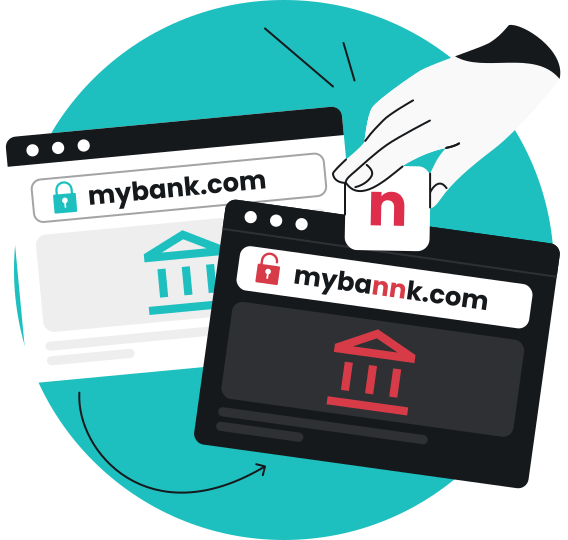
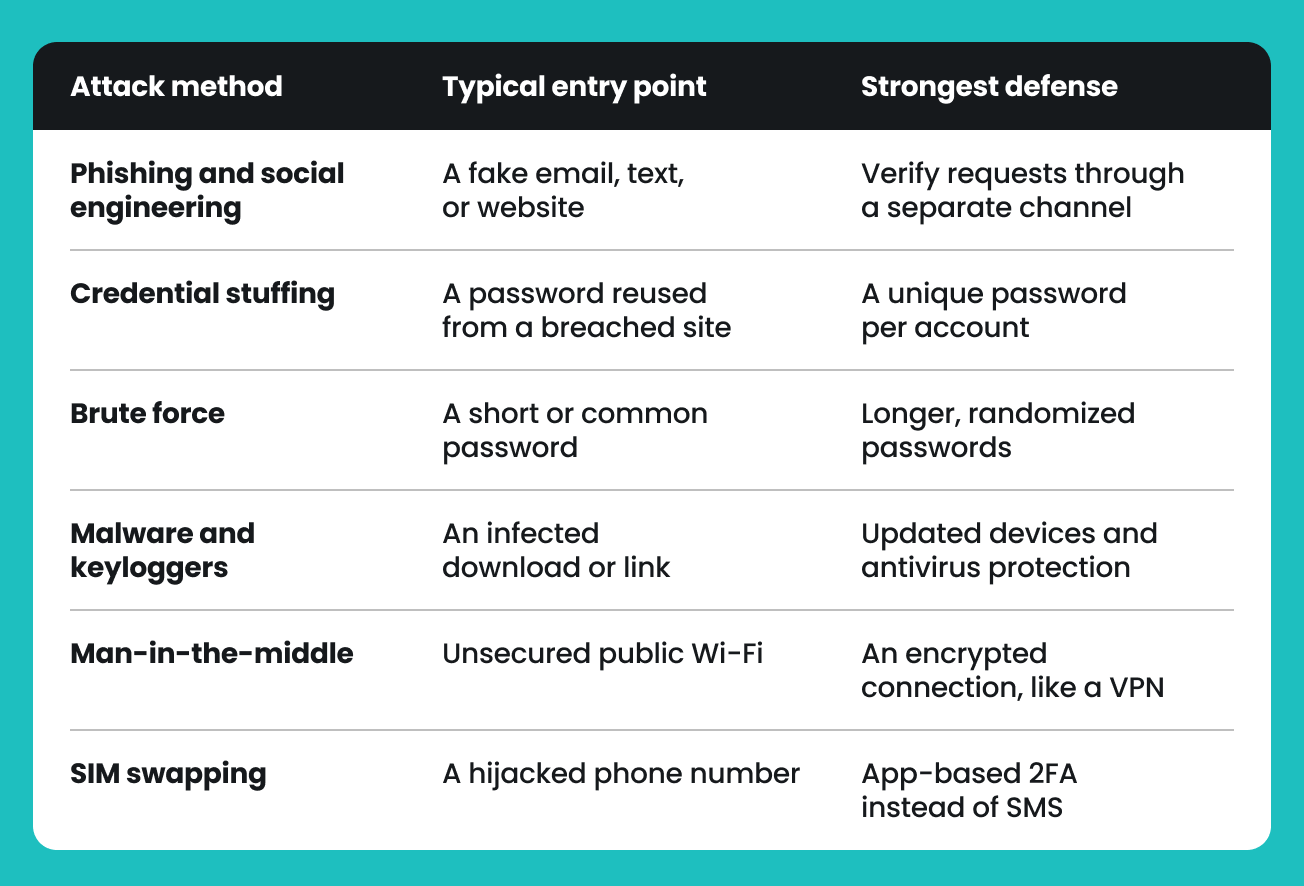
Phishing emails, texts, and fake websites impersonate legitimate companies, tricking you into typing your username and password somewhere that looks real but isn’t. Social engineering goes a step further, relying on social engineering techniques like impersonation and manufactured urgency to build trust before asking for anything sensitive.
These tactics work because they exploit urgency and familiarity rather than a technical flaw, and most phishing attacks now come from ready-made phishing-as-a-service kits rather than a lone attacker’s handiwork. One 2026 industry report found generative AI used in roughly one in ten of those observed campaigns[2]. Our guides to phishing and social engineering both cover how these phishing scams unfold in more detail.
Credential stuffing
Credential stuffing always starts with stolen credentials that already leaked somewhere, not random guesses — that’s brute force, covered next. Once a data breach exposes millions of account credentials, bad actors test those same username-password pairs against other sites, banking on the fact that so many people reuse a password across multiple accounts.
That’s what makes reused passwords so dangerous: one compromised account can turn into several once the same login information turns up for sale on the dark web for other criminals to buy.
Brute force attacks
Automated tools cycle through thousands of password combinations a minute until one works. Short passwords, dictionary words, and other weak combinations, like predictable birthdays, fall the fastest.
Add length and randomness, and the math flips: a short, common password can fall in seconds, while a long, random one can take years for the same tool to crack.
Malware and keyloggers
Malicious software called a keylogger — one of several client-side attacks that run on your device rather than a company’s servers — can quietly record every keystroke, including the login information you type, and send it back to an attacker. Some malware grabs saved passwords or session cookies straight from the browser instead.
Because keyloggers work in the background, most people don’t notice until money is missing or an account starts behaving strangely. Antivirus software, like Surfshark Antivirus, can catch many of these infections before they cause damage.
Man-in-the-middle attacks
On unsecured public Wi-Fi, an attacker positioned between your device and the website you’re visiting can intercept unencrypted traffic, login credentials included, as it travels. Coffee shops and airports are common hunting grounds simply because their Wi-Fi access points see so many people connect without a second thought.
Encrypting your connection before logging into anything sensitive closes this gap. That’s what Surfshark VPN (Virtual Private Network) does: it routes your traffic through an encrypted tunnel, even on networks you don’t control.
SIM swapping
Attackers convince a mobile carrier, sometimes through social engineering over a phone call, sometimes through an inside contact, to transfer a victim’s phone number onto a new SIM card. Once the swap goes through, they intercept the one-time passcodes many accounts still use for recovery or two-factor authentication.
Because SIM swapping defeats text-message verification specifically, security experts increasingly recommend an app-based authenticator or a physical security key over SMS alone.
Here’s a quick overview of the popular account takeover methods:
Signs and consequences of account takeover fraud
Detecting account takeover fraud early matters.
How to spot account takeover
Watch for changes to your account information and other red flags:
- A password reset or security alert you didn’t request;
- Purchases or transactions you don’t recognize;
- Login notifications from unfamiliar devices or locations;
- Being locked out of an account that worked fine yesterday;
- Changes to your email, phone number, or address you didn’t make;
- Messages sent from your account that you didn’t write.
What can happen if your account is taken over?
Once a hacker is in, the goal is usually financial gain — whether that means using saved cards to steal money directly, transferring funds out of an account, or using your personal details for something bigger down the line:
- Financial losses, from a single unauthorized purchase to a fully drained account;
- Identity theft, since the personal data behind an account can be used to open new lines of credit or file fraudulent claims elsewhere;
- Reputation damage, as a hijacked social or email account can be used to scam your own contacts;
- Emotional stress, from the time and worry it takes to regain control and undo the damage.
Picture a single reused email password that leaks in a breach: within minutes, an attacker can log into a shopping account, swap the delivery address, place an order on a saved card, and set up a mail filter that quietly hides any confirmation email. None of that requires guessing anything new, just reusing what already leaked.
These consequences add up fast: the FBI’s Internet Crime Complaint Center logged about 4,700 account takeover complaints in 2025, with reported losses of $359.7 million — an average of roughly $76,500 per incident. Identity theft, a related but separate complaint category, added another $185.8 million in reported losses that year[3].
Account takeover vs. identity theft
Account takeover and identity theft are related but different threats, and mixing them up can mean applying the wrong fix.
Account takeover: an attacker gets into an account you already have — your email, your bank account, and shopping account details with a saved card — and misuses it directly.
Identity theft: an attacker uses your stolen personal information, such as a Social Security number or date of birth, to open new accounts or impersonate you elsewhere, sometimes without you noticing right away.
The two are connected: a takeover can hand an attacker enough personal data to commit identity theft later, which is why stopping at a single password change often isn’t enough. We built Surfshark Alert and Alternative ID specifically for this side of the equation: watching for exposed personal data and helping limit what information you share at every sign up.
The short version: protect your account credentials to stop a takeover, and protect your personally identifiable information to stop identity theft. Ideally, do both.
How to prevent account takeover fraud
A few consistent habits can help reduce the risk of account takeover:
- Use a strong, unique password for every account, not a variation of the same one;
- Turn on two-factor or multi-factor authentication (2FA/MFA) wherever it’s offered, ideally through an authenticator app rather than SMS;
- Use a password manager to generate and store complex passwords so you never have to reuse one — see whether password managers are safe to trust with that job first;
- Use a unique email alias per important account (yourname+bank@domain.com, for example), so if spam or login attempts start, you know exactly which service leaked;
- Pair that habit with identity monitoring like Surfshark Alert, which makes exposure even easier to catch early;
- Slow down on unexpected emails, messages, and links, and verify a request through a separate channel before acting on it; our text and email scam protection can help flag deceptive messages and links before you click one;
- Check your accounts regularly for logins, purchases, or settings you don’t recognize;
- Keep devices and apps updated so known vulnerabilities get patched before someone exploits them;
- Avoid logging into sensitive accounts over public Wi-Fi unless your connection is encrypted first, for example, with Surfshark VPN.
What to do if your account has been taken over
Speed is what actually matters here. Once someone else gets there first, “just turn on 2FA” won’t undo it — so move fast, roughly in this order:
- Secure your email first. It’s the recovery point for most other accounts, so a compromised inbox needs to be locked down before anything else.
- Change passwords on every affected and related account immediately, especially any account that reused the same one.
- Sign out of all active sessions and revoke access for any connected third-party apps; a new password alone won’t end a session the attacker already started or an app they authorized.
- Turn on two-factor authentication everywhere it isn’t already active.
- Contact the affected service directly, report the unauthorized access, and follow its account recovery process.
- Check your financial accounts for unauthorized transactions, and contact your bank right away if you find any.
- Watch for signs that other accounts may be compromised too, since one takeover is rarely isolated; Surfshark Alert tool can monitor your personal information for further signs of exposure, so you’re not checking everything by hand.
- Report it to the relevant authorities, such as the FTC (Federal Trade Commission) at identitytheft.gov or the FBI’s Internet Crime Complaint Center (IC3), especially if money changed hands.
Conclusion: are your accounts as locked down as you think?
Account takeover isn’t a rare, unlucky event anymore — it’s a numbers game that rewards whoever automates the most attempts, and reused passwords or SMS-only codes hand attackers exactly the shortcut they’re looking for in most ATO attacks. If there’s one highest-leverage move here, it’s turning on an authenticator-app-based 2FA everywhere it’s offered; that single setting closes the door that phishing, credential stuffing attacks, and a good deal of SIM swapping all rely on.
From there, a password manager and a bit of healthy suspicion around unexpected links do most of the remaining work. None of this requires becoming a security expert — good account takeover protection, like most fraud prevention, is mostly about consistency. It just means treating your accounts like they’re worth locking, because to someone else, they already look that way.
FAQ
What is the key difference between identity theft and account takeover?
Account takeover means someone gets into an account you already own and uses it directly, while identity theft means someone uses your stolen personal information to open new accounts or impersonate you elsewhere. That’s also why it’s worth knowing whether identity theft protection is worth it for your situation — a takeover can lead to identity theft, but the two aren’t the same problem and don’t always call for the same fix..
How are attackers using AI in account takeover attacks?
Mostly to make impersonation more convincing at the verification stage, not to guess passwords faster. One 2026 industry report found that digitally submitted identity documents and selfies were 300% more likely to be AI-generated or altered than the year before, with impersonation attempts accounting for more than 85% of observed fraud[4].
Can someone steal my money if they have my account and routing number?
It’s harder than with a card number alone, since most banks require extra verification for a transfer, but it isn’t impossible, especially if the attacker pairs it with other stolen information or targets your bank directly through social engineering. Either way, it’s worth treating routing and account numbers as sensitive and reporting any exposure to your bank right away.
What is the difference between account takeover and account takeover fraud?
In practice, none — “account takeover” and “account takeover fraud” describe the same thing, and both are commonly shortened to ATO. Some sources reserve “account takeover fraud” for cases where money or a financial account is involved, but the security industry largely uses the terms interchangeably.