Got a suspicious text open right now? Keep your thumb off the link. To identify a fake text message, look for pressure to act fast, links that don’t match the sender, requests for passwords or codes, and details that don’t fit your life. No single sign proves a message is fraudulent, so weigh them together. The safest next step is to skip the links from unknown senders and check directly with the company or person the message claims to be from, using an app, website, or number you already trust.
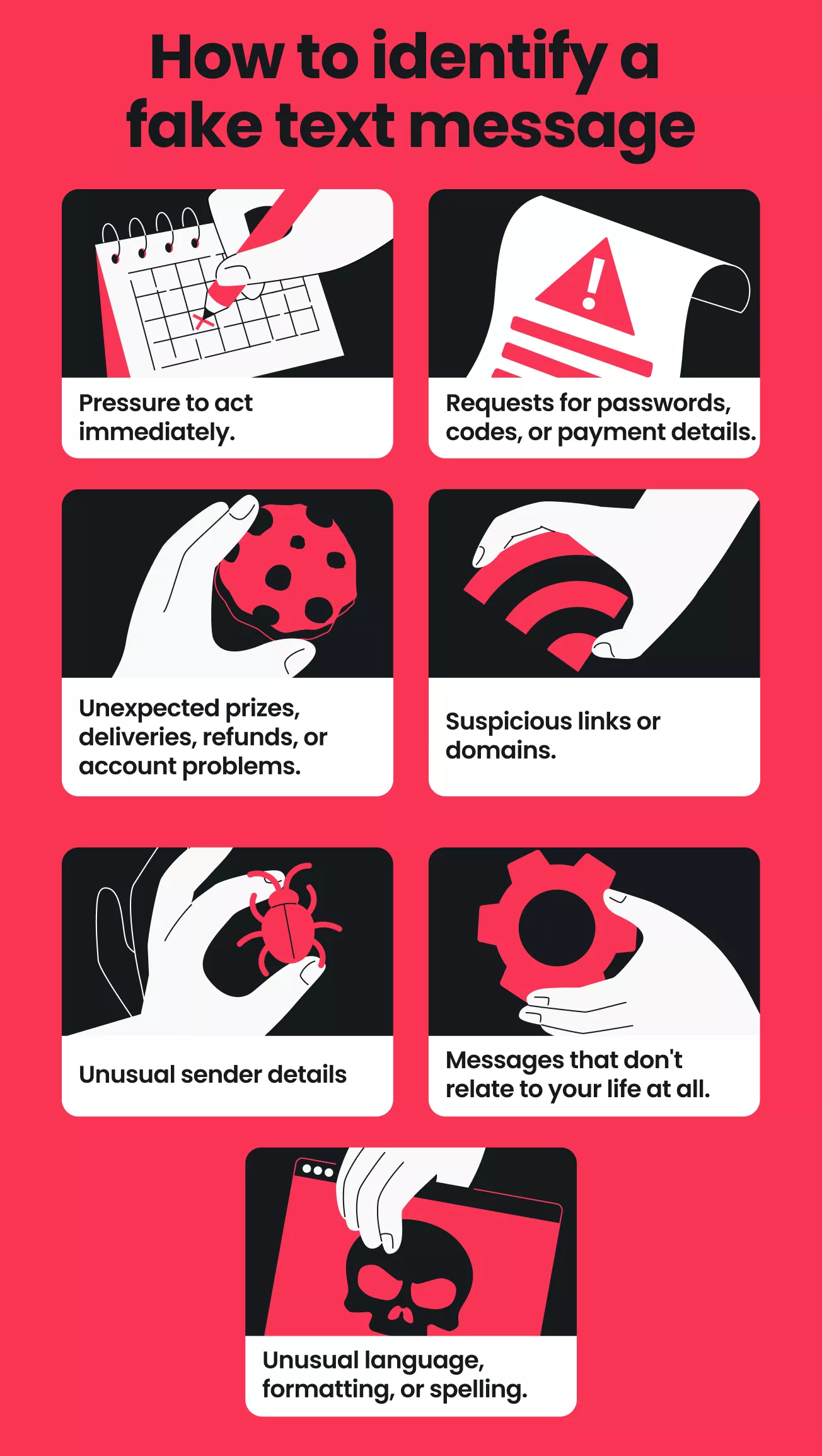
7 signs a text message might be fake
Think of these as your little pocket checklist. One is a reason to stop and think, but several of them together are a very good reason to check before you do anything.
- Pressure to act immediately. The scammers want you to tap before you’ve had a chance to think, so they’ll throw in all sorts of urgency like “pay within 24 hours” or “your account will be locked.” In a study of 1.35 million reports sent to a UK mobile network’s spam line in 2024, researchers found that urgency was present in every type of scam text they looked at[1].
- Requests for passwords, codes, or payment details. Legitimate companies don’t ask for account information by text. Treat verification codes the same way: if a text or a caller asks you to read one back, it’s a red flag.
- Unexpected prizes, deliveries, refunds, or account problems. If you didn’t enter a contest, order a parcel, or expect a refund, the message has no context. Fake package alerts were the most commonly reported type of text scam in an FTC (Federal Trade Commission) report on 2024 text scams[2].
- Suspicious links or domains. A message from a courier, a bank, or a toll agency should lead to that organization’s own website. Scam links will often take a genuine name and add some extra words or hyphens to it. Of the 100 web addresses sampled from the scam texts in the study, 67 were lookalikes of real brands. A missing link isn’t a green light either, since 78% of the scam texts in the study had no link at all[1].
- Unusual sender details. Be wary of a regular 10-digit mobile number claiming to be a bank, an email address used as a sender, or a company name with one letter swapped. A familiar sender name isn’t proof either, because spoofed texts can slip into an existing thread alongside genuine messages [3].
- Messages that don’t relate to your life at all. A bank you don’t use, a highway you’ve never driven on, or a simple “Hi, is this Sam?” from a complete stranger all fail the context test. Wrong-number texts were the most common scam in the UK study (16% of the scam texts), and virtually none of them contained a link[1].
- Unusual language, formatting, or spelling. Odd phrasing, random capitals, or strange spacing can give a scam away, but don’t count on typos. Many scam texts are short, plain, and written at roughly a middle-school reading level, so polished grammar or convincing branding doesn’t make a message real.
Is it a scam, spam, or a real notification?
Not every unwanted text is a scam. A scam text, also called smishing, tries to get money or information, while spam is bulk marketing and a legitimate notification is one you expect.
|
Type
|
What it looks like
|
|
Scam text
|
Impersonates a company or person and asks for money, codes, or details
|
|
Spam
|
Unsolicited marketing, often with opt-out instructions, like “Flash sale: 20% off today. Reply STOP to opt out.”
|
|
Legitimate notification
|
Expected, matches your account activity, and doesn’t demand secrecy or instant payment
|
Examples of fake text messages
Text messages were the most frequently reported contact method in US fraud reports in 2025 among those that named one, according to the FTC [4].
Here are five invented examples of common scam texts, so you can practice spotting them with zero risk. The web addresses are fictional, so none lead to a real site. For more patterns, see our guide to common text message scams.
|
Example message
|
Warning signs
|
|
“Your parcel is on hold because the address is incomplete. Update it within 24 hours or it will be returned: parcel-update.example”
|
No order, tracking number, or name; a 24-hour deadline; and a link that doesn’t match any courier you use.
|
|
“Final notice: you have an unpaid toll balance of $9.40. Pay today to avoid a $50 late fee: toll-balance.example”
|
No road, date, or plate number, and a small amount paired with a big late fee.
|
|
“Security alert: a $482.00 payment from your account is pending. If this wasn’t you, call 555-0100 now.”
|
No link, but the phone number connects you to the sender, not your bank. Researchers have flagged this callback pattern as an emerging trend [1]. Call the number of your bank instead.
|
|
“Congratulations! You’ve been picked to receive a $500 gift card. Claim it before midnight: gift-claim.example”
|
You didn’t enter a contest, the offer is too good to be true, and the deadline pushes you to act before you check.
|
|
“Hi Mom, my phone broke, so this is my new number. Can you send $350 to cover a bill? I’ll explain later.”
|
An unknown number claiming to be family and asking for money. Call your family member on the number you already have first.
|
How to check if a text message is legitimate
Check a text outside the message itself, in this order:
- Don’t use anything inside the text. Skip the links, attachments, and phone number it gives you.
- Check the sender and the context. Does the number ring a bell? Does the message make reference to something you’re actually expecting?
- Go to the source yourself. Open the company’s official app or type its website address into your browser.
- See whether the issue exists. Look for the delivery, payment, or account alert inside your account. If it isn’t there, the text probably isn’t real.
- Contact the real sender if you’re still unsure. Reach out directly using a number you already have or one from the company’s official website, never one from the text.
Who’s actually texting you from that unknown number? You often can’t be certain, since numbers and names can be spoofed and a reverse lookup can’t identify every sender. A blank search doesn’t clear a number either: in the UK study, the median scam number was active for 48 days, so a new one may have no reports yet[1].
Can you use an online text message checker?
You can, but you have to be careful. Some online tools will give you a useful second opinion on a suspicious link or piece of text, but others will simply store whatever you’ve pasted in. Never enter a password, a verification code, or any other personal details, and always remove names and account numbers first. Treat any result as a pointer, not as a definitive judgment.
How to identify scam text messages on iPhone and Android
The red flags are the same on every phone, though the filtering, blocking, and reporting options vary, and no built-in filter is going to catch every single fraudulent message.
On iPhone
- Check the sender. Open the conversation and tap the sender’s name or number to see their details;
- Filter unknown senders. In Settings, open Messages and turn on the option that filters texts from people who aren’t in your contacts. Check the filtered list occasionally for anything real;
- Report junk. For iMessage, tap Report Junk. Reporting regular text messages this way depends on your carrier and region, so you may need to report through your carrier instead;
- Block the sender. Reporting doesn’t stop a sender from texting you, so block the number as well.
On Android
These steps use Google Messages. Menu labels vary by phone maker and messaging app.
- Check the sender. Open the conversation, tap More options, then Details, to see who sent it;
- Look for a spam warning. If Google Messages flags a suspected spam text, tap Report spam or Report not spam to tell Google whether it got it right;
- Block and report. Open the conversation, tap More options, then Details, then Block & report spam, and confirm;
- Turn on spam protection. In Messages settings, check that Spam protection is on. It only appears if your device supports it;
- Know what you’re sharing. If you report a conversation as spam, Google will get the sender’s number and a copy of the last 10 incoming messages from that sender.
For step-by-step help, see our guide to stopping spam texts on Android.
What to do if you receive a suspicious text
If you haven’t clicked or shared anything, you’re in a good spot. Take these steps:
- Don’t click or reply. Replying to a text you don’t recognize can signal that your number is active, which may bring more scam texts. STOP replies are for marketing texts from senders you recognize.
- Verify the claim independently. Use the steps above.
- Report it. If your carrier supports it, forward the text to 7726 (SPAM) so carriers can spot and block similar messages[2]. Carriers in the US, Canada, the UK, and New Zealand run this service, but it isn’t available everywhere [1]. In the US, you can also report at ReportFraud.ftc.gov [2].
- Block the sender. Blocking stops that number, although scammers often switch to new ones. If a bad actor already has your number, our guide explains what to do if a scammer has your phone number.
- Delete the message. Take a screenshot in case you need it as evidence.
What if you'd already clicked or shared the information?
The right response depends on what you actually did. Opening a link doesn’t always mean your device is compromised, but entering details or installing something raises the stakes. Follow the arrows below to find your next step, and see our guide on what to do after clicking a phishing link for more detail.
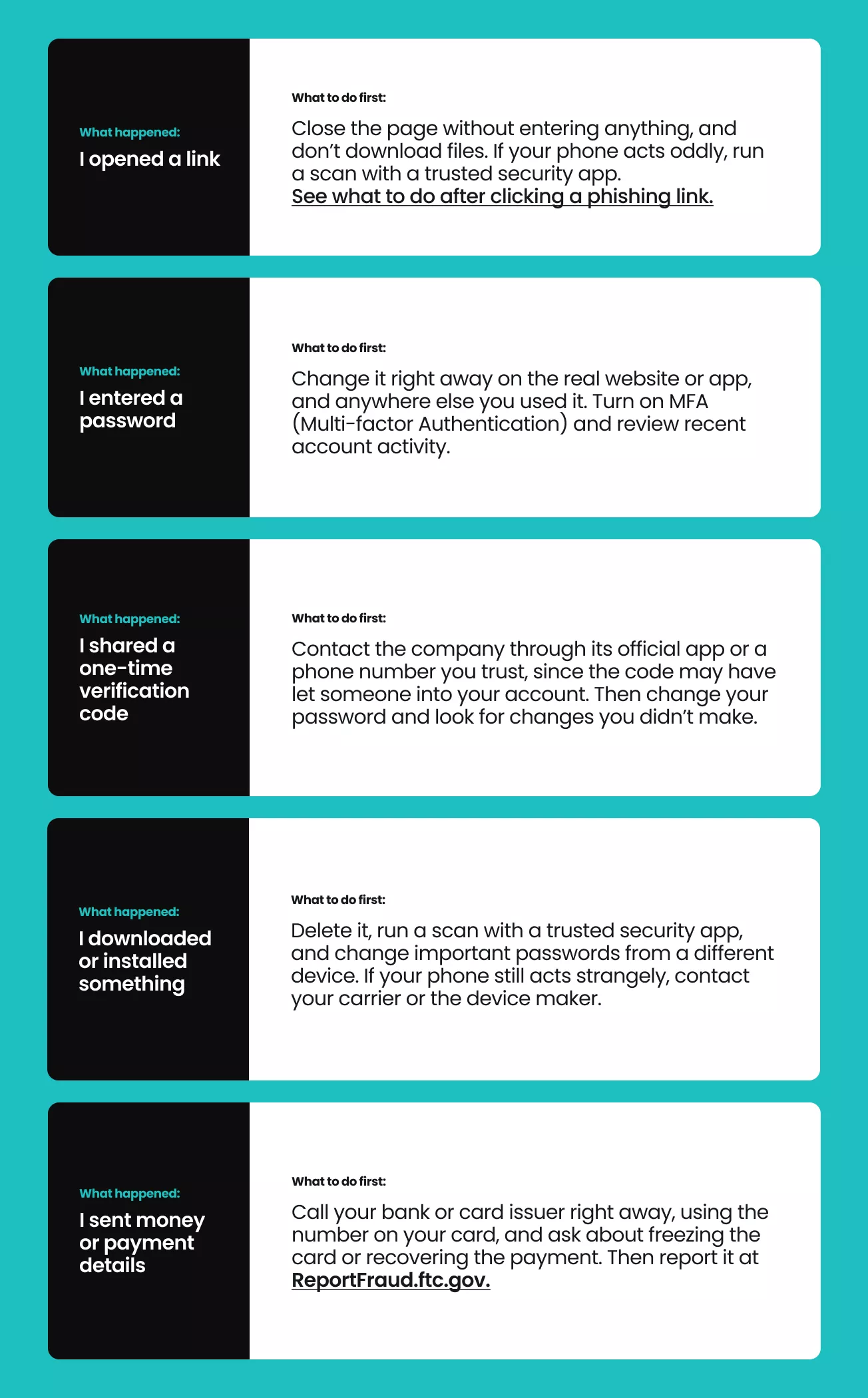
Speed is of the essence when money is at stake. In 2024, the FBI’s IC3 (Internet Crime Complaint Center) Recovery Asset Team worked with banks on 2,651 incidents and froze $469 million of the $651.5 million reported lost in those incidents[4]. That covers the high-dollar losses that meet the FBI’s criteria, so it won’t fit every case, but it’s a good reason to go straight to your bank.
How to reduce scam texts in the future
You can’t stop scammers from texting, but a few habits can reduce how many reach you:
- Share your number sparingly. Ask whether a business really needs it, and offer an email address when you can;
- Review your privacy settings. Check which apps and accounts have your number, and turn off marketing texts you don’t want;
- Skip suspicious messages. Avoid links, replies, and callbacks;
- Use built-in tools. Filter unknown senders, report junk, and block repeat senders;
- Learn the common tricks. Delivery notices, toll balances, bank alerts, and “wrong number” openers show up again and again.
These habits do the heavy lifting, and a tool can add a second layer, so you’re not playing detective with every ping. Surfshark’s scam text protection, included in Surfshark One and Surfshark One+ plans, checks incoming texts for known scam signatures and suspicious patterns, so suspicious ones get flagged before you interact with them. What you see depends on your phone:
- On iOS, a text flagged as a scam moves to the Spam folder in the Messages app, with no notification;
- On Android, you get a notification from us. Opening it shows the message in the Surfshark app, along with the signs that made it seem like a scam.
We don’t retain your messages, monitor your phone in general, or use private data to train AI models. Our scam text protection won’t catch every scam text, so you should always be on the lookout and verify anything that’s asking for money, codes, or personal details.
Another option: phone number masking
If you often give your number to websites and businesses, phone number masking is worth a look. It gives you a virtual US phone number for online accounts and listings, so your regular number is shared less widely.
Calls and texts happen inside the Surfshark app, and you can reply to messages but not start conversations. It’s a paid add-on and won’t stop texts to the number you already use.
Conclusion: pause, verify, then act
A suspicious text is far easier to deal with if you just slow down. Cross-check it against the usual red flags, verify it with the company or person it claims to be from, using an app, website, or number you already trust, and hold off on any request for money, codes, or passwords until you’ve confirmed it’s real.
Awareness and your phone’s built-in controls go a long way, and if you’d like some help checking, Surfshark’s scam text protection can flag suspicious texts for you, so you have a second set of eyes and stay at the helm.

Frequently asked questions
How do I know if a text message is real?
If it comes from an unknown sender, you often can’t tell from the message alone, so verify it outside the text. Contact the company or person directly through an app, website, or number you already trust.
Can you check if a text message is a scam online?
Sometimes (though treat the result as a second opinion rather than proof). Never paste passwords, verification codes, or any personal details into a website, as an unknown tool may just store what you’ve entered.
Can I find out who texted me from an unknown number?
Not reliably. Numbers and sender names can be spoofed, and a lookup coming up blank doesn’t necessarily mean the sender is safe, since scammers often switch numbers.
What happens if I click a fake text message link?
It depends on what happens after the click. Opening a page doesn’t always mean your device is compromised, but entering details or downloading something increases the risk. Find your situation in the “What if you’d already clicked or shared the information?” section.
What does a spoofed text message look like?
It can look a lot like a real one, with a familiar sender name or number and, in some cases, a place in an existing thread of genuine messages. A familiar sender isn’t proof, so judge the request, not the name.
Can a fake text message look legitimate?
Yes. Convincing branding and correct grammar don’t prove a message is genuine, since many scam texts are written in plain, easy-to-follow language.
References:
- Network and Distributed System Security (NDSS) Symposium. An Overview of 7726 User Reports: Uncovering SMS Scams and Scammer Strategies.
- FTC. Top text scams of 2024.
- Action Fraud. Alert: Watch out for spoof text messages that appear to come from banks.
- FTC. The Rising Scam Economy: Modernizing Federal Approaches to Protect Americans from Foreign Fraudsters.