
Facebook scams use the platform to deceive users by exploiting trust or creating urgency. They’re popular with scammers because the platform has a huge user base and people share a lot of information there.
So, you’ll find classics like fake Marketplace listings still doing the rounds, but also phishing, impersonation, and AI-generated content.
Learn more about these common Facebook scams and how to protect yourself.
What are Facebook scams?
Facebook scams are fraudulent schemes that use the platform to trick you into sending money, sharing sensitive personal information, or giving attackers access to your account. Put simply, it’s an umbrella term for scams that happen on or through the platform.
In these scams, bad actors often exploit different Facebook features, including:
- Marketplace
Scammers can take advantage of the way Marketplace lets buyers and sellers connect directly. They may pose as either party, post fake listings, offer deals at unusually low prices, or use fake payment confirmations to make transactions seem legitimate.
- Messenger
Scammers may use Messenger to contact you directly, often pretending to be your family members, friends, buyers, or sellers. They may then send fake requests or phishing links, ask for money or personal information, or try to move the conversation to another platform.
- Pages
Scammers often create Pages that appear to belong to legitimate public figures, businesses, or organizations to make them seem credible. They can then use the Pages to promote fake offers, giveaways, or malicious links, and make the scams seem trustworthy.
- Groups
Scammers may also create or join communities built around shared interests. This gives them access to a relevant audience, making it easier to push things like fake products, sham job offers, and phony investment opportunities or giveaways.
Why do scammers target Facebook?
Between Marketplace, Messenger, Pages, and Groups, scammers have plenty of ways to reach their potential victims. But that’s only part of what keeps Facebook so popular with bad actors. Several other factors also make it a prime hunting ground for cybercriminals:
- Huge pool of potential victims: Facebook has billions of daily users, giving scammers a massive number of people to target across different ages, locations, and interests;
- Easy access to personal information: people often share details like their relationship status and travel plans, which scammers can use to make their scams more convincing;
- Targeted communities: Groups and Pages make it easy for bad actors to find people with specific interests, such as investing or thrifting, and target them with related scams;
- Low-effort and scalable: cybercriminals can reach a large number of Facebook users with a single fake post, message, ad, or profile.
Facebook scams vs. Facebook hacks
With so many different Facebook scams out there, it can be easy to mistake other threats for scams. For instance, many confuse Facebook scams and hacks. After all, both can put your account, personal information, and money at risk.
However, knowing the difference between Facebook scams and Facebook hacks can help you recognize what’s happening and take the right steps to protect yourself. Here’s how they compare:
|
|
Facebook scam
|
Facebook hack
|
|
Definition
|
A scammer tricks you into handing over money, information, or access to your Facebook account
|
A bad actor gains unauthorized access to your Facebook account
|
|
Method
|
Relies on creating urgency or exploiting trust
|
Often involves stolen login credentials, reused passwords, or phishing
|
|
Warning signs
|
Suspicious offers, messages, links, or requests for money or sensitive information
|
Posts or messages you don’t recognize, unknown logins, or changed account details
|
|
Result
|
You may end up sending money, sharing sensitive information, clicking a malicious link, or giving someone access to your account
|
A bad actor may take over your account, change security settings, send messages or scams to your contacts, or publish posts without your permission
|
|
Overlap
|
A Facebook scam can be used to steal login credentials and compromise your account
|
A hacked Facebook account may be used to scam your friends, followers, or other people
|
How to recognize a Facebook scam
Scammers can be extremely creative and come up with different versions of Facebook scams. However, many scams still share the same warning signs.
Here are some red flags to keep an eye out for:
|
If you see…
|
It could be…
|
|
An urgent message saying your account will be suspended
|
Phishing scam
|
|
A friend suddenly asking you to send money
|
Impersonation scam
|
|
A Marketplace listing at an unrealistically low price
|
Marketplace scam
|
|
A celebrity promoting a “guaranteed” investment with unusually high returns
|
Investment scam
|
|
A Messenger message urging you to click a login link
|
Credential phishing
|
|
A giveaway asking for your sensitive personal or payment information
|
Fake giveaway
|
|
A job offer promising easy money for little effort
|
Job scam
|
|
An online romantic interest asking for financial help
|
Romance scam
|
Common Facebook scams
Facebook scams can take many forms and show up almost anywhere on the platform. From bogus Marketplace listings to messages from your supposed soulmate, check out some of the tricks scammers often use so you know what to look out for.
Marketplace scams
Marketplace scams are some of the most common Facebook scams because Marketplace connects buyers and sellers directly. That gives scammers plenty of opportunities to target both sides of a deal.
So, you might see:
- Fake sellers: scammers may post listings for products that don’t exist, offer items at impossibly low prices, or demand that you pay up front before disappearing with your money;
- Fake buyers: scammers may pretend they’ve paid, send fake payment confirmations, or claim they overpaid and ask you to refund the difference;
- Payment scams: scammers may also pressure you to switch to an unfamiliar payment portal or transfer payment outside Facebook;
- Shipping scams: scammers may ask you to pay for fake delivery or insurance fees, or send malicious links disguised as tracking links to steal your information.
Messenger scams
Messenger scams use Facebook’s messaging feature to deceive you. Often, cybercriminals will pretend to be long-lost friends, Facebook support agents, or even celebrities to make their messages seem legitimate.
They may:
- Send phishing links that lead to fake login pages or malicious sites designed to steal your login credentials and other sensitive information;
- Pose as fake support agents and warn you about an account issue that requires your immediate action;
- Offer fake account recovery by claiming your account has been hacked or compromised, then directing you to a link to supposedly recover or secure it;
- Share malware links disguised as videos or files that can infect your device.
Fake Facebook security alerts
Scammers may also use fake security alerts as part of a phishing scam, pretending to be an authority you recognize and can trust.
On Facebook, they may set up fake profiles or Pages that look like they represent the platform and claim your account is about to be suspended or has been compromised. The message will then urge you to click a link to verify or recover your account, but the link often leads to a fake Facebook login page built to steal your credentials.
Account cloning and impersonation
Scammers may also impersonate people you know. There are several variations of this type of scam.
One is to clone someone’s Facebook profile by copying their name, profile photo, and other personal details. This could be a friend or even a public figure, like a celebrity or politician. The scammer may then send you a friend request or message before asking you to send money for an emergency, receive a payment on their behalf, or invest in an opportunity.
Businesses are fair game to scammers, too. They may create fake Pages that mimic a legitimate business’s name, logo, and branding, then use them to promote non-existent products, promotions, or giveaways.
Romance scams
Preying on emotions and connections, romance scams are aplenty on Facebook and other social media platforms. In fact, according to the FTC (Federal Trade Commission), nearly 60% of people who reported losing money to a romance scam in 2025 said it started on social media.
Typically, cybercriminals use a fake Facebook profile to get close to you, gaining your trust and affection before hitting you with requests for money. They may claim they need the cash for emergencies, sudden medical expenses, travel costs, or investment opportunities.
Investment and cryptocurrency scams
If a stranger — or even a supposed “friend” — on Facebook promises that you can turn a small amount of money into a fortune that can last you a lifetime, you’re probably looking at an investment scam.
These scams often promise unrealistically high or guaranteed returns. Sometimes they might even back it up with fake testimonials, screenshots of profits, and endorsements from experts or celebrities. Some scammers go as far as letting you withdraw a small amount first so they can establish credibility and hook you in.
Giveaway and prize scams
In Facebook giveaway and prize scams, bad actors may create fake contests using the name of a well-known brand or celebrity. They’ll then contact you through DMs or public posts, saying you’ve won.
To claim your prize, they may ask for your personal or payment information. Some may also ask you to pay a processing or shipping fee before you can receive your prize. Needless to say, once you’ve paid, they vanish, and you never get your prize.
Emerging Facebook scams powered by AI
With AI tools becoming more accessible, scammers are also stepping up their game and using these tools to make their Facebook scams more convincing.
Here are some ways Facebook scammers use AI:
- AI-generated profile photos: many scammers use AI to generate realistic-looking profile photos for fake accounts and impersonation scams;
- Deepfake videos: Facebook is the most targeted platform for deepfake-related fraud, with scammers using altered videos to promote fraudulent investment schemes or gain trust in romance scams;
- Voice cloning: scammers can use AI voice-cloning tools to generate convincing messages or calls that appear to come from a friend, relative, or other trusted person;
- Fake celebrity endorsement: by combining AI-generated images, deepfake videos, and cloned voices, bad actors can make it seem as if a celebrity is endorsing something.
What should you do if you become a victim?
If you’ve fallen for a Facebook scam, take a breather and don’t panic just yet. Instead, focus on what you can do to minimize the damage. Here’s where to start:
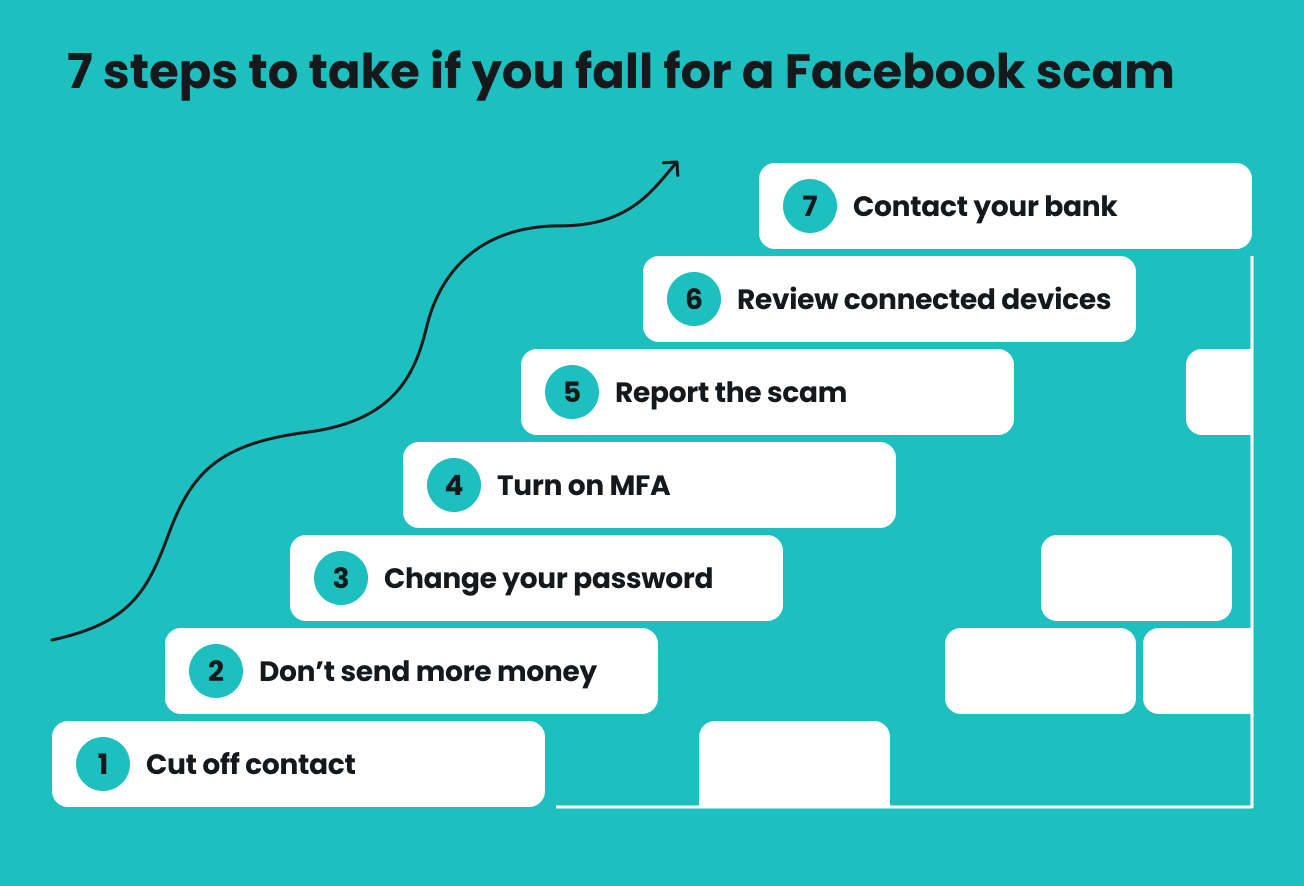
1. Stop communicating
First things first, stop all communication with the scammer. Don’t reply to their messages, click any further links, open attachments, or follow any instructions they send. Cut them out cold and block where necessary.
2. Don't send additional money
If you’ve already sent money, chances are the scammer will invent another problem that supposedly requires an additional payment. Don’t cave, even if they claim you need to pay a deposit to release a package, a registration fee to claim your prize, or tax to withdraw your investment.
3. Change your password
If you shared your Facebook password with the scammer or entered it somewhere suspicious, change your password immediately.
Here’s how:
- Open Facebook and select your profile picture in the top right corner.
- Select Settings and privacy > Settings.
- Select Accounts Center > Password and security > Change password.
- Select the account that you’d like to update.
- Enter your current password, then enter and confirm your new password.
If you’ve used the same password for other accounts, be sure to change those too. The scammer may try your Facebook login details on your other accounts in a credential stuffing attack.
4. Switch on MFA
Turn on MFA (Multi-factor Authentication) for your Facebook account. This security safeguard adds another verification step when someone tries to log in. So, even if the scammer has your password, it alone isn’t enough to get into your account.
5. Report the scam
Whether it’s a scam profile, post, message, Marketplace listing, or Page, report it to Facebook immediately. Before you do, take screenshots of the scam and any important messages. You may need them later as evidence.
Visit this Facebook help page, select the option that matches what you want to report, and follow the instructions.
6. Review connected devices
Go through the devices currently signed in to your Facebook account and look for anything you don’t recognize. If the scammer got into your account, they may still have access even if you’ve already changed your password.
Follow these steps:
- Open Facebook and select your profile picture in the top right corner.
- Select Settings and privacy > Settings.
- Select Accounts Center > Password and security.
- Scroll down to Security checks and select Where you’re logged in.
- Select your account.
- Review the list of devices and click Select devices to log out.
- Select the devices you don’t recognize or no longer use, then confirm by selecting Log out.
7. Notify your bank if necessary
Get in touch with your bank or payment provider as soon as possible if you’ve sent money to the scammer. Tell them what happened and give them the details of the transaction.
Depending on how you paid and how quickly you report the scam, they may be able to stop, reverse, or dispute the payment. If you shared your card or banking details, they can also help freeze your card or account to prevent further unauthorized transactions.
How to protect yourself from Facebook scams
You can’t completely stop Facebook scammers from trying their tricks, but you can make it a lot harder for them to succeed. Here’s how you can protect yourself from Facebook scams.
Verify suspicious messages
A message isn’t necessarily safe just because it appears to come from someone you know or an account that looks legitimate. Always check the sender’s profile and look out for anything that seems odd or unusual in the message. If you can, verify with the person through another channel before you jump into action.
Be especially cautious if the message:
- Tries to rush you into doing something;
- Asks for money, personal information, verification codes, or access to your account;
- Tells you to click a link to log in.
Keep Marketplace payments on Facebook
If you’re buying or selling through Marketplace, make sure to keep all your payments within Facebook. Be on guard if the other party asks you to pay through another platform, moves the transaction to an unfamiliar portal, sends you a suspicious payment link, or pressures you to send money immediately to secure the deal.
Turn on two-factor authentication
If you haven’t already, make sure to set up 2FA (Two-factor Authentication) for your Facebook account. It adds another layer of protection by requiring an additional verification step when someone tries to log in.
This is how you set it up:
- Open Facebook and select your profile picture in the top right corner.
- Select Settings and privacy > Settings.
- Select Accounts Center > Password and security.
- Select Two-factor authentication, then choose your account.
- Choose how you want to verify your identity and follow the on-screen instructions.
Never reuse passwords
Use a strong, unique password for your Facebook account, and avoid reusing one from another platform or service. This way, even if the other account is breached and your password is exposed, bad actors can’t use the same credentials to access your Facebook.
Ideally, your password should be long and difficult to guess, with a random mix of uppercase and lowercase letters, numbers, and special characters.
Stay alert to phishing attempts
According to Surfshark’s research on phishing, it remains one of the most common cybercrime methods — with over 800 victims per day — out there. Facebook is no exception.
So, exercise caution when clicking links in Facebook posts, comments, messages, or ads. Before you click anything, check where the link leads and hit the brakes if something doesn’t seem right. When in doubt, always double-check with the person or business involved through an official channel.
Block known scam and phishing websites
Sometimes, all it takes for a successful Facebook scam is a careless click. This is where blocking known scam and phishing sites can help.
Consider using Surfshark’s scam protection to:
- Block known phishing sites so you don’t accidentally land on one through a Facebook post, message, or ad;
- Warn you before you interact with malicious links, giving you a chance to back out before leaving Facebook for a potentially harmful website;
- Add another layer of protection against fake Facebook login pages and scam websites, which may steal your login credentials or personal information.
Browse more securely on public Wi-Fi
A VPN (Virtual Private Network) like Surfshark can add a valuable extra layer of security, though it doesn’t directly prevent Facebook scams. Surfshark VPN encrypts your connection, making it harder for anyone to intercept data such as your login credentials — especially on unsecured public Wi-Fi networks.
A VPN can also mask your IP (Internet Protocol) address. This is helpful because your IP address can reveal your approximate location, which Facebook scammers may sometimes use to target you. For example, knowing your general area could help a scammer make a fake Marketplace listing look more convincing.
Don’t let scammers ruin your Facebook scrolling
Facebook scammers aren’t going anywhere anytime soon. In fact, their tactics will only keep evolving. But while the methods may change, many still rely on the same old playbook — creating urgency, exploiting trust, or pretending to be someone they’re not.
Knowing how these scams work is still your best defense, as it can help you spot one before you fall for it. Stay cautious with unexpected requests, suspicious links, and offers that seem too good to be true. Make sure to also strengthen your defenses with 2FA and tools like a VPN for Facebook to add another layer of security and privacy.
Stay sharp when scrolling
Protect yourself against phishing, scam websites, credential theft, and other online threats with Surfshark’s security tools
Get SurfsharkFAQ
What are the current scams on Facebook?
The current scams on Facebook are constantly changing, but they usually include fake Marketplace listings, phishing messages, impersonation, fake giveaways, and investment and romance scams.
Scammers are also turning to AI to make their profiles, images, messages, and other scam content — such as investment endorsements — more convincing.
What are the top 3 scams?
There isn’t a definitive list of the top three scams, but some of the most common are fake Marketplace listings, phishing scams, and impersonation. You may see different variations of these scams, but they generally use the same tactics to trick you into sending money, sharing personal information, or taking over your account.
Whatever the scam, a good rule of thumb is to be wary of unexpected messages, suspicious links, and anyone asking for money or sensitive information.
What are the signs of Facebook being hacked?
Common signs that your Facebook account has been hacked include changes to your profile or settings that you didn’t make, as well as login alerts from devices or locations you don’t recognize. You may also notice unfamiliar posts or messages sent from your account. Additionally, your email address may have been changed, or your password may no longer work.