Credential stuffing is a cyberattack where bad actors use stolen usernames and passwords to try to get into other online accounts. It’s become a popular choice for cybercriminals because it can be highly rewarding with relatively little effort. Rather than cracking passwords, they simply count on people reusing the same ones across multiple websites and apps.
Fortunately, a few simple security habits can significantly reduce your risk of a credential stuffing attack. But before you get to prevention, let’s first look at how the attack works.
What is credential stuffing?
Credential stuffing is when cybercriminals use stolen username and password combinations to try to access accounts on other websites and services. The term comes from stuffing large volumes of credentials obtained elsewhere into login pages to see which ones work. This type of attack takes advantage of something many of us do — password reuse.
For example, imagine a social media platform you use suffers a data breach, and your email address and password are exposed. Cybercriminals behind the breach may sell or share those credentials. Another criminal who gets hold of them could then try those same login details on your email, cloud storage, or banking accounts.
There’s no password guessing or cracking here — the attacker already has the login details. They’re simply checking whether those same credentials work somewhere else.
And attackers don’t usually do the checking manually. Instead, the process is often automated. They use bots or specialized software to quickly test thousands of stolen username and password combos against different websites.
How does a credential stuffing attack work?
Credential stuffing attacks generally follow three stages: obtain stolen credentials, test them across services, and exploit successful logins.
Here’s how a typical credential stuffing attack unfolds:
Step 1 — Credentials are stolen
Credential stuffing usually starts with attackers getting their hands on usernames and passwords that have already been stolen elsewhere. More often than not, they didn’t steal them directly from the victims.
These username and password pairs usually come from:
- Data breaches: attackers obtain login credentials exposed when a company or service is hacked or buy them from the dark web;
- Phishing campaigns: cybercriminals trick victims into entering or sharing their usernames and passwords through fake links, messages, emails, or websites;
- Malware: malicious software steals passwords and other login information stored on an infected device;
- Credential harvesting: bad actors use deception or manipulation to collect login credentials from victims.
Step 2 — Automated bots test stolen credentials
Instead of entering each stolen username and password one by one, attackers use bots or specialized software to automate the process. These tools can take huge batches of username and password combinations and test them against different websites and services, including online marketplaces, streaming platforms, and banks.
The goal is to find out whether credentials you used on one account can also get them into another. So if you reuse the same login details across multiple accounts, an attacker may be able to use credentials stolen from one service to access your other accounts.
Step 3 — Attackers take over accounts
If one of those login attempts succeeds, the attacker can get into your account. Once they’re in, what they can do depends on the type of account and what’s stored in it.
Some of the risks include:
- Account takeover: change your password or recovery details to lock you out and hijack your account;
- Personal data exposure: access your financial information, contact details, or other personal data stored in your account;
- Financial fraud: make unauthorized purchases or carry out fraudulent transactions with your saved payment details;
- Identity theft: exploit your personal information to impersonate you or open accounts in your name;
- Access to other accounts: use your compromised email account to reset passwords or get into even more services and sites;
- Scams: trick your contacts into sharing information, sending money, or clicking malicious links.
Credential stuffing vs. other login attacks
Credential stuffing is often compared to brute-force attacks and password spraying because they all involve attackers trying to obtain your credentials or gain unauthorized access to your accounts.
However, they actually work in different ways. Here’s a quick look at how they differ:
|
|
Credential stuffing
|
Brute force attack
|
Password spraying
|
|
Definition
|
Uses previously stolen username and password combinations to try to access other accounts
|
Tries to discover a password by testing possible combinations, including common passwords and patterns
|
Tries common passwords against many different accounts
|
|
Credentials
|
Data breaches, leaks, phishing, malware, and other sources
|
Possible password combinations
|
Common or likely passwords
|
|
Target
|
Other accounts where the stolen credentials may work
|
A specific account
|
Many accounts on the same platform
|
|
Method
|
Automated tools test lists of username and password combinations against websites and services
|
Automated tools repeatedly try different password combinations against a specific account
|
Attackers test common passwords against many different accounts
|
|
Example
|
An attacker uses your leaked credentials from an online store’s data breach to try logging into your email or banking accounts
|
An attacker tries thousands of possible passwords against one account until one works
|
An attacker tries “Password123” against hundreds of accounts to find users with weak passwords
|
Why credential stuffing attacks are so effective
Credential stuffing attacks are often considered highly effective. But that’s not necessarily because the attackers are particularly skilled geniuses or have exceptionally sophisticated techniques. Instead, their effectiveness comes from several factors that make it possible to compromise large numbers of accounts.
- Password reuse
The number one reason credential stuffing works is password reuse.
Ideally, you should use a unique password for every account. That way, if one password is exposed, the damage is limited to that account.
But in reality, people often reuse the same password or slight variations of it across multiple websites and services. In fact, 65% of Americans say they reuse passwords for different online accounts. That means user credentials exposed in one breach can put several other accounts at risk.
- Massive pools of leaked credentials
Years of data breaches and leaks mean that attackers have no shortage of usernames and passwords to test.
For instance, a security researcher discovered a dataset known as Collection #1 circulating online in 2019. It contained 773 million unique email addresses and 21 million unique passwords, compiled from more than 2,000 previous breaches and leaks. Soon after, Collections #2 – #5 followed. Together, they contained about 25 billion records before duplicates were removed.
More recently, another security researcher discovered a database containing 149 million stolen usernames and passwords. The database was left completely exposed on the open web and contained credentials for accounts across popular services and platforms. These include Gmail, Facebook, Netflix, and Binance.
It’s also important to remember that leaked credentials don’t necessarily become obsolete just because they were exposed years ago. The same credentials can keep resurfacing, and data from different breaches can be combined into larger collections for testing against other websites and services.
- Automation makes credential stuffing easier
Credential stuffing wouldn’t work nearly as well if attackers had to test every stolen credential individually.
Instead, malicious bots and specialized software can process large batches of username and password pairs and quickly identify the ones that work. This makes credential stuffing attacks easy to carry out at scale.
The sheer number of attempts also means attackers can afford for most of them to fail. Say an attacker tests 1 million stolen credential pairs and a mere 0.1% works. That still gives the attacker 1,000 successful logins. The threat actor still ends the day with a large number of compromised accounts.
- Users don’t know their credentials were exposed
Credential stuffing also takes advantage of the fact that people often don’t realize their credentials have been exposed.
The exposed credentials may come from an old account you’ve forgotten about or from an undisclosed breach. And if you don’t know your password was leaked, you may not think to change it. You may keep using that same password, or a slight variation of it, on other accounts.
Many also have no idea that exposed credentials from old breaches can still be out there and remain available to attackers for years. Take the MySpace breach, for example. It was believed to have happened around 2008, but the data was only publicly circulated in 2016.
How to prevent credential stuffing
It’s always better to prevent a credential stuffing attack from happening in the first place than to recover from its aftermath.
While no method can guarantee complete protection, you can adopt these simple practices to make your accounts harder to compromise.
Use unique passwords for every account
Give every account its own password. That way, even if your username and password are exposed in a data breach, attackers can’t use the same credentials to access your other accounts.
When creating your passwords, be sure to:
- Aim for at least 12-16 characters;
- Include a mix of uppercase and lowercase letters, numbers, and special characters;
- Avoid easily guessed information, such as names, birthdays, or common words like “password”;
- Skip simple sequences and patterns, such as “abcd1234” or “123456”;
- Steer clear of predictable substitutions, such as “b@nk1ng” or “p@55w0rd”;
- Use a password manager to generate and keep track of your unique passwords.
Enable multi-factor authentication
Turn on MFA (Multi-factor Authentication) for every account that supports it, especially for your email, banking, social media, and other accounts containing sensitive information. CISA (Cybersecurity & Infrastructure Security Agency) says using MFA makes you 99% less likely to be hacked.
MFA adds an extra authentication step to the login process. Even if an attacker somehow gets hold of your credentials, they still need to clear the additional verification step to access your account.
When you set up MFA, go for the strongest option the service supports. Generally, passkeys, hardware security keys, and authenticator apps provide stronger protection than SMS-based codes. That said, SMS-based MFA is still better than having no MFA at all.
Monitor your credentials for data breaches
Check whether your email address and password have shown up in any known data breaches. Also, bear in mind that login details from old breaches can continue circulating long after the original breach. If your password has been exposed, change it right away and avoid reusing it on any other accounts.
To make things easier for yourself, you can use a data leak monitoring tool like Surfshark Alert. It notifies you when your email address or password appears in breached online databases. You can also choose to receive leak reports right in your inbox on a schedule you choose.
Reduce your online exposure
Think twice about what information you’re putting online and who can access it. The less you share, the less likely it is for your email address and other personal information to be collected, exposed in a breach, or used to target you in the future.
There are also tools that can help you reduce how much of your personal information is available online. Here are some of them:
- Surfshark’s Alternative ID: lets you create an alternative online identity with a separate email address to use in lieu of your primary details;
- Incogni: contacts data brokers and people search sites on your behalf to request the removal of your personal information;
- Surfshark VPN (Virtual Private Network): encrypts your internet traffic to help keep your online activity private, especially on unsecured networks like public Wi-Fi.
Protect yourself from phishing
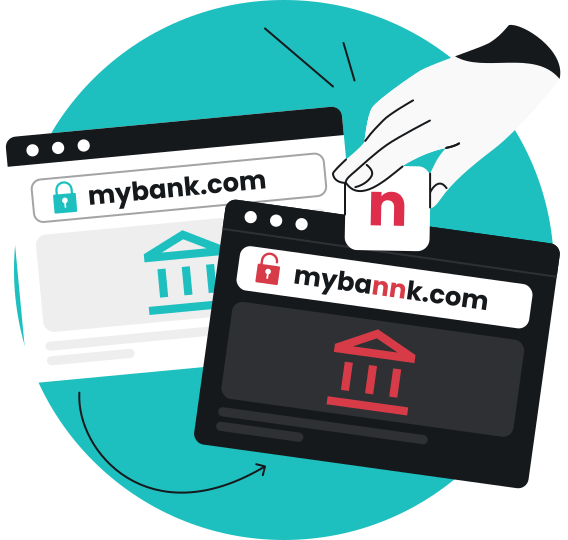
Phishing is a common way for your username and password to fall into the hands of credential-stuffing attackers. A phishing scam may trick you into entering your login details on a fake website or giving them away through an email, text, or social media message. Those stolen credentials can then be sold, shared, or used in credential stuffing attacks.
To reduce the risk:
- Don’t click unexpected login links: open the service’s official app or website instead;
- Check the URL before signing in: look for misspellings, odd characters, or unfamiliar domains;
- Be wary of urgent requests: don’t let deadlines pressure you into acting without double-checking;
- Never share your password by email or message: legitimate services generally won’t ask for it this way;
- Use Surfshark’s scam protection: the set of tools includes an email scam checker, text scam protection, and web content blocker to help protect against phishing, scams, and malicious websites.
Building a stronger account security strategy
Credential stuffing is only one of many ways attackers can compromise your online accounts. That’s why it’s important to adopt a layered approach to strengthen your overall account security.
Here are some steps you can take:
Protect your identity
One of the first and best things you can do to protect your online accounts is to limit how much of your personal information and account data is available out there. The less useful information attackers can dig up about you, the less they have to work with.
Start by:
- Monitoring for exposed credentials in known data breaches, or using a data leak monitoring tool like Surfshark Alert for automatic notifications;
- Creating an alternative persona with Surfshark’s Alternative ID and using it when you sign up for services to keep your primary details private;
- Reducing your online personal information with services like Incogni, which contacts data brokers to request its removal.
Stay ahead of scams
Limiting information exposure helps reduce what attackers can find out about you online. But threat actors may also actively try to get your sensitive data before using it in future credential stuffing attacks.
Some common tactics include phishing emails, fake websites, and scam messages that may trick you into clicking a malicious link or entering your login details.
To help tackle these threats, there are tools that can come in extremely handy. For instance, Surfshark’s scam protection includes a web content blocker that helps filter out phishing, malicious, and scam websites. Meanwhile, its email scam checker — available in the Surfshark Chrome browser extension — uses AI to detect phishing patterns in your Gmail inbox.
Protect your internet connection
Using encrypted connections might not directly prevent credential stuffing attacks, but they can add a valuable additional layer of protection. This is where a VPN comes in.
A reliable VPN like Surfshark VPN encrypts your internet traffic, helping protect your login details and other sensitive information. This is especially important when you’re using unsecured networks like public Wi-Fi, where your data may be more vulnerable to unauthorized access or credential theft.
Protect your devices
Malware designed to steal passwords can also contribute to credential theft. Attackers often use malware such as password stealers, infostealers, and keyloggers to capture your passwords and other sensitive information right from your device. They can then use those compromised credentials to get into your account or try accessing other accounts with the same credentials.
You can reduce this risk by not clicking suspicious links or downloading unfamiliar files. Make sure to keep your operating system and apps up to date as well. You can also use Surfshark Antivirus to scan your device and help remove malware that could put your credentials at risk.
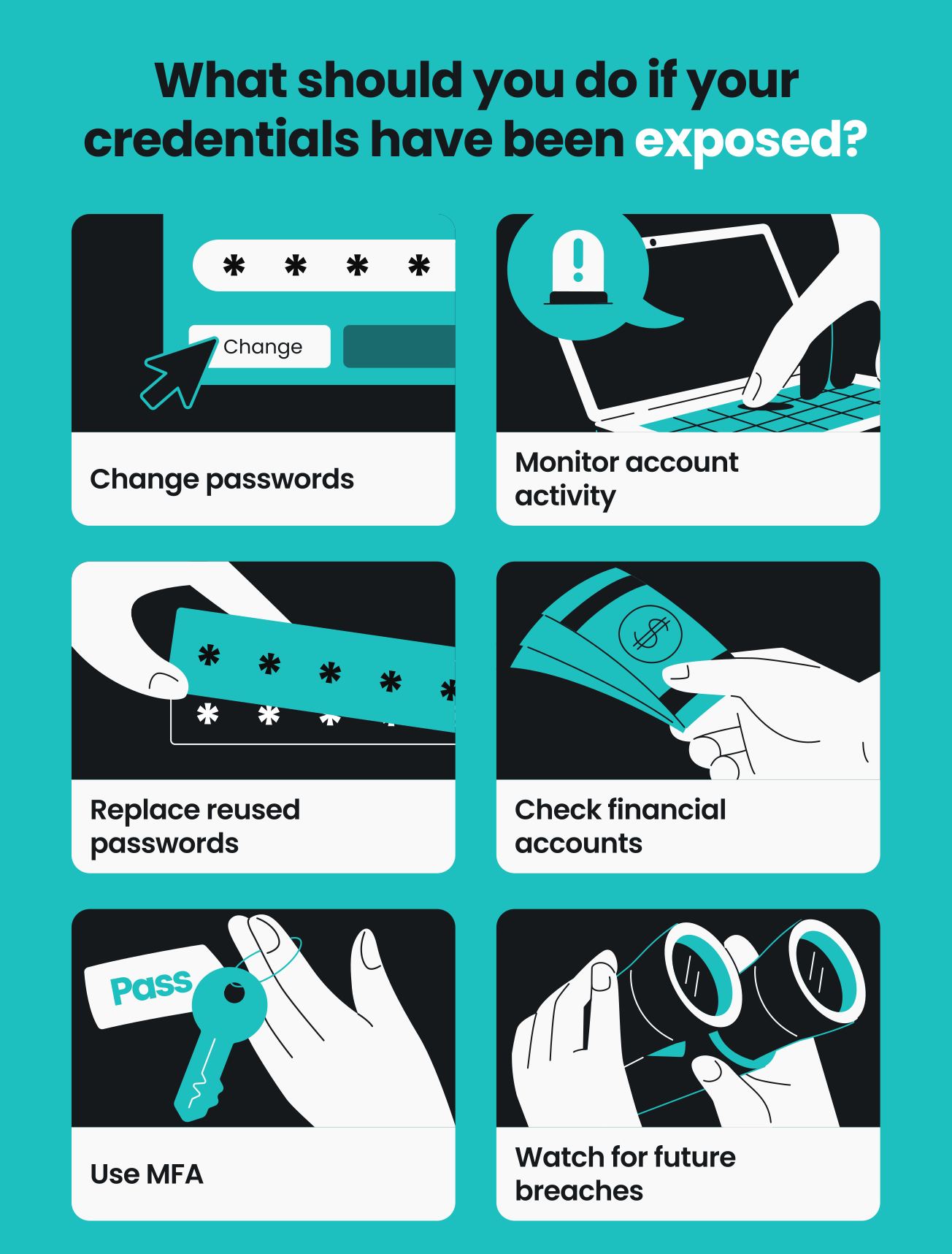
What should you do if your credentials have been exposed?
If your username and password have already been exposed or stolen, it’s time to act quickly to minimize the damage.
Work your way through this checklist:
- Change the exposed password immediately: update your password on the affected account or use the account recovery options if you can’t sign in;
- Replace reused passwords: if you’ve used the compromised password on other accounts, change those too;
- Use MFA: turn on MFA wherever available to add another layer of protection, especially for high-stakes accounts like email and banking;
- Review account activity: look for unfamiliar logins, password changes, new devices, or other suspicious activity;
- Check financial accounts: go through your banking and credit card statements for unfamiliar transactions and contact your bank or card provider immediately if you spot anything strange;
- Monitor for future breaches: use a breach-monitoring service to let you know if your email address or other personal information appears in newly reported breaches.
Don’t let one stolen password put multiple accounts at risk
Unlike many other cyberattacks, credential stuffing exploits reused credentials rather than weak passwords. Attackers take username and password combinations obtained elsewhere and try them against other user accounts, hoping you’ve reused the same password.
The simplest way you can dramatically reduce the risk of credential stuffing is to use a unique password for every account and switch on MFA. For additional protection, monitor for exposed credentials and limit how much personal information you share online. Together, these measures help protect your accounts from credential stuffing and other account attacks.
FAQ
What is the difference between brute-force and credential stuffing?
The main difference between brute-force and credential stuffing is how attackers try to gain access to your account.
In a brute-force attack, the attacker usually tries to guess your password by systematically testing as many possible combinations as possible.
On the other hand, a credential stuffing attack uses your login details that have already been stolen or exposed in a previous data breach. They’re now simply trying your stolen username and password combination on your other accounts to see if it works there, too.
How do you detect credential stuffing?
To detect credential stuffing, you can watch for unusual login activity on your accounts. This includes repeated failed login attempts and multiple login attempts from unrecognized devices or locations.
How do I stop credential stuffing and bot attacks?
The simplest way you can reduce the risk of credential stuffing and bot attacks is by using strong, unique passwords for each of your accounts. Don’t reuse passwords, and switch on MFA when available.
What is an example of credential theft?
A common example of credential theft is a phishing attack where a bad actor tricks you into entering your username and password on a fake login page. The attacker can then use those stolen credentials to try logging into your actual account.
They may also use those same username and password combinations in a credential stuffing attack, trying them on other websites and services to see if they work.