Doxxing is when someone publishes your private information, like your address, without your consent, usually to harass or expose you. It often starts small, but as scattered details pile up, someone connects the dots, which is why almost anyone can become a target, not just public figures.
You can prevent doxxing by shrinking that trail of information: locking down social media, removing your data from broker sites, separating your online identities, and securing your accounts and connections. Here’s a step-by-step guide to reducing your digital footprint.
Why do people get doxxed?
Doxxing rarely starts with a single mistake. Usually, it’s small pieces of personal information piling up in different places until someone with harmful intent connects the dots. Common sources of personal information include:
- Oversharing personal details on social media, forums, or dating apps
- Public records, such as property, court, or voter registration listings, that anyone can search
- Data brokers that compile and resell your contact and location details
- Social engineering, where someone tricks you or a contact into handing over information
- Reused usernames or emails that link your separate accounts back to your real identity.
The US Senate Joint Economic Committee report found that just four major data-broker-linked breaches resulted in a combined $20.9 billion in identity theft losses. This figure is about breach fallout in general, not doxxing specifically — but it shows how much damage data leaks can cause, and doxxing draws on that exact same pool of exposed personal details. That’s why closing off those data points before attacks happen is the most effective prevention strategy.
How to prevent doxxing
Preventing doxxing primarily involves auditing your personal information online and closing the gaps one at a time. Here are the steps in order, each one explaining how to remove a piece of the puzzle that an attacker could use.
Review your social media privacy settings
Your social media accounts are usually the first place someone looks, and younger users tend to be more exposed simply because more of their lives are publicly visible there.
Adjust these settings on every platform you use:
- Switch personal accounts to private, and limit who can see your posts
- Remove your birthday, workplace, school, and family details from your bio
- Hide or restrict your friend and follower lists
- Turn off location tagging on posts and stories.
Remove your information from data broker websites
Data brokers are companies that collect your name, address, phone number, and other details, then sell or publish them on people-search sites. Estimates put the number of active data brokers in the thousands, and a single broker, such as Acxiom, holds records on more than 260 million people, according to a CNBC report cited by data-removal service DeleteMe. Every one of those listings is a potential source of doxxing because it gives an attacker your home address without any digging.
You can opt out of each broker manually, which usually means submitting a separate removal request for each site and repeating the process every few months as your data is re-collected. Manual opt-out is often harder than it sounds: a March 2026 Senate investigation found that data brokers including Comscore, IQVIA Digital, Telesign, and 6sense Insights had placed “noindex” code on their own opt-out pages, hiding them from Google search until regulators intervened.
If that sounds like a nightmare, Incogni takes that off your plate. It automates the process by sending and tracking opt-out requests across data broker databases on your behalf, so your information stays off these sites without you having to chase every listing yourself. If you are interested in the topic, we have a dedicated blog explaining how to remove your information from the internet.
|
|
Manual opt-out
|
Incogni
|
|
Time per data broker site
|
10–20 minutes, per site
|
Automated
|
|
Re-checks after data gets re-collected
|
Requires manual tracking and repetition
|
Runs on an ongoing basis
|
|
Data broker overage
|
Limited to brokers you know about
|
Covers a broad, regularly updated broker list
|
Separate your online identities
Using the same username, email, and photo everywhere makes it easy to link your anonymous forum account to your real name. Separating your identities breaks that chain.
- Use different usernames for different platforms
- Create separate email addresses for social accounts, shopping, and anonymous profiles
- Avoid reusing the same profile photo across sites
- Keep personal and professional accounts fully disconnected.
That profile-photo rule matters more than most realize: privacy-focused Reddit communities regularly point out that a simple reverse image search can link separate accounts with the same profile picture to each other even when the usernames and bios don’t match.
Imagine signing up for a forum or shopping site with your everyday email address. If that site is later breached, your name is now tied to that email, and anyone can search for other accounts registered under it. Surfshark’s Alternative ID lets you generate a separate email and identity for sign-ups like these, so a breach or leak on one site doesn’t trace back to you.
Protect your accounts
Weak or reused passwords give attackers an easy way to hack an account and mine it for personal details. To minimize this:
- Use a unique password for every account, ideally generated and stored in a password manager
- Enable 2FA (Two-factor Authentication) or MFA (Multi-factor Authentication) everywhere it’s offered
- Check your account recovery options: an outdated recovery email or phone number is often the weakest link, since it’s the exact detail that account-recovery flows are built to trust.
A locked-down account matters even when it holds nothing sensitive on the surface. Many people underestimate an old, dormant social account until someone takes it over and mines years of tagged photos, comments, and mutual connections for identifying details.
Use a VPN on public Wi-Fi
A VPN (Virtual Private Network) masks your IP (Internet Protocol) address and encrypts your internet traffic, making it much harder for snoopers on public Wi-Fi to trace your activity back to you. Surfshark VPN offers this layer of protection whenever you turn it on.
Note: A VPN can’t prevent doxxing on its own. Most doxxing attacks pull information from social media, public records, and data brokers rather than your IP address, so a VPN is one layer of a broader strategy, not a complete solution.
Be careful about what you share online
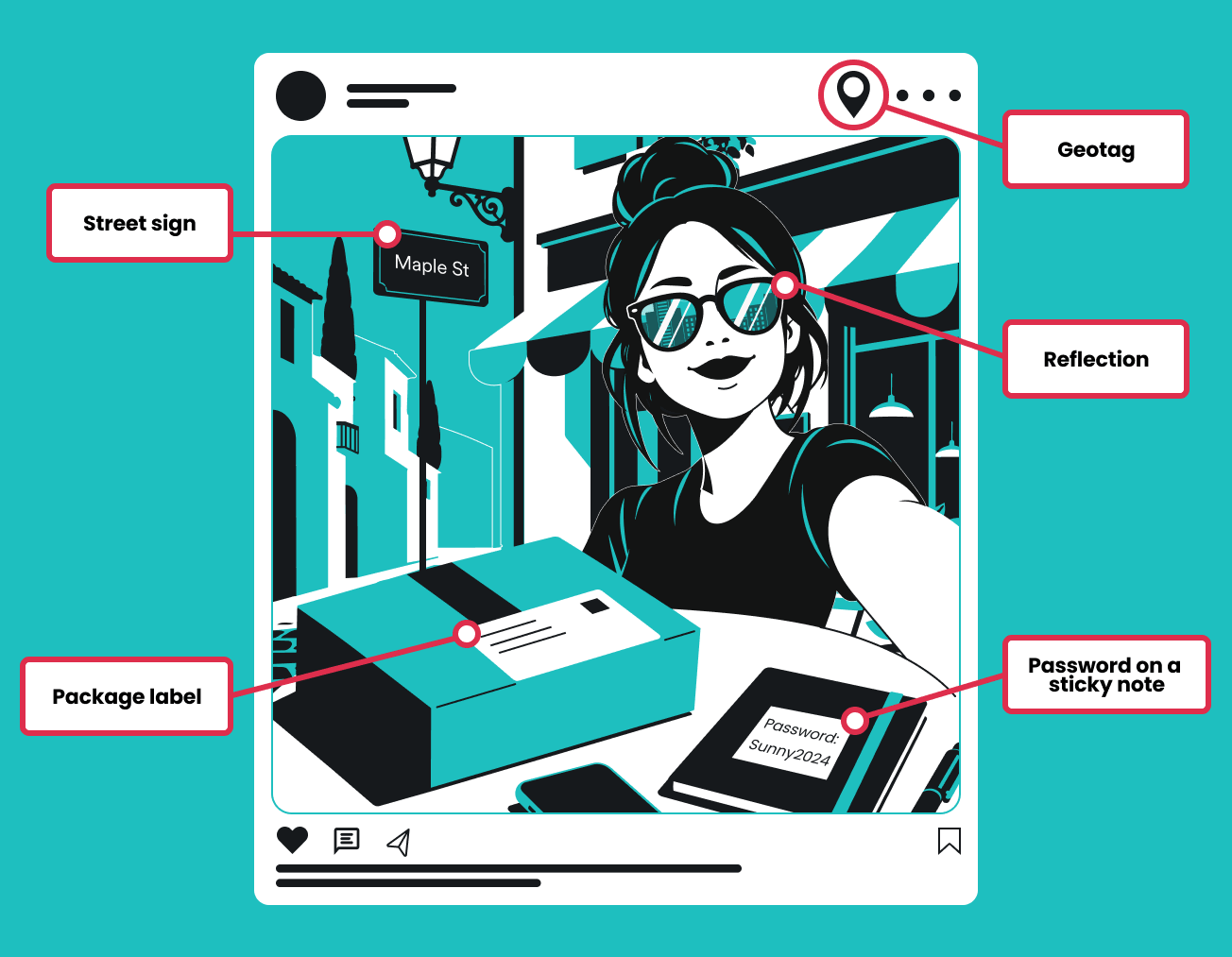
Photos and posts often reveal more than you intend. Watch out for:
- Geotags embedded in photos or added automatically by an app
- Livestreams that show your street, license plate, or neighborhood
- Documents or screenshots that include your full name or account numbers
- Package labels visible in delivery or unboxing photos
- File metadata, which can store the exact location and time a photo was taken.
A package left for an unboxing video, with the shipping label still readable, hands over a full name and home address in a single frame — information an attacker would otherwise have to gather by searching multiple people-search sites.
Build a stronger digital privacy strategy with Surfshark
As covered above, reducing the risk of doxxing is a multistep process. Surfshark protects several parts of your online life at once — your connection, your identity, and your devices.
Protect your identity
Reducing how much of your personal information is publicly available is the key to identity protection and should ideally be covered by one subscription rather than several separate tools. Surfshark One+ bundles a full cybersecurity suite:
- Incogni removes your details from data broker databases
- Alternative ID creates a separate persona and email address for sign-ups and subscriptions
- Scam protection flags phishing emails and scam texts before you click on them
- Antivirus scans for and removes malware from your devices
- Alert monitors your email, cards, and other details for data breaches and notifies you
- Clean Web blocks ads and trackers so fewer sites can log your browsing habits
- VPN masks your IP address and encrypts your traffic on any network.
One subscription protects every angle of your online identity, shrinking the pool of information available to anyone trying to build a profile on you.
Stay ahead of scams
Phishing and other social engineering methods are how attackers tend to gather the personally identifiable information they need before attempting to harass or doxx someone.
A convincing fake email or text can trick you into confirming your address, workplace, or full name. Surfshark’s scam protection helps catch such attempts before you accidentally hand over the information.
Monitor your personal information for data leaks
Data breaches hand attackers the raw material that doxxing runs on: emails, passwords, and sometimes addresses or phone numbers, all in one dump. And there’s increasingly more of that data to work with — Identity Theft Resource Center’s 2025 Annual Data Breach Report tracked 3,322 data compromises, a 79% jump over the past five years.
Attackers routinely combine that leaked data with information they already found publicly to build a fuller profile. Surfshark Alert monitors whether your email address, credit card, ID card, or other personal information, shows up in known data breaches and notifies you so you can act quickly. From there, the best approach is to change passwords, enable MFA, and delete unused accounts.
Protect your devices
Malware can quietly copy passwords, personal files, screenshots, and other sensitive data straight off your device, giving an attacker a goldmine of information without ever touching a data broker site. A stealth-logging infection is especially dangerous here: it can sit unnoticed on a laptop for months, quietly harvesting the exact address, contacts, and account details that a manual opt-out or privacy setting would otherwise keep hidden.
Surfshark Antivirus scans for and blocks malware, reducing the risk of cyberattacks.
What to do if you've been doxxed
If you suspect your personal information has been exposed, act quickly and methodically:
- Document what happened first, since screenshots of the posts — including URLs, timestamps, and usernames — are your evidence if content gets deleted or you need to report it later.
- Remove exposed information where possible, reporting the content to the platform and requesting removal.
- Change your passwords for any account linked to the exposed information or that uses the same login details.
- Enable MFA on those accounts if you haven’t already.
- Escalate through the platform’s official support or safety channels if the standard reporting flow doesn’t resolve it. Response times vary, but a documented report strengthens your case if you need to involve law enforcement later.
- Contact local law enforcement if you’re facing threats. Doxxing itself is a crime in at least 19 US states, with Alabama, California, and Illinois defining it as a standalone offense.
- Monitor your accounts for further misuse in the days and weeks that follow, and revisit the steps above to lock down your other accounts so the same exposure is harder to use against you again.
Conclusion: doxxing needs a layered approach
Preventing doxxing starts with reducing your digital footprint, but no single tool or setting can fully prevent it. Combine better privacy habits with data broker removal, identity protection, secure browsing, and account protection to lower the risk of identity theft and doxxing. While each step may seem small in silos, each layer covers a data path that the others don’t.
FAQ
Is doxxing illegal?
Sometimes, depending on where you live. The US has no single federal doxxing law, but at least 19 states criminalize it under doxxing-specific statutes or related harassment and stalking laws. In the EU, publishing someone’s personal data without consent may fall under the GDPR and national harassment laws instead.
What should I do if I’ve been doxxed?
You should stay calm but act quickly: document the exposed content, request its removal, and change passwords on any connected accounts with MFA enabled. From there, report ongoing threats to the platform and, if you feel unsafe, to law enforcement.
How can I reduce my digital footprint to avoid getting doxxed?
Start by auditing what’s already public about you, then tighten your social media privacy settings, opt out of data broker sites, and use separate email addresses and usernames going forward. Treat it as an ongoing habit rather than a one-time fix, since old accounts and new data broker listings keep resurfacing.
How do I remove myself from data broker sites?
You can submit opt-out requests to each broker manually, or use a service like Incogni to automate and track the removal process for you. Either way, treat it as ongoing maintenance, since brokers regularly re-collect and republish your information after it’s removed.
Can a VPN prevent doxxing?
Not on its own. A VPN masks your IP address and encrypts your traffic, which helps you stay safe on public Wi-Fi, but most doxxing attacks also pull information from social media, public records, and data brokers rather than from your connection.