





Detect suspicious activity across text messages, emails, and web with Surfshark’s integrated scam protection tools.
Scam protection:
multi-layer defense
Stay one step ahead of online scams with Surfshark’s online security app. Combine multiple security layers that work seamlessly together:
- Detect scams across text messages, emails, and web
- Identify suspicious texts and emails before you interact
- Built directly into Surfshark’s security ecosystem
Widely trusted with 40M+ global app downloads, rewarded with 30+ recognition awards
Data as of 2026-03-26
Data as of 2026-03-26
Why does scam detection matter?
Standard built-in phone protections provide baseline security, but they can miss modern scams because scammers constantly change their tactics. A dedicated scam detector fills these gaps with automatic protection and real-time guidance.
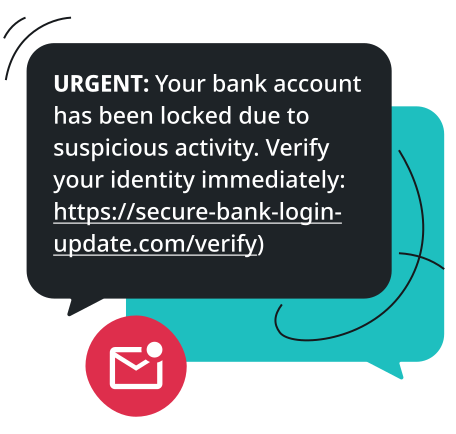
- AI-powered scams: criminals use AI to generate flawless emails, fake messages, and phishing scams that bypass visual checks;
- Multi-channel attacks: some scam attempts can hit your SMS, email inbox, and browser simultaneously to maximize exposure;
- Financial and identity risks: a single click on risky links or fake ads can lead to exposed sensitive information like your home address, phone number, or financial details, causing you to fall victim to identity theft and financial loss.
Surfshark adds proactive scam detection directly into your security routine, helping you catch hidden threats and stay protected without sacrificing convenience.
Stay protected wherever scammers might reach you
Scam messages often look convincing and aim to trick people through urgent emotional responses. Recognizing red flags across different cyberthreats is the first step toward learning how to avoid scams.

Is this text message real?
Scam text messages often contain suspicious links or urgent prompts asking you to verify personal info. Surfshark helps you identify suspicious SMS before you click or reply.
Is this email a scam?
Phishing emails often spoof brand logos and sender domains, and contain malicious links. Surfshark analyzes suspicious emails for phishing attempts before you open links or share information.
Is this website safe?
Unsafe and fraudulent websites can host hidden malware, explicit material, or deceptive phishing pages. Surfshark lets you block entire categories of risky or unwanted websites before the pages can load.
Can I browse with peace of mind?
Rather than relying on manual checks every time you receive a message or surf the web, Surfshark combines multiple layers of protection for safer browsing.
Why choose Surfshark’s scam protection?
When choosing the best scam protection app, single-purpose apps often fall short, as cybercriminals rarely stick to one channel. Surfshark combines multiple security tools to help you identify suspicious activity across text messages, emails, and the web, ensuring better protection and ease of use.
Protection across multiple channels
Detect suspicious messages, phishing emails, and malicious websites with a set of protection tools working together.
Privacy-first architecture
Built with privacy in mind — scans and checks are designed to handle your information responsibly and securely.
Quiet operation in the background
Enjoy your everyday online experience with no workflow interruptions or system slowdowns.
Part of an all-in-one security ecosystem
Surfshark’s scam defense works alongside VPN, Antivirus, and identity protection tools, offering comprehensive online security under one subscription.

How to use Surfshark’s scam protection
Securing your daily interactions online and keeping your devices protected against fraud only takes a few minutes.
1. Choose a Surfshark plan
Subscribe to a Surfshark security package — Surfshark One or One+ — that includes scam and threat protection tools.
2. Enable scam protection
Download the Surfshark app and browser extension on your devices and turn on your preferred scam detection and web blocking features.
3. Stay protected from scams
Scam protection continuously helps identify suspicious activity and alerts you to threats so you can make safer decisions online.

Explore Surfshark’s scam detection solutions
Spot suspicious text messages before they can mislead you. Scam text protection helps identify SMS phishing attempts, malicious links, and impersonation scams, helping keep your inbox more secure.
Detect scam text messages
Automatically scans incoming SMS patterns to flag fraudulent smishing attempts before you interact.
Spot malicious links
Flags dangerous URLs hidden inside text messages so you do not open compromised links.
Identify impersonation attempts
Catches urgent messages posing as trusted banks, postal services, or government agencies.
Reduce SMS phishing risks
Minimizes exposure to mobile fraud by filtering high-risk text message sources.
Catch phishing emails with AI. Email scam checker analyzes suspicious emails in your Gmail inbox for phishing signs, malicious links, and impersonation attempts, and alerts you before you interact with them.
AI-powered phishing detection
Uses advanced AI algorithms to spot fake emails and subtle phishing signatures instantly.
Suspicious Gmail emails analysis
Integrates smoothly on your browser with your Gmail inbox to evaluate risky emails in real time.
Malicious link and impersonation detection
Identifies deceptive sender domains, urgency language, and harmful links embedded in emails.
Privacy-first scanning
Analyzes incoming messages securely without logging or storing email contents.
Control which websites you or your family members can access by blocking categories associated with risky or unwanted content with web content blocker.
Category-based website blocking
Restrict entire website categories associated with adult content, phishing, or known malicious domains.
Family-friendly browsing
Filter out inappropriate or adult web content to build a safer browsing space on household devices.
Reduced exposure to harmful content
Prevent accidental visits to unverified, malicious, or deceptive domains before they load.
Customizable protection
Tailor your web filters and blocklists to match your personal security and privacy preferences.
One subscription. Multiple layers of protection.
Surfshark combines privacy, security, and identity protection in a single cybersecurity suite.
Secure connection
Browse with greater privacy using Surfshark VPN to encrypt your web traffic, mask your IP address, protect sensitive data on public Wi-Fi, and block ads and malicious domains.

Device protection
Protect your devices from malware, spyware, and other online threats with Surfshark Antivirus — real-time protection, scheduled scans, and more.
Scam detection
Stay one step ahead of scams with our scam text protection, email scam checker, and web content blocker working together to help you spot threats before you interact with them.
Identity protection
Shield your digital identity with personal data masking, monitor for data leaks, reduce your online exposure with Incogni, and get support for identity theft recovery.

Choose your level of protection
See why millions trust Surfshark
Check out what users and tech experts around the world have to say about Surfshark.



The reviews highlighted in this section were selected from publicly available posts on social media platforms. They reflect the opinions of individual users at the time of posting and may not represent the full range of our product features and qualities.
The reviews quoted on this page have been published by media outlets associated with Surfshark through affiliate partnerships. Their recommendations are based on their own independent research and insights to ensure value for the readers.
I have been using Surfshark since I got it and I love it!

When I am traveling, I use Surfshark to access the internet quickly and securely, works like a treat in China.

We love Surfshark because it is an easy-to-use app that you can download on all your devices.

The reviews quoted on this page have been published by media outlets associated with Surfshark through affiliate partnerships. Their recommendations are based on their own independent research and insights to ensure value for the readers.
“This is my first year and I absolutely love it. The fact I can have a good antivirus, great VPN, and incognito for like $120 a year is great.”
“I’ve been using Surfshark for 4 years on Android and ChromeOS with zero issues, it’s an absolute bargain”
“I’ve had it for 3 years and just renewed it for the next 2 years. I never have any issues with it and get my full internet speed…”
The reviews highlighted in this section were selected from publicly available posts on social media platforms. They reflect the opinions of individual users at the time of posting and may not represent the full range of our product features and qualities.