
We all know Harry Potter lived at Number 4 Privet Drive. Sure, he’s fictional, but your home address may be just as easy to find online.
Anything from data brokers to old social media profiles can surface your current address to people who know where to look.
While the process isn’t always straightforward, the good news is that you can remove your address from the internet with the right tools. This guide walks you through the main places where your address might appear and exactly how to remove it from each.
Why is your address on the internet?
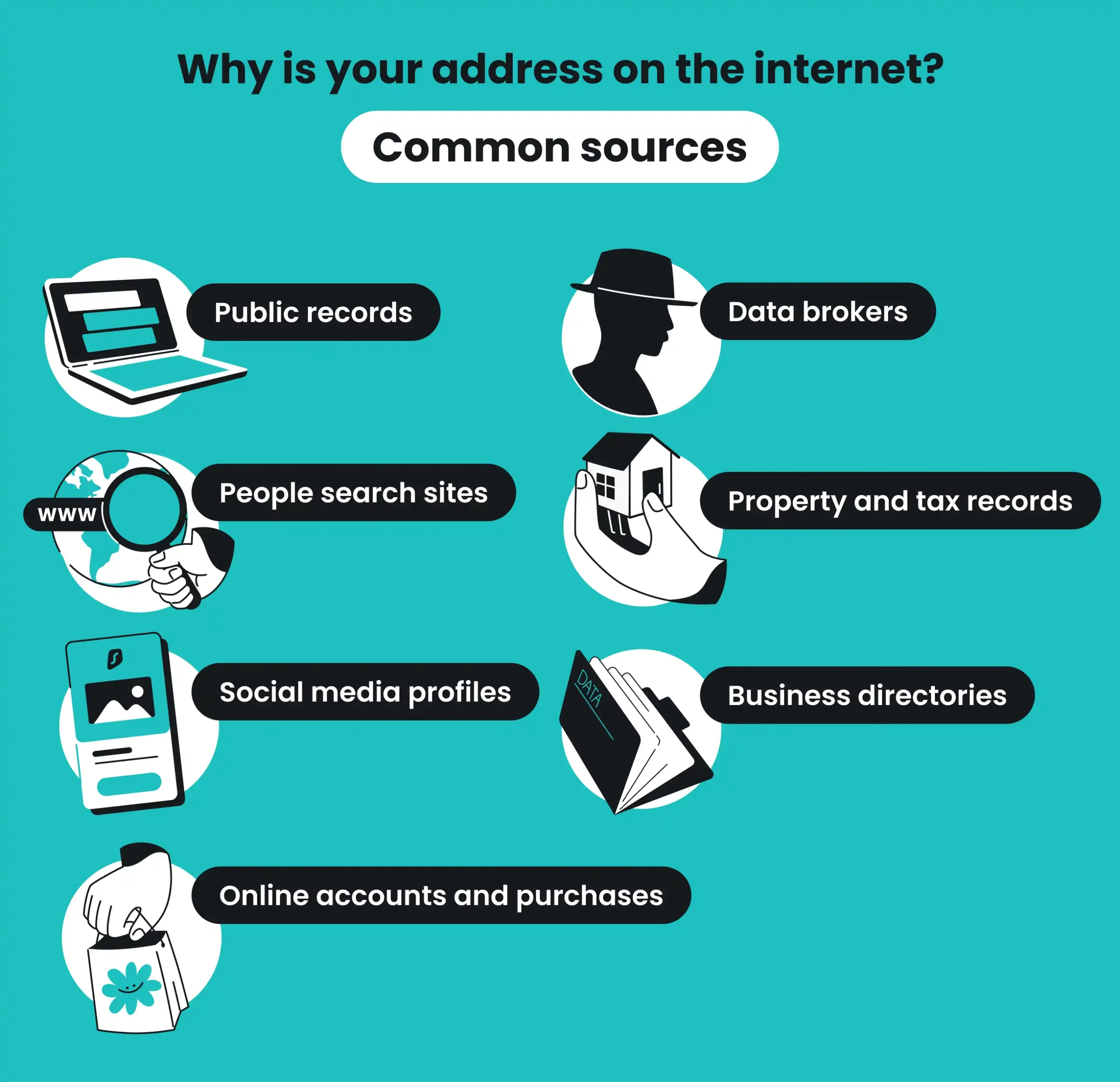
In most cases, your address isn’t on the internet because of a single event. It ends up online through several different sources, often without your knowledge. Here are the most common ones:
Public records
Government agencies collect your address through voter registration, property purchases, court filings, and business licenses. Many of these records are legally required to be publicly accessible.
Unfortunately, this means they can appear in online databases without your consent.
Data brokers
Companies like Spokeo, BeenVerified, and PeopleFinder aggregate personal details from public records, purchase histories, loyalty programs, and other sources. They compile that data into searchable profiles that may include your name, phone number, and — of course — your home address.
Data brokers then sell access to this information to third parties, including marketers and other businesses.
People search websites
Sites like Whitepages, TruePeopleSearch, and FastPeopleSearch pull data from brokers and public records to create free or low-cost lookup pages. If you’ve ever searched for your own name and found your address attached, it likely came from one of these.
Property and tax records
If you own a home, your name and address are almost certainly tied to county property records. These logs are public information in most US states and are often indexed by search engines.
Social media profiles
A surprising number of people list their city or full address on platforms like Facebook, Instagram, or LinkedIn. Even if your profile is set to private, old posts with location tags or check-ins can expose your general area.
Online accounts and purchases
Every time you enter your address during checkout, sign up for a newsletter, or register for a rewards program, that data is stored. If the company holding your data suffers a data breach or sells your information, your address moves further into the open internet.
Business directories
If you’ve ever registered a business, your address may appear on Google Maps, Yelp, the Better Business Bureau’s website, or your state’s business registration database.
How to find where your address appears online
Before you can start removing your address from the internet, you often need to find exactly where it’s posted online. Start by searching for yourself using the following steps:
- Search Google with your full name: put your first and last name in quotes — like “Michael Scott” — along with your city or state. Review the first three to five pages of results and note every site that displays your address.
- Search for your phone number: type your phone number into Google — once with dashes and once without them. Many data broker profiles link phone numbers directly to home addresses.
- Check major people search sites manually: visit sites like Whitepages, Spokeo, BeenVerified, TruePeopleSearch, and FastPeopleSearch. Search for your name on each one and see if your address appears.
- Set up Google Alerts: create an alert for your full name and address, so you’re notified whenever new pages mentioning either one surface.
How to remove your address from Google Search
Search engines like Google are the first place most people look for someone’s address, so they’re the first place you should act. Google offers two ways to remove your address from search results:
Google Search removal
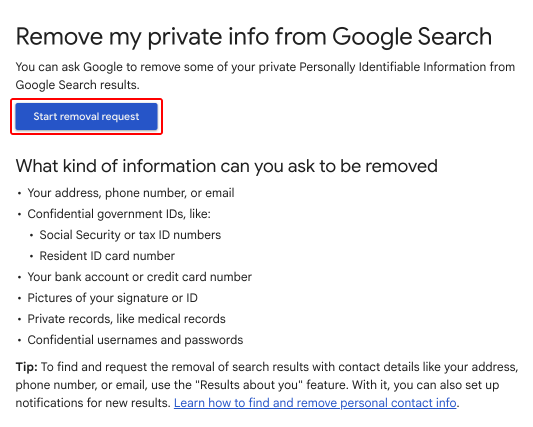
If you find a specific search result that includes your address, you can request its removal via Google Search Help. Here’s how:
- Go to the Remove my private info page in Google’s Help Center and select Start removal request.
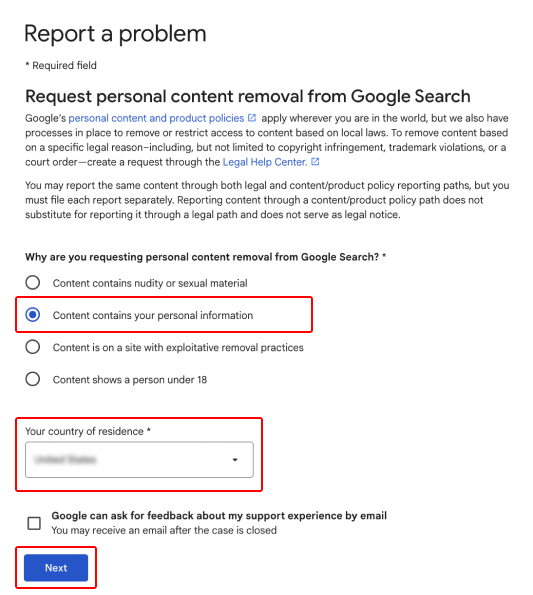
- On the Report a problem page, select Content contains your personal information and choose your country of residence. Then hit Next.
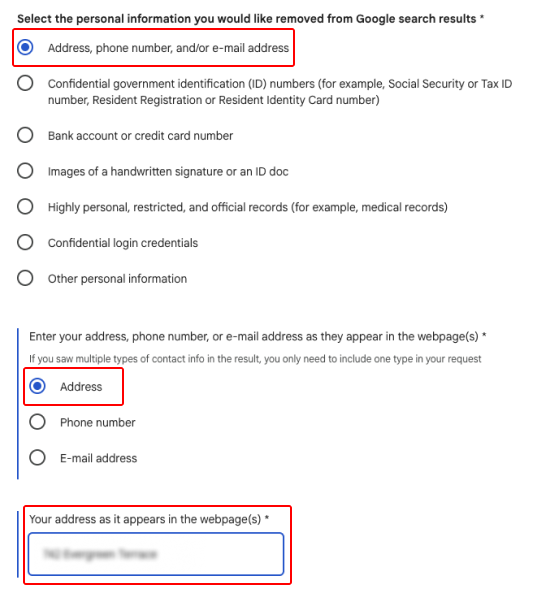
- On the next page, choose Address, phone number, and/or e-mail address > Address and enter your home address. Fill in any other required information and hit Next.
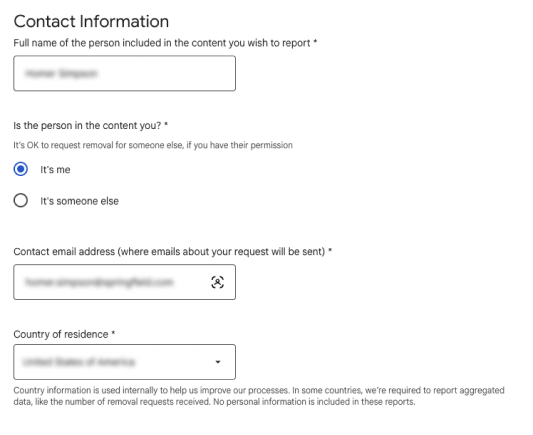
- Enter your contact information, confirm that your details are accurate, and select Submit.
Results about you
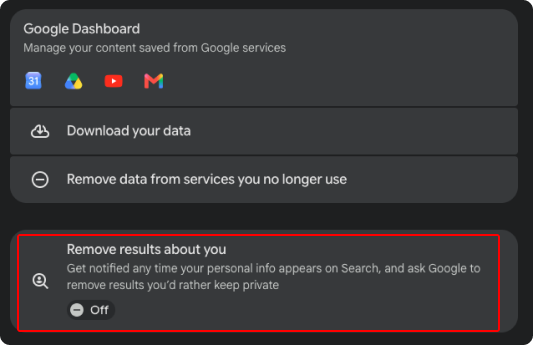
Google offers a tool called Results about you that notifies you when your personal info appears in a search and instructs Google to remove results you want to keep private — like your home address.
Here’s how to use it:
- Go to your Google Account > Data & privacy. Select Remove results about you.
- Select Get started and enter your full name, home address, phone number, and email address. You can also add ID numbers if you’d like. Confirm your details, including how you want to be notified, and select Save.
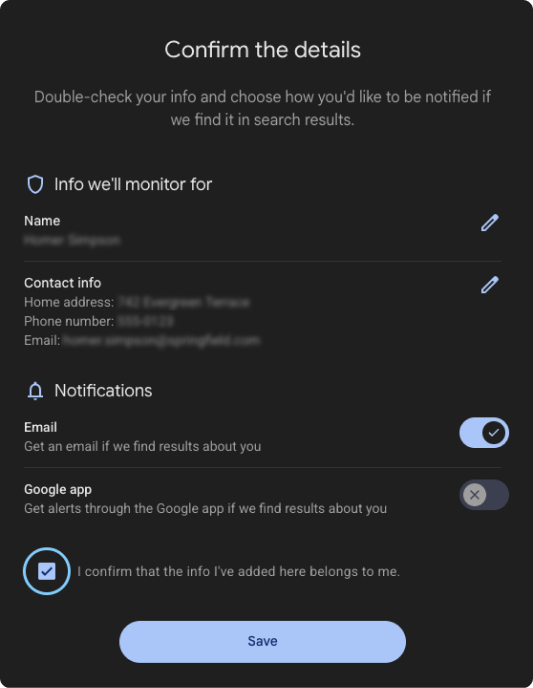
- Google will scan for matching search results and alert you when it finds any. You can review each result and submit a removal request directly from the tool.
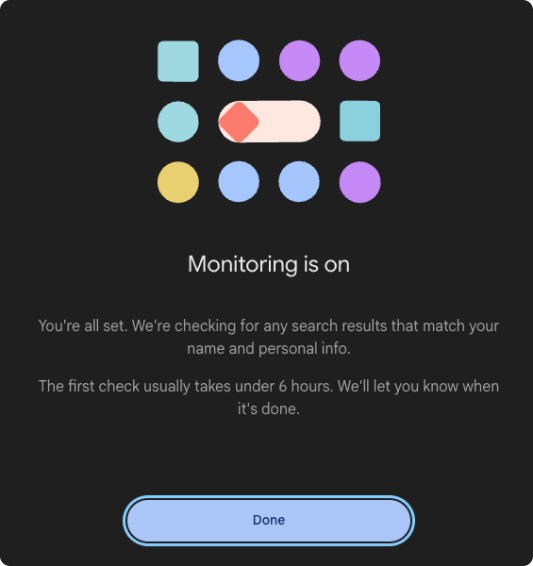
- Google will evaluate the request and, if it qualifies, remove the result from its search index.
Keep in mind:
Google removes results that display your home address, phone number, email, or other personal identifiers without your consent.
Google doesn’t remove content it considers in the public interest, such as news articles, government pages, or business listings.
Removing a result from Google Search also doesn’t wipe the information from the original website. The page still exists — it simply won’t appear in Google’s results. If you want the data gone entirely, you’ll need to take further action.
How to remove your address from data brokers and people search sites
Data broker pages and people search sites are the most likely places where your personal information can appear online.
Data brokers are companies that collect, package, and sell personal data. They pull your information from public records, purchase histories, social media profiles, and even other data brokers.
People search sites are essentially the consumer-facing front end of this data brokerage industry.
Manual opt-out requests
If you find your address on a data broker or people search site, one option to remove it is to go through the manual opt-out process. Each site has its own steps, with some requiring you to fill out an online form and others using email verification, phone verification, or a scanned ID.
Here’s how manual opt-out works for some of the most popular people search sites:
- Whitepages: visit their suppression request page, paste your profile URL, verify by phone, and submit;
- Spokeo: search for your name, find your listing, and use the opt-out page to request removal;
- BeenVerified: submit an opt-out request using their dedicated FAQ page;
- TruePeopleSearch: navigate to their removal page and submit your listing for deletion.
One problem with manual opt-outs is that they don’t prevent data brokers from relisting your address in the future. Brokers and people search sites regularly rescrape public records and purchase new sets of user data. Even after a successful opt-out, your information can reappear within weeks or months.
In short, manual opt-outs aren’t a permanent fix, and removal from data brokers is an ongoing process.
Automated data removal
If you’d rather not spend hours filing individual requests across dozens of data brokers to remove your address, using a data removal service is another option. Solutions like Incogni automate the entire process, continuously sending removal requests and monitoring them so your data doesn’t quietly reappear.
Instead of managing spreadsheets of opt-out deadlines, you get regular status reports showing which brokers have been contacted and which have completed removal.
Incogni is available in the Surfshark One+ cybersecurity bundle.
Pro tip: California residents can also use the state’s DROP (Delete Request and Opt-out Platform) program. As of August 2026, DROP lets state residents submit a single request that’s sent to every registered data broker in California’s system. It’s free to use and one of the strongest state-level privacy tools available.
DROP equivalents in other states aren’t common yet, but it’s worth watching for similar legislation in your area.
How to remove your address from websites
If your address appears on a specific website — not a data broker or people search site, but a standard webpage — manual removal may require several different steps.
Manual removal
To manually remove your address from a website, consider these common measures:
- Reach out to the site owner: most legitimate websites have some way to get in touch. Look for a Contact Us page or privacy request form, and send a clear message that identifies the page URL, the personal information displayed, and your request for removal;
- Delete old accounts: think about every account you’ve created over the years, including any on old shopping sites, forums, and unused apps. Your address may still be stored there. Log in and delete the account, or at least remove your address from the profile;
- Update current accounts: for accounts you still use, review what personal details are visible in your profile. Remove your home address anywhere it’s not strictly needed. On platforms that require a shipping address, using a PO box (post office box) can be helpful;
- Request removal from Google Maps Street View: if your home is clearly visible in Street View, you can submit a blur request. Open Google Maps, navigate to Street View of your address, and select Report a problem. Then select the area you want blurred.
Custom removals through a data removal service
Many websites lack simple opt-out forms or ignore removal requests. In these cases, handling address removal yourself can mean back-and-forth emails, unanswered messages, and repeated follow-ups.
Data removal services can still help if your address is found on sites that aren’t data brokers or people search sites. If a site is slow to respond or requires additional steps, the service follows up so you don’t have to.
Incogni, for example, includes custom removals on 3,000+ websites as part of its Unlimited Plan. You can send Incogni the site that exposes your address, and Incogni will send removal requests on your behalf or help you opt out on your own.
Can you completely remove your address from the internet?
Honesty matters here — complete, permanent removal of your address and other information from the internet is difficult for the following reasons:
- Government records are largely outside your control: voter registration, property tax records, court filings, and business registrations are public information in most states. Some jurisdictions offer address confidentiality programs for certain at-risk individuals, but these records remain accessible for most people;
- Cached and archived pages persist: even after a website removes your address, cached versions may linger in search engines for weeks. Archive sites like the Wayback Machine can also preserve old snapshots indefinitely;
- Data breaches can’t be undone: if your address was exposed in a past data breach, those details may circulate on the dark web or in private databases that you have no way to access or request removal from.
What can you realistically achieve?
You can remove your address from the vast majority of search engine results, publicly searchable databases, and people search sites. This dramatically reduces your public exposure and makes it much harder for someone to look you up casually.
Your goal isn’t perfect invisibility — it’s a meaningful reduction in exposure.
How to stop your address from appearing online again
Removal is only half the equation. Here’s how to keep your address private moving forward.
Review your privacy settings
Go through every online account and social media platform you use. Set profiles to private where possible. Remove your address, city, and location tags from any About sections, and turn off location sharing in apps that don’t absolutely need it.
Share less personal information online
Every app you download, every form you fill out, or every online contest you enter is a potential data source.
Before entering your home address on the internet, ask yourself whether it’s truly required. Consider a PO box or a virtual mailbox service for package deliveries. For online purchases, check whether you can use a pickup location instead.
Monitor your personal information regularly
Set up Google Alerts for your name and address, and periodically research yourself on major people search sites.
Services like Incogni offer ongoing data broker monitoring, so you can run continuous checks and get alerted when your data resurfaces without having to repeat the manual process every few months.
Use Alternative ID personal data masking where appropriate
For accounts that don’t require your legal name or primary address, using a tool like Surfshark’s personal data masking is a smart option. It generates a substitute name, email address, and physical address for situations where you’d rather not hand over your personal details. This includes things like newsletter signups, internet forums, and casual browsing.
Personal data masking helps keep your name and address out of new databases before they even get there.
Just like Incogni, personal data masking comes included in the Surfshark One+ bundle.
Protect your online privacy beyond address removal
Removing your address is one piece of a larger privacy strategy. Your digital footprint includes more than a street address, whether it’s your name, passwords, financial information, or browsing habits.
Here’s how to reduce your overall exposure.
Reduce your data broker footprint
Data brokers don’t stop at collecting your address. Details like your age, marital status, and employment history can also be shared.
Incogni handles data broker opt-outs automatically and monitors for re-listings over time. Instead of treating removal as a one-time project, it turns it into continuous protection.
Limit the information you share online
To reduce the amount of your personal data that’s on the internet, delete unused apps, turn off third-party cookies in your browser, and use strong passwords with 2FA (Two-factor Authentication) on every account that supports it.
Beyond tightening privacy settings, use personal data masking for new account signups where your legal identity isn’t required. Each of these steps makes it harder for brokers and scrapers to build a profile tied to your real identity.
Monitor for data leaks
Even with strong privacy habits, companies you’ve trusted with your data can still be breached. Surfshark’s data leak monitoring (Alert) checks known data leaks and notifies you if your personal information — like your email address and credit card numbers — appears in a leaked database. Early detection lets you change compromised credentials and limit any damage.
All three tools — Incogni, personal data masking, and data leak monitoring — are included in the Surfshark One+ bundle. Together with cybersecurity tools like a VPN (Virtual Private Network) and antivirus software, they give you a single privacy solution that covers removal, prevention, and leak monitoring.
Key takeaway: protect your address with Surfshark
Your address can appear across dozens of online sources — public records, data brokers, people search sites, and old accounts. Each requires a different manual removal method, and removing a search result from Google isn’t the same as removing the information from the original website.
Manual opt-outs often work, but they’re time-consuming and rarely permanent. The most effective long-term approach integrates privacy tools that handle the heavy lifting for you.
Spend less time chasing data brokers with an all-in-one privacy solution like Surfshark.
The Surfshark One+ bundle includes automated and custom data removal, personal data masking, and leak monitoring to help you take control of your personal information.
Remove your personal information from data broker sites
Get all-around privacy protection in the Surfshark One+ bundle
Get SurfsharkFAQ
Why is my home address on the internet?
Your address most likely appears online because of public records (property tax filings, voter registration, court records), data broker sites, old accounts, or profiles on social platforms.
In most cases, it’s a combination of several sources that collect and share the same personal info.
Can I remove my address from Google?
Yes, Google’s Results about you tool lets you request the removal of search results that contain your home address. However, Google only removes the result from its search index — the original site still has your data.
You’ll need to contact the source separately to remove your personal information fully.
Can I remove my address from Whitepages?
To remove personal information from Whitepages, visit the Whitepages suppression request page, paste the URL of your listing, verify your identity by phone, and submit the request. The listing is typically removed within 24 to 48 hours, but the data may reappear if Whitepages re-scrapes public records.
Can I remove my address from public records?
You can’t remove personal details like your home address from public records in most states. Documents such as property filings, voter registration, and court records are legally required to remain accessible.
Some jurisdictions offer address confidentiality programs for individuals facing safety threats, but these records can’t be removed for most people. You can, however, remove them from third-party sites that republish your personal data.
How long does it take to remove my address from the internet?
The time it takes to remove your address or personal details from the internet depends on how many sources they appear in. Google removal requests are usually processed within a few days. Opt-outs on people search sites can take anywhere from 24 hours to several weeks, while data broker opt-outs may take 30 to 90 days.
Without automation tools, a comprehensive manual cleanup across all sources typically takes several weeks of sustained effort.
Can I completely remove my personal information online?
Trying to remove your personal data from the internet completely is nearly impossible due to government records, archived web pages, and the ongoing nature of data broker activity.
You can still remove your personal information from the vast majority of searchable databases and drastically reduce your public exposure.
Why does my address keep showing up after I removed it?
Data brokers continuously re-scrape public records and purchase new datasets from other sources. Even after a successful opt-out, your address and contact details can reappear.
That’s why ongoing monitoring through an automated service like Incogni is essential for long-term privacy.
Is using a data removal service worth it?
Using a data removal service to safeguard your sensitive data is worth it if you value your time. Manually opting out of every data broker and people search site can take several hours, and you’ll need to repeat the process regularly.
Automated services submit and track removal requests on your behalf and monitor for re-listings, turning a time-consuming project into a hands-off process.