
You get an email from your CEO asking you to process an urgent invoice — flawless grammar, tone is just right, and it even references yesterday’s meeting. What could possibly go wrong? Well, there’s one tiny problem: the email isn’t actually from your CEO.
Instead, you’re looking at AI phishing, where bad actors use artificial intelligence to make their attacks feel more personal and believable. Keep reading to see how they weaponize AI, check out real-world examples, understand why these attacks are harder to detect, and learn how to protect yourself.
What is AI phishing?
AI phishing is a type of cyberattack that uses artificial intelligence to create and distribute more convincing, targeted fraudulent communications. These deceptive messages, known as phishing attacks, are designed to trick you into revealing sensitive information, such as login credentials or financial data, or into installing malware.
In AI phishing campaigns, bad actors use LLMs (Large Language Models) or voice and video synthesis tools to personalize content and manipulate you into taking an action that benefits them. This may include making a payment, clicking a link, or sharing personal information that the bad actor can exploit later on.
Traditional phishing requires attackers to do the heavy lifting — manually researching potential targets, deciding what details to include, and actually writing the message. They then have to rinse and repeat for each campaign. It’s time-consuming work, which is why you’ll often see generic messages with grammatical and spelling errors. Such obvious flaws make these messages relatively easy to spot.
But the rise of publicly available AI tools changes the equation. ChatGPT and other AI apps have lowered the barriers to entry for scammers, as attackers no longer need strong writing skills, fluency in multiple languages, or advanced technical knowledge to create believable phishing content.
With relatively little effort, they can use AI to research your background and craft a plausible message tailored to your situation. And they can do this at scale, reaching hundreds or even thousands of potential victims in minutes.
So, rather than a clearly fishy “Dear Friend, please sends moniez immediately” email, you might receive one that addresses you by name, references real events, and closely mimics the way your friends and family communicate. That personalization and familiarity can make the message feel legitimate — and easier to fall for.
How can AI be used in phishing attacks?
While generative AI can be used in cybersecurity, it’s also used in phishing attacks to automate, enhance, and scale the scammer’s efforts. From mainstream chatbots like Google Gemini and ChatGPT to malicious tools like WormGPT and FraudGPT, here are some of the ways bad actors are using AI in phishing attacks:
Crafting hyper-personalized AI phishing emails
One of the main ways attackers use AI in phishing is to create highly personalized emails. To do this, they can use AI to scrape publicly available information from sources such as LinkedIn, company websites, and social media. This could include your job title, colleagues, company projects, relationships, interests, or travel plans.
AI can then analyze and organize these scattered tidbits into a profile. From there, it can identify which details could make a phishing message more believable and use them to create an email tailored specifically to you, rather than just copying and pasting a generic template.
So, the email might mention a coworker by name, bring up a real event from your personal life, or imitate the way your family member writes. AI can also work recent news and events into the message to make it feel even more realistic and legitimate.
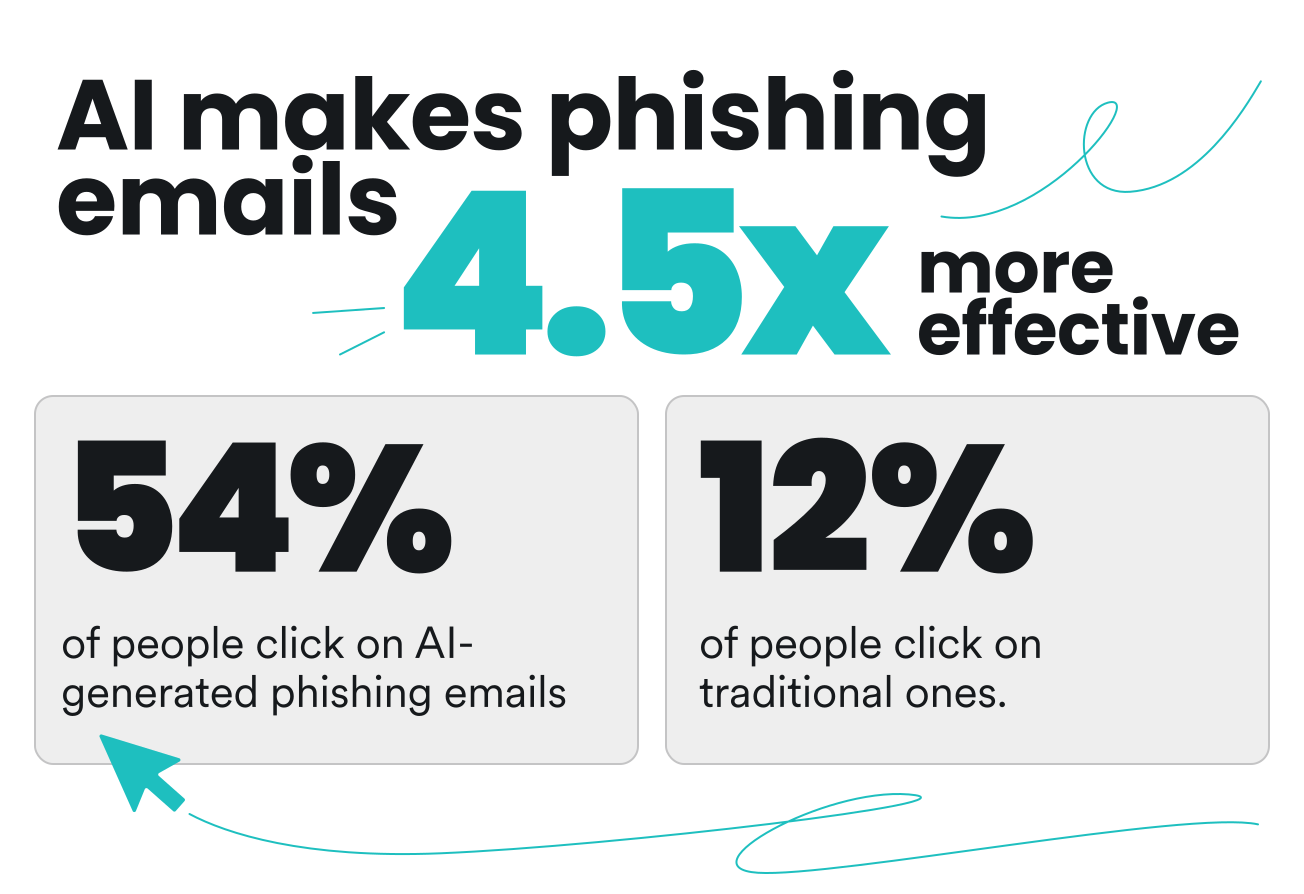
And that personalization can be very effective — 4.5 times more effective, in fact. A 2024 study on spear phishing found that 54% of participants clicked on fully AI-generated phishing emails, compared to just 12% for generic phishing emails.
Voice cloning and deepfake video
AI’s role in phishing isn’t limited to written emails and messages. Attackers also often use AI to imitate someone’s voice or appearance.
For instance, malicious actors can use voice-cloning tools to analyze voice recordings of someone you know — whether that’s your partner, friend, boss, or coworker — and generate new speech that closely resembles their voice.
First, they can get voice samples from recordings like social media videos, podcasts, or interviews. Then, they use AI to analyze characteristics such as the person’s pronunciation, accent, and pitch before generating speech that sounds like the real person. With this synthetic voice, the attacker can now impersonate that person and ask you for money or information via AI voice scams.
Deepfake videos take this up a notch by adding visuals to the attack. Using publicly available footage of someone, bad actors can use AI to generate or manipulate video so it looks like that person is saying or doing something they never actually did. In fact, research into AI shows that video is currently the most popular format for deepfake incidents.
Think of it as a digital costume the attacker puts on. Once on, they can look, sound, and act like someone you know.
For example, an attacker could pose as someone you know during a video call and ask you to make an urgent payment. Seeing and hearing the supposed person in real time can make the request feel significantly more credible than an email or a message.
Scaling attacks with polymorphic emails
AI can also help attackers create polymorphic phishing emails, where they generate different versions of the same scam using AI. Instead of sending the same phishing email to everyone, scammers tweak elements like wording, sender information, URLs, attachments, or formatting.
For example, rather than 1,000 identical emails saying “Your account has been suspended. Click here to verify,” an attacker can use AI to generate slightly different versions for each recipient:
- “Your account requires immediate verification. Click here to confirm your details”;
- “Your account has been flagged for suspicious activity. Verify your account now”;
- “Please confirm your account details to restore access”.
Without AI, coming up with these variations would be time-consuming. With AI, however, attackers can craft them in minutes. To put that into perspective, IBM X-Force researchers generated a convincing phishing email in five minutes using five simple prompts. In comparison, it took their human team around 16 hours to create a similar email manually.
These variations matter because security systems often look for patterns when trying to identify malicious messages. When these emails use different wording, subject lines, and personal details, it makes it harder for the systems to flag them.
How AI phishing attacks work
An AI phishing attack typically involves several steps, and AI has its virtual hands in each one.
Here’s how they usually work:
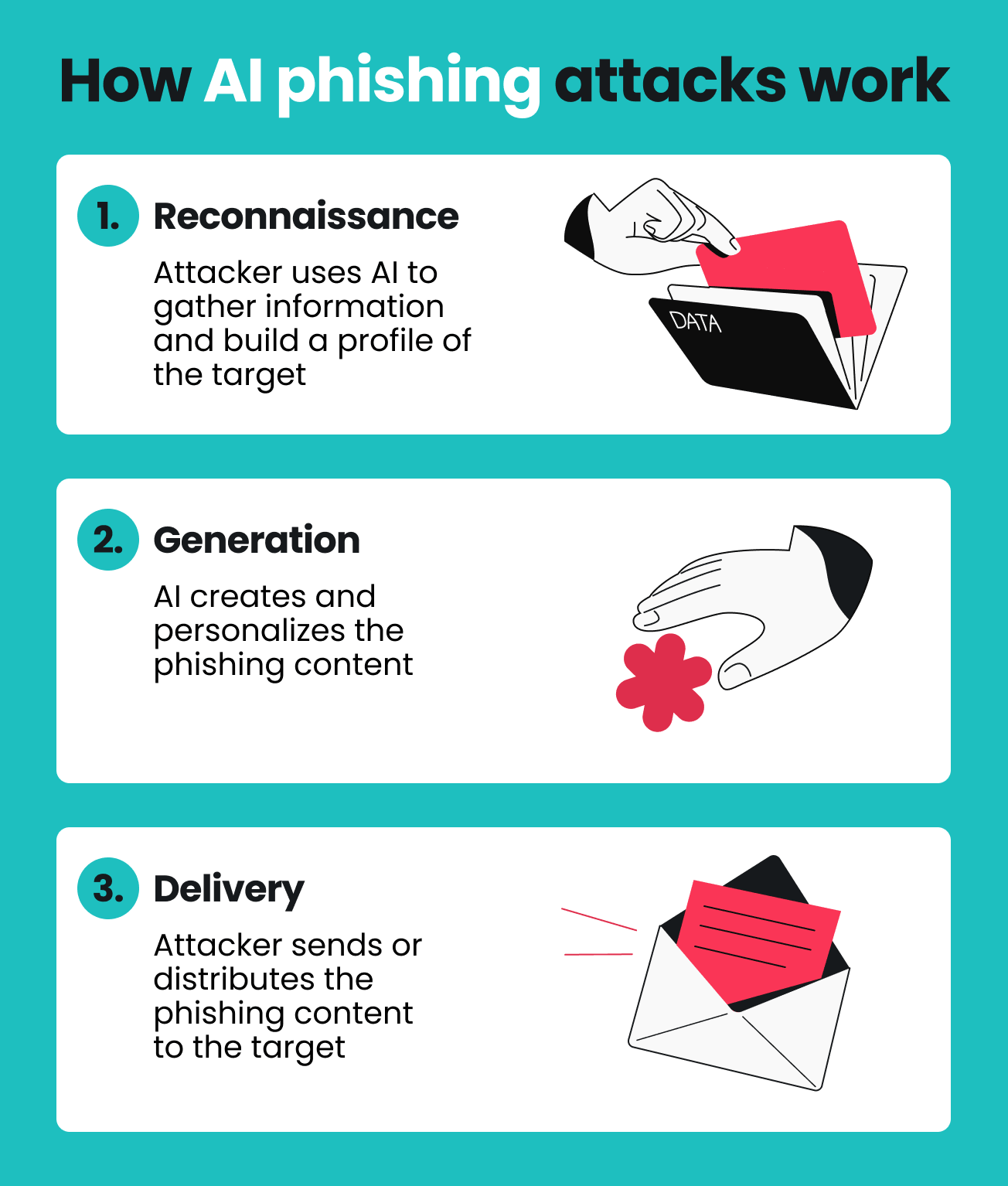
Step 1: Reconnaissance (OSINT)
Usually, the first thing an attacker does is gather information about you through OSINT (Open-Source Intelligence). In simple terms, it means collecting and analyzing information from publicly available sources. Here, AI might scrape your social media posts, leaked databases, Google search results, and other publicly accessible information.
The goal is to collect information like your name, job, friends, interests, recent activities, and communication style. An AI system can then organize those little pieces of information into a target profile that the attacker can use to make the eventual phishing attempt feel familiar.
And it can do so with surprising accuracy. In the same 2024 spear phishing study mentioned earlier, researchers found that the system gathered information that was accurate and useful in 88% of cases.
Now, there’s nothing malicious about OSINT itself. Plenty of security researchers use the same technique to understand threats and investigate incidents. The problem is how attackers use it. They weaponize OSINT to find the details most likely to make you trust a phishing attempt.
Step 2: Generation
Once the attacker has built a profile, they can feed that information into an LLM and ask it to create phishing content. Some may also use AI tools designed for malicious purposes, like WormGPT or FraudGPT. From there, AI generates all kinds of phishing content — from targeted spear phishing emails and fake login pages to cloned voice messages and deepfake videos.
Whatever the output, the content is often polished, localized, and tailored to you. The message might mention Amy from your kickball team, use your company’s terminology, or give you a plausible reason to click a link or approve a request.
And attackers typically don’t stop at just one message. Instead, they go on to generate hundreds of variations — changing the wording, subject line, structure, or details to make each one look slightly different. Something that used to be laborious to do manually can now be wrapped up in just minutes.
Step 3: Delivery
The final step in an AI phishing attack is getting the phishing content in front of you. Email is still the most obvious route, but the attacker could also contact you through a text, phone call, or video chat. And the more channels they combine, the more convincing the overall scenario can become.
For example, you might first receive an email that appears to come from an old friend of yours asking for an urgent payment. A few minutes later, you get a call that’s supposedly from them confirming the request using a cloned voice. Coming in close succession, that second interaction can make the first one seem legitimate.
AI can also help attackers choose when to contact you. A request that slides into your inbox during normal working hours may feel considerably less suspicious than the same message arriving in the middle of the night.
At the same time, polymorphic variation ensures that each phishing message looks different, making it harder for security systems that rely on known patterns to detect them.
Real-world examples of AI phishing attacks
It can be tough to imagine what a few tailored emails and manipulated videos or voice clips can actually do. So, let’s look at some real cases of AI phishing attacks and the impact they had.
The AI voice clone CEO scam
In a 2019 case, attackers used generative AI to clone the voice of a German CEO — down to his accent and speech patterns. They then used the cloned voice to call the head of the company’s UK-based energy subsidiary and requested an urgent transfer of approximately $243,000.
Convinced by the “slight German accent and the melody” of the CEO’s voice, the UK executive authorized the transfer. The attackers later tried to push for a second and third transfer, but the repeated requests set off alarm bells, prompting the UK executive to refuse.
The identity of the company in question has been kept confidential.
The $25 million deepfake video call
In 2024, a finance employee at engineering firm Arup fell victim to an AI phishing attack involving a deepfake video call. The employee was tricked into joining a video conference with people he believed were the company’s CFO and other senior staff members. In reality, everyone on the call was an AI-generated deepfake.
Convinced that the meeting and the instructions were legitimate, the employee authorized 15 wire transfers totaling around $25 million. The fraud was discovered only after he manually verified the request with Arup’s headquarters.
The 8,000 “celeb-bait” scam ads
In 2024, Meta and Australian banks took action against a widespread AI phishing scheme using AI-generated images of celebrities to promote fake investment opportunities. The scam ads used likenesses of famous figures like Russell Crowe and Nicole Kidman to lend credibility to non-existent cryptocurrency platforms, tricking users into transferring money to fraudulent accounts.
Convinced that the endorsements were genuine, victims across Australia lost a share of the roughly $1.94 billion stolen in scams during 2023 alone. The problem was significant enough that Meta removed approximately 8,000 of these ads after receiving reports from the Australian Financial Crimes Exchange.
Meta itself is also facing lawsuits from regulators and individuals over its handling of this fraudulent content.
Adversarial AI tools: WormGPT and FraudGPT
AI tools like WormGPT and FraudGPT make it extremely easy for attackers to create malicious content for phishing campaigns.
These dark-web LLMs don’t have the content guardrails you’ll usually find in mainstream AI tools. So, with no safeguards or restrictions on the type of content they can generate, bad actors can create sophisticated phishing emails, spoof websites, and malicious code on demand.
Plus, these tools are relatively cheap and accessible. In other words, launching sophisticated phishing attacks no longer requires deep pockets or advanced technical expertise.
What makes AI-powered phishing hard to detect?
AI-powered phishing is often considered harder to detect than traditional phishing because it eliminates many of the red flags that are easy to spot. Instead, messages used in these attacks can look just like legitimate, everyday communication. They often have the following characteristics:
1. No spelling or grammar mistakes
AI-powered phishing removes one of the classic signs of a phishing email — error-ridden, awkward-sounding text. Instead, AI can generate polished, native-sounding messages with perfect spelling, grammar, and punctuation.
2. Hyper-personalization
Rather than generic greetings and content, AI can use information gathered through OSINT to tailor its messages to you. The phishing email might mention your actual job title, recent events, or friends’ names. These details make the message feel familiar and give you more reason to trust it.
3. Polymorphic variation
AI-generated phishing is also often polymorphic, with each message phrased slightly differently. Attackers can use AI to quickly vary the wording, subject line, structure, and other minute details to make each message look unique. This undermines signature-based email filters that rely on known patterns to detect phishing messages.
4. Multichannel attacks
Attackers behind AI phishing usually don’t just send one email and call it quits. More commonly, they follow up with a text, phone or video call, or social media message that reinforces the original request.
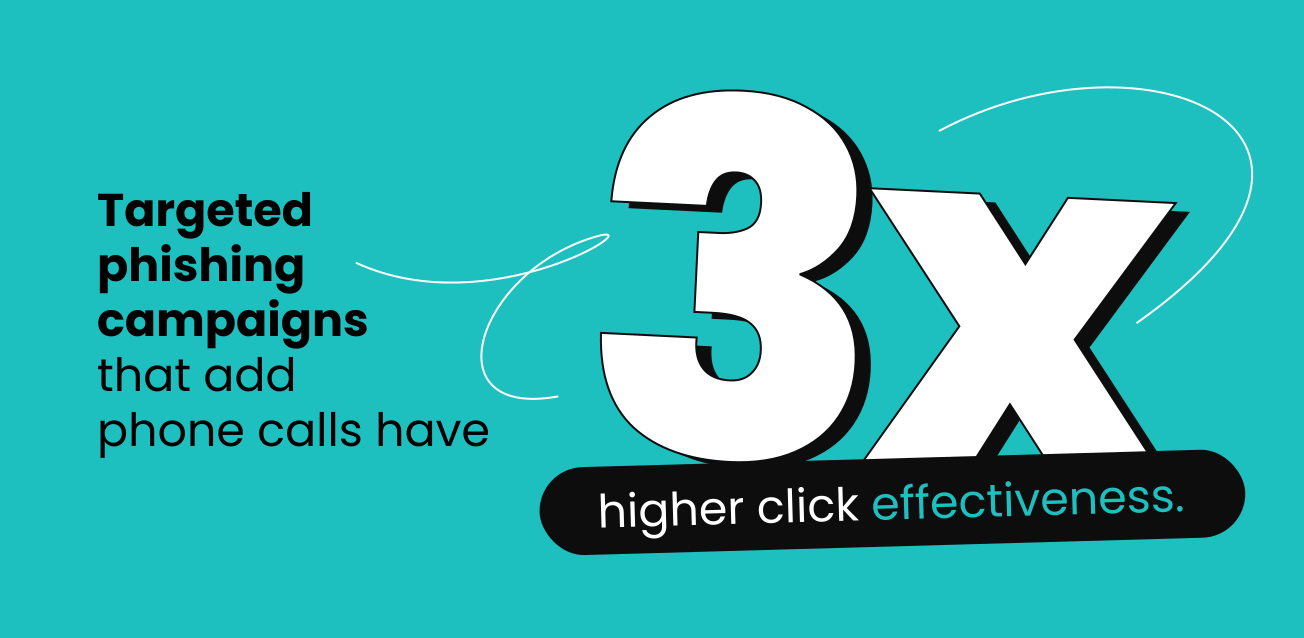
Using multiple channels can make the request feel more legitimate because each one seems to back up the others. In fact, an IBM report also found that targeted phishing campaigns that add a vishing phone call are roughly three times more effective at getting victims to click.
5. No malicious payload
Unlike malware and ransomware attacks, many AI phishing attempts rely purely on social engineering. Instead of sending a malicious attachment, the attacker might simply ask you to approve a payment, reset a password, or share sensitive information. As a result, traditional antivirus and malware detection tools may not catch the attack.
How to spot AI phishing
AI can make phishing attempts much harder to identify, but that doesn’t mean you’re completely defenseless. There are still signs you can watch out for and steps you can take if you suspect that something isn’t quite right.
Unusual urgency and authority combination
Be on guard when a message appears to combine urgency with a claim of authority. For example, the message might say it’s “from someone senior” while demanding action “right now.” This one-two combo is a common social engineering tactic, even when accompanied by flawless language.
Over-personalization
Personalization might be the key to making AI phishing messages more convincing, but too much of it can be awkward. If a message is overly personalized and so specific that it starts to feel unnatural, you should tread carefully.
Realistically, a friend or coworker probably wouldn’t bring up every detail they know about you and recap everything in one email. When a message packs this much unnecessary information, it may be a sign that AI has stitched together scraped data to build a false sense of familiarity.
Odd timing
Pay attention to when a message arrives. A “request from your grandma” landing in your inbox at 3 a.m. or your “CEO” emailing you while they’re known to be on vacation in Hawaii should raise eyebrows. It’s not unusual for attackers to overlook time zones when scheduling mass AI phishing messages.
Mismatched tone
Some emails and texts may be grammatically perfect, but subtly off. Watch out for those. They might be too formal, too brief, or simply not match how that person normally communicates.
Maybe someone who is allegedly your colleague suddenly starts using phrases they’ve never used before, or an email from a normally informal person now sounds stiff and technical. These little changes can be a sign that you should investigate further.
Unsolicited verification requests
Be careful with unexpected verification requests. For instance, you might get a message saying something like “Just to confirm your credentials” or “Please re-authenticate,” followed by a link asking you to log in or verify your information.
Whenever in doubt, it’s much safer to go directly to the supposed sender or the official website or app. From there, you can check whether any action is actually required and whether the request is legitimate.
How to respond to an AI phishing attempt
If you suspect an email, text, voice message, or video is part of an AI phishing attack, here’s what to do:
- Don’t click or reply: if a message feels suspicious, don’t click any links, open any attachments, or even reply to the sender;
- Verify through another channel: double-check the request with the direct source through another channel, preferably in person or via an official website or app;
- Report it: contact your IT or cybersecurity team, email provider, or platform moderators so they can investigate the message;
- Secure your account and device: if you clicked a link or opened an attachment, change your passwords immediately and run a security scan on your device;
- Use phishing-resistant MFA (Multi-factor Authentication): whenever available, use MFA — such as passkeys or security keys — to add another layer of protection;
- Follow verification protocols: for high-value requests involving payments, passwords, or sensitive data, be sure to follow the appropriate verification process.
Best AI phishing detection tools and defenses
There’s no one magical solution that can completely eliminate AI phishing. That said, there are steps you can take, tools you can use, and defenses you can put up to lower the risk of an attack.
AI-powered email security
To fight AI, you need AI. Modern security platforms have moved beyond simple keyword filters and now use NLP (Natural Language Processing) and machine learning to analyze the intent and context of every incoming message. Rather than just checking for “bad words,” these tools look for behavioral anomalies.
For example, if you receive an email from a “friend” or a “CFO” that doesn’t match their usual writing style or login location, the AI can flag it as a risk. You can access this level of protection through secure email gateways, such as those built into Google Workspace or Microsoft Defender.
In addition, scanners like Surfshark’s email scam checker use AI to detect phishing patterns in emails, analyzing an email’s content, sender information, and other characteristics.
Web content blocking
If a message manages to bypass your AI filters and your own intuition, a content blocker offers an extra browser-level barrier. Tools like Surfshark’s web content blocker let you filter entire categories of suspicious sites, including URLs flagged for phishing, scams, and fraud.
If you accidentally click a link that leads to a known phishing domain, web content blocker can stop the page from loading. Even if the AI-crafted email containing the link is perfect, the blocker stops the attack in its tracks.
Phishing simulation and training platforms
Phishing simulations and security training can also help minimize the risk of an AI phishing attack. And they’re a vital tool for anyone looking for stronger online security — not just big corporations.
AI-generated phishing simulators can generate realistic phishing attempts to test your awareness. These simulators can create scenarios based on the types of threats you’re most likely to encounter today, rather than old, predictable ones.
By testing yourself or your team with these simulations, you can identify which types of messages are most deceptive and learn how to respond. While training yourself the traditional way, say once a year, may not be enough as AI-powered attacks can evolve quickly, simulation still helps you maintain a mindset of continuous skepticism.
Behavioral analytics and identity monitoring
Behavioral analytics and identity monitoring tools can be useful as a last line of defense against AI phishing.
These tools establish a baseline of “normal” user behavior and flag anything that seems out of place. So that could be an unusual login location, an unexpected access request, or an abnormal transaction pattern. By keeping track of what’s normal, these tools can detect suspicious activity that happens after a phishing attempt.
This serves as a critical last line of defense. Even if you click a phishing link and enter personal information, data leak monitoring can help you. Tools like Surfshark Alert monitor for your leaked credentials, credit card details, or ID numbers, sending you notifications that let you take action before any damage is done.
AI phishing vs. traditional phishing: key differences
AI phishing isn’t strictly a new type of scam that’s completely separate from traditional phishing. Instead, it’s more about how attackers add AI tools to the mix to make attacks more plausible and efficient.
That said, while the goal remains the same, artificial intelligence can significantly change how tailored, convincing, and scalable these attacks can be.
Here’s how AI phishing compares with traditional phishing:
|
Feature
|
Traditional phishing
|
AI phishing
|
|
Content quality
|
Messages often contain generic greetings, overly urgent language, and obvious spelling, grammar, or formatting mistakes
|
Content is usually polished and natural-sounding with flawless grammar and personalized details
|
|
Scale
|
Attackers may need to craft and modify messages manually, limiting the volume they can send
|
Attackers can generate thousands of unique variants in minutes, with little to no manual effort
|
|
Personalization
|
Usually low, with generic wording and greetings such as “Dear customer”
|
Can be high, often tailored using details such as your name, role, projects, or interests
|
|
Channels
|
Primarily uses email and SMS
|
Can use multiple channels, including email, SMS, social media, and deepfake videos
|
|
Detection difficulty
|
Often easier to identify, with messages following known patterns and containing red flags like suspicious links or attachments
|
Can be much harder to detect due to constantly changing (polymorphic) content and attacks that don’t always rely on traditional malicious payloads
|
|
Cost to attacker
|
Usually higher per attack, requiring more human effort to create and manage campaigns
|
Can be extremely low, as many AI tools are cheap or free and can automate much of the heavy lifting
|
Staying safe starts with awareness
AI phishing isn’t just an enhanced version of traditional phishing. It’s more accurate to see it as a different category of threat, since AI has fundamentally changed the game. It’s now easier and faster than ever for attackers to create convincing messages, personalize them, and deploy them through multiple channels to reach you.
That’s why your first and most effective line of defense against AI phishing is still awareness. The more you understand how attackers use AI in phishing attacks, the harder it is for them to trick you. Just remember that as AI evolves, so will these attacks. Staying informed is an ongoing practice, not a one-and-done task.
FAQ
Can AI also be used to detect and fight phishing attacks?
Yes, AI can also be used to detect and fight phishing attacks.
Here are some ways it can help:
- Screen suspicious emails by analyzing sender information, content, links, and attachments;
- Check URLs and webpages to determine whether a link or website is likely malicious;
- Analyze writing patterns to identify language often used in phishing scams;
- Flag unusual behavior that could suggest a compromised account or phishing attempt.
What should I do if I fall for an AI phishing attack?
If you fall for an AI phishing attack, it’s vital to act quickly to secure your accounts and minimize the damage. Start by cutting off all communication with the attacker, and don’t click any more links or open any attachments. Next, change any compromised passwords immediately and enable MFA where available.
If you shared financial information or sent money, reach out to your bank or payment provider as soon as possible. Be sure to also report the phishing attack to relevant IT and security teams, email providers, or agencies. Continue to monitor your accounts for suspicious logins, password changes, unexpected transactions, or other unusual activity.
Is AI phishing illegal?
Yes, AI phishing is generally illegal when it’s used to deceive people, steal information, commit fraud, or gain unauthorized access to accounts or systems. In most countries, phishing attacks are covered by laws against cybercrime, fraud, identity theft, and similar offenses. The specific laws and penalties can vary depending on where you are and what the attack involves.
Will AI eventually make phishing completely undetectable?
No, it’s unlikely that AI will eventually make phishing completely undetectable. While AI can make phishing attacks considerably more convincing and harder to recognize, security tools and technologies are also getting better at identifying sophisticated scams.
And while AI can make phishing harder to detect, it doesn’t completely erase the red flags. Things like unusual urgency, odd timing, over-personalization, and messages that don’t quite sound like the person who supposedly sent them can still tip you off.