A botnet attack is when a hacker uses a network of malware-infected devices — a botnet — to carry out large-scale cyberattacks. Attackers build botnets by quietly infecting phones, laptops, routers, and smart devices, then controlling them remotely without their owners knowing.
Botnets power some of the internet’s most damaging attacks, including DDoS (Distributed Denial-of-Service) floods, credential theft, spam, phishing, and malware distribution. Here’s how botnet attacks work, how your device could become one of the “bots,” and how to keep it from happening.
What is a botnet attack?
A botnet attack is a coordinated cyberattack launched from a network of malware-infected devices that a single attacker, or bot herder, controls remotely. “Botnet” combines the words “robot” and “network,” referring to infected devices, known as “bots” or “zombies,” that act like remote-controlled robots, following the attacker’s commands without their owners’ knowledge.
Botnets aren’t just one type of attack. They often form the infrastructure that criminals rent and reuse as a base for various scams and attacks. A botnet can:
- Flood websites and servers with traffic to knock them offline;
- Test stolen usernames and passwords against thousands of accounts at once;
- Send massive volumes of spam, phishing, or scam messages;
- Spread malware to new victims;
- Mine cryptocurrency using victims’ processing power.
Because botnets, malware, and viruses often get mentioned together, it helps to see how they actually differ. We also have a dedicated virus vs. malware guide.
|
Term
|
What it is
|
Key trait
|
|
Botnet
|
A network of compromised devices controlled by an attacker
|
Made up of many compromised devices working together
|
|
Malware
|
Any malicious software designed to damage, exploit, or gain unauthorized access to a device
|
An umbrella term that includes viruses, worms, spyware, and more
|
|
Virus
|
A specific type of malware that attaches to files and spreads by replicating itself
|
Needs a host file or program to spread
|
How does a botnet work?
Building and running a botnet generally happens in three stages: infection, connection, and attack.
Step 1 — A device becomes infected
Attackers need to get botnet software (malware) onto a device before they can add it to a botnet. Common entry points include phishing emails or scam texts with malicious links, Trojan horse malware disguised as a legitimate app, compromised websites that trigger silent downloads, and fake software updates. Weak or default passwords on routers, mobile devices, and other internet-connected IoT (Internet of Things) devices are another common way in, along with unpatched vulnerabilities and exposed remote desktop protocol ports.
Step 2 — The device joins the botnet
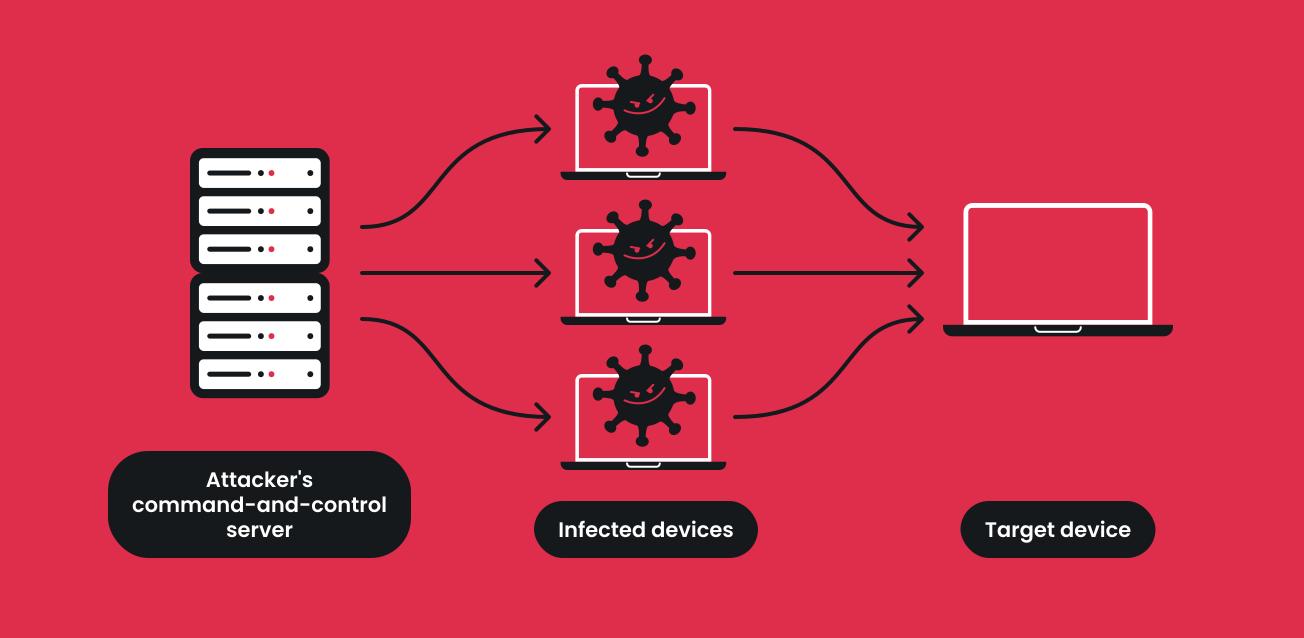
Once malware is installed, the device connects to the attacker’s command-and-control (C2) server — the botnet’s control center, where the bot herder sends commands to the entire botnet at once, directing infected machines to carry out malicious tasks. From here, the device runs in the background, following commands without obvious signs, so most people don’t notice right away.
Most botnets rely on a single centralized server, but some modern botnets use a peer-to-peer architecture instead, passing commands directly between infected machines.
Step 3 — The attacker launches attacks
With enough bots connected, the attacker can coordinate thousands or even millions of devices at once: overwhelming a website with traffic, attempting logins using breached credential lists, blasting out spam and phishing messages, spreading malware further, or enabling other fraud.
Together, these three stages keep botnet operations running: a hijacked device joins a network of others, all following the bot herder’s commands.
What are botnets used for?
Once a device joins a botnet, attackers can point it at almost any kind of cybercrime. Here are the most common ways botnets get used.
DDoS attacks
DDoS attacks are the most well-known use of botnets. Attackers direct thousands of bots to flood a target — a website, app, or server — with traffic at once, overwhelming it until it slows down or crashes for legitimate users. Attackers use DDoS floods for extortion, to sabotage a competitor, or as a smokescreen for another attack.
Credential stuffing
Botnets can automate credential stuffing: testing stolen login credentials — username-and-password combinations exposed in data leaks — against many websites at high speed. Because so many people reuse passwords, a single leaked login can unlock several accounts. Some botnets brute-force logins directly, cycling through passwords to steal sensitive information such as saved payment details.
Scams and phishing campaigns
A botnet isn’t itself a scam — it’s infrastructure hackers use to run scams at scale. Botnets can help attackers send large volumes of phishing or scam messages designed to trick users into clicking malicious links and direct victims to fraudulent websites. Compromised accounts within a botnet’s reach can also be used for impersonation or further scams. The more messages sent, the more convincing a campaign looks through volume alone, which is why catching phishing early matters.
Spam and malware distribution
Spam and scam distribution heavily overlap. Botnets pump out unsolicited messages, some just annoying, some carrying phishing links or malware. Beyond spreading itself, a botnet can also deliver other malware, including ransomware and spyware, which is why infections tend to compound over time.
Cryptocurrency mining
Some botnets hijack a device’s processing power to mine cryptocurrency for the attacker, known as cryptojacking. Victims typically notice this through slower performance, higher electricity use, and overheating, rather than any direct financial loss.
Notable botnet examples
A few real-world botnets show just how far this can go.
Mirai botnet
The Mirai botnet attack is the one most people have heard of, and for good reason. In October 2016, it was used to launch a massive DDoS attack against Dyn, a company that manages critical internet infrastructure. The attack knocked major sites offline, including Twitter, Spotify, and GitHub, and involved tens of millions of IP addresses at its peak, disrupting roughly 75% of Dyn’s monitored global network over about 18 hours[1].
What made Mirai notable was its target: everyday IoT devices like security cameras and home routers, turned into an army of zombie computers simply because their owners never changed the default password. Its source code was later published online, and variants of it are still used in attacks today.
Other notable botnets
Mirai isn’t the only dangerous botnet — multiple others have caused major damage in just the past few years, and DDoS isn’t the only thing they’re built for.
In 2025 and into 2026, a botnet named Aisuru became one of the most disruptive on record, built from more than 500,000 infected IoT and Android devices and responsible for one of the largest DDoS attacks ever measured. A later variant expanded the infected footprint to more than 2 million Android TVs and streaming devices[2].
Not every botnet stays quiet, either. In late 2023, a botnet called Pumpkin Eclipse didn’t just take over devices — it bricked roughly 600,000 routers at a single internet provider over just a few days, permanently disabling them rather than using them for an attack [3]. It’s a warning that a botnet infection doesn’t always end with “your device gets used;” sometimes it ends with “your device stops working.”
Signs your device may be part of a botnet
Botnet malware is designed to run quietly, but a few symptoms can be a red flag:
- Noticeably slower performance than usual;
- A device that overheats or drains battery faster than normal;
- Unusual network activity, especially when you’re not using the device;
- Unexpected crashes or restarts;
- Security software that’s disabled without your input.
Note: None of these symptoms alone confirms a botnet infection — they can also point to outdated hardware or an unrelated software issue. Some infections show no symptoms at all, since modern devices usually have enough spare bandwidth that extra traffic doesn’t register as a slowdown.
How to detect a botnet infection
These checks matter more than watching for performance alone, since not every infection shows obvious signs.
Run antivirus scans
A full antivirus scan is the most direct way to check for botnet malware, flagging known malware code signatures and suspicious background processes that manual inspection would miss.
Check unusual network activity
Review your router’s connected-device list and data usage for spikes you can’t explain, especially outbound traffic sent when you’re not actively online. Persistent connections to unfamiliar servers are worth investigating.
Review installed software
Go through installed apps and browser extensions for anything you don’t recognize. Botnet malware sometimes hides malicious files inside a program that looks legitimate at a glance.
How to remove botnet malware
If you suspect your device is infected, work through this checklist:
- Disconnect the device from Wi-Fi or your network right away;
- Run a full antivirus scan and remove anything it flags;
- Update your operating system and all software to close known vulnerabilities;
- Change your passwords, starting with your router, email, and financial accounts;
- Check important accounts for suspicious logins or activity;
- Reinstall the operating system if the infection persists after these steps.
How to prevent botnet attacks
No single step eliminates the risk of a botnet attack, but these steps, layered together, cover your devices from multiple angles.
Keep software updated
Software updates patch the vulnerabilities that botnet malware often exploits. Turn on automatic updates for your operating system, apps, and router firmware where possible.
Use strong passwords
Weak or default passwords are how a huge share of routers and other IoT devices end up in botnets. Use a unique, strong password for every connected device, not just your main accounts. One catch worth knowing: on some routers and smart devices, the vulnerable credential is hardcoded into the firmware rather than something you can change yourself. If you can’t reset it, replacing the device may be the only real fix.
Enable MFA
Multi-factor authentication (MFA) adds a second checkpoint beyond your password, so a compromised credential alone isn’t enough for an attacker to take over your account.
Watch out for phishing and scams
Phishing emails, scam texts, and fake websites are common entry points for botnet malware. Recognizing and blocking these threats early cuts off some of the first steps that lead to infection.
Surfshark’s Text and Email Scam Protection helps identify scam messages and emails before you click on them. It doesn’t detect or remove an existing botnet infection — its role sits earlier in the attack chain, helping you avoid the content that leads to infection in the first place.
Protect devices from malware
Surfshark Antivirus delivers the next layer, scanning for and detecting malware that reaches your device. Together, the layers work like this: text and email scam protection and Clean Web help you avoid deceptive messages, links, and websites that pose threats, while Antivirus catches malware that gets through.
Monitor exposed credentials
Stolen credentials can be exploited for account takeover, credential stuffing, or further scams, often long after the first breach. Surfshark Alert monitors for your personal information appearing in known data leaks, so you can change compromised passwords faster.
Browse more securely
A VPN encrypts your internet traffic and improves your privacy, which matters most on public Wi-Fi, where traffic is easier to intercept. A VPN doesn’t stop botnet malware or scams on its own — it secures your connection, not your device or inbox, which is why it works best alongside the layers above. Get started with Surfshark VPN or explore Surfshark’s full learning hub for more online safety guides.
Conclusion: are you doing enough to keep your devices out of a botnet?
Botnets turn everyday, compromised devices into remotely controlled networks that attackers use for DDoS attacks, credential theft, spam, phishing, and other scams. Devices get pulled in through vulnerabilities, weak passwords, malicious downloads, and phishing, often without any obvious warning signs.
Because entry points vary so much, no single tool fully closes the gap. Preventing infection takes multiple layers: recognizing scams, protecting devices from malware, monitoring exposed credentials, and securing your connection.
FAQ
What is a botnet attack?
A botnet attack is a coordinated cyberattack launched from a network of malware-infected devices controlled by one attacker. The attacker uses these “bot” devices together to overwhelm targets, steal data, or distribute scams and malware at scale.
What is the difference between a botnet and malware?
Malware is the broad category of malicious software, while a botnet is a network of devices that malware has infected and connected under one attacker’s control. In short, malware is what infects a device; a botnet is what happens when many infected devices are linked together.
How do devices become part of a botnet?
Devices typically join a botnet through phishing links, malicious downloads, weak or default passwords, fake software updates, or unpatched vulnerabilities. IoT devices like routers and cameras are especially common targets since many are never updated after setup.
Are botnets used for scams?
Yes, botnets can help criminals distribute phishing and scam messages, malicious links, malware, and other fraudulent content at scale. The botnet itself isn’t the scam — it’s the infrastructure that lets criminals run scam campaigns to far more people at once.
How do I know if my device is part of a botnet?
Common signs include slower performance, overheating, unusual network activity, unexpected crashes, or security software that turns off on its own. These symptoms don’t confirm an infection on their own, so a full antivirus scan is the most reliable way to check.
Can antivirus remove botnet malware?
Yes, in most cases, antivirus software can detect and remove known botnet malware from an infected device. For persistent or advanced infections, a full operating system reinstall may be needed after the initial cleanup.