One in four internet users uses a VPN, yet plenty of people still aren’t quite sure what it does. Welcome to VPN explained for dummies: a plain-English beginner’s guide to what a VPN is, how it works, and how to use one.
What is a VPN for dummies?
In one line: a VPN is a tool that encrypts your internet connection and masks your IP address, keeping what you do online private.
Here’s a more detailed breakdown. VPN stands for virtual private network. A private network is a connection between two computers that are isolated from all others.
A VPN works similarly, but over the internet. It uses data encryption and special servers to shield your connection, even though you’re using the same public internet as everyone else.
What does a VPN do? A short answer for dummies
- Encrypts your data, making it unreadable to anyone trying to intercept it between your device and the VPN server, so your information stays private;
- Routes your traffic via a VPN server, making it appear that you’re connecting from the location of the VPN server, so your real location stays private.
Disclaimer: Please note that when we use the term “VPN for dummies,” we mean it as a lighthearted reference to a popular series of tutorial books. We want to make it clear that we value the intelligence of all our readers and do not intend to insult or undermine anyone’s knowledge.
How does a VPN work? (explained for dummies)
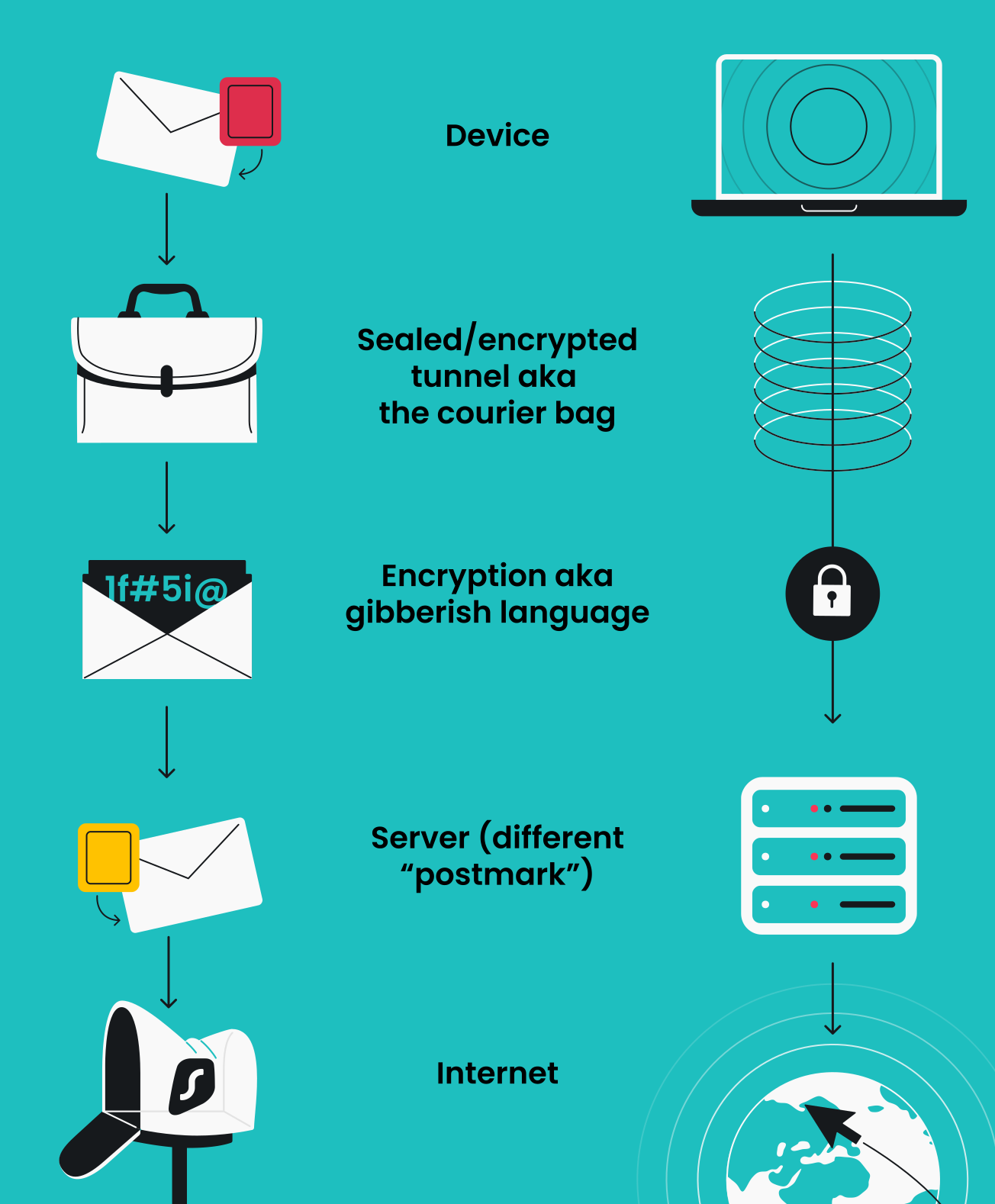
The easiest way to picture a VPN is to think about sending a letter through the mail. Normally, anyone handling your letter could read the address or peek inside. A VPN solves both problems with three simple components: the tunnel, encryption, and the server.
The tunnel: instead of your data traveling out in the open, the VPN sends it through a private channel, like a sealed courier bag that no one along the route can open, tamper with, or peek into.
The encryption: the letter inside is written in a code only the recipient can read. Intercept it, and you get a page of nonsense, as if you opened someone else’s mail and found it’s all in a language you’ll never crack.
The server: your data is sent from the VPN’s location, not yours, like mailing your letter from a different city’s post office. The recipient sees that city’s postmark instead of your home address, so your real location stays private.
Put the three together, and your data travels sealed, unreadable, and postmarked from somewhere else, the moment you hit connect.
How to use a VPN for beginners
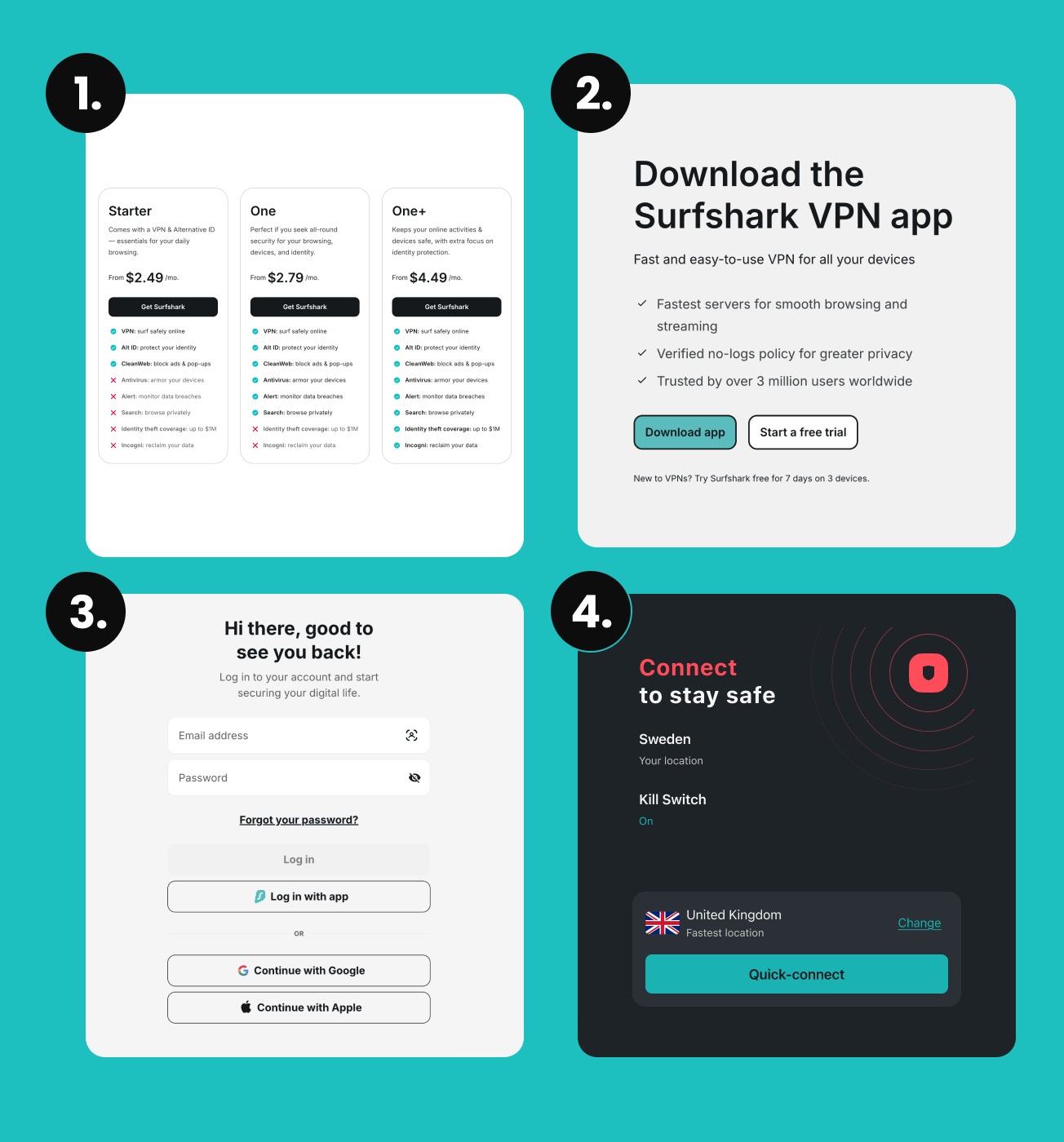
With Surfshark, setting up a VPN takes under two minutes, and you never need to touch a single advanced setting. Here’s the whole flow:
- Get a Surfshark subscription. Pick a plan on the Surfshark website and create your account.
- Download and install the app. Get the Surfshark app, which works on Windows, macOS, iOS, Android, and more, with unlimited devices on one account.
- Log in. Open the app and sign in with the account you just created.
- Connect. Select Quick connect, and Surfshark will automatically pick the fastest server for you. Leave the VPN on whenever you want privacy, especially on public Wi-Fi.
Maximize your security with Surfshark One
Surfshark One — a cybersecurity bundle for all-over protection. Surf the web without tracking, secure your devices from threats, & guard your accounts’ security.
Get SurfsharkWhen should you use a VPN?
A VPN isn’t only for tech experts or people with something to hide. It’s genuinely useful in everyday moments because it helps keep your data private and your connection safer. Here are the ones where switching it on makes the biggest difference:
- On public Wi-Fi. Whether you’re connecting from a cafe, an airport, or a hotel, public networks tend to be easy targets for anyone looking to snoop on your data. Turning on a VPN encrypts your connection, so your logins, messages, and payment details stay unreadable to anyone sharing that network;
- When you travel. Away from home, you often end up juggling unfamiliar networks and foreign connections. A VPN lets you reach your usual accounts and services securely from abroad and keeps sensitive activity protected. It is also paramount in countries that restrict access to certain websites and social media;
- When you stream. Some internet providers slow down (throttle) your connection when they notice you’re streaming or downloading a lot. Because a VPN keeps your activity private from your provider, it can help you avoid slowdowns and keep your viewing to yourself;
- At work or school. Office, campus, and dorm networks are usually shared by a lot of people, and they aren’t always as secure as you’d hope. A VPN encrypts your connection so your personal logins, messages, and surfing stay private from others on the same network.
Why it matters: research from Surfshark shows over 425 million user accounts were breached globally in a single year, showcasing how exposed everyday data can be.
Does a VPN help with streaming?
Yes, there are a few ways a VPN can help you with streaming.
- Avoid activity-based ISP (Internet Service Provider) throttling. Ever notice your internet slowing down during a Netflix binge? Internet service providers often put a cap on your bandwidth if they see that you’re streaming or downloading files. Since your activity is hidden from your ISP when you have a VPN on, it can help you avoid this type of throttling.
- Stream securely. Ideally, you should always have a VPN on (even on mobile devices — VPN apps don’t drain battery that much). It helps protect your data when you’re browsing online. The same goes for streaming — enjoying your favorite shows and movies shouldn’t come at the cost of your privacy. So, use a VPN when you do. Just make sure you choose a provider with fast servers (Psst! Surfshark is one of them).
And, believe it or not, there’s even more you can use a VPN for — check out our guide on cool things you can do with a VPN.
Disclaimer: Please note that using Surfshark services for any illegal activities is strictly forbidden and violates our Terms of Service. Make sure that any use of Surfshark services for your particular activities conforms to all relevant laws and regulations, including those of any service providers and websites you access using Surfshark.
VPN vs. proxy vs. browser extension
Here’s the difference at a glance:
|
Tool
|
VPN app
|
Proxy
|
Browser extension
|
|
Coverage
|
Your whole device
|
One app or website
|
Only your browser
|
|
Encryption
|
Yes, all traffic
|
No
|
Browser traffic only
|
|
Security level
|
High
|
Low
|
Medium
|
|
Ease of use
|
Very easy
|
Moderate
|
Easy
|
Bottom line: a proxy just changes your IP (Internet Protocol) address without protecting your data, and a browser extension only covers what happens inside that browser. A VPN is the only option here that encrypts everything leaving your device, making it the simplest and safest choice for protecting your connection.
How is a VPN different from a proxy/DNS/Tor/firewall?
|
How is a VPN different from…
|
|
|
a proxy?
|
A proxy only re-routes your traffic but doesn’t handle security tasks such as encryption.
|
|
a DNS?
|
A DNS (Domain Name System) is just like an internet phonebook, so changing a DNS is like getting a better phonebook. It does not re-route your traffic or encrypt it.
|
|
a smart DNS?
|
That’s just a DNS that routes only specific traffic (like streaming services) through a proxy. Again, no encryption!
|
|
Tor?
|
Tor is a volunteer-run network that encrypts your data and reroutes it three times. It’s very slow and doesn’t allow you to choose the location to connect from.
|
|
a VPN browser/plug-in?
|
A VPN browser or plug-in only provides VPN functionality to the traffic that involves the browser. Fire up Steam, and you’re unprotected.
|
|
a firewall?
|
A firewall is just a filter for incoming data. Notably, it doesn’t do anything to keep your data safe after it leaves your device.
|
Free VPNs vs. paid VPNs for beginners
Free VPNs are tempting, but they usually come with trade-offs. Many limit your data or speed, show ads, or make money by logging and selling your browsing activity — the exact opposite of what a VPN is for. Some low-quality free VPNs have even been found to carry malware.
A paid VPN like Surfshark removes those catches: no data caps, faster and more stable connections, a clear privacy stance, and real customer support if you get stuck. It also lets you add unlimited devices, so your phone, computer, iPad, and TV can all benefit.
Is VPN use legal?
A VPN is a tool for improving privacy and security and is legal in most countries in the world.
However, there are several countries that have made VPNs less-than-legal due to political reasons. VPN use is currently restricted in 15 countries.
Benefits of using a reputable VPN
If you’re still not sure what the benefits of a VPN are and whether you should really invest in one, here you go:
- Privacy. Your provider and network snoops can’t see your activity;
- Safer public Wi-Fi. Encryption protects you on networks you don’t control;
- A more open, secure connection. Reach your services safely, wherever you are;
- Peace of mind. Set it once, leave it on, and stop worrying about who’s watching.
Common VPN misconceptions
“A VPN makes me invisible online.” Not quite. A VPN greatly improves your privacy, but no tool makes you completely untraceable. For example, your internet service provider might still know your IP and that you’re using a VPN (with the exception of Surfshark’s obfuscated servers, which ensure your ISP will have a hard time identifying you’re connected to a VPN), but it doesn’t know what you’re doing online.
“VPNs are only for tech experts.” Actually, it’s quite the opposite. Modern VPNs are built for one-tap use — connect and go, no extra setup needed.
“A VPN will slow my internet to a crawl.” With a quality provider, the difference is usually too small to notice, and if your provider throttles certain activities, a VPN can even help.
What to look for when choosing a VPN
There are many VPNs out there, and choosing one can be intimidating. That’s why we compiled a list of qualities to look for in a good VPN:
The selection of servers: the more servers in more countries a VPN has, the more options you have to stay private. For example, Surfshark maintains over 4,500 servers in 100 countries.
Tunneling protocols: these are among the most important aspects of VPN security. Look for WireGuard, IKEv2, and OpenVPN support. Surfshark also offers Dausos, its own protocol built for everyday users. Don’t use a VPN that only offers outdated protocols like L2TP.
No-activity-logs policy: as VPNs route your traffic via their servers, they can keep track of what you’re doing online. That’s why it is important to use a VPN that keeps no records, also known as having a no-logs policy.
Kill switch: a VPN feature that disconnects your internet connection if the VPN protection goes down. It’s a dramatic name for a simple safety net: without it, if your VPN connection drops, you’d start browsing unprotected without even realizing it.
Customer support: check for a VPN that has not only a good FAQ section but also live support. For example, Surfshark offers 24/7 live support.
Value: free VPNs can be insecure or even dangerous. A good paid VPN delivers ultimate value, pairing independently audited, no-logs security with an extensive feature set, and 24/7 support.
Money-back guarantee: you may find out that a VPN doesn’t suit your needs or doesn’t work for you. In this case, a money-back guarantee is an important feature. Surfshark offers a 30-day money-back guarantee.
VPNs are for everyone
This might be a “VPN for dummies” article, but your questions about virtual private networks are anything but silly. It’s smart to understand a tool before you rely on it — and the good news is, VPNs are more user-friendly than ever. So, how about giving Surfshark VPN a spin?
FAQ
How safe is it to use a VPN?
A VPN is safe to use when the provider is trustworthy. Look for a VPN that is independently audited and maintains a no-logs policy. Remember, a paid VPN is safer than a free one, which may recoup costs by selling your data.
Does a VPN keep you completely private online?
Not entirely. A VPN keeps your activity private, but it doesn’t make you fully anonymous. Your internet provider may still see that you’re using a VPN (unless you use Surfshark’s obfuscated servers), but it can’t see what you’re doing online.
How do I use a VPN for the first time?
It’s easy: download the Surfshark app, log in, and tap Quick connect. The app handles the encryption and server choice for you, so no technical setup is required.
Are free VPNs safe for beginners?
Generally, free VPNs are not safe for anyone. Free VPNs often limit speed or data and may log and sell your activity, so a reputable paid VPN is usually the safer choice.