Although ZTNA and VPNs can both be used to regulate secure access, they work in different ways. A VPN encrypts internet traffic and routes it through another server, making it a go-to option for personal online privacy. ZTNA, on the other hand, is mainly designed for workplaces, granting access to internal apps and services only after a series of strict identity checks. While VPNs secure connections broadly, ZTNA provides a more targeted, identity-based access model.
What is ZTNA (Zero Trust Network Access)?
ZTNA, short for Zero Trust Network Access, is a security approach that controls how users connect to private company applications and services. Instead of assuming someone should be trusted once they’re inside a network, ZTNA follows a stricter rule: no user or device is trusted by default, even if they’re logging in from the right place.
The main idea behind ZTNA is simple: people should only be able to access what they actually need — and only after they’ve been properly verified.
How ZTNA works
Rather than opening the door to an entire internal network, ZTNA grants access on an application-by-application basis. Here’s what typically happens:
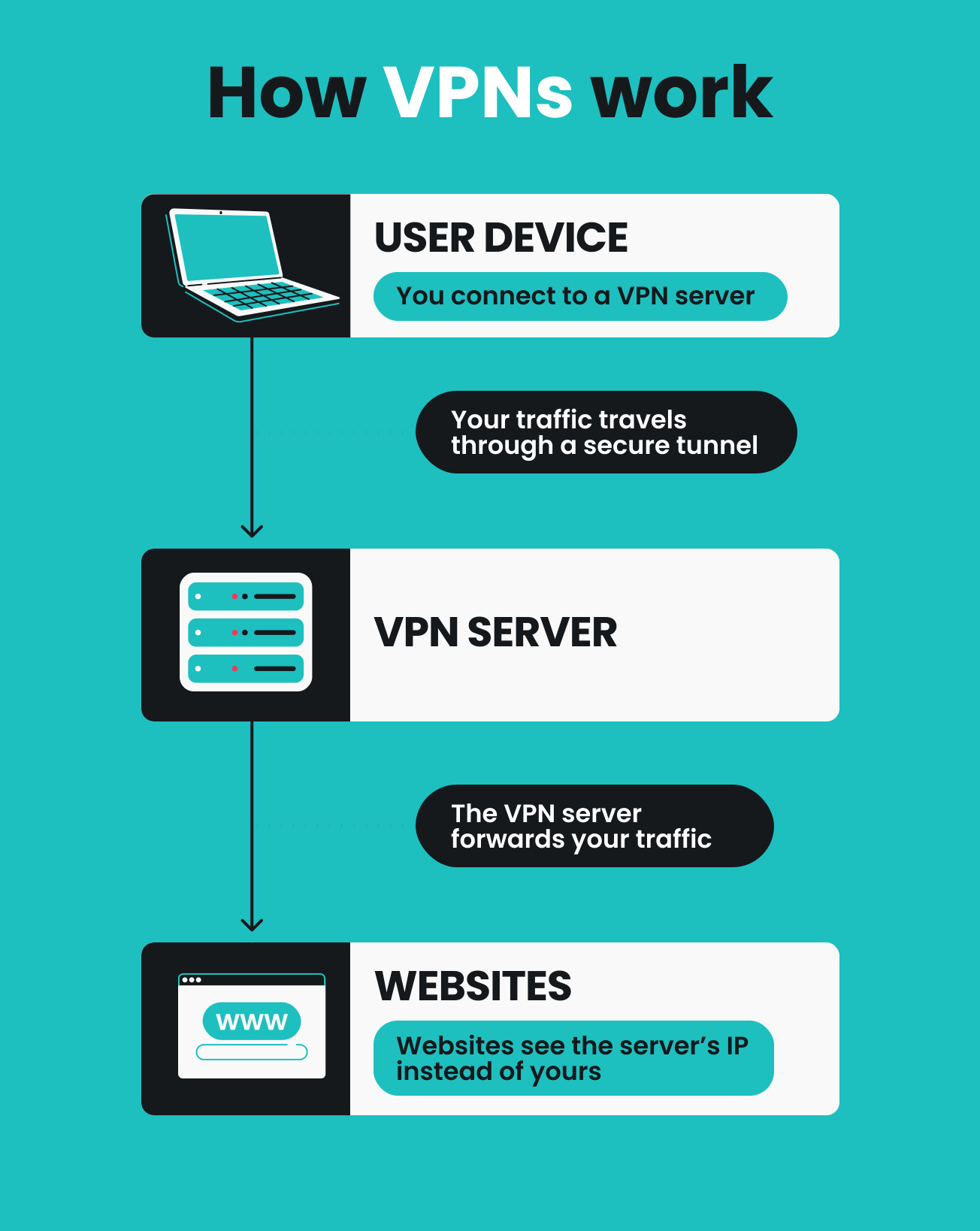
- You request access to a specific tool or app (like an internal dashboard or HR system).
- The ZTNA gateway verifies your identity and device.
- You get access to the requested app.
- All other apps remain restricted.
This makes ZTNA especially useful for modern workplaces where employees, contractors, and teams may be working from different locations, devices, or cloud environments.
Why businesses use ZTNA
ZTNA is often seen as a more modern alternative to traditional network-based access because it:
- Limits unnecessary exposure to internal systems;
- Reduces the risk of attackers moving through a network if an account is compromised;
- Works well with cloud-based apps and hybrid work setups;
- Gives organizations more visibility and control over who can access what.
Instead of connecting users to a full private network, ZTNA connects them only to the specific applications they’re approved to use — nothing more.
What is a VPN (Virtual Private Network)?
A VPN is a tool that creates a secure, encrypted connection between your device and another server or network. It’s most commonly used to protect your internet traffic, especially when you’re on public Wi-Fi, and to add an extra layer of privacy while browsing online.
VPNs have evolved over decades and are widely used by businesses and everyday users alike.
How a VPN works
When you connect to a VPN, your internet traffic is routed through a secure tunnel before it reaches its destination. That process usually looks like this:
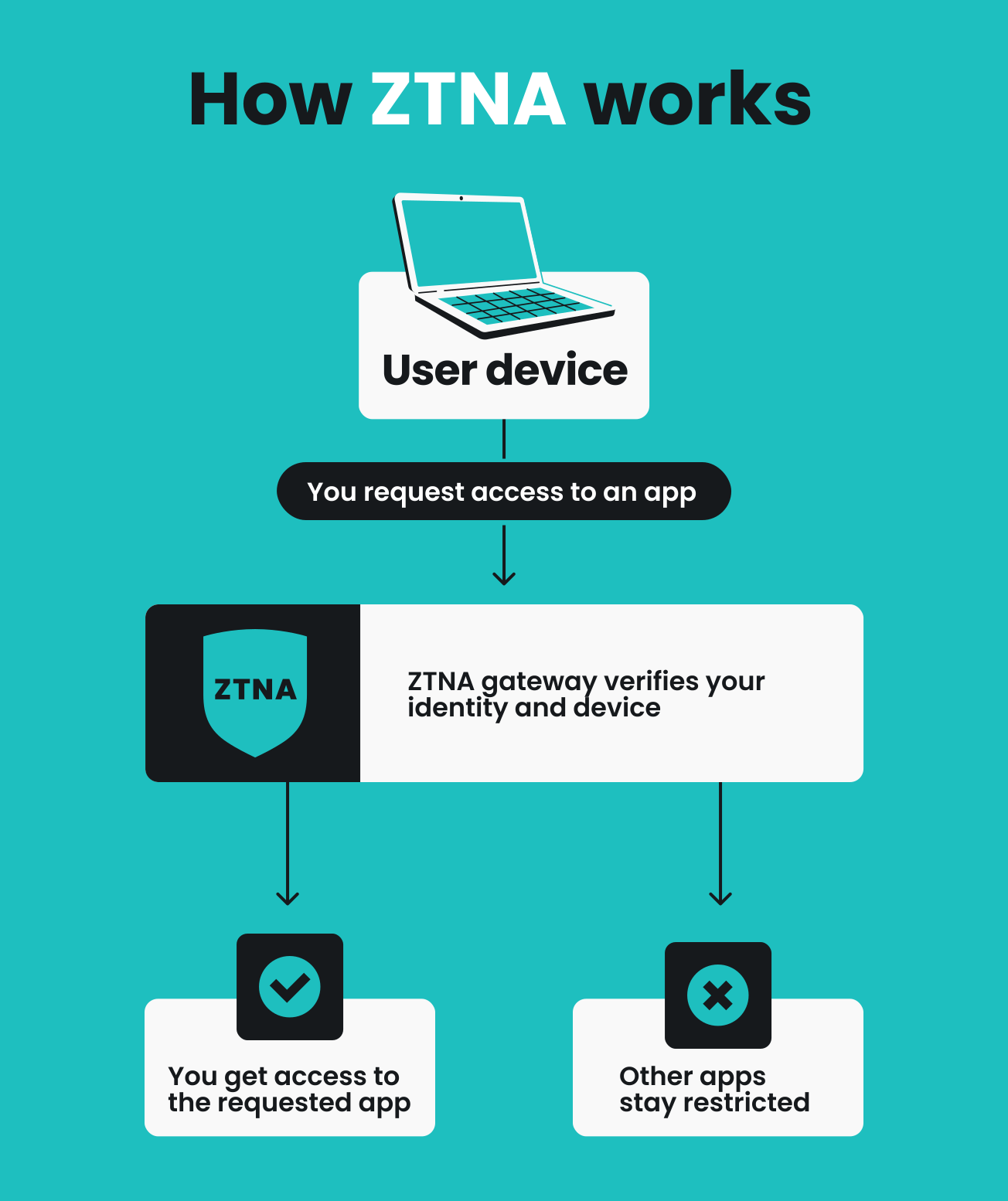
- You connect to a VPN server.
- Your traffic travels through a secure tunnel.
- The VPN server forwards your traffic.
- Websites see the server’s IP (Internet Protocol) address instead of yours.
In a workplace setting, VPNs can enable employees to access internal company systems remotely, as if they were physically connected to the office network. However, because that connection can provide relatively broad access to internal systems, many organizations have also adopted approaches such as ZTNA.
Why people use VPNs
VPNs are popular because they can:
- Encrypt internet activity and protect data on unsecured networks;
- Help prevent malicious tracking by masking your IP address;
- Allow remote access to private networks (like company resources);
- Improve privacy while browsing, streaming, or traveling.
Disclaimer: Please note that using Surfshark services for any illegal activities is strictly forbidden and violates our Terms of Service. Make sure that any use of Surfshark services for your particular activities conforms to all relevant laws and regulations, including those of any service providers and websites you access using Surfshark.
Key differences between ZTNA and VPN
ZTNA and VPNs may seem similar, since both help users securely connect from outside a network. But the way they handle access — and the level of control they provide — is very different.
A VPN focuses on protecting the connection itself by routing and encrypting traffic. ZTNA takes a more targeted approach, verifying users continuously and granting them access only to specific applications.
Rather than thinking of one as universally better, it’s more helpful to understand how they differ — and which situations each one is best suited for.
Key differences at a glance
|
|
VPN
|
ZTNA
|
|
Security approach
|
Trust is mostly established once, at login
|
Trust is never assumed and is constantly verified
|
|
Scope of access
|
Broad access to an entire network
|
Access only to specific apps or services
|
|
Network exposure and breach risk
|
Higher, since attackers may move through the network
|
Lower, because users never gain full network visibility
|
|
Ease of use
|
Simple and widely available for both personal and business use
|
Often require integration with workplace identity and access systems
|
|
Performance and scalability
|
Reliable for secure browsing and remote connections
|
Designed for large-scale, app-by-app access in modern organizations
|
|
Cloud readiness and workplace fit
|
Common in traditional remote access setups
|
Built with cloud-first and hybrid workplaces in mind
|
|
Best for
|
Privacy, secure browsing, legacy remote access
|
Modern workplaces, cloud-first environments
|
Security approach
VPNs and ZTNA both improve security, but they do so in different ways.
A VPN protects data in transit by encrypting traffic between a user and a server. Once connected, the user can communicate privately through an established tunnel.
ZTNA adds an additional layer by continuously verifying identity and context, applying a stricter access model suitable for enterprise environments.
Access scope and control
Another key difference lies in what users gain access to once they have connected.
VPNs are often used to route traffic through a secure VPN server or securely connect to a private network. Depending on the setup, this can allow access to a broader range of internal resources.
ZTNA is more specific by design, granting access only to particular applications or services rather than the wider network.
Network visibility
With VPNs, users may be able to see more of the internal environment once connected, which can be useful in traditional corporate setups where employees need access to multiple systems.
ZTNA limits visibility by keeping applications hidden unless access is explicitly approved, thereby reducing unnecessary exposure in larger organizations.
Ease of use
VPNs are widely used because they’re straightforward: users typically log in, establish a secure tunnel, and once connected, subsequent outgoing traffic is protected.
ZTNA is typically part of a broader workplace access system, often working alongside identity providers and company security policies. As a result, initial setup and management are more complex; however, for end users (i.e., company employees), the connection process is usually smooth.
Performance and scalability
Both technologies are designed to support secure access, but they’re often used in different environments and at different scales.
VPNs are a reliable and widely adopted option that lets individuals and businesses secure their connections without requiring major changes to existing infrastructure.
ZTNA platforms are typically built for larger organizations managing access across many applications, users, and cloud services. By focusing on app-specific connections rather than full network tunnels, ZTNA can offer more flexibility as environments grow more complex.
In practice, VPNs remain a strong solution for many common use cases, while ZTNA is often chosen when granular access control and large-scale application management become a priority.
Cloud readiness and modern workplace fit
VPNs remain a widely used solution for secure connectivity, especially in remote work and privacy-focused browsing.
ZTNA was developed more recently to match the needs of cloud-first workplaces, where access is often centered around specific applications rather than a single internal network.
ZTNA vs. VPN: which one better fits your needs?
ZTNA and VPNs are both valuable tools for secure access — the better choice depends on what you’re trying to protect, who needs access, and the environment you’re working in.
Here’s how to think about which solution fits your needs best.
When a VPN is the right choice
VPNs are a great option when you want a secure, encrypted connection that works broadly across the internet.
A VPN may be the better fit if you:
- Use public Wi-Fi while traveling or working remotely;
- Want more privacy while browsing online;
- Need to protect your traffic from eavesdropping on unsecured networks;
- Want a straightforward way to route your connection through a secure server;
- Work at a company that relies on traditional remote access setups.
For everyday users, VPNs are especially popular because they combine security and privacy into a single, easy-to-use tool.
If you’re curious about how VPN technology became so widely used, you can also explore the broader background in our guide to the history of VPNs.
When ZTNA makes more sense
ZTNA is typically designed for business environments where access needs to be more specific and tightly managed.
ZTNA may be the better option if an organization:
- Has a large hybrid or distributed workforce;
- Relies heavily on cloud-based applications;
- Needs to grant different access levels to employees, contractors, or partners;
- Wants to limit access to individual apps rather than entire networks;
- Uses a zero-trust security strategy as part of its IT model.
In these situations, ZTNA can help companies manage access more granularly, especially across complex systems.
Conclusion: personal privacy vs. workplace access control
ZTNA and VPNs cater to different needs. If your priority is everyday security and safer browsing anywhere, a trusted VPN remains one of the best tools to rely on. But if you’re managing access in a business environment, ZTNA provides deeper, safer, and more granular control.

Need secure access beyond the workplace?
Turn on Surfshark VPN and surf safer on public Wi-Fi, at home, and anywhere in between
Get SurfsharkFAQ
Can ZTNA replace a VPN?
In some organizations, ZTNA can serve as a VPN alternative, particularly when most work is done through cloud applications. That said, VPNs are still widely used — especially for privacy, secure browsing, and general encrypted connectivity. Many businesses also continue to rely on VPNs for certain legacy systems or broader network access needs, often alongside ZTNA.
Does ZTNA use encryption?
Yes, ZTNA solutions typically encrypt traffic to protect data in transit. In addition to encryption, ZTNA also provides stricter identity-based access controls.
What is the difference between ZTNA and SASE?
ZTNA is a secure access method focused on connecting users to specific applications. SASE (Secure Access Service Edge) is a broader framework that combines multiple networking and security tools, and ZTNA is often one part of it.
What does never trust, always verify mean?
Never trust, always verify is the core idea behind zero-trust security, where no user or device is trusted by default, even if they’re already inside a company network. Instead, access is based on identity and security checks that apply consistently to everyone, protecting sensitive systems and applications from unnecessary exposure.
What does ZTNA stand for?
ZTNA stands for Zero Trust Network Access, a security model that only grants users access to specific applications after strict verification. It’s commonly used in business environments to support zero-trust security strategies.
Do I need ZTNA for personal use?
In most cases, no — ZTNA is mainly designed for workplace access management. For everyday browsing, privacy, and secure connections on public Wi-Fi, a VPN is usually the more practical tool.
Does ZTNA hide internal applications from users?
In many cases, yes — ZTNA systems can make internal apps invisible unless a user is explicitly authorized to access them. This helps reduce unnecessary exposure and keeps access more tightly controlled.