

Yes, others can potentially see your search history, depending on your security tools and internet activity. Some examples of parties that might be able to see your searches include:
- Your ISP (Internet Service Provider);
- Network administrators;
- Websites and apps;
- Search engines;
- Hackers.

Who can see your browsing history?
Here are the top entities that often try to access your browsing data:
1. Internet service providers
All connection requests to websites or apps go through your ISP, meaning it can see a lot of information about your internet activity. This includes:
- Your approximate current location via your IP (Internet Protocol) address;
- Domains of websites you visit and how long you stay on them;
- Data on the device and operating system you’re using;
- What you download from HTTP sites.
If you visit outdated HTTP sites, your ISP can also see the full URLs of the sites you visit and the contents of your downloads.
ISPs collect information about you for a variety of reasons:
- Complying with data retention laws: they track and provide data to the government for investigations, most often those concerning copyright violations;
- Imposing censorship: in restrictive countries like China, governments require ISPs to block access to sites that criticize the regime;
- Bandwidth throttling: ISPs decrease the connection speed when accessing specific web pages or services to regulate their network traffic;
- Selling data to marketing companies: your web activity can be used to predict your online behavior and to personalize ads, so ISPs might monetize this data.
Can you request ISPs to provide the data collected from you?
Yes, you can request it, but you’ll likely get denied. ISPs deny requests to retrieve customer internet history because doing so would involve extra labor and increased costs. They also might not want you to know how much they know.
ISP tracking varies by provider and data retention laws. Some countries require providers to keep logs for six months, while others require up to a year. However, in most places, selling data to third parties is illegal (with exceptions like the USA).
2. Government institutions
Do you ever wonder how much government or law enforcement agencies know about you? In most countries, they need a court order or warrant to see your search or browsing data. This information could be relevant to them because it can show:
- Your lifestyle: understanding your lifestyle and interests might help agencies identify odd behavior tendencies indicating illegal activity and security threats;
- Your search queries: your search history can help identify potential radicalization, criminal intent, and other illegal activities, which is crucial for detecting and preventing public safety threats;
- Your communication tools and online calls: monitoring services like WhatsApp and Messenger can help identify suspicious conversations and stop illegal schemes or cybercrimes.
How could the government use your browsing history?
Your browsing habits can help the government:
- Fight crime: governments use internet browsing history to gather evidence, monitor suspicious activities and financial transactions, and build profiles on suspected criminals;
- Repress and influence opinions: some governments use browsing history to track down people or organizations who hold opposing views and opinions, view their online activity, and limit political opposition or activism.
3. Hackers
Hackers can gain access to your browser history in the following ways:
- Hacking company databases: criminals can get login details for something like your Google account, which stores your Google Chrome browsing history when Chrome Sync is turned on;
- Installing malware: hackers have plenty of malicious files planted on the internet. If any of them infects your devices, cybercriminals may see your browsing history and other information like your login credentials and banking details;
- Breaking into your network: if an attacker connects to the same Wi-Fi network as you, it’s much easier for them to hack your devices and access your data. This is especially true on public Wi-Fi;
- Exploiting security loopholes: outdated operating systems, weak passwords, and unencrypted devices make it easier to find your browsing history.
Here’s how hackers can exploit your data:
- Blackmail: demanding money for not exposing compromising details;
- Financial fraud: using your payment cards, or opening new accounts under your name and spending your funds;
- Impersonation: creating a personal profile after analyzing your browsing history to scam people close to you in phishing attacks;
- Black market sales: monetizing your data by selling it to the highest bidder on the dark web.
4. Search engines
Your search engine collects a large amount of data from your search terms, clicked links, and browsing patterns. All this information is used to show personalized search results based on your past searches and create detailed profiles based on your interests and behavior.
For example, data from Google’s services — including Gmail, YouTube, Maps, and more — is combined to make a single profile linked to your Google account. While Google doesn’t directly share your data with advertisers, it uses the collected data to show you targeted ads.
5. Websites and apps
Cookies help webpages load faster the next time you visit them, but they’re also used to help websites track you. For example, an online shop can see which specific store pages you visited and show you targeted ads based on that info.
On the other hand, apps ask for permissions when you first open them or when using certain features. For instance, many apps require storage permissions, and things like dating apps and Google Maps require GPS.
Some apps might ask for bizarre permissions that are irrelevant to their use, like an e-book app requesting camera or phonebook access. Beware of such apps, as they are most likely intended to scam you or gain access to your data.
Only accept reasonable access requests, and check your apps’ privacy policies to see if you can reduce your digital footprint.

Shield your online activity from prying eyes
Encrypt your connection and protect your privacy with Surfshark VPN
Get SurfsharkCan people see what was searched on their Wi-Fi network?
Yes, network owners can see the domains or URLs of the websites you visit. If you visit HTTP unencrypted websites, network owners can see the full URL, including search terms and other details. On the other hand, if you visit pages with HTTPS encryption, they can only see the website’s domain without extra details.
If Wi-Fi network owners or administrators use network monitoring software, they can see which websites users visit and the search queries they make. This applies to work or school networks, public Wi-Fi, and even home networks. And, if you can’t delete your Wi-Fi history, they can see everything.
Someone could also see the sites you visit via their router. It’s possible to set certain routers to log browsing activity, so anyone who has access to the router’s settings can see the browsing history of all devices connected to that network.
Can parents see search history?
Yes, parents can potentially see their children’s search history depending on how their internet is monitored. If parents have access to their children’s devices, they can use parenting controls to track internet activity, even if it’s been deleted.
Your home network’s router can also log the websites children are visiting, so parents with admin access can check these records, too.
Can someone see my search history in Incognito?
Yes, your search history may still be visible in Incognito mode.
Private browsing (or Incognito mode) is safer than usual browsing, as the web browser doesn’t save your browsing history, secured forms, cookies, and temporary files on your device. But it’s far from anonymous browsing.
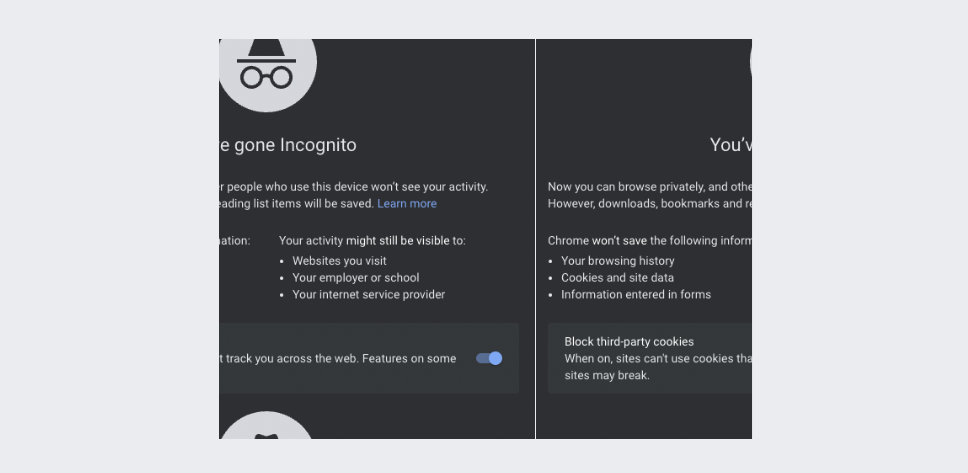
In the notification above, Google states that your activity is still visible to websites, network administrators (school or employer), and ISPs. That is because in private browsing mode, your online traffic is not encrypted, and your actual IP address and geolocation are exposed.
What can you do to hide your online activity?
Here are some tools you can use to help secure your online activity:
1. A VPN
A VPN (Virtual Private Network) encrypts all internet traffic from your web browser and other applications and routes it through a VPN server. This data encryption makes it harder for internet snoops to see your browsing history.
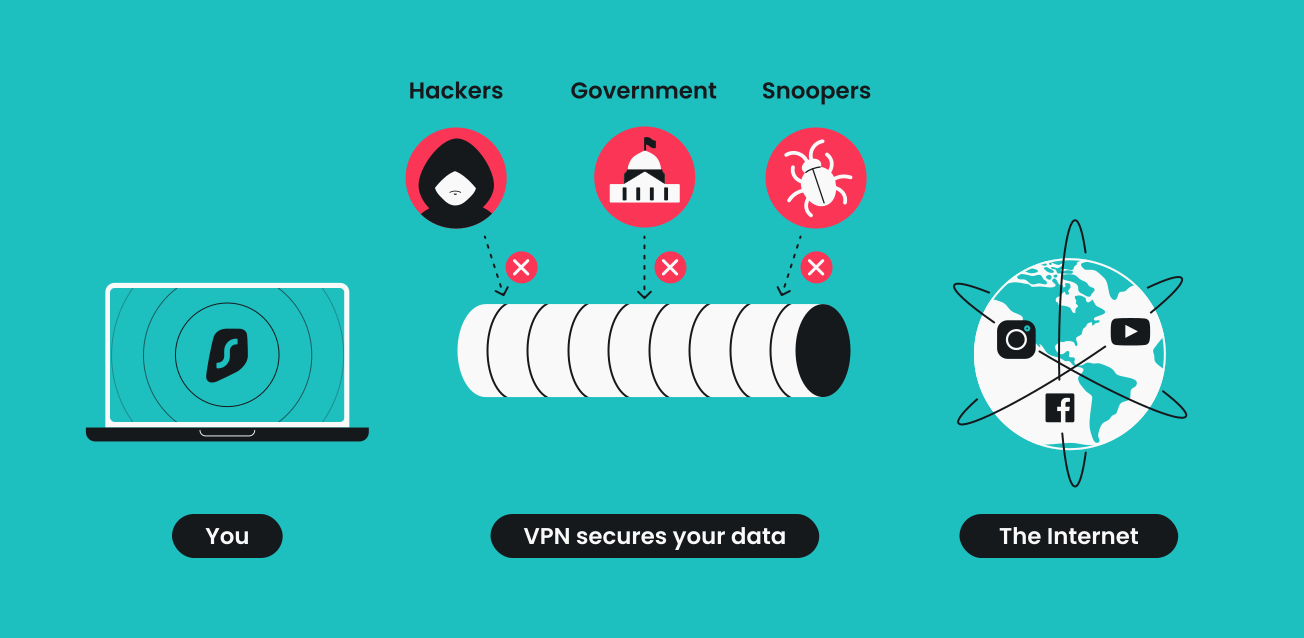
A VPN also replaces your IP address with one from a VPN server, effectively masking your location and safeguarding your online activities from potential risks posed by someone else using your IP address.
In addition to helping protect your internet activity with encryption, a reputable VPN service like Surfshark will provide even more security and privacy benefits like:
- A double VPN for an extra layer of encryption;
- A kill switch that disables your internet connection if your VPN disconnects;
- A rotating IP that makes you more difficult to track;
- Many more VPN features.
2. A private search engine
Private search engines are designed to show only organic search results that aren’t impacted by your previous search history. These typically don’t track your browsing, store personal data, or build user profiles. Some options are ad-free, while others still rely on ads that aren’t personalized based on your searches.
Many private search engines like DuckDuckGo are free, making them safer alternatives to data-hungry tools like Google.
3. An HTTPS proxy
HTTPS proxies encrypt your browser traffic and route it through a proxy server. However, they have a major drawback compared to VPNs — they encrypt only your browser traffic. All other traffic your device receives and sends outside the browser remains unprotected.
Additionally, when using HTTPS proxies, your ISP or other parties can still see DNS (Domain Name System) requests if you don’t have extra security measures like DoH (DNS-over-HTTPS) set up.
It’s also important to highlight that similar tools like DNS and SOCKS proxies don’t encrypt traffic. These only help with IP address masking, so don’t consider them as a solution.
4. The Tor Browser
While the Tor Browser has multiple disadvantages, it helps users protect their browser traffic by routing it through multiple servers (nodes) and adding layers of encryption.
However, Tor isn’t the best way to keep your online activity private. Its multi-layered encryption and traffic routing tend to significantly slow down connection speeds.
On top of that, using Tor is often used to securely access the dark web, exposing you to various cyberthreats. Even though using Tor itself isn’t illegal and you can use it safely, it can still be seen as a red flag by your ISP and government.
Some sites even block Tor connections, so if you absolutely have to be on the Tor network, it’s best to use Tor over a VPN.
Key takeaway: should you be concerned about your browser history?
Yes, your search history can potentially reveal a large amount of private and sensitive data. While regular internet users can’t see it, several other parties can — and you shouldn’t take your online privacy lightly.
Using a VPN like Surfshark is a simple first step to keeping your browsing history private.

Boost your internet privacy with a VPN
Test out Surfshark’s 30-day money-back guarantee
Get SurfsharkFAQ
Can anyone see what I’m looking at on the internet?
No, regular users can’t see what you’re looking at online. However, depending on your security settings, some entities can potentially see your search and browsing history. This includes your internet service provider, hackers, government agencies, and search engines.
Can my internet provider see my history?
Yes. Internet providers can see information about your search history and online activity. Solutions that encrypt your data, like a VPN, can help protect your data and keep your history private.
Does deleting history really delete it?
No, clearing your history doesn’t completely wipe it. Internet providers can collect and store this information for periods that depend on your local data retention laws (often 6 months to 1 year). The best way to protect your data is to prevent third parties from seeing your search history with data encryption tools like a VPN.
Can police recover deleted internet history?
Yes, police can recover deleted browsing history by contacting your internet service provider. Providers are often legally obligated to store records of your online activity, but they delete this data after a certain period.
Can you tell if someone has Googled you?
No, there’s no way to know for sure if anyone has Googled you, as Google doesn’t provide alerts or reports about searches for individual names. At most, you can see aggregate traffic to your site, but this doesn’t confirm if someone specifically searched your name.