Check out what users and tech experts around the world have to say about Surfshark.
IP rotation: make your browsing harder to track
- Automatically change your IP without interrupting your connection
- Use a rotating IP address to reduce advertiser profiling
- Add an extra layer of privacy to your everyday internet use

When should you use an IP rotator?
IP address rotation can be a powerful privacy tool if you use the internet every day. You can rotate your IP to:
What is Surfshark’s rotating IP?
Surfshark’s rotating IP is an advanced VPN (Virtual Private Network) feature that automatically changes your IP (Internet Protocol) address every five minutes within your chosen VPN location.
A standard VPN connection keeps you with a single IP address for the entire session. If you use the same IP address for longer browsing periods, some traceable behavioral patterns may emerge.
In contrast, an IP rotator service breaks up these patterns before they can develop. Rotating IP regularly swaps your visible IP, making your online identity harder to track.
Powered by Surfshark’s Nexus technology, our rotating IP keeps your traffic fully encrypted while automatically refreshing your public IP address. This shields you from snooping, restricts surveillance, and disrupts profiling from advertisers.
How to activate the VPN rotating IP
With a Surfshark subscription, you can start IP rotation in just three simple steps.
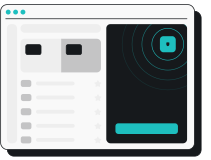
1. Launch Surfshark
Get a Surfshark subscription, download and open the app, and log in to your account.
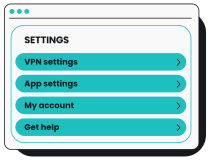
2. Access your Settings
Go to Settings > VPN Settings and scroll down to Advanced settings.
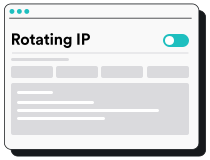
3. Enable IP rotation
Toggle Rotating IP on to instantly boost your online privacy.
Rotating IP vs. other options:
which is right for you?
Different IP options serve different purposes. Here is a quick look at how rotating IPs compare to other solutions:
|
Rotating IP
|
Automatically changes your IP address while keeping your connection encrypted.
Best for: general browsing, avoiding tracking, and researching prices. |
|
Static VPN IP
|
Shares an unchanging IP address with other VPN users.
Best for: secure everyday streaming and other services that flag frequent IP changes. |
|
Provides a single, static IP address that only you use.
Best for: securely accessing IP-sensitive online services and avoiding repeated human verifications. |
|
|
Rotating proxy
|
Changes your IP address but typically doesn’t encrypt your entire internet connection.
Best for: automated tasks or web scraping, but lacks the comprehensive privacy and security of a VPN. |
Automatically rotate your IP address with Surfshark
See what you can achieve with VPN rotation today
More Surfshark VPN features for broader protection
Surfshark offers advanced features that surpass those of standard proxies and other IP rotation software.
Double VPN
You can encrypt your internet traffic twice by routing it through two separate VPN servers, thanks to Surfshark’s Multi Hop double VPN. The feature lets you choose your own server pairs, making it easier to add an extra layer of protection for your most sensitive tasks.
Split tunneling
Our Bypasser split tunneling tool lets you choose which apps or websites use VPN protection and which connect directly to the internet. Select the data you want to encrypt and use two IP addresses simultaneously without disconnecting from your VPN.
Kill switch
Automatically disconnect your device from the internet if your VPN connection ever drops with Surfshark’s kill switch. This ensures your actual IP address stays private and your personal info doesn’t get exposed. If your VPN’s off, you’re offline — and safe from data leaks.
Obfuscated servers
Our obfuscated servers improve your online privacy by making a VPN connection harder to identify. This feature makes it harder for even your ISP to recognize VPN traffic, allowing users to access content in countries with oppressive internet censorship and VPN IP blocks.*
Ad blocking
Surfshark’s Clean Web ad blocker helps you block ads, trackers, and malicious websites as you browse. When used on our browser extension, Clean Web boosts safety by alerting you to past data leaks on the sites you visit, giving enhanced protection against phishing attacks.
*Obfuscation is available on the OpenVPN protocol.
See why millions trust Surfshark

Teshir Jennifer
@memesfordigital
All the VPNs you mentioned are good. But Surfshark is the one I recommend in person for the best overall.
1:08 PM · Jul 28, 2024

Morgan Leggett
@YouBettaLeggett
I’ve had SurfShark for years. It’s amazing.
12:28 AM · Aug 14, 2024

Eakan
@eakangk
Trialling out @surfshark’s IP rotation. It is doing it pretty well. Seamless in the background.
3:20 PM · Oct 26, 2024
The reviews highlighted in this section were selected from publicly available posts on social media platforms. They reflect the opinions of individual users at the time of posting and may not represent the full range of our product features and qualities.
The reviews quoted on this page have been published by media outlets associated with Surfshark through affiliate partnerships. Their recommendations are based on their own independent research and insights to ensure value for the readers.
I have been using Surfshark since I got it and I love it!

MRWHOSETHEBOSS
20.2M subscribers
When I am traveling, I use Surfshark to access the internet quickly and securely, works like a treat in China.

SAM CHUI
3.61M subscribers
We love Surfshark because it is an easy-to-use app that you can download on all your devices.

MAX & OCCY
265K subscribers
The reviews quoted on this page have been published by media outlets associated with Surfshark through affiliate partnerships. Their recommendations are based on their own independent research and insights to ensure value for the readers.
“This is my first year and I absolutely love it. The fact I can have a good antivirus, great VPN, and incognito for like $120 a year is great.”
“I’ve been using Surfshark for 4 years on Android and ChromeOS with zero issues, it’s an absolute bargain”
“I’ve had it for 3 years and just renewed it for the next 2 years. I never have any issues with it and get my full internet speed..”
The reviews highlighted in this section were selected from publicly available posts on social media platforms. They reflect the opinions of individual users at the time of posting and may not represent the full range of our product features and qualities.





Increase your privacy with IP address rotation
Enjoy simple IP rotation with a VPN