• Get Surfshark
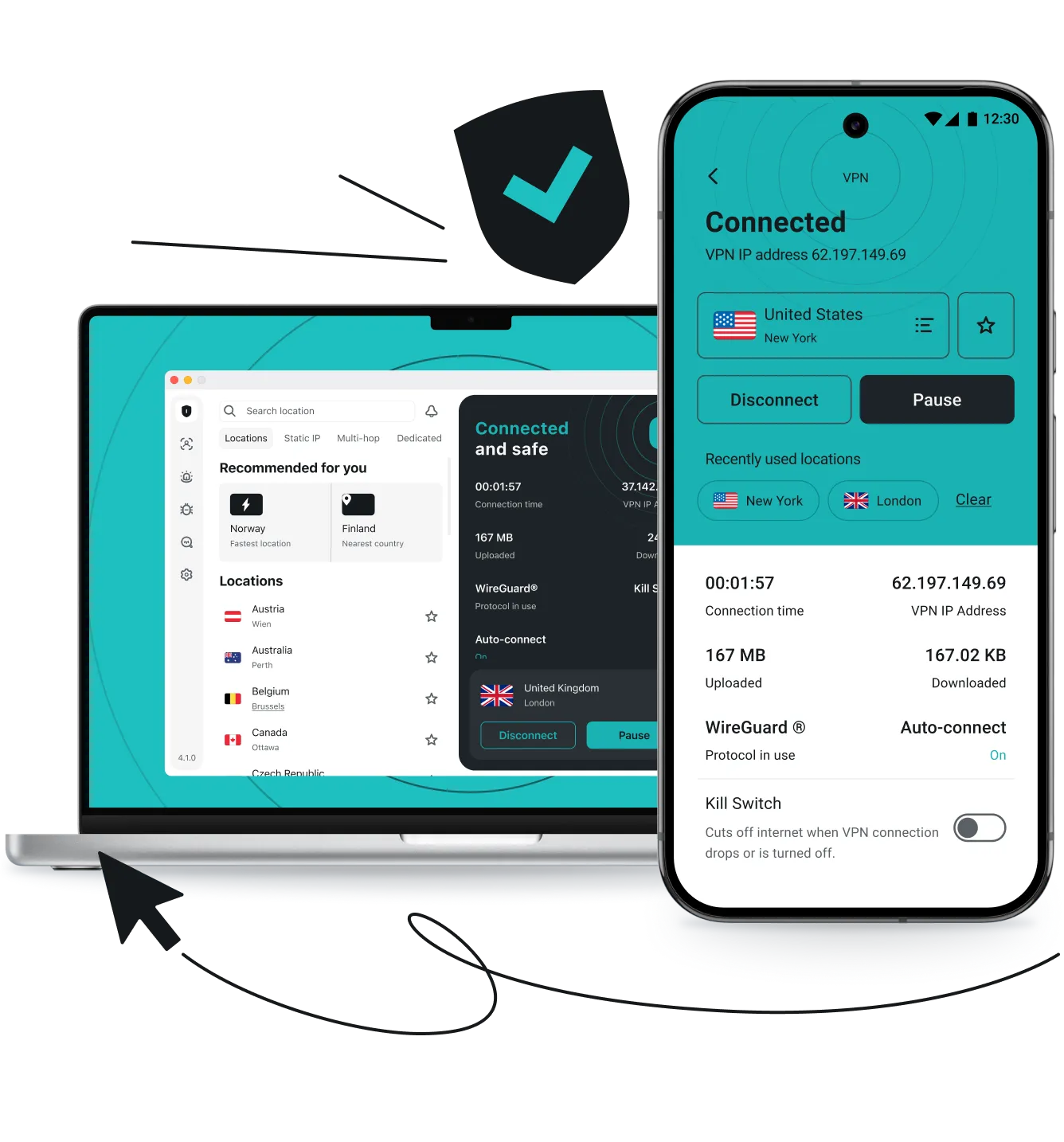
A hand pointing at a laptop with a checkmarked shield icon on the screen.

What is a VPN? A beginner’s guide

A VPN, or virtual private network, is a service that routes your internet traffic through a secure, remote server. It encrypts your internet traffic and masks your IP (Internet Protocol) address.

This process secures your connection to the internet and protects your privacy while browsing online. It also hides your online activities from third parties trying to collect your data or intercept your connection.
How a VPN works

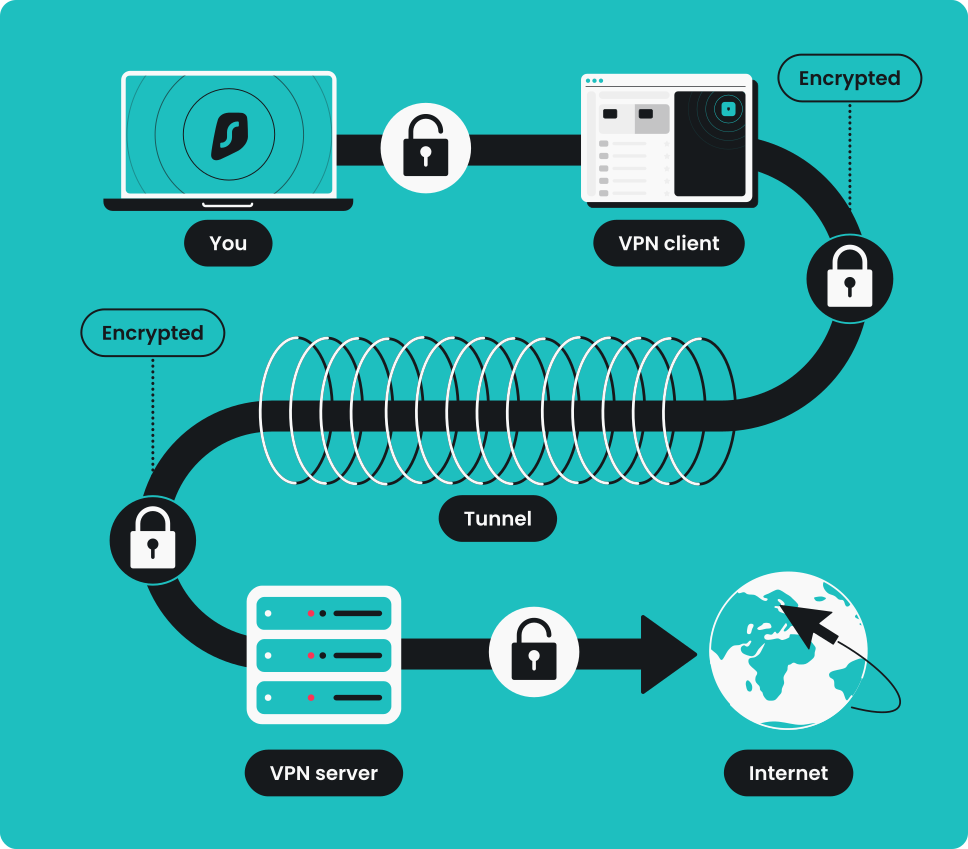
A virtual private network creates a secure, encrypted tunnel between your device and a VPN server. So, when you open your VPN app and click “Connect,” all of your incoming and outgoing data travels through this secure tunnel. 

This process encrypts your data, making it look like scrambled nonsense to anyone trying to intercept your connection, including your ISP (Internet Service Provider). It also masks your IP address, making it seem like your traffic is coming from the VPN server’s location rather than your actual location.

Infographic explaining how a VPN works, with an arrow showing data moving from a computer to the internet via a VPN server.

Key VPN concepts explained

Let’s take a closer look at what a VPN does when you connect:

  1. Encryption. It’s the process of turning your easily readable data into a complex secret code. When the VPN connects, it encrypts your outgoing network traffic, and only your device and the VPN server hold the decryption key to unlock and read it. Common strong encryption methods include AES-256 and ChaCha20.
  2. VPN tunnel. It’s a secure, isolated path between your device and the remote VPN server. A VPN tunnel ensures only authorized data packets pass through it, making your online activity private and unreadable to outside observers.
  3. VPN server. It’s a regular server configured with VPN software. When a VPN is active, all your internet traffic passes through this server. This is where your encrypted data is unlocked using the special decryption key before it reaches its destination.
  4. IP masking. It’s the act of hiding your ISP-provided IP address. As your traffic leaves the VPN server, your original IP address gets replaced by an IP address from the server’s location, making it appear as though you are browsing from somewhere else entirely.

VPN protocols

VPN protocols determine how your virtual private network connections work from start to finish. They can also impact the speed, security, and performance of your VPN connection. While there are many VPN protocols out there, modern VPNs rely on three industry standards:

  • WireGuard. WireGuard is currently the fastest protocol available. It’s been built to outperform older technology in terms of power usage and performance, with highly efficient, streamlined code;
  • OpenVPN. OpenVPN is an open-source VPN protocol known for its rock-solid security and broad compatibility. Because it is open-source, its code has been thoroughly tested and verified by cybersecurity experts worldwide;
  • IKEv2/IPSec. IKEv2 (Internet Key Exchange version 2), paired with IPSec (Internet Protocol Security), excels at speed, particularly when switching networks (like moving from Wi-Fi to cellular data), making it the top choice for mobile phone users.

What does a VPN hide?

A VPN hides and encrypts all your internet traffic — including your IP address, location, the websites you visit, and what you do on those websites. That said, a virtual private network cannot hide any information you choose to show, such as social media posts or the information you voluntarily provide when registering for online services.

Can you hide this?
With a VPN
Without a VPN
IP address
Hidden
Exposed
Location
Hidden
Exposed
Browsing habits
Hidden
Exposed
Internet traffic
Encrypted
Exposed
Targeted ads
Minimal
Very frequent
Email you use to register
Exposed
Exposed
Information you put on social media
Exposed
Exposed

Common reasons to use a VPN

There are many reasons why you should use a VPN — from securing your connection on open networks to accessing your regular online services while traveling. Here are a few:

Staying safe on a public Wi-Fi

Public Wi-Fi networks, such as those in cafés, airports, or hotels, are often less secure than private connections. This makes them attractive targets for hackers who may try to intercept your data. By encrypting your traffic, a VPN shields sensitive information — like login credentials or payment details — from being exposed to cyberattacks when you’re browsing on these networks.

Maintaining online privacy

Your online activity can be tracked by ISPs, advertisers, and other third parties. A VPN masks your browsing habits by encrypting your connection, which makes it far harder for outsiders to monitor or collect your data. Many virtual private network services also enforce strict no-logs policies, adding an extra layer of privacy.

Accessing content

When you travel, you may notice that some websites or services are unavailable in certain regions. Having a VPN when traveling can help securely access your usual online accounts and services by providing a shielded connection, no matter where you are. It’s also a useful tool in areas where internet access is restricted, allowing you to stay connected and use the web more freely.

Working remotely

For remote workers, securely connecting to company resources is crucial. A VPN establishes an encrypted tunnel between your device and your company’s network, ensuring sensitive business data stays protected. This is especially important when employees are working from different locations and relying on public or home networks.

Avoiding ISP bandwidth throttling

Some ISPs intentionally slow down certain activities, such as streaming or online gaming, when they detect high bandwidth usage. A VPN connection can prevent this by masking your traffic, so your ISP can’t easily identify what you’re doing online. This helps maintain a smoother experience, reducing buffering while streaming and minimizing lag during gaming.

Take control of your life online

Whether you’re traveling, working, or just browsing, stay secure and unrestricted on any network

Get Surfshark
30-day money-back guarantee
Take control of your life online

Free VPN vs. paid VPN

Running a VPN service involves real costs. To cover the expenses, free and paid VPNs usually take very different approaches regarding your data and security.

Free VPNs
Paid VPNs
Cost
Free, but often supported by ads or data collection
Subscription-based
Privacy
May log or share data with third parties
Often strict, audited no-logs policies
Speed
Slower due to limited resources
Faster, optimized servers
Server choice
Limited locations, crowded servers
Wide range of global servers
Data limits
Common (daily or monthly caps)
Typically unlimited
Security
Basic encryption, often outdated
Modern protocols, strong security features

While Free VPNs may be tempting for occasional use, they often compromise speed, security, and privacy to make a profit. Paid VPNs, on the other hand, invest in high-end encryption, audited security, and unlimited bandwidth to ensure your connection remains private and seamless.

How much do VPNs cost?

VPN pricing depends on the VPN service provider and typically scales based on your commitment. While monthly plans usually range from $12–$15, opting for a 2-year subscription can bring the cost down to as low as $2–$4 per month.

To see a full breakdown of the best values on the market, check out our top VPN providers comparison for detailed pricing and feature reviews.

Do you need a VPN: checklist

If you…
Then a VPN…
Work from cafes/airports/hotels
Encrypts your passwords from hackers
Stream movies/TV
Prevents ISP throttling and buffering
Play online games
Protects against DDoS attacks
Shop online
Prevents region-based price discrimination
Travel abroad
Keeps your home accounts accessible
Value privacy
Hides your browsing history from your ISP

Do you need a VPN on your mobile?

Most people spend more time on their phones than on their computers. Yet, mobile security is often an afterthought. Connecting to public Wi-Fi networks to save mobile data makes your phone a prime target for hackers. So, using a VPN on your mobile isn’t just an option — it’s a necessity for protecting your most personal, private data. 

Whether you use iOS or Android, major VPN providers offer dedicated apps that provide the same privacy and security as their desktop versions. By installing a mobile VPN, you can surf safely on public networks, prevent mobile carriers from selling your browsing history, and even stop ISP throttling during your commute. 

If you value your privacy, securing the device that never leaves your side is the most important step you can take.

Ready for a more private online experience?

Get the best VPN protection for your devices at an affordable price

Get Surfshark
30-day money-back guarantee
Ready for a more private online experience?

FAQ

VPN stands for virtual private network. It refers to a secure, encrypted connection established between your device and a server or network. It encrypts your internet traffic and safeguards your identity online, allowing you to access the internet more safely.

You can use a free VPN, but it’s usually not the best idea. VPN services are expensive to maintain, so providers have to make money — typically by charging a subscription fee. However, many free VPNs resort to bombarding users with ads or collecting and selling their information, sometimes both. So, be careful when choosing a VPN service provider!

Yes, a VPN is safe as long as the VPN provider is reputable and has its services verified by independent audits. Reliable VPNs tend to use industry-leading encryption algorithms and modern VPN protocols without known vulnerabilities to ensure a secure connection.

While no system is 100% unbreakable, reputable VPNs use strong encryption and modern security protocols that make direct hacking highly unlikely. The bigger risks usually come from weak passwords, malware on your device, or using an untrustworthy VPN provider.

No. A virtual private network keeps your internet connection private and secure, but it doesn’t scan or block malicious files. To stay safe from malware, you still need antivirus software or other security tools. Some VPN providers, however, offer built-in antivirus software. Surfshark, for example, has Antivirus as part of its cybersecurity suite in the higher-tier subscription plans, giving you wider protection in one package.

A VPN connection may slightly reduce your speed because your data is being encrypted and routed through a secure server. The impact depends on the provider’s infrastructure — paid VPNs with optimized servers usually keep the slowdown virtually unnoticeable, while free VPNs are more likely to feel notably slower.

No, a VPN does not make you completely anonymous. In reality, total anonymity online isn’t possible. What a virtual private network does is improve your privacy: it encrypts your internet traffic, masks your IP address, and makes it harder for websites, advertisers, and other third parties to track your activity. While it can’t erase every digital trace, it’s a valuable tool for strengthening your overall online privacy.

The short answer is yes — VPNs are legal in most countries. They’re widely used by individuals, businesses, and organizations to improve security and protect sensitive data. 

However, legality can vary depending on where you are. Some countries place restrictions on VPN use, and in a few places, they are heavily regulated or banned altogether.

It’s also important to remember that while using a virtual private network is generally legal, it’s still against the law to use it for illegal activities. Actions like hacking, fraud, or copyright infringement remain unlawful regardless of whether you’re connected through a VPN.

VPN deal that Rocks

Get % off + mo. EXTRA
Get VPN Deal