If you’ve ever typed a web address slightly wrong and ended up somewhere unexpected, you’ve likely encountered a cyberattack known as typosquatting.
The goal of typosquatting is to trick people who mistype a web address or don’t notice small errors into landing on a fake website instead of the real one. Such domains rely entirely on human error rather than a technical vulnerability, which is exactly why they’re so effective.
This guide covers how typosquatting works, its most common types, and how to avoid being fooled by it.
What is typosquatting?
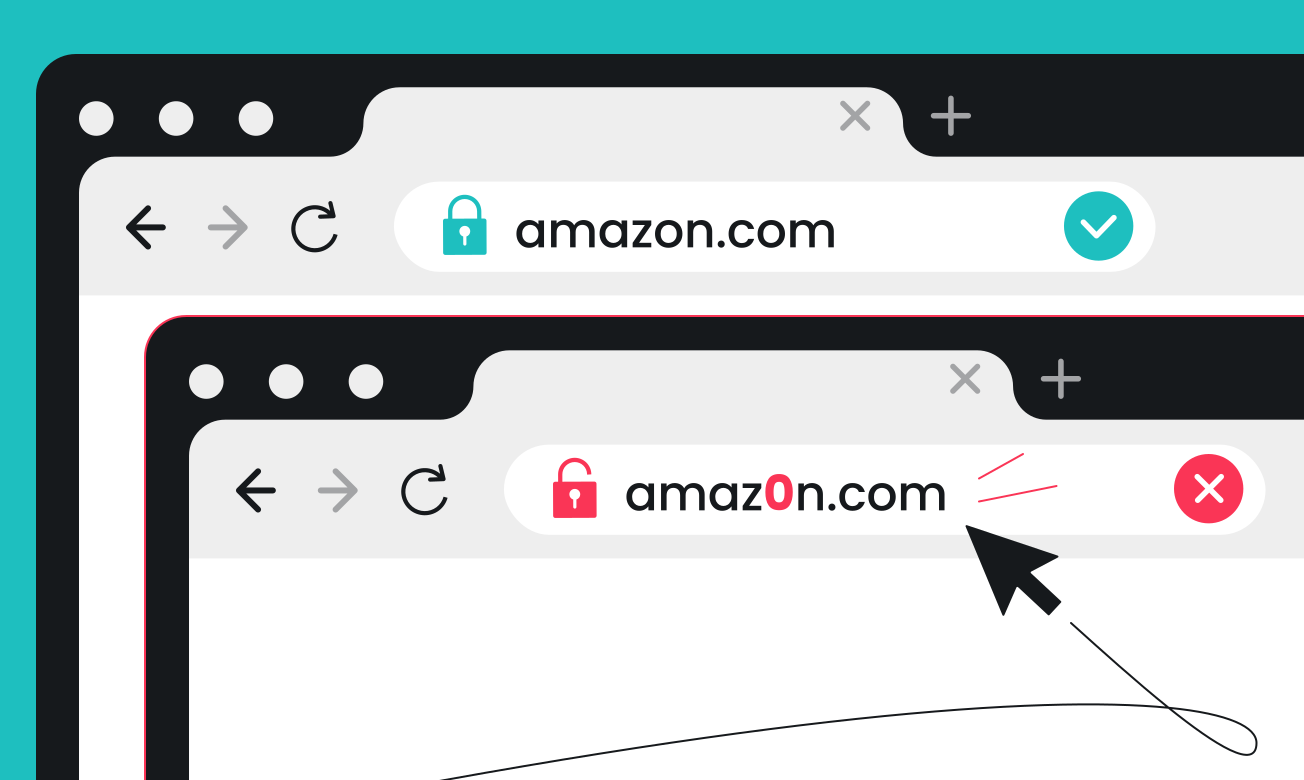
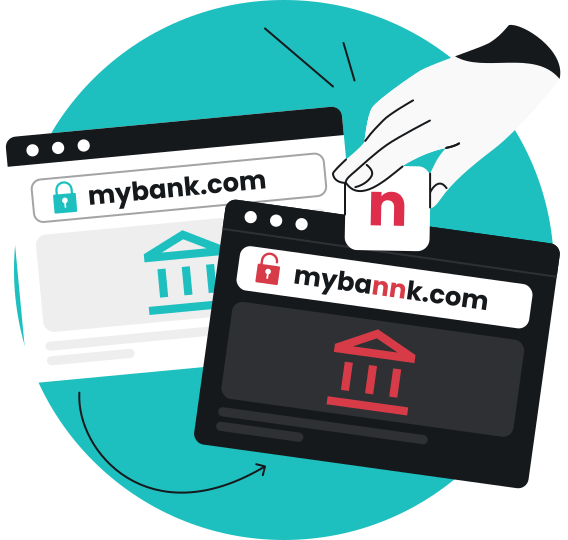
Typosquatting is a social engineering attack where cybercriminals register domain names that closely mimic legitimate websites, often by including a common typo or misspelling. For example, a legitimate domain is “amazon.com,” but its typosquatted variation could look like “amaz0n.com,” with a “zero” replacing the letter “o.”
Malicious actors register these lookalike domains, hoping internet users will visit them by mistake, most often due to a simple spelling slip or typing error, such as hitting an extra letter or missing one. Webpage visitors rarely double-check the address bar, so a fake domain that looks close enough to the real one is easy to miss, especially when you’re typing fast.
This tactic is also known as URL hijacking. Its main aim is to intercept traffic meant for a legitimate domain name and redirect it elsewhere.
How does a typosquatting attack work?
A typosquatting attack works in three steps:
- Create a lookalike domain: attackers register domains that closely resemble a real one.
- Attract visitors: they wait for unsuspecting users to stumble onto the site through a typographical error, a misleading link, an ad, or an email or text that’s part of a phishing attack.
- Target visitors: the fake website tries to trick users into installing malware or acts as a phishing site. In the latter case, the goal is to get visitors to share personal information, such as login credentials and payment details, before they realize they’re not on a legitimate page.
Typosquatting examples
Criminals create typosquatting sites through a handful of common techniques:
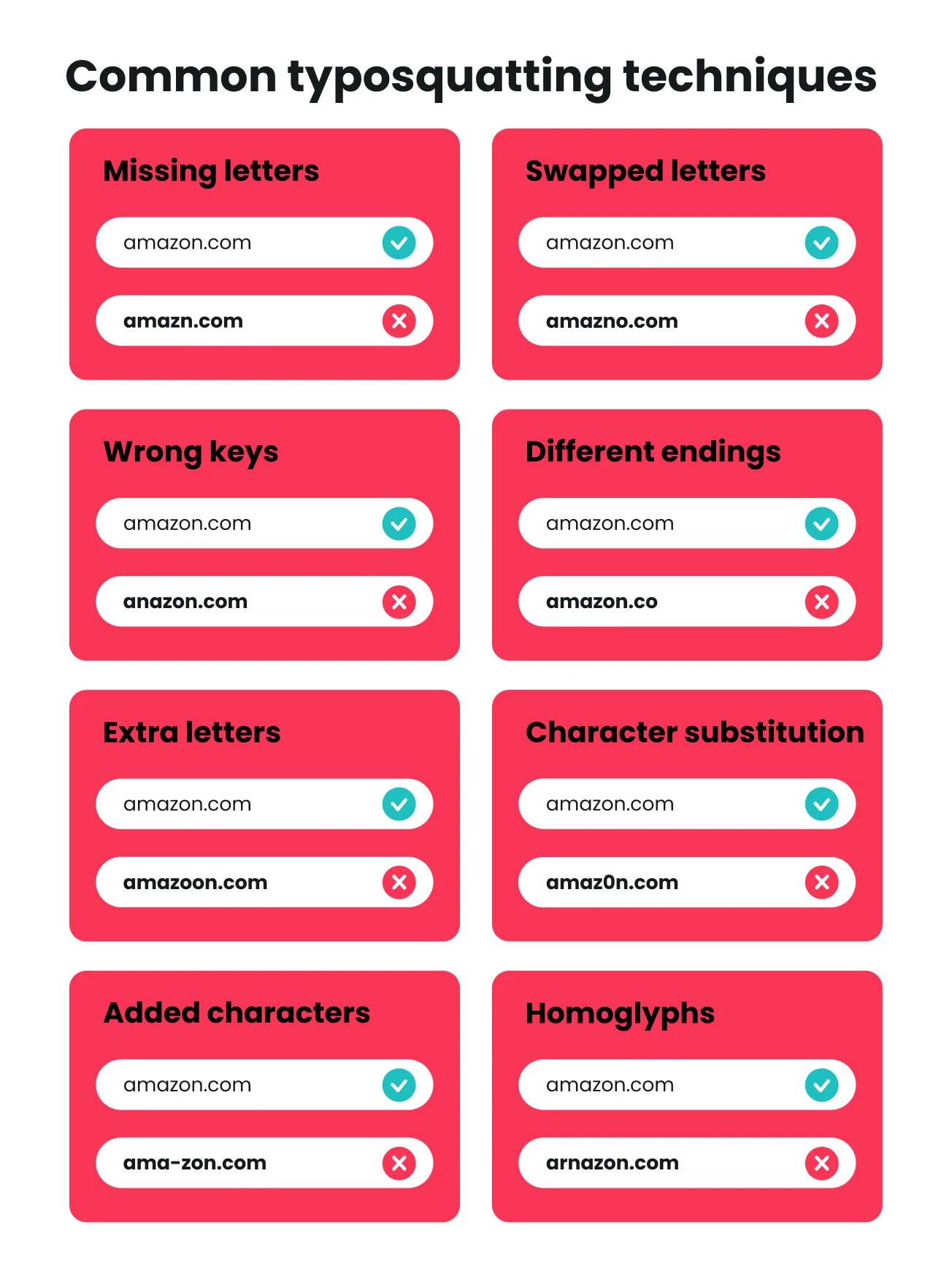
- Missing letters: dropping a letter from the real domain, like “amazn.com” instead of “amazon.com”;
- Swapped letters: switching the order of two letters, like “amazno.com” instead of “amazon.com”;
- Wrong keys: hitting a neighboring key by mistake, like “anazon.com” instead of “amazon.com”;
- Different endings: swapping a familiar .com for another extension, like “amazon.co” instead of “amazon.com”;
- Extra letters: adding an extra letter, like “amazoon.com” instead of “amazon.com”;
- Character substitution: replacing a letter with a similar-looking number, like “amaz0n.com” instead of “amazon.com”;
- Added characters: inserting an extra character like a hyphen, like “ama-zon.com” instead of “amazon.com”;
- Homoglyphs: using visually similar letters to mimic the real spelling, like “arnazon.com,” where “rn” is used to imitate the letter “m” in “amazon.com.”
Types of typosquatting
Not every typosquatting website exists for the same reason:
- Advert typosquatting exists mainly to monetize traffic through ad clicks;
- Reputation-damaging typosquatting tarnishes a legitimate site’s image, sometimes with offensive or embarrassing content;
- Traffic diversion typosquatting directs users toward a competitor’s site instead of the one they meant to reach;
- Malware typosquatting relies on malicious websites that infect visitors’ devices as soon as the page loads, often without any download required. This is known as a drive-by download;
- Phishing typosquatting: URL phishing campaigns lead victims to sites that mimic a legitimate login or checkout page. Their aim is to trick you into entering usernames, passwords, or credit card details, which the attackers then steal.
Real-world typosquatting cases
A few real cases show how pervasive typosquatting can be.
- In 2005, Google acquired the typosquatting domains “googkle.com,” “ghoogle.com,” “gfoogle.com,” and “gooigle.com.” These were previously used to trick users into downloading viruses, spyware, and Trojan horses;
- In 2013, Facebook won about $2.8 million in damages after a court found that more than 100 lookalike domains, including “facebokook.com” and “faacebok.com,” had been set up to steal its traffic;
- Microsoft users may encounter a phishing campaign that uses the “rniscrosoft.com” domain, replacing the “m” with an “r” and “n.” The difference is hard to spot, and those who fall for the trick often face stolen logins or fraudulent vendor payment requests.
Typosquatting vs. cybersquatting
Typosquatting and cybersquatting are often used interchangeably, but they’re not quite the same thing. Typosquatting involves domains that closely resemble a legitimate website but specifically have a typo or misspelling. These domains target users who land on them by mistake, tricking them into installing malware or falling for phishing scams.
Cybersquatting, on the other hand, means registering a domain tied to an existing brand or trademark. No typo or misspelling needs to be present.
An example of a cybersquatting domain can be amazon-2.com. No typo is present — it’s just difficult for users to tell if it’s a suspicious page or a genuine alternative website that’s still run by Amazon. The goal of cybersquatting can still be to deceive users, but it’s often also to profit off the brand’s reputation and simply resell the domain to its rightful owner.
Typosquatting is a type of cybersquatting that specifically relies on typos and misspellings. Typosquatting domains target user mistakes, while cybersquatting largely targets general brand confusion.
|
|
Typosquatting
|
Cybersquatting
|
|
What it targets
|
A misspelled or mistyped version of a domain
|
A domain tied to an existing brand or trademark
|
|
How the domain looks
|
Closely resembles a legitimate website (often via a typo)
|
May use the exact brand name or a close variation
|
|
Main goal
|
Deceive visitors who land there by mistake
|
Profit from the brand’s reputation or resell the domain
|
|
Common tactics
|
Swapped letters, added characters, lookalike characters
|
Registering trademarked names before the brand does
|
|
Typical harm
|
Phishing, malware, or credential theft
|
Lost traffic, brand dilution, or extortion-style resale offers
|
Why is typosquatting dangerous?
Visiting malicious websites can put your funds, accounts, and devices at risk, depending on what the site is built to do. Here are the biggest risks:
Credential theft
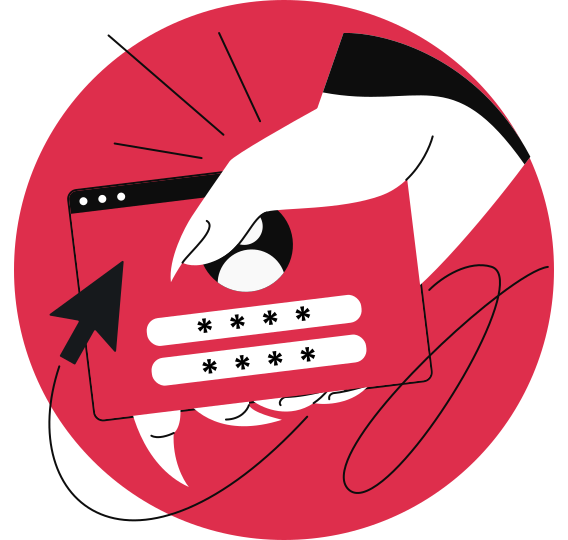
Many typosquatted sites look like login pages for services you already use, such as a bank, social media platform, or online shopping site.
If you type in your username and password, that information goes straight to the attacker instead of the real company. From there, they can log into your account. If you rarely change your password or reuse the same password across multiple sites, the risk might extend beyond a single account.
Financial fraud
Typosquatting helps some fake sites spoof real checkout or payment pages. If you enter a credit card number or bank details thinking you’re paying for something real, that data can be used to make unauthorized charges or drain your account.
And this spoofing can lead to sizable losses. FBI crime statistics on spoofing indicate that cybercriminals have stolen over $777 million in spoofing attacks since 2018. Because these pages often look legitimate, people don’t always realize anything’s wrong until they see a strange transaction later.
Malware
Instead of asking for information directly, some typosquatting domains try to trick you into clicking malicious links and downloading something like a mandatory update or a file disguised as something you were looking for.
Once installed, that software can do anything from logging your keystrokes to opening the door to identity theft, giving an attacker enough personal data to cause real damage.
Phishing and scams
A typosquatting site is often the first step in a bigger phishing attack. It can steal personal information you enter, like your email address or phone number, and then send fake alerts warning that your account is locked, tricking you into sharing more info or giving up access to your account. Scammers can even rely on individualized spear phishing campaigns to specifically target the sites you’re most likely to visit.
Since it all starts with a familiar-looking domain, people think they’re on a genuine site and tend to let their guard down until it’s too late. And the numbers highlight just how dangerous phishing has become. FBI crime data on phishing shows that over $326 million has been lost to these attacks since 2015.
Reputation damage
Fake domains also leave a mark on the legitimate brand they’re copying.
If a customer gets scammed on a lookalike site, they usually remember having a bad experience with that company and not the random domain that actually tricked them. That memory sticks around, even though the business never controlled the fake site to begin with.
How to protect yourself from typosquatting
You can’t stop someone from registering a lookalike domain, but you can make it a lot harder for one to fool you.
Here’s how:
- Bookmark the sites you use most: it’s a small habit, but it means you’re clicking a saved link instead of retyping a web address from memory for a particular site, which is exactly the moment a typo usually happens;
- Use official apps where you can: downloading a company’s app from the App Store or Google Play skips the browser address bar entirely, so there’s no domain to get wrong in the first place;
- Use a password manager: a password manager only fills in your credentials when the domain matches exactly, so if you land on a page and it doesn’t offer to autofill, that’s your cue to stop and check the URL before typing anything in yourself;
- Keep your browser and security software up to date: updates often include the latest lists of known malicious sites, so your browser can warn you before you even load the page;
- Check for a padlock icon or a valid SSL certificate: look for this before entering sensitive details anywhere. It’s not proof alone that you’re on a correct site, since scam sites can have one too, but a missing padlock is a clear warning sign;
- Turn on 2FA (Two-factor Authentication): when you enable 2FA, it means that if your password does get stolen, it isn’t enough for attackers to get into your account;
- Use security tools to block malicious websites: set up something like Surfshark’s web content blocker to filter harmful categories, including pages flagged for fraud, malware, and phishing. If you accidentally navigate to a dangerous typosquatting domain, the blocker prevents the page from loading;
- Be careful with links you weren’t expecting: if an email, text, or DM sends you somewhere you didn’t ask to go, take a second look even if it looks like it’s from a company or person you know. Surfshark’s email scam checker can scan your emails for phishing patterns before you ever click a suspicious link.
What to do if you visited a typosquatted website
If you’re already on a typosquatted website, do the following:
- Leave the website right away. Don’t download anything or type in anything else, even if the page is asking you to confirm something;
- Change your password if you entered login credentials, and turn on 2FA while you’re at it. This locks the account down before whoever has your password can actually use it;
- Keep an eye on the accounts you might have exposed. Monitor logins you don’t recognize, purchases you didn’t make, or password reset emails you didn’t ask for;
- Report the website to your browser, the hosting provider, the domain registrar, or the company being impersonated. This helps get it taken down before it catches someone else;
- Run a security scan if you downloaded anything or think malware might have entered. Surfshark Antivirus scans your device to catch and remove anything that installed itself before you realized the website was fake;
- Monitor for data leaks and get alerts when your personal data is leaked online. Tools like Surfshark Alert help you act quickly before scammers use your credentials in targeted phishing attacks.
Pro tip: You don’t need to hunt down each of Surfshark’s tools individually — they all come included in the Surfshark One bundle. You’ll get the web content blocker, email scam checker, Antivirus, Alert, and more — all in a single app.
Key takeaway: slow down before you click
Typosquatting relies on victims rushing as they type, but a couple of small habits can help protect you from it. Bookmark the sites you use most and check the URL before you type anything into it, especially when a link arrives in your inbox and asks you to act fast.
For additional security, Surfshark’s scam protection tools can catch what gets missed, flagging suspicious links and blocking harmful websites across your inbox, texts, and browser before you ever interact with them.
FAQ
Is typosquatting legal?
No, typosquatting is illegal in the US under the ACPA (Anticybersquatting Consumer Protection Act), which lets trademark holders take legal action against domains registered in bad faith to profit from their brand. Legal action depends on jurisdiction and the attacker’s intent. Beyond the legal outcome, a brand can suffer reputational damage from being impersonated.
Are there examples of famous typosquatting cases?
Yes, Facebook won about $2.8 million in damages after a court found that over 100 lookalike domains, including “fagebook.com” and “facewbook.com”, had been set up to steal its traffic.
Other examples include Google fighting to take down malware sites like “ghoogle.com” and “gfoogle.com,” and Microsoft users receiving messages from “rnicrosoft.com,” where the “m” has been replaced by “r” and an “n.”
What is domain squatting?
Domain squatting is the act of registering a domain name tied to someone else’s brand or trademark, usually to profit from it or resell it later. It’s the broader term, and cybersquatting means the same thing. Typosquatting is one specific way of doing it, using typos instead of the exact brand name.
What’s the difference between URL hijacking and typosquatting?
URL hijacking and typosquatting describe the same tactic: registering a domain that looks like a real one to catch people who mistype or misread the address.