
In an AitM (Adversary-in-the-Middle) attack, a bad actor inserts themselves between you and a website, intercepting and manipulating the interaction. It’s a modern variant of an MitM (Man-in-the-Middle) attack, but it isn’t any less dangerous. That’s why it helps to understand everything from how AitM attacks work to their warning signs.
How AitM attacks work
In an AitM attack, a malicious actor positions themselves between you and a website or service, intercepting and relaying your data in real time. This allows them to steal, modify, or manipulate sensitive data like login credentials, 2FA (Two-factor Authentication) codes, session tokens, payment details, and page content.
The mechanics of Adversary-in-the-Middle attacks
Normally, your device communicates directly with a legitimate server when you’re using a website or app. Your device sends a request, the server processes it, and a secure session is established. From there, your device keeps interacting with the server as you browse pages, make payments, and perform other actions.
An AitM attack interrupts this direct connection by placing the attacker in the middle. They relay messages between you and the server, secretly capturing sensitive information as it travels from one side to another.
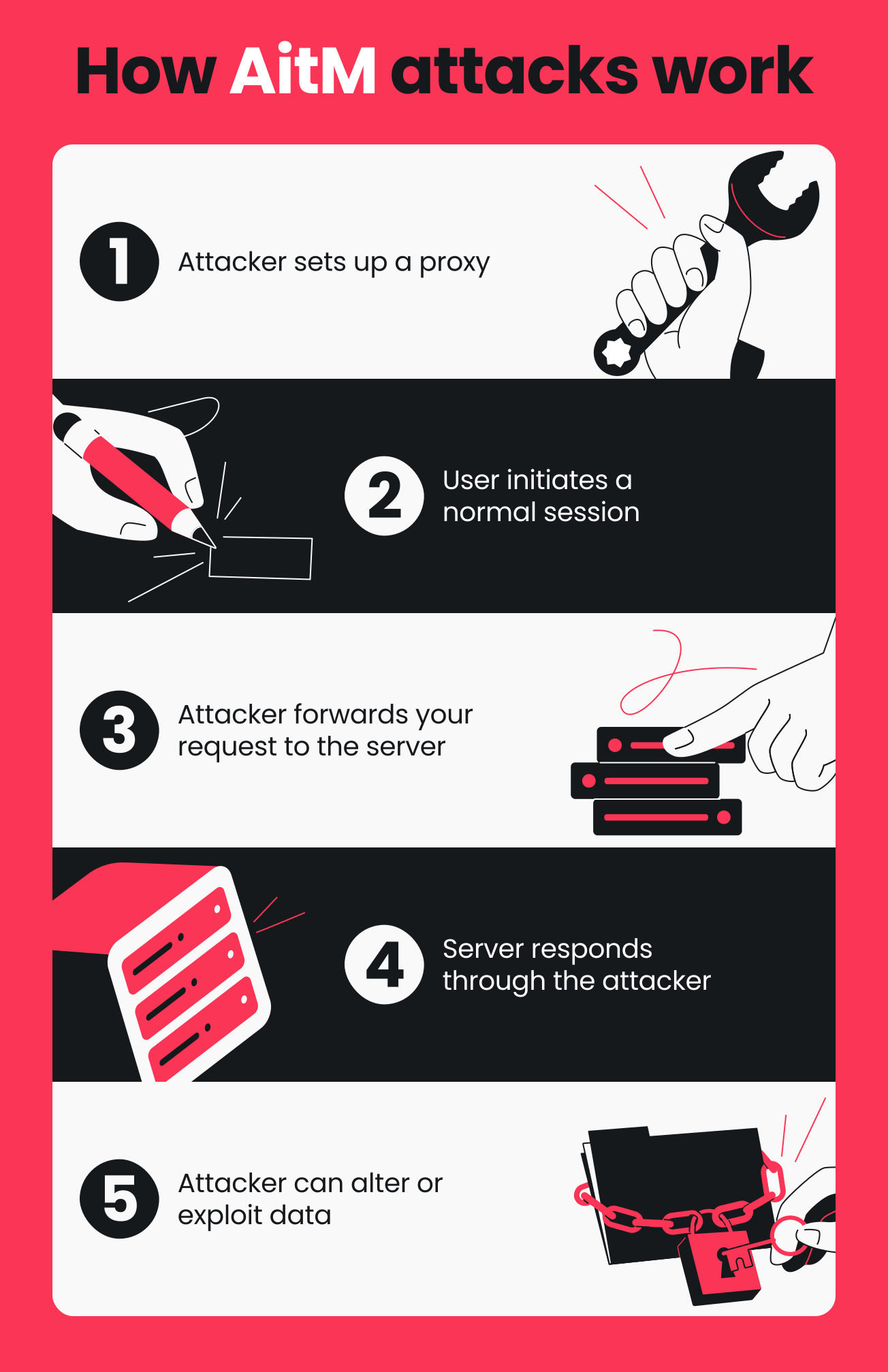
Here’s a step-by-step breakdown of the attack process:
- Attacker sets up a proxy
The attacker sets up a malicious proxy that sits between you and the website, often using tactics such as phishing pages or fake Wi-Fi networks. - User initiates a normal session
You access a website as you normally would by plugging in a URL or clicking a login link. From your end, everything looks legitimate, but your connection is already being routed through the attacker’s proxy. - Attacker forwards your request to the server
Acting like a live relay, the attacker forwards your request to the legitimate server. The server sees it as a request coming directly from you. - Server responds through the attacker
The server processes the request and sends a response. This can be login results, authentication data, messages, or payment information. Since the response goes through the attacker, they get a first look at everything being exchanged. - Attacker can alter or exploit data
While the session is active, the attacker can also steal or modify what’s sent and received. They may:
- Steal usernames and passwords;
- Capture 2FA codes in real time;
- Hijack session tokens to access accounts without reauthentication;
- Change payment amounts or recipient details;
- Inject malicious scripts or modify page content.
Common targets of AitM attacks
Most AitM attacks are fairly opportunistic. That said, high-value services, platforms, and systems are more frequently in the crosshairs than others.
Here are some of them:
- Corporate credentials and authentication: they act as the entry point, providing access to the organization’s internal systems, databases, and emails;
- Cloud services and SaaS accounts: platforms like Microsoft 365 and Google Workspace hold sensitive data (such as confidential documents and customer records) and are often used to access other connected tools and services;
- Banking and financial accounts: these are prime targets for obvious reasons — they offer direct access to money and allow attackers to view balances, move funds, or carry out fraudulent transactions;
- MFA (Multi-factor Authentication) systems: MFA isn’t the final target itself, but many systems act like a barrier that attackers try to get past to reach the account they protect.
What is AitM phishing?
AitM phishing is a type of phishing attack where the attacker gets between you and the actual website you’re using. They relay your login process in real time and capture the session token issued after authentication. With the token acting like a temporary pass, they can take over your active session and access your account without re-entering login details or verification codes.
Understanding AitM phishing techniques
In AitM phishing campaigns, a proxy server sits between you and the website you’re trying to access. Rather than simply cloning a login page like traditional phishing attacks, the attacker uses this proxy server as an intermediary — passing data back and forth between you and the legitimate website.
When you enter your login details on what looks like a genuine page, the attacker forwards them to the actual service. Whatever the site sends back also goes through the attacker before it reaches you.
Once you log in, the real site creates a session cookie that confirms you’re authenticated.
How AitM phishing attacks bypass MFA
The session cookie is how AitM phishing attacks typically bypass MFA. Instead of trying to break or guess the second factor, the attacker simply lets the login process play out while they focus on real-time credential harvesting in the background.
When you enter your username, password, and even your MFA code, they immediately forward those details to the legitimate site. If everything checks out and the login is successful, the real site issues a session token or cookie to confirm that you’re authenticated.
Since the attacker intercepts everything, they can grab the token as it’s sent back. That token signals that MFA has already been completed, and whoever has it can access the account without needing to log in or verify again. From there, the attacker just uses the token to get straight into your account.
Types of AitM phishing attacks
AitM phishing attacks usually share the same goal: hijacking your login session in real time. What’s different is how different AitM attacks operate. Let’s run through some of the most common types of AitM attacks.
Email-based AitM phishing
Email is a popular entry point for AitM phishing attacks since it’s regularly used for logins, password resets, and account notifications. This is why attackers often send malicious emails that lead you to a fake login page.
Typically, they impersonate trusted organizations such as big tech companies, banks, or even government agencies. They also mimic branding, language, and domain names so the email looks familiar and routine, making it easier for you to lower your guard.
To help you flag these emails before you interact with them, consider using tools like Surfshark’s email scam checker.
SMS and social engineering AitM attacks
With global smartphone users expected to hit 6.1 billion in 2029, attackers are increasingly targeting mobile-based communication channels in AitM phishing attacks.
These include:
- Smishing (SMS phishing): you get a text about missed deliveries, account issues, or security alerts, with a link that leads to a fake login page;
- Vishing (voice phishing): someone calls pretending to be your bank or tech support and walks you through the steps to log in via a link they provide;
- Quishing (QR code phishing): instead of a link, you’re pushed to scan a QR code that opens a fake login page in your browser.
Browser-based AitM attacks
Some AitM attackers target the browser level, where your active sessions are especially vulnerable:
- Malicious browser extensions: disguised as helpful add-ons, these extensions access active sessions and grab authentication data like session tokens;
- DNS (Domain Name System) spoofing: even if you enter the correct address, the attacker manipulates DNS results to reroute your traffic to a fake site;
- SSL stripping: by downgrading encrypted HTTPS connections to unencrypted HTTP, the attacker makes your session data visible.
Real-world examples of AitM attacks
AitM may give the impression that it’s a new threat with little real-world impact so far, but there have already been plenty of reported cases.
Notable AitM attack cases
Let’s take a look at some high-profile cases that show AitM in action.
Attack on Microsoft 365 accounts
In 2022, Microsoft reported a large-scale AitM attack targeting over 10,000 Microsoft 365 compromised accounts. Victims received phishing emails that led to a fake page that proxy-redirected to the Azure Active Directory sign-in page. Attackers then captured credentials and session cookies, used them to access inboxes, and carried out payment fraud.
Attacks against banking and financial services
Microsoft Defender Experts uncovered AitM phishing attacks targeting people in the financial sector in 2023. These attacks started from a compromised trusted vendor and escalated into a series of AitM and BEC (Business Email Compromise) campaigns that affected multiple organizations.
Attack involving SOHO routers
An AitM campaign linked to Forest Blizzard — a Russia-linked threat actor — used compromised SOHO (Small Office/Home Office) routers and DNS hijacking to sit between victims and Microsoft services. It hit sectors like government, IT, energy, and telecommunications and impacted over 200 organizations and 5,000 consumer devices.
Attack statistics and trends
AitM has quickly become one of the biggest headaches in cybersecurity:
- In 2024, Microsoft saw a 146% jump in AitM phishing attacks;
- Tycoon2FA — a PhaaS (Phishing-as-a-Service) platform — used AitM to bypass MFA and enable campaigns that send millions of phishing messages to over 500,000 organizations;
- In 2026, Microsoft warned of rising AitM phishing activity targeting the energy sector.
How to detect AitM attacks
AitM attacks might be trickier to spot than traditional phishing, but they aren’t invincible. The key is to stay vigilant and watch for common red flags.
Warning signs of AitM phishing
Some AitM phishing signs are more visible than others. These are the ones you’re most likely to notice:
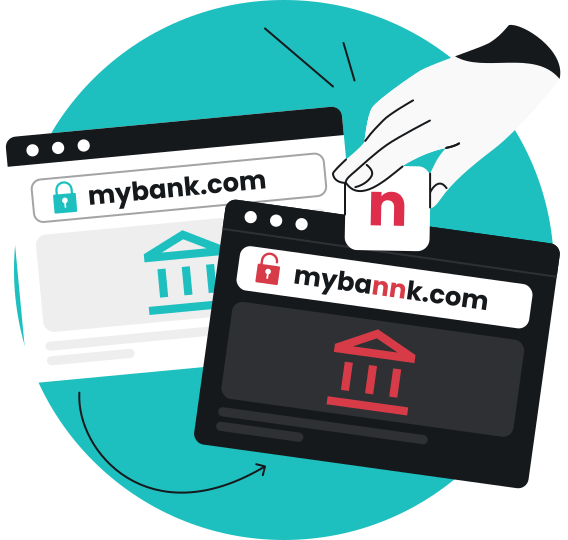
- Suspicious URL patterns: in URL phishing, links may appear legitimate at first glance, but a closer look often reveals misspellings, odd subdomains, and other inconsistencies;
- Certificate warnings: browser security alerts like Your connection is not private or Certificate not trusted can pop up when your connection is being intercepted or isn’t secure;
- Unusual login requests: if you’re repeatedly asked to sign in or re-enter credentials within the same session, it can indicate session interception.
Technical indicators of AitM activity
Other signs of AitM attacks are harder to identify, especially when the clues appear mostly behind the scenes. In these cases, check system or account behavior:
- Network traffic: you might notice unusual activity like repeated authentication requests or delays during login as your traffic gets routed through an intermediary;
- Session behavior: strange activity patterns like sudden location jumps, repeated silent re-authentication, or sessions appearing active from multiple locations at once often suggest session interception;
- Authentication logs: multiple login attempts, sign-ins from new locations, or mismatched IP (Internet Protocol) and device details can all point to AitM activity.
Attack disruption: preventing AitM phishing attacks
For strong protection against AitM phishing attacks, you need a multi-layered defense that combines user, organizational, and technical safeguards.
User-level protection strategies
In AitM phishing attempts, attackers often count on users trusting and breezing through logins. Here’s how you can make it that much harder for them to succeed:
- Security awareness training helps you pick up on AitM tricks and patterns so you’re less likely to fall for or interact with them;
- URL verification best practices reduce the risk of logging into fake login pages by encouraging you to always check the full domain;
- Password managers only autofill when the domain is an exact match and cut out manual typing so AitM pages can’t capture what you enter;
- Hardware security keys only work on the right sites and require a physical action for verification, which blocks AitM phishing sites from completing authentication.
Organizational defense measures
Disrupting AitM attacks at scale often takes more than just individual effort. This is where organization-wide protections come in:
- Phishing-resistant MFA replaces easy-to-intercept login codes with cryptographic authentication tied to the real site;
- Conditional access policies filter login requests based on device, location, and even behavior patterns to block or challenge suspicious sign-in attempts;
- Email security gateways screen and check your messages, blocking phishing emails that lead to proxy login pages;
- ZTA (Zero Trust Architecture) treats every access request as untrusted and verifies them continuously, limiting what AitM attackers can do with a hijacked session;
- B2B cybersecurity suites like Surfshark for teams disrupt AitM attacks by combining VPN (Virtual Private Network) protection with real-time threat detection. Beyond a standard encrypted tunnel, these solutions can also include security alerts that notify admins if credentials have been leaked and antivirus software that prevents the installation of malicious proxies often used in AitM interceptions.
Technical controls against AitM
In addition to user and organizational measures, technical safeguards help to round out protection against AitM attacks:
- Certificate pinning locks an app or service to a trusted digital certificate so it rejects fake certificates used in AitM attacks;
- Token binding ties your login session to your device so attackers can’t reuse your stolen session cookie elsewhere;
- Continuous authentication keeps verifying you throughout the session and blocks access if something appears off;
- Behavioral analytics track how you normally behave and flag or block activity if it doesn’t match your usual pattern.
AitM vs. traditional phishing: key differences
AitM and traditional phishing attacks are often lumped together, but there are actually some significant differences between the two. Knowing how to tell them apart can help you better protect yourself.
Here’s a quick recap of how they differ:
|
Feature
|
AitM Phishing
|
Traditional Phishing
|
|
Real-time interception
|
|
|
|
Session hijacking
|
|
|
|
MFA bypass
|
|
|
|
Steal authentication tokens
|
|
|
|
Post-login access
|
|
|
The future of AitM attacks
AitM attacks are evolving quickly as attackers refine their techniques and find more gaps in security. In response, defenses are adapting just as fast to keep pace.
Emerging AitM attack vectors
AitM attacks are becoming more sophisticated as attackers look for new ways to scale, automate, and deliver their campaigns more effectively.
Here are some new AitM methods and trends to watch:
- AI-powered AitM automation: attackers are starting to use AI (Artificial Intelligence) to scale and refine attacks, from generating convincing phishing pages to adapting in real time;
- Mobile-specific AitM threats: as everything shifts to mobile, attackers are increasingly going after compromised users through in-app browsers, smishing, and mobile sign-in processes;
- Cloud service vulnerabilities: as more logins move to the cloud, attackers often exploit weak or misconfigured login processes, session management, and identity verification.
Evolution of defense technologies
Security tools and measures are also stepping up their game as AitM attacks become more sophisticated.
These are some main ones to know:
- Passwordless authentication — like hardware security keys — removes passwords entirely, so there’s nothing for attackers to steal or reuse;
- Biometric verification advances make logins more reliable, using fingerprint or face recognition that’s harder to fake;
- FIDO2 and WebAuthn (Web Authentication) standards replace passwords with a pair of cryptographic keys that verify identity without exposing credentials, minimizing AitM interception or reuse.
Conclusion: protecting against AitM threats
Considering how dynamic AitM attacks can be, there’s no one quick fix that can stop them for good. Instead, you can minimize the risk by combining smarter habits with layered defenses.
Start by getting familiar with common AitM tactics and always checking the full domain before you log in. You can also use a password manager to reduce manual credential entry. For stronger protection, switch from traditional MFA to phishing-resistant authentication methods.
FAQ
What makes AitM attacks more dangerous than regular phishing?
AitM attacks are more dangerous than regular phishing attacks because they don’t just steal your login credentials, but also capture your session token. This typically allows the attacker to bypass MFA and use the token to take over your logged-in account.
In contrast, attackers in traditional phishing usually still need to clear MFA even after stealing your credentials.
Can AitM attacks bypass all types of MFA?
No, AitM attacks can’t bypass all types of MFA. They mainly work with common MFA methods where you get a code and type it in yourself, like email and app-based OTPs (One-time Passwords).
How can I tell if my organization has been targeted by an AitM attack?
You can tell if your organization has been targeted by an AitM attack by watching for signs like suspicious URL patterns, unexpected certificate warnings, and unusual login requests.
What is the difference between AitM and MitM attacks?
AitM (Adversary-in-the-Middle) attacks are a modern form of MitM (Man-in-the-Middle) attacks. They’re a specialized subset commonly used for data theft and session hijacking.
AitM attacks typically operate at the application layer, using phishing proxy pages that mimic real login sites. They capture credentials and session tokens in real time, which can allow attackers to bypass MFA and take over accounts.
MitM, on the other hand, is a broader term for attacks where an attacker intercepts communication between a user and a service. These are often associated with network-level interception, such as spying on traffic over unsecured Wi-Fi.
Are mobile devices vulnerable to AitM phishing?
Yes, mobile devices are just as vulnerable to AitM phishing as desktops. AitM phishing works through the browser, not the device itself. So if you open a malicious link on your phone and log in through a fake proxy page, the attacker can still capture your session and bypass MFA in real time.