The key difference between a VPN and an antivirus is that a VPN encrypts your internet connection to protect your privacy online, while antivirus software detects and removes malware from your device. A VPN secures data while it’s in transit, and an antivirus protects data that’s already on your device.
A VPN and antivirus serve different functions, but using both of them offers stronger overall security. Let’s see how.
Key takeaways
- A VPN protects your internet connection and privacy, but not your device;
- An antivirus protects your device, but not your internet traffic;
- A VPN can’t stop malware, virus infections, or malicious downloads;
- An antivirus isn’t enough to keep you secure on public Wi-Fi networks;
- Using both a VPN and antivirus together offers broader protection from various cyberthreats;
- All-in-one bundles that include both a VPN and antivirus software simplify security management compared to pairing two standalone tools from different providers.
What is an antivirus?
An antivirus is a tool that scans, detects, and removes malicious software from computers, phones, and other devices.
Hazardous programs like viruses, ransomware, and spyware can steal sensitive data or infect computer systems. An antivirus works behind the scenes to remove these potential threats.
Since new risks are popping up online daily, it’s important to use an antivirus solution that automatically updates its virus database to fight emerging threats in real time.
How does an antivirus work?
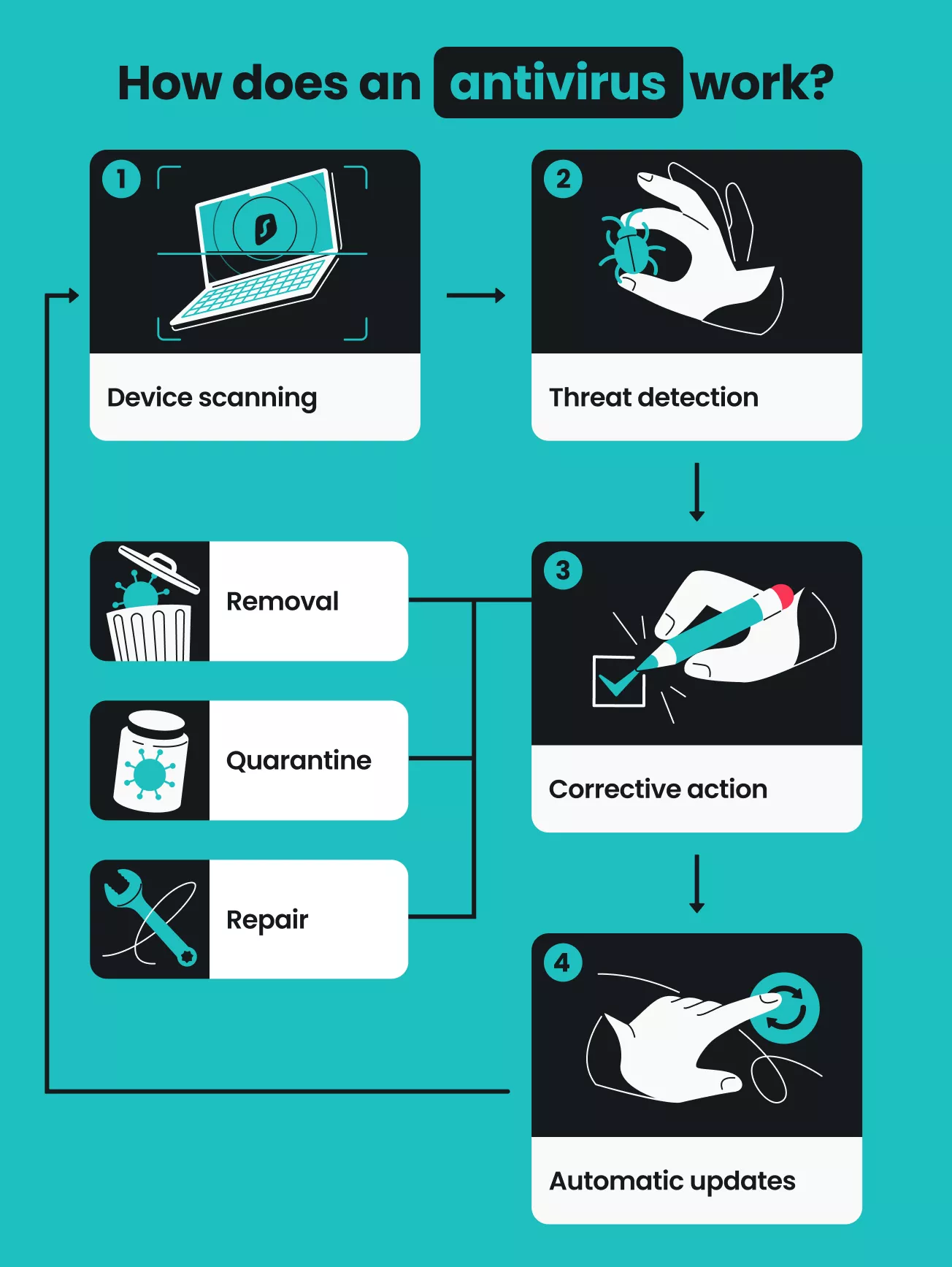
Antivirus software scans devices for suspicious programs or behaviors by comparing them to a database of known threats. When a match is detected, the antivirus quarantines the malicious files, deletes them, or attempts to repair them. Even for new threats not yet on the list, antivirus software can still watch for unusual activity and proactively take corrective measures.
A good antivirus program includes advanced security features like firewalls, anti-phishing protection, and secure browsing tools to help safeguard you against a broader range of online threats. To go the extra mile, an antivirus continuously evolves by learning from the latest virus patterns.
Antivirus software keeps your devices clean, your data safe, and your online activities out of harm’s way.
What an antivirus DOES
Antivirus programs can deliver powerful online security, but they won’t give you all-around defense.
Here are the top kinds of protection antivirus software provides:
- Dedicated malware detection: an antivirus scans, detects, and removes malicious software using robust, up-to-date databases;
- Multi-threat defense: today’s top tools protect devices from viruses, spyware, ransomware, and other cyberthreats;
- On-demand scanning: antivirus software lets you choose when to run your scans. Schedule full or quick scans for a specific day and time, or just click Scan to check your device on the spot;
- Real-time scanning: your devices are continuously monitored, giving you instant alerts if anything unusual is found;
- Advanced protection: whether it’s webcam protection, web protection, or coverage for multiple devices, antivirus software can offer advanced security features for elevated support.
What an antivirus DOESN’T do
No tool can offer total safety. Here’s what an antivirus program can’t do:
- Enhance online privacy: an antivirus can’t prevent tracking from websites and ISPs (Internet Service Providers) or mask your IP (Internet Protocol) address from potential threats;
- Protect internet activities: you’re still vulnerable to hackers on unsecured networks;
- Prevent user error: even the best antivirus can’t save you from yourself. It may be easy to gain a false sense of security once you have an antivirus, but you shouldn’t start taking more risks. Continue practicing common-sense security practices so you don’t fall victim to scams, identity theft, or phishing attacks;
- Detect all kinds of malware: an antivirus is only as good as the threat database it has access to. No antivirus software can guarantee 100% protection, especially against new or advanced threats;
- Work on all devices: you’re unlikely to find a solution that’s compatible with every device at your disposal. For example, while iPhones are generally secure, iOS’s strict security protocols limit the functionality of antivirus apps.
Antivirus software is great at detecting malware and protecting your device from infections, but it falls short in defending your personal information while you browse online. For this, you’d need a VPN.
How to choose an antivirus
Choosing the best antivirus software can be tricky, as you have to consider many factors. Here’s a checklist of what to look for:
|
Independent certification
|
Any antivirus provider can tell you they’re the best. Find a tool certified by independent testing labs — like AV-TEST — so you know its protection, performance, and usability are reliable.
|
|
Good reputation
|
A trustworthy antivirus app will have a good reputation. Do a quick Google search of any provider you’re interested in. Check out any reviews or mentions on social media, online forums, and the service’s Wikipedia page.
|
|
Suitable price
|
Antivirus tools vary greatly in price. A free antivirus will likely have limited features and subpar protection, while enterprise solutions can boast price tags approaching $300/yr. A budget-friendly paid app will get the job done for most users.
|
|
Multi-device protection
|
Some paid antivirus programs only protect a single device, so you’ll need to buy another subscription to cover a second (or third) device. Opt for a solution that protects all your devices — your computers, smartphones, tablets, and more.
|
|
Advanced features
|
Leading antivirus software does more than just protect against malware. Is yours customizable? Can it protect your webcam? Is it bundled with other tools like a VPN or data leak alerts? Look for tools that do more than the bare minimum.
|
What is a VPN?
A Virtual Private Network (VPN) encrypts your internet traffic and masks your IP address by routing your traffic through a VPN server. It creates a secure, private tunnel that allows you to send and receive data safely while maintaining online privacy.
VPNs are often used to protect sensitive information and financial details — especially on public Wi-Fi networks — to keep your private data safe from hackers, snoops, and malicious actors.
In addition to enhanced security, you need a VPN because it gives you greater freedom online. People living in areas with heavy internet censorship can use a VPN to access news sites and email or social media accounts. Also, a VPN can help anyone traveling abroad access their home country’s online content and resources.
How does a VPN work?
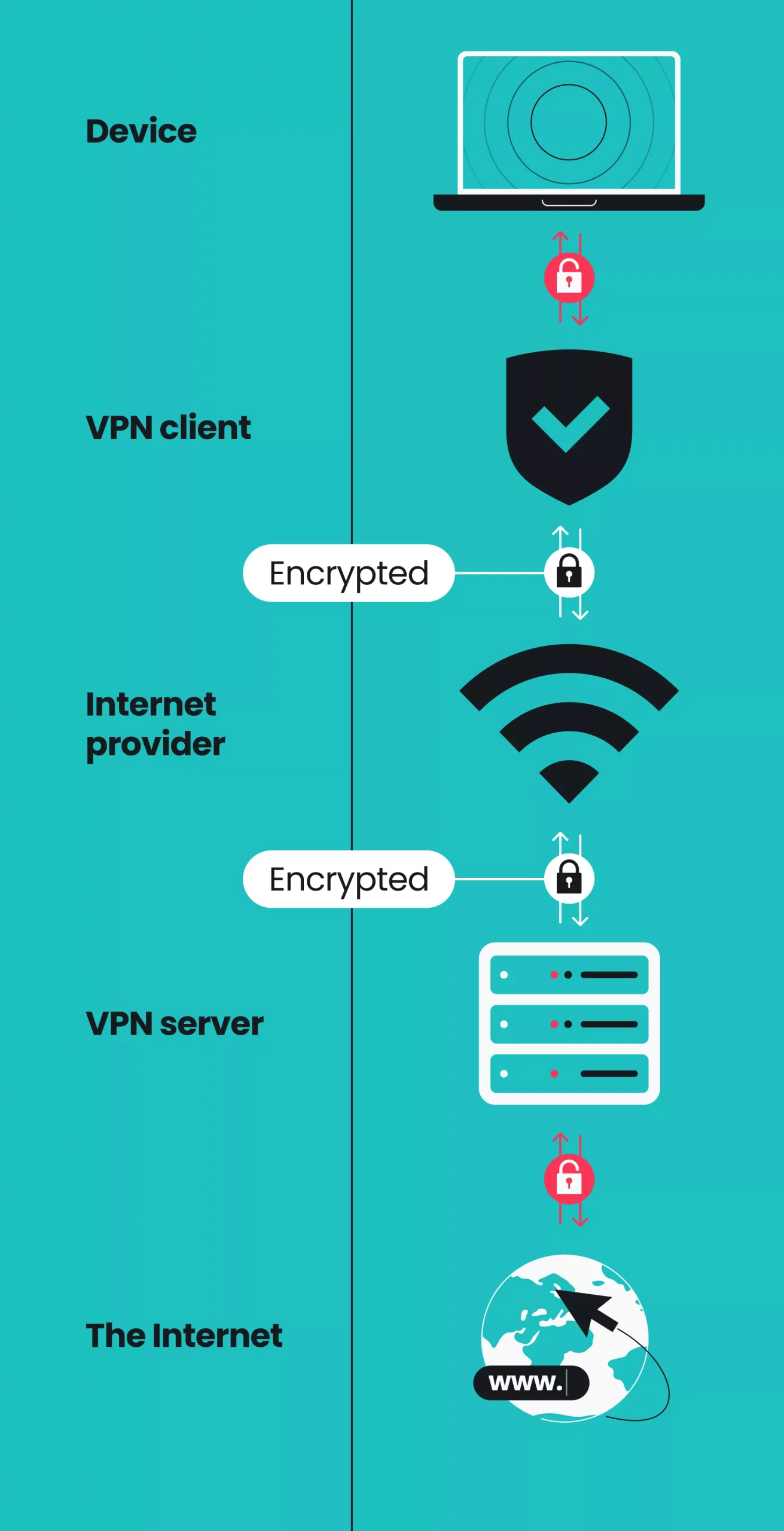
A VPN works by routing your internet connection through a server operated by the VPN provider. When you connect to a VPN, your device establishes a secure connection to the VPN server. This connection serves as an encrypted tunnel, so your data is scrambled and unreadable to anyone who might try to intercept it.
Once connected, the VPN server forwards your data to the websites you want to access. These sites see the server’s IP address, not your own, so your actual location and identity are concealed.
The data from these sites also travels back via the VPN before reaching you, and this encryption prevents anyone from spying on your browsing history. As a result, a VPN protects the entire flow of data online.
What a VPN DOES
Here are the top benefits of a VPN:
- Elevated privacy: by masking your IP address, a VPN makes it hard for websites, advertisers, and ISPs to track your online activity;
- Increased online security: with a VPN, all data you send and receive is encrypted. This protects sensitive information and browsing data from hackers, even on public Wi-Fi;
- Greater online freedom: VPNs allow users to bypass censorship from oppressive regimes and access content from their home countries while traveling;
- Lower risk of bandwidth throttling: if your ISP is throttling your internet speeds based on traffic type, a VPN can help you get around these restrictions.
What a VPN DOESN’T do
While VPNs are fundamental security tools you should never be without, they don’t:
- Protect your devices: VPNs don’t offer added security against viruses, malware downloads, or other threats to your local device;
- Prevent user error: if you click on a malicious link, download malware, or visit a phishing site, data encryption and a masked IP won’t help. A VPN can keep your data secure, but it can’t protect you from yourself. That’s why it’s essential to follow basic internet safety practices;
- Make you 100% anonymous: a VPN masks your IP address, but websites can still track behavior through cookies, browser fingerprinting, or by you logging into any personal accounts;
- Increase your internet speed: aside from helping with bandwidth throttling, a VPN isn’t likely to increase connection speeds. Your data gets encrypted and routed through an additional server, so a slowdown, however slight, can be expected.
How to choose a VPN
The best VPN should include the following:
|
Vast server network
|
The more server locations a VPN provider has, the more likely you are to find one right for you. More servers equal faster, more reliable connections without network congestion.
|
|
Modern encryption
|
More robust encryption makes it much harder for third parties to decipher your data. Look for AEGIS-256X2, AES-256, or ChaCha20 encryption, along with secure VPN protocols like WireGuard, IKEv2, and OpenVPN.
|
|
Affordable price
|
Just like antivirus programs, VPNs range widely in price. A free VPN can compromise your safety, so consider a tool like Surfshark that offers excellent value at an affordable price.
|
|
Unlimited simultaneous connections
|
Why pay for a VPN subscription that only covers one device? Top VPN services can protect unlimited devices at once with a single subscription, so you won’t have to pick and choose what to safeguard.
|
|
Money-back guarantee
|
Try tools with a 30-day money-back guarantee to see if they back up their claims — risk-free. Go with software that lets you try it out without having to make a financial commitment on the spot.
|
How to choose between a VPN and antivirus software
A VPN and antivirus help keep you safe online, but they have completely different jobs. To help you understand exactly what each tool does, here is a quick breakdown of their features:
|
|
VPN
|
Antivirus
|
|
Browsing privacy
|
✅
|
❌
|
|
Malware detection
|
❌
|
✅
|
|
Public Wi-Fi protection
|
✅
|
❌
|
|
IP masking
|
✅
|
❌
|
|
Ransomware protection
|
❌
|
✅
|
|
Phishing protection
|
❌
|
✅
|
|
Data encryption
|
✅
|
❌
|
|
Local file scanning
|
❌
|
✅
|
|
Access to home content
|
✅
|
❌
|
VPN vs. antivirus: what if you only use one?
Relying on just a VPN or just an antivirus leaves a blind spot in your online security. Because these tools protect different things, leaving one out leaves you exposed to real threats.
Here’s what can happen if you leave your defenses incomplete:
Antivirus only
When you’re on public Wi-Fi, your connection is unencrypted — even if you have antivirus software protecting your hard drive. If a hacker is on the same network, they don’t need to infect your device with malware to do damage.
Instead, they can intercept your exposed data in transit. They may steal your login credentials, session cookies, or banking details without you — or your antivirus — ever knowing.
VPN only
Imagine you have a VPN running, and you’re tricked into downloading a disguised Trojan or other malicious program. Your traffic is encrypted, and your IP address is masked, but the download will proceed directly to your system.
A VPN doesn’t scan files, so it can’t notify you if you’re handling dangerous software. As a result, the virus will install and run without much resistance.
Risks with both tools
Even if you run a reliable VPN alongside leading antivirus software, you might still be in danger.
If you reuse weak passwords, enter credentials into a fake website, or share personal data on social media, cybersecurity software won’t offer much help. Security tools are safety nets, but practicing good digital hygiene is still critical if you want greater protection online.
Do you need an antivirus if you have a VPN?
Combining a VPN with antivirus software is a great idea. Since both types of tools have distinct strengths, using them in tandem will enhance your overall security. A VPN service makes up for an antivirus’s shortcomings and vice versa.
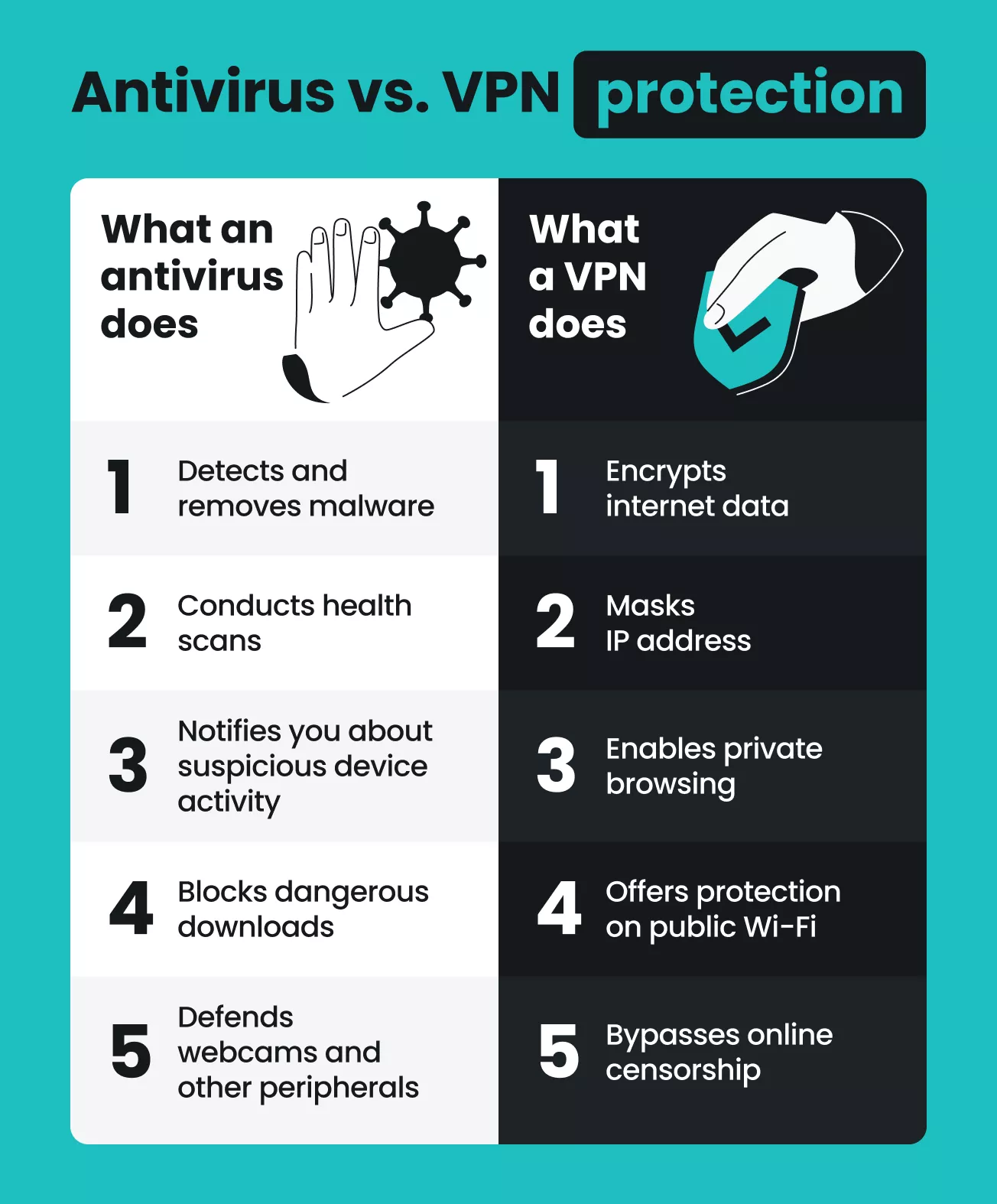
While an antivirus can detect malware, it doesn’t protect your internet traffic. On the other hand, while a VPN routes your data through a secure server, it won’t protect against viruses or threats already on your device. To get maximum protection, you need both.
If you want a VPN and antivirus software in a single suite, Surfshark One is an excellent solution. The bundle includes both Surfshark VPN for online privacy protection and Antivirus to defend your devices against malware. In addition, Surfshark One also comes with an ad blocker, an alternative ID generator, and data leak monitoring — all in one user-friendly app.
And yes, you can use a VPN and an antivirus simultaneously to protect your device and online traffic at the same time.
VPN vs. antivirus: which one do you need?
Online security extends beyond the scope of any one app. Comprehensive threat protection requires multiple tools, so it’s worth investing in both a VPN and an antivirus.
The good news? You can get a VPN and antivirus in one app with Surfshark One.
The best antivirus with a VPN won’t require a separate subscription, and Surfshark doesn’t. Surfshark One bundles the flagship Surfshark VPN with our Antivirus as well as the Clean Web, Alert, and Alternative ID tools.
Combine a VPN and antivirus today to see what you can achieve with all-in-one cybersecurity protection.

FAQ
Do VPNs protect you from viruses?
No, VPNs generally don’t protect from viruses. A VPN helps secure your internet connection and protect your privacy by encrypting your data, but this alone doesn’t stop malware.
However, a VPN may prevent some kinds of malware from successfully executing their task and stop adware from spreading malicious code. For more information, check out our article on whether VPNs protect you from viruses.
Does a VPN remove viruses?
No, a VPN service doesn’t remove viruses from your device. Antivirus software is needed to detect, isolate, and remove malware from a device.
Do I really need an antivirus with a VPN?
Yes, using antivirus software with a VPN is an excellent idea. Malware threats are evolving and becoming extremely harmful, so browsing the web without an antivirus can be dangerous. A VPN encrypts your data to offer even more protection, so installing a suite that combines an antivirus with a VPN is a smart choice. For more information, check out our Surfshark vs. Norton, Surfshark vs. Bitdefender, and Surfshark vs. Microsoft Defender comparisons.
Is a VPN better than an antivirus?
A VPN isn’t better than an antivirus, and an antivirus isn’t better than a VPN. They are two different types of software meant to handle separate tasks. For greater cybersecurity, it’s a good idea to equip your devices with both a VPN and an antivirus.
Should I leave a VPN on all the time?
Yes, having a VPN on all the time is a good idea. A VPN offers greater online privacy and security, creating a safer, smoother browsing experience for all internet users.
That said, leading VPN providers like Surfshark have a split tunneling feature that lets you bypass your VPN connection for specific apps or websites. This will help you consume less data and access sites that require your real IP while protecting the rest of your online activity.
What is the best VPN with a built-in antivirus?
There isn’t one VPN with a built-in antivirus that’s objectively the best, but it’s important to remember that many VPNs don’t offer any antivirus tools at all. Surfshark stands out as a great choice because its Surfshark One bundle combines fast, secure VPN protection with its reliable Antivirus.
In addition, the bundle also gives users access to the Clean Web, Alert, and Alternative ID tools, providing an all-in-one solution for anyone looking to enhance their online privacy and device security.