
A stealth VPN uses obfuscation techniques to disguise VPN traffic as ordinary HTTPS traffic. While a regular VPN encrypts your internet traffic, a stealth VPN goes one step further and hides the fact that you’re using a VPN at all.
Stealth VPNs are especially useful on restrictive networks or in countries where governments, ISPs (Internet Service Providers), or network administrators actively block VPN connections.
This article explores what a stealth VPN is and how stealth VPN protocols work. Taking the top stealth VPN strengths and limitations into account, it also covers when using stealth mode makes sense — and when it doesn’t.
What is a stealth VPN?
A stealth VPN is a VPN (Virtual Private Network) that disguises your VPN connection so it doesn’t look like VPN traffic to outside observers. It can be a standalone tool or a specific feature within a VPN service.
The “stealth” part refers to obfuscation: the process of altering VPN data packets so they resemble normal web traffic rather than encrypted VPN traffic.
Here’s the key difference between a regular VPN and a stealth VPN:
- A regular VPN encrypts your traffic and routes it through a VPN server. Your data is protected, but the connection is recognizable as a VPN connection. Anyone inspecting your traffic — your ISP, firewall, or network admin — can tell you’re using a VPN, even if they can’t see what you’re doing;
- A stealth VPN does everything a regular VPN does, but it also masks the VPN connection itself. Your encrypted traffic looks like normal HTTPS traffic, the same kind of encrypted connection your browser uses when you visit a secure website.
Why are some VPNs blocked or detected?
VPN connections leave digital fingerprints. Even though VPN data is encrypted, the way it’s packaged and transmitted differs from normal web traffic. Network monitoring tools can spot these differences using the following methods.
Deep packet inspection
DPI (Deep Packet Inspection) is the most common and effective way to detect VPN usage. It works by analyzing the structure of data packets, including where they’re going and how they’re formatted.
Standard VPN protocols like WireGuard, OpenVPN, and IKEv2 each have recognizable packet signatures. DPI systems can identify these signatures and flag — or block — VPN traffic in real time. Governments in countries that restrict access to certain websites or services invest heavily in DPI technology to block VPNs at the network level.
Port blocking
Many VPN protocols use specific ports by default. For example, OpenVPN typically uses UDP port 1194.
A network administrator can simply block traffic on that port to successfully block VPN traffic. This is a blunt approach, but it’s common on school and workplace networks.
IP blocking
Some networks maintain lists of known VPN server IP (Internet Protocol) addresses and block connections to them. Streaming services and certain websites also use this method to restrict access from VPN users.
Protocol-based blocking
Some firewalls are configured to block specific protocol types entirely. If a firewall recognizes a connection as WireGuard or OpenVPN, it drops the connection regardless of port or destination.
These detection methods explain why a regular VPN isn’t always enough and why stealth VPN protocols can be useful.
How does a stealth VPN work?
A stealth VPN works by wrapping your VPN connection inside an additional layer of obfuscation, making your VPN traffic look like regular HTTPS traffic. Here’s how the general process works:
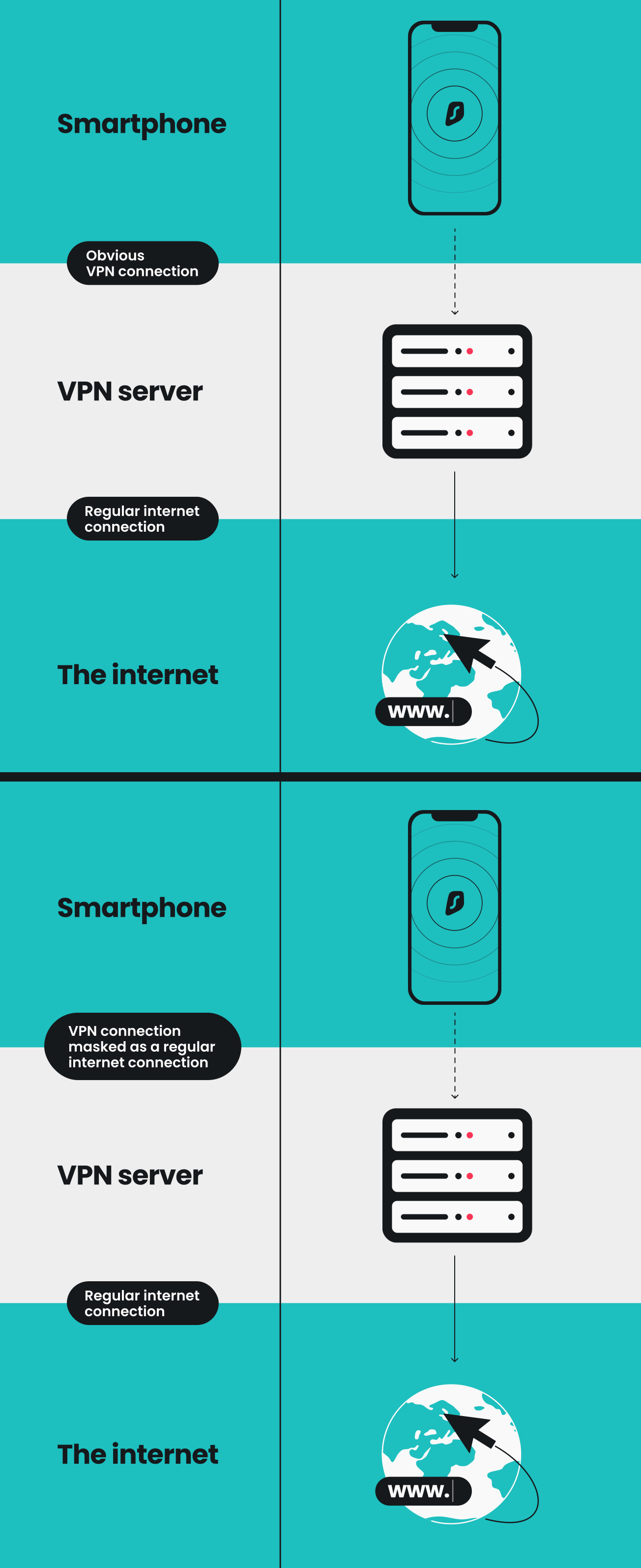
- You connect to a VPN server using a stealth-enabled protocol.
- The VPN encrypts your traffic as usual.
- The obfuscation layer wraps the encrypted VPN packets inside standard TLS/SSL encryption, which is the same type of encryption secure websites use.
- The disguised traffic is sent over port 443, the same port that HTTPS web traffic uses.
- To outside observers like an ISP, DPI firewall, or network admin, your VPN connection looks indistinguishable from someone browsing without a VPN.
Different VPN providers implement obfuscation in different ways:
- Using OpenVPN wrapped in an SSL tunnel. Services like Surfshark also scramble OpenVPN traffic into random patterns that resemble neither VPN traffic nor regular browsing;
- Building custom protocols that use obfuscated TLS tunneling over TCP from the ground up;
- Skipping a dedicated stealth protocol and instead offering obfuscated servers. These are specialized VPN servers that apply obfuscation at the server level, disguising your VPN traffic regardless of protocol.
The technical approach varies, but the goal remains the same: to make VPN data unrecognizable.
Key insight: In most cases, blocking obfuscated traffic would mean blocking all HTTPS traffic, something that would essentially make the internet unusable for everyone on the network in question. Most firewalls or censorship systems aren’t willing to take such drastic actions, which is what makes stealth VPN technology so effective.
What is VPN obfuscation?
VPN obfuscation is a cybersecurity technique that disguises encrypted VPN traffic as regular HTTPS traffic. While stealth VPN and VPN obfuscation are often used interchangeably, it’s worth noting that obfuscation is the underlying method that lets a stealth VPN function properly.
VPN obfuscation isn’t the same as encryption. Here are the main differences:
- Encryption scrambles the content of your data so nobody can read it. A normal VPN encrypts traffic;
- Obfuscation disguises the appearance of your data so nobody can tell it’s VPN traffic. This is what a stealth VPN adds.
In practice, obfuscation works by stripping or modifying metadata in VPN packet headers that would normally identify traffic as VPN traffic. It then re-packages that traffic to mimic standard HTTPS connections.
Note: Obfuscation doesn’t make you invisible online. It hides the fact that you’re using a VPN, but it doesn’t hide everything. Websites you log into still know who you are, and your browser fingerprint can still be tracked.
Obfuscation is a tool for bypassing VPN blocks — not a solution that offers total anonymity.
Stealth VPN vs. regular VPN
A standard VPN connection provides most users plenty of online protection. As a result, not everyone needs a stealth VPN.
Here’s a side-by-side comparison of a stealth VPN and a regular VPN.
|
|
Stealth VPN
|
Regular VPN
|
|
Encrypts traffic
|
✅
|
✅
|
|
Masks IP address
|
✅
|
✅
|
|
Hides VPN usage
|
✅ (traffic looks like normal HTTPS)
|
❌
|
|
Bypasses DPI and advanced firewalls
|
✅
|
❌
|
|
Speed
|
Slightly slower (extra obfuscation layer)
|
Faster (less processing)
|
|
Best for
|
Censored networks, VPN-blocked environments
|
Everyday privacy, streaming, browsing on public Wi-Fi
|
|
Availability
|
Specific stealth protocols or obfuscated servers
|
All VPN protocols
|
If you’re using a VPN for general privacy, protecting your data on public Wi-Fi, or accessing content while traveling in countries that don’t restrict VPN usage, a regular VPN connection works fine. Your traffic is still encrypted, and you can’t be easily tracked because your activity gets routed through a remote server.
However, if your VPN connection keeps getting blocked or you’re in a situation where VPN traffic is actively detected and restricted, then a stealth VPN can make a real difference.
When should you use a stealth VPN?
Stealth VPN features are designed for specific situations and generally aren’t needed for everyday use. Here are the most common scenarios where stealth mode matters:
- Traveling to countries that restrict VPN usage: some governments use advanced DPI systems to detect and block VPN traffic. A stealth VPN can bypass censorship and give you access to the open internet;
- Using school or workplace networks: many institutional networks configure firewalls to prevent VPN connections. Stealth protocols route traffic through port 443, making it look like regular web browsing;
- Avoiding ISP throttling of VPN traffic: some ISPs throttle connections they identify as VPN traffic. Obfuscation hides the VPN signature, so your ISP treats your connections like any other HTTPS session;
- Connecting on public Wi-Fi with VPN restrictions: hotels, airports, and cafés sometimes block VPN connections. Stealth mode helps connect you to a VPN server on these restrictive networks;
- Bypassing internet filters: if you’re behind a firewall that blocks standard VPN protocols by signature, a stealth protocol is often the best way to establish a VPN connection.
Pro tip: Use a stealth VPN when you need it, not as a default. Stealth mode adds processing overhead that can needlessly reduce your connection speed when doing routine tasks like browsing at home.
Does a stealth VPN make you anonymous?
No, a stealth VPN doesn’t make you anonymous.
Here’s what a stealth VPN actually does:
- Encrypt your traffic so your online activities can’t be easily monitored;
- Hide the fact you’re using a VPN from your ISP, network, or firewall;
- Help you bypass VPN blocks to access online content and services.
And here’s what a stealth VPN doesn’t do:
- Hide your identity from websites you log in to: if you sign in to Google, Facebook, or your bank while using a VPN, those services know who you are;
- Stop browser fingerprinting: websites can identify your device based on browser type, software versions, hardware configurations, and other signals — even if you have a VPN;
- Prevent all tracking: tracking pixels and ad networks can follow your activity across the web. Agreeing to cookies makes you trackable as well;
- Guarantee untraceability: users may want an anonymous VPN that makes tracking significantly harder, but your behavior, accounts, and digital footprint all contribute to maintaining your online privacy.
How to use stealth VPN features with Surfshark
Surfshark includes several VPN features that help you use a VPN in restrictive environments without needing any complex configuration.
OpenVPN protocol
Surfshark supports OpenVPN over both TCP and UDP.
OpenVPN over TCP is one of the most established methods of disguising VPN traffic. If you’re on a network that blocks other VPN protocols, switching to OpenVPN TCP is often the first step to finding a solution.
To use the OpenVPN protocol, open the Surfshark VPN app and go to Settings > VPN settings > Protocol.
No Borders
No Borders is Surfshark’s built-in detection system for restrictive networks.
When you connect to a network that restricts VPN usage, No Borders automatically activates and provides you with a list of servers optimized to work in that environment. Surfshark detects restrictions and adapts accordingly, so you don’t have to manually select any stealth capabilities.
Activate No Borders by going to Settings > VPN settings > NoBorders in the Surfshark app.
Multi Hop
Surfshark’s Multi Hop routes your VPN connection through two VPN servers in different locations rather than a single one. This adds another layer of protection by making it harder to trace the connection back to you.
While this isn’t an obfuscation tool in the traditional sense, it complements stealth features by creating additional distance between your real IP and your online activities.
You can connect via Multi Hop by opening Surfshark and selecting Multi Hop.
Key takeaway: stay undetected with a stealth VPN
A stealth VPN makes your VPN usage harder to detect, but it doesn’t make you anonymous. And while it’s great for restrictive networks, a regular VPN connection is usually enough for enhanced online privacy.
Whether you want standard encryption or a stealth VPN, Surfshark is a smart choice.

Boost your privacy — even on restrictive networks
Enjoy greater protection with a stealth VPN
Get SurfsharkFAQ
Which VPN is best for stealth?
The best stealth VPN depends on your needs, but you should look for a provider that supports obfuscation features like the OpenVPN protocol and automatic detection of restrictive networks. Surfshark’s No Borders, for example, identifies VPN-blocking networks and automatically connects you to optimized servers.
Which VPN can’t be traced?
No VPN can guarantee it will never be traced. A stealth VPN makes your connection much harder to detect by disguising VPN traffic as normal web browsing, but factors like account logins and cookies still contribute to your online footprint.
Is there an undetectable VPN?
No VPN is completely undetectable in every scenario. Stealth VPNs make detection more difficult by mimicking HTTPS traffic, but monitoring systems may still be able to identify data patterns over time. That said, stealth VPNs are still good options for avoiding VPN detection on restrictive networks.
What is stealth mode in a VPN?
Stealth mode is a setting in some VPN apps that activates obfuscation. When turned on, it changes how your VPN traffic is packaged and transmitted so it resembles normal encrypted web traffic. This helps you bypass network restrictions, avoid VPN blocks, and connect through firewalls that would normally detect and stop standard VPN protocols.
Does a stealth VPN slow down my connection?
A stealth VPN can slightly slow your internet connection because it adds an extra layer of obfuscation on top of standard encryption that requires added processing overhead. Most users won’t notice a difference, but speeds are usually somewhat slower compared to using a standard VPN connection.
Does a stealth VPN make me untraceable?
A reliable VPN provider will make it very hard to track you. However, 100% anonymity is impossible online, and privacy requires a lot of effort on your side.
There is so much more to being anonymous than just using a VPN. For example, you can further increase your privacy by giving out as few details as possible on social media and exercising caution when filling out online forms.
How does a stealth VPN bypass DPI?
A stealth VPN works like a digital camouflage suit for internet data. Traditional VPNs encrypt information, but they leave distinct structural signatures — such as specialized headers or specific port usage — that DPI systems easily identify and block.
To bypass this inspection, a stealth VPN uses obfuscation technologies to strip away these digital signatures, transforming the identifiable data packets into traffic that mirrors ordinary HTTPS web browsing. Because it travels over standard web ports like port 443, DPI firewalls recognize it as regular, safe web traffic and allow it through without restrictions.