Protecting your Xbox with a VPN is simple. Whether you have an Xbox One, Xbox Series X or S, or Xbox 360, there are two ways to boost your online security with Surfshark.

VPN for Xbox One, Series X, Series S, and 360
-
Stay private while playing Xbox games online
-
Enjoy safer gaming with defense against DDoS attacks
-
Game smoothly with a fast VPN for Xbox
How to use a VPN on Xbox

1. Check your router
See whether your router supports VPN connections by opening your router settings and going to VPN or VPN Client. You can also use a VPN-ready router.

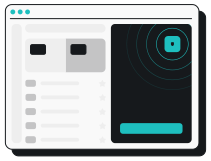
3. Connect your Xbox
Connect to one of Surfshark’s 4,500+ servers and join your home Wi-Fi on your Xbox. All devices on your home network now automatically gain VPN protection.
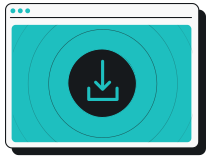
1. Get Surfshark
Download the VPN app on your PC. Since Microsoft makes both Xbox and Windows, you’ll need to use a Windows computer.
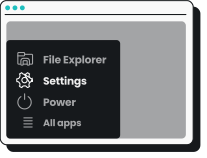
2. Open your PC settings
On Windows 11, go to your Control Panel and choose Network & internet. Then, select Advanced network settings and open More network adapter options.
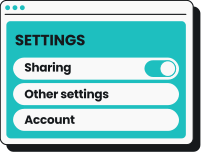
3. Adjust your VPN connection
Go into your VPN properties. In the Sharing tab, check the box to Allow other network users to connect through this computer’s internet connection and pick the network you want to share.
4. Connect your Xbox
Use an Ethernet cable to link your Xbox console to your PC. Launch the Surfshark app, connect to a VPN server, and enjoy safer, more private online gaming.
Bonus tip: You can also share your VPN connection through a mobile hotspot. Just install the Surfshark app, set up a hotspot, and connect your Xbox console.
Surfshark works on all major platforms
You can get VPN protection from Surfshark on all your Xbox consoles — Xbox One, Xbox Series X, Xbox Series S — and much more. Learn more about the benefits of Surfshark on your devices and find more dedicated apps:
But that’s not all. You can also protect your whole home network at once by setting up a VPN on your router to simultaneously secure every device connected to your Wi-Fi. That includes your smart TVs, gaming consoles like Nintendo Switch and PlayStation, and gadgets like Oculus Quest 2, Apple Vision Pro, and Raspberry Pi.

Why you need a VPN on Xbox
A VPN lets Xbox users achieve the following:

A safer online experience
A VPN encrypts your internet traffic, giving you a secure connection and heightened protection from hackers. Whether gaming or enjoying your favorite streaming services, VPN apps mask your IP (Internet Protocol) address to enhance your privacy.
Reduced bandwidth throttling
Facing a slow connection speed? Your ISP (Internet Service Provider) might be throttling your internet connection based on traffic type. VPN software helps you beat ISP throttling and increases your odds of getting smoother gameplay with fewer bandwidth limitations.
Defense against DDoS attacks
DDoS (Distributed Denial of Service) attacks threaten many multiplayer games. A gaming VPN offers an encrypted connection and a new IP address, making it much more difficult for harassers to target you. Play worry-free with an Xbox VPN by your side.
Greater protection around the house
When you use your Xbox VPN via a Wi-Fi router, you can secure unlimited devices in one go. A VPN router setup covers your whole household, so placing your smartphones, TVs, and gaming consoles on the same network can make a VPN service that much more effective.
Disclaimer: Please note that using Surfshark services for any illegal activities is strictly forbidden and violates our Terms of Service. Make sure that any use of Surfshark services for your particular activities conforms to all relevant laws and regulations, including those of any service providers and websites you access using Surfshark.
How to choose the best VPN on Xbox
Look out for these features when choosing your Xbox VPN.
Extensive server count
VPNs work fastest when you connect to an uncongested VPN server close to your physical location. VPN providers with more servers — and server locations — are much more likely to provide the enhanced lag-free experience you’re looking for. With 4,500+ servers in 100 countries, Surfshark is an excellent choice.
VPN service speed
The best VPNs won’t slow your internet connection. Surfshark relies on a RAM-only server infrastructure with 10 Gbps ports to deliver a high-speed VPN connection. It’s equipped to overcome activity-based bandwidth throttling, so there’s a smaller chance you’ll have to worry about speed bumps from ISPs, too.
Ease of use
You know how natural holding an Xbox controller feels? That’s exactly what using the best VPN services is like. Find a tool with a simple user interface that’s flexible enough to protect everything from gaming to web browsing. Whether you’re connecting with an Ethernet cable or Wi-Fi router, a VPN provider like Surfshark has your back.
Surfshark vs. free VPNs
Free Xbox VPNs often compromise on privacy and performance. Surfshark VPN offers a more secure and reliable gaming experience you can trust.
|
|
Free VPNs
|
Surfshark VPN
|
|
Data collection risk
|
High: free options often track your activity and share data with third parties
|
Low: Surfshark’s strict no-logs policy was independently verified by Deloitte in 2023 and 2025
|
|
Speed and bandwidth
|
Restricted: speed throttling and bandwidth limits are common
|
Unlimited: no bandwidth or speed caps are in place
|
|
Ads and trackers
|
Common: free tools may inject ads or allow trackers
|
Blocked: Clean Web offers built-in ad and tracker blocking
|
|
Customer support
|
Limited: often no live help and slow response times
|
24/7: live chat and email support are available
|
|
VPN server locations
|
Few: frequently have overloaded servers that slow your connection
|
Thousands: lets you connect to 4,500+ high-speed servers in 100 countries
|
|
Encryption
|
Unreliable: may lack strong encryption standardsption protocols
|
Strong: AES-256 and ChaCha20 encryption standards for increased data and privacy protection
|
Surfshark’s advanced features
Modern protocols
Leading VPN services let you connect with fast and safe protocols like WireGuard, OpenVPN, and IKEv2. Each VPN protocol is optimized and regularly updated to protect against emerging threats and work with the latest, most popular software. Their speed, safety, and stability make them great for online gaming.
Kill switch
A VPN kill switch automatically cuts your internet connection if your VPN unexpectedly disconnects. This prevents your real IP address and data from being exposed whenever the VPN is down, helping you enjoy reliable protection while gaming and accessing online services.
Split tunneling
With a split-tunneling feature like Surfshark’s Bypasser, you have the ability to choose what traffic is routed through your VPN and what stays on your regular internet connection. For instance, you can leave IP-sensitive services unprotected while still shielding your gaming traffic to enhance the overall online experience.
Ad-free gaming
Leading paid VPNs come with built-in ad blockers that can offer smoother, uninterrupted browsing and streaming on your Xbox. By blocking ads, trackers, and links to malicious sites, features like Surfshark’s Clean Web remove some of the biggest online distractions and can even prevent ads from loading, keeping you under any bandwidth limits.
Rotating IP
If you’re worried your IP address may have been exposed, a rotating IP feature is just for you. This maintains your privacy by periodically assigning you different IP addresses without ever disconnecting your VPN. It’ll be harder for third parties to track you, and you’ll have greater protection against DDoS attacks.

VPN obfuscation
VPN obfuscation makes it harder for third parties like your ISP to see you’re connected to a VPN. Gamers see added privacy over their online traffic, and you have yet another tool under your belt to get around activity-based ISP bandwidth throttling and gain access to numerous Xbox services on restricted networks that might otherwise block VPNs.

Compare Surfshark’s plans
Surfshark Starter
Comes with a VPN & Alternative ID — essentials for your daily browsing.
- VPN: surf safely online
- Personal data masking: protect your identity
- Ad blocker: block ads & pop-ups
Surfshark One
Shields you with all-round security for your browsing, devices, and identity.
- VPN: surf safely online
- Personal data masking: protect your identity
- Ad blocker: block ads & pop-ups
- Antivirus: armor your devices
- Data leak monitoring: get notified of leaks
Surfshark One+
Keeps your online activities & devices safe, with extra focus on identity protection.
- VPN: surf safely online
- Personal data masking: protect your identity
- Ad blocker: block ads & pop-ups
- Antivirus: armor your devices
- Data leak monitoring: get notified of leaks
- Incogni: reclaim your data
See why millions trust Surfshark
Check out what users and tech experts around the world have to say about Surfshark.



The reviews highlighted in this section were selected from publicly available posts on social media platforms. They reflect the opinions of individual users at the time of posting and may not represent the full range of our product features and qualities.
The reviews quoted on this page have been published by media outlets associated with Surfshark through affiliate partnerships. Their recommendations are based on their own independent research and insights to ensure value for the readers.
I have been using Surfshark since I got it and I love it!

When I am traveling, I use Surfshark to access the internet quickly and securely, works like a treat in China.

We love Surfshark because it is an easy-to-use app that you can download on all your devices.

The reviews quoted on this page have been published by media outlets associated with Surfshark through affiliate partnerships. Their recommendations are based on their own independent research and insights to ensure value for the readers.
“This is my first year and I absolutely love it. The fact I can have a good antivirus, great VPN, and incognito for like $120 a year is great.”
“I’ve been using Surfshark for 4 years on Android and ChromeOS with zero issues, it’s an absolute bargain”
“I’ve had it for 3 years and just renewed it for the next 2 years. I never have any issues with it and get my full internet speed…”
The reviews highlighted in this section were selected from publicly available posts on social media platforms. They reflect the opinions of individual users at the time of posting and may not represent the full range of our product features and qualities.






Frequently asked questions
Can I use a VPN on Xbox One?
While you can’t directly install a VPN on your Xbox One, you can connect your Xbox to a compatible router, computer, or mobile hotspot (or any other internet-sharing device that allows VPN protection).
Here are two guides that can provide more assistance:
Is there a free VPN for Xbox One?
A free VPN can technically be used for an Xbox One, but cybersecurity experts recommend avoiding free VPNs altogether. These often compromise your security or data and offer limited features and poorer performance, so getting a paid VPN like Surfshark is a better option.
Will using a VPN with my Xbox One protect my identity?
Yes, using a VPN will help protect your data and identity by changing your IP address. This makes it harder for hackers or other players to track your location or personal information. However, it won’t protect your Xbox Live account directly, so strong passwords and 2FA (Two-factor Authentication) are still important for securing your account.
Does using a VPN for Xbox One boost gaming speeds?
No, a VPN on Xbox One is usually unlikely to boost your gaming speed. Your data has to travel farther when routing your internet connection via a VPN server, so you likely won’t experience a speed boost with a VPN.
However, there are cases where a VPN can positively impact speed. For example, whenever internet service providers throttle internet connections based on traffic type, it’s possible to use a VPN to increase your speed.
What’s the best VPN for Xbox One?
There isn’t a single best VPN for Xbox One, but it’s a good idea to choose a paid VPN for faster speeds, stronger security, and more reliable servers. Free VPNs often have low speeds and limited server locations, making them an inferior choice. A good VPN for Xbox — like Surfshark — offers high-speed gaming and advanced security features that can prevent DDoS attacks.
What Xbox games can I play with a VPN?
Here’s a non-exhaustive list of games you can play with an Xbox VPN:
Do any VPNs work on Xbox?
Any VPN you can set up on a Windows PC hotspot or router will work on an Xbox One, Xbox Series S, Xbox Series X, and Xbox 360. However, Xbox consoles don’t have native VPN support, so you can’t directly install any VPN app.
How do you use a VPN on Xbox?
To use a VPN on Xbox, you can either set up a VPN-protected hotspot on a Windows PC or install a VPN on a Wi-Fi router. After that, just connect your Xbox to the VPN-protected wireless network, making any necessary adjustments to your network settings along the way, and you’re good to go.