Google Gemini — Google’s latest AI system — is generally safe for everyday tasks, such as writing, searching, planning, and learning.
Yet, it’s not a private space, and that distinction matters.
In this article, I’ll break down what “safe” really means when it comes to Gemini, what risks you should be aware of, and how to use it responsibly without giving up more data than necessary.
What is Google Gemini?
Google Gemini is Google’s answer to ChatGPT — a powerful AI model that can understand and generate text, images, audio, and more.
Yet, unlike standalone chatbots, Gemini is deeply woven into Google’s entire ecosystem, not just Google Search.
Usually, you’ll notice Gemini across multiple Google products, including:
- Search (AI overviews with 2 billion users each month);
- Gmail and Docs (help with writing and summarizing);
- Android (Gemini as the on-device assistant);
- Chrome (AI suggestions and summaries).
Gemini apps now have around 650 million users per month, nearly twice the population of the US. If you’ve used anything from Google recently, there’s a good chance you’ve interacted with Gemini.
In a nutshell, Gemini acts as a single AI brain behind many of Google’s apps — and that’s why users are paying closer attention to its safety and privacy practices.
Is it safe to use Google Gemini? Privacy and security explained
Gemini runs on top of Google’s well-established security systems, so in many ways it’s as safe as using other Google services.
Yet, since Gemini is tightly connected to your Google account and collects a wide range of data, security and privacy risks appear.
What data does Gemini collect?
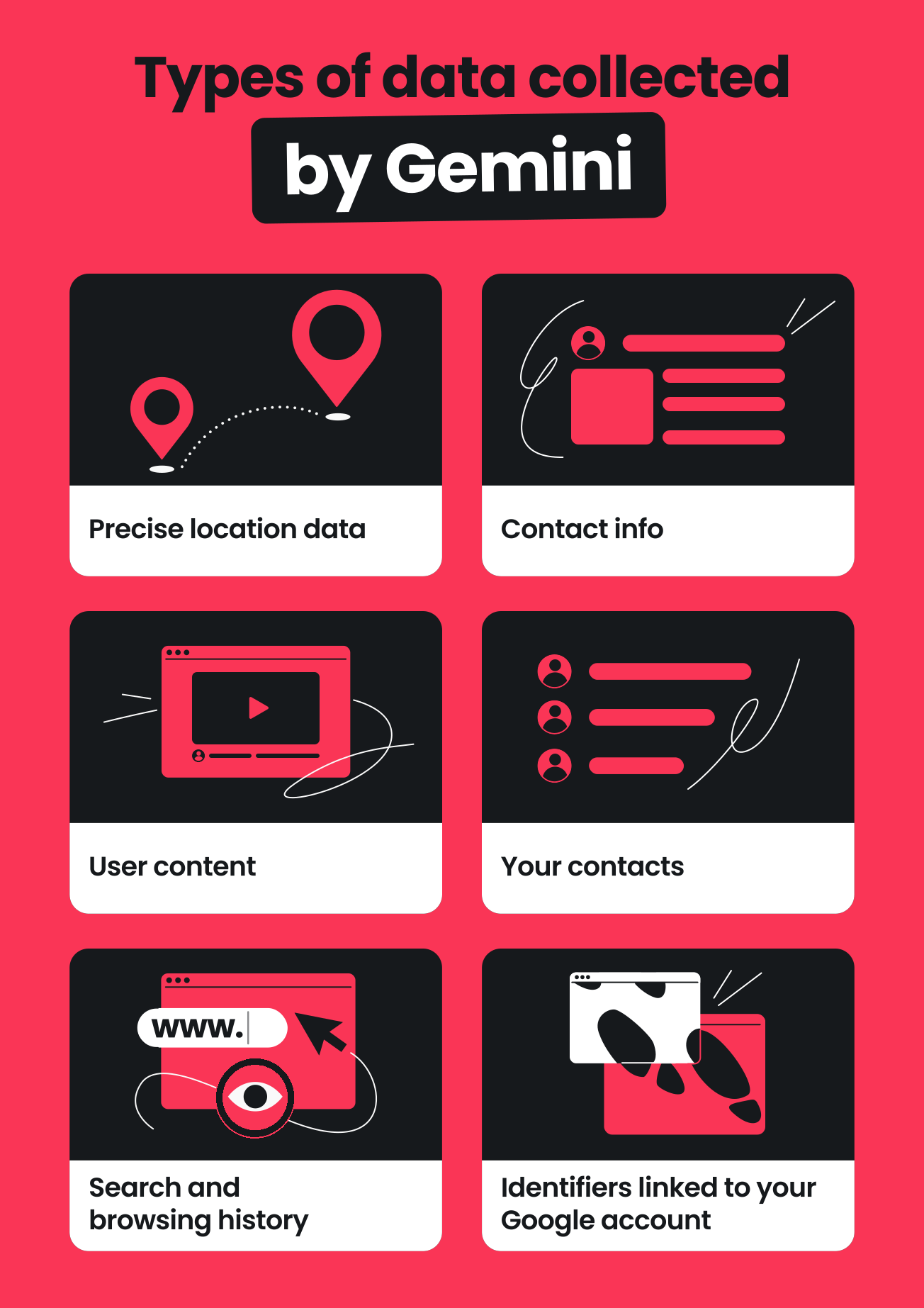
Google is transparent about the fact that Gemini apps collect 22 different types of data about you, making it one of the most data-hungry chatbots. The data Gemini collects includes:
- Precise location data (a category only a few AI tools gather: Gemini, Meta AI, Copilot, and Perplexity);
- Contact information (name, email address, phone number);
- User content (what you type into the model);
- Your contacts (e.g., contact list on your phone, if permissions are granted);
- Search and browsing history;
- Other identifiers linked to your Google account.
For some users, this level of data collection feels excessive or intrusive — especially when they rely on Gemini apps for tasks that involve work-related information or sensitive data.
And that raises some security concerns, too.
Data use for AI training
Google may use your data to improve its products and machine-learning systems (unless you turn off certain activity controls).
Yet, as a user, you may not fully grasp what you’re agreeing to. Besides, there’s always a lingering fear that your sensitive information could accidentally become part of training data.
Chat history visibility
This is one of the points that raises the most eyebrows. Here’s a snippet from Google’s own Gemini Apps Privacy Hub statement:
“Please don’t enter confidential information that you wouldn’t want a reviewer to see or Google to use to improve our services, including machine-learning technologies.”
Yes, Google employees may review parts of your Gemini app convers ations to evaluate data security and improve machine learning technologies. And even if you delete your Gemini app activity, all those conversations reviewed by humans will be kept for up to three years.
Risky data sharing
Since Gemini apps are integrated across other Google services, there’s always a risk that information can accidentally move to those that don’t have permission to see it.
For instance, an employee could accidentally see sensitive HR docs or other confidential business data.
For organizations and businesses, this requires strong transparency and tight controls to avoid accidental exposure.
Phishing and other scams
There’s also a broader security concern around phishing. While Gemini itself isn’t “phishing” you, AI tools make it easier for scammers to create extremely convincing messages, emails, or fake websites.
This isn’t unique to Gemini (in fact, it’s a general risk across all AI systems). Still, it’s worth noting because users may encounter AI-generated phishing attempts that look more legitimate than ever.
Prompt injection
Prompt injection is another issue. It’s when someone intentionally writes a prompt to trick the AI into revealing information or bypassing safety rules. Google does use safety layers to minimize this, but no AI model is completely immune.
For everyday users, the risk is low. Yet, it becomes more relevant in workplaces, apps, or tools that integrate Gemini into automated workflows, where a malicious input could influence the system’s behavior.
Are there ethical concerns with Google Gemini?
Yes, like all large AI systems, Gemini comes with a few key ethical questions that you should be informed of. They mostly come down to how Gemini decides what to show you, what to hide, and how it interprets the world.
Algorithmic bias
Gemini learns from massive amounts of internet data, which naturally contains biases and stereotypes.
For example, if you ask it about certain professions, cultures, or political issues, the answers may unintentionally lean in one direction because that’s what the training data contained more of.
Google tries to correct this, but no AI model is perfectly neutral, and users often notice subtle biases in tone, examples, or assumptions.
Over-filtering and censoring
In an effort to stay safe and avoid harmful or controversial topics, Gemini sometimes “plays it too safe.” It may refuse harmless questions, give vague responses when you’re looking for specifics, or avoid certain topics altogether.
For instance, you might ask for historical context about a sensitive event and instead receive a very polished, watered-down summary that leaves out important details.
This can feel more like censorship than safety, especially when you’re trying to learn or research.
Lack of transparency
Gemini doesn’t clearly explain where its answers come from or which sources shaped them. Since the model is trained on trillions of tokens from the internet, books, and other texts, it’s nearly impossible to trace any idea back to a single source.
So, when you ask for advice or analysis, you don’t know whether the answer is influenced by solid research, random blog posts, social media chatter, or outdated material.
This “black box” effect makes it harder to judge accuracy or understand how the AI shapes what you see online.
How to stay safe while using AI tools like Gemini
You don’t need to be paranoid or ultra-technical to use Gemini apps safely. A few simple habits can greatly reduce privacy risks while still letting you enjoy the benefits.
1. Don’t share personal or sensitive information
Avoid entering anything you wouldn’t type into a public form: passwords, financial details, ID numbers, private documents, medical records, or any sensitive data (even deeply personal stories that you’d regret seeing leaked).
Pro tip: Before you hit Enter, ask yourself: “Would I be okay if this text was seen by a stranger at Google?” If the answer is no, don’t submit it.
2. Review your Google privacy settings
Head to your Google Account > Data & privacy > Activity controls and check what’s turned on.
Pay special attention to features like Gemini Apps Activity. Turn this off if you don’t want chats stored long-term or used for training.
Pro tip: During cleanup, also double-check what’s saved under Web & App Activity, Location History, and Gemini Apps Activity.
3. Consider using a separate Google Workspace
Creating a second Google account just for AI tools is a simple way to “sandbox” your usage. This keeps your email, contacts, Drive files, and personal info separate from your Gemini interactions.
Pro tip: Use your “AI-only” account in a separate browser profile or a different browser (e.g., Chrome for personal, Firefox for AI). That makes it harder to accidentally mix contexts.
4. Use a VPN for an extra layer of privacy
A VPN can help by hiding your IP address and general location. It won’t make you invisible, but it does reduce some tracking signals and makes it harder to tie your activity to your real-world location.
You can choose Surfshark or any other reputable VPN you trust.
Pro tip: Turn on your VPN by default when working on public Wi-Fi (cafés, airports, hotels). That’s where the privacy and security boost really matters.
5. Be cautious with work or sensitive data
If you’re using Gemini apps for work, treat them like an external contractor, not a secure internal tool. Be especially careful with:
- Client information;
- Internal strategies or financials;
- Unreleased product details;
- Legal, HR, or health-related documents.
When in doubt, keep sensitive documents offline or use company-approved AI solutions with clear data protection policies.
Pro tip: If you must use AI with work content, remove names, emails, and any identifiable details first. Work with anonymized or summarized versions instead of raw documents.
6. Sanity-check the answers
Remember — AI is helpful, but it’s not always right or up to date. It can sound confident and still be wrong. Therefore, cross-check important information and avoid relying on AI alone for legal, medical, or financial decisions.
Pro tip: Use AI for early drafts, outlines, and idea generation. When it comes to facts or decisions, confirm everything with reliable sources.
The verdict: is it safe to use Google Gemini?
Yes, Gemini is generally safe for everyday tasks like writing, planning, and searching. But remember — it’s not a private space.
The model collects a wide range of data, may involve human review, and stores some information longer than you think. While it’s secure for casual use, it’s not the right place for confidential or sensitive data.
For extra privacy, consider using a VPN to help keep your location and connection data out of sight.
Extra privacy — whenever it’s needed
Keep your location and connection data out of AI’s sight with a VPN
Get SurfsharkFAQ
Is it safe to let Gemini access my Gmail?
Yes, it’s technically safe to let Gemini access your Gmail, but it depends on your comfort level. Gemini apps can read and summarize your emails if you grant permission, which means sensitive information may be processed by AI systems and could be reviewed by humans.
If you’re cautious about privacy, it’s safer to keep this feature off.
What’s the difference between Google Gemini and Bard?
Bard was Google’s earlier AI chatbot. Gemini is its replacement — faster, more capable, and integrated across all Google Workspace (Search, Gmail, Docs, Android, etc.).
Besides, Bard was a standalone tool, whereas Gemini acts as Google’s new AI engine.
What are the disadvantages of Google Gemini?
The main drawbacks of Gemini are privacy concerns over data collection and retention, occasional inaccuracies, limited transparency about where the answers come from, over-filtering of sensitive topics, and the fact that human reviewers may see parts of your conversations.
Does Gemini use your data for training?
Yes, Gemini can use your data for training purposes, but only if certain activity settings are turned on. By default, Google may use your interactions to improve its products and machine learning technologies. Besides, some Gemini conversations can be reviewed by humans.
If you don’t want your data used for training, you can turn off Gemini Apps Activity in your Google Account settings. However, even with this off, Gemini may still store your prompts for up to 72 hours to operate the service.