You likely don’t need antivirus software on a modern Android phone — if you’re careful and use your device’s built-in protection.
Android comes with security features like Google Play Protect, and unlike a typical Windows PC, it’s designed to isolate apps and reduce the risk of classic malware.
However, your overall safety really depends on how you use your phone. Let’s break down Android’s antivirus defenses so you can decide what makes sense for you.
Is Android protected from viruses by default?
While Android devices ship with multiple built-in antivirus security features, these aren’t enough to guarantee protection from every malware attack or risky link.
Android devices come with the following default defenses:
- Google Play Protect: this tool scans apps in the Play Store and on your device for malicious code and behavior. To enable Google Play Protect, just turn it on in your security settings;
- App sandboxing: each Android app runs in its own ecosystem, limiting what malicious software can access on the entire platform. If a single app gets infected, this design makes it much harder for any damage to spread;
- Permission system: Android lets you control what your apps can do. Can a given app access your camera, contacts, or location? It’s all up to you. Reviewing permissions reduces risky data usage and exposure;
- OS updates: Google regularly releases security patches that fix vulnerabilities in your Android’s operating system. Many of these install automatically with little effort on your part.
Despite this malware defense, you should be aware of the following limitations:
- Built-in security tools won’t catch every scam site, phishing attempt, or piece of malicious software;
- Play Protect focuses on apps, so it doesn’t necessarily safeguard against risky links, untrusted networks, or social engineering;
- Relying on outdated software or granting permissions too liberally can expose you to security threats.
What risks do Android users actually face today?
The top threats on Android rarely look like traditional viruses and malware. In many cases, they’re more about tricking you or sneaking in through shady apps or networks.
The biggest security risks on your Android phone include:
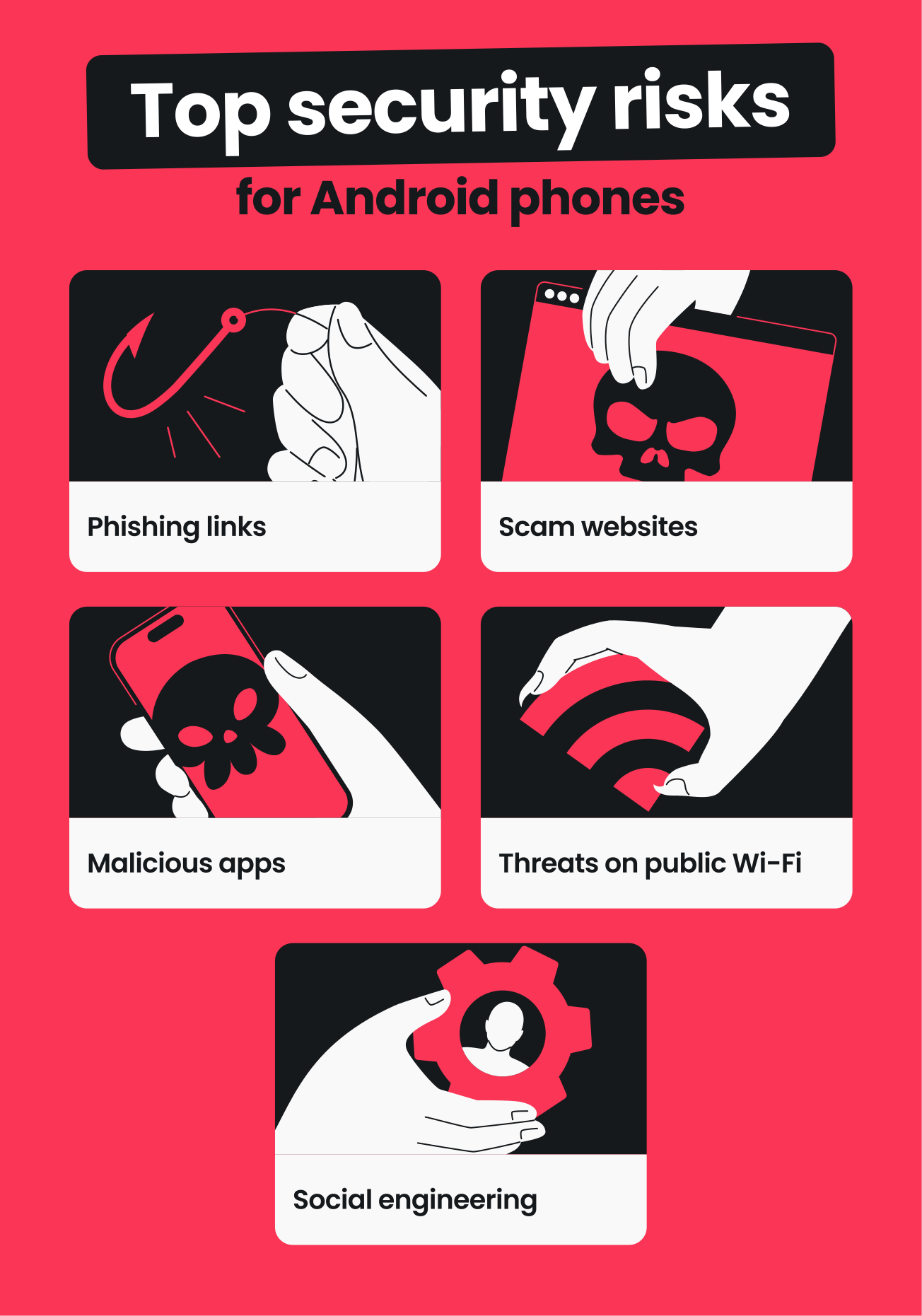
- Phishing links: fraudulent emails, texts, or direct messages can lead to fake login pages designed to steal your passwords, banking details, or verification codes. These messages often mimic trusted sources or create urgency to pressure you into acting quickly;
- Scam websites: fake sites can take the form of copycat online stores, payment platforms, support pages, or more. These look legitimate but really exist to collect payment details, personal information, or upfront fees — with no real products or services behind them;
- Malicious or deceptive apps: many apps look safe but hide some kind of malicious activity under the surface. In fact, a 2025 study found over 200 malicious apps were hosted on Google Play, resulting in more than 40M malware downloads. Many of these asked for unnecessary permissions or served as data-harvesting tools;
- Public Wi-Fi risks: when you’re on an open, unsecured internet connection, attackers may try to push you to fake portals or intercept traffic that’s transmitted to and from your mobile device;
- Social engineering: scammers can try to trick mobile users with persuasive messages that pressure you to install apps, pay bogus fees, or share sensitive data.
When you probably don’t need an Android phone antivirus
There’s a good chance you don’t need an Android antivirus app if you:
- Review permissions for new apps;
- Regularly update your apps and operating system;
- Only download apps from the official Google Play Store or verified developers;
- Avoid opening suspicious links or attachments sent via email, SMS, or social media DMs;
- Use your phone mostly for basic tasks (calls, messages, social media, streaming, and GPS navigation).
If the above points describe you, there’s a good chance Android’s built-in security measures are enough to keep you safe for day-to-day use.
When an antivirus for your Android phone makes sense
The added malware protection of an antivirus app can help protect your Android when you:
- Frequently use public Wi-Fi networks at places like cafés, airports, and hotels;
- Want to block risky websites and have extra defense against phishing;
- Use your phone to handle sensitive data, like mobile banking accounts, work emails, or private files;
- Install or sideload apps from unverified third-party stores outside Google Play;
- Share your device with family members or less tech-savvy users who might tap Allow or install new apps without checking;
- Notice warning signs like unusual battery drain, slow performance, pop-ups, or apps requesting unnecessary permissions.
Examples: do you need an antivirus on your Android phone?
If you aren’t sure if antivirus protection is the best choice for you, use these example personas as a guide:
|
Persona
|
Description
|
Verdict
|
|
The cautious, casual user
|
I only install apps from Google Play and update them often. I’m careful with the links I open and rarely use public Wi-Fi.
|
You probably don’t need antivirus software.
|
|
The plugged-in power user
|
I travel a lot and frequently connect to open Wi-Fi networks. I use my phone for work tasks, online banking, and handling sensitive data.
|
An antivirus is a good idea, giving you valuable malware protection and peace of mind.
|
|
The connected, click-happy user
|
I like testing new tools and often install apps outside the Google Play Store. I share my phone with my children, and I’m not confident reviewing permissions for every single download.
|
An antivirus is a good idea for scanning apps, checking for suspicious downloads, and providing an extra layer of defense against malware.
|
What an Android phone antivirus can and can’t protect you from
An antivirus on your Android phone can provide security in various situations, but it can’t guarantee total protection (no tool can). Here’s a breakdown of what antivirus software can do and its main limitations:
An antivirus on your Android does the following:
- Blocks risky or malicious websites to reduce your exposure to phishing attempts;
- Alerts you to suspicious behavior from apps that you downloaded recently;
- Runs scheduled system scans to catch malicious software on your device;
- Scans and detects malware in real time on new apps and updates.
In contrast, antivirus programs for Android don’t:
- Stop every scam or social engineering trick;
- Patch security vulnerabilities in outdated software;
- Prevent risky user habits, such as tapping unknown links, granting broad permissions, or ignoring updates.
For antivirus software to be truly effective, it’s vital to practice safe, common-sense habits when using your Android.
Protecting your Android phone: where Surfshark Antivirus fits in
If you decide you need an antivirus for your Android phone, Surfshark Antivirus is an excellent option.
Designed to work quietly in the background, Antivirus scans apps and helps block malicious sites without getting in your way. It can detect, quarantine, and delete threats from both installed Android apps and installation files (APKs) to bring extra peace of mind, especially if you frequently download apps, connect to public networks, or log in to sensitive accounts.
Antivirus can protect against malware types as diverse as adware, spyware, and PUAs (Potentially Unwanted Applications), providing you with an additional layer of antivirus protection — minus the heavy configuration.
Surfshark Antivirus is also part of a broader cybersecurity suite that adds protection beyond what a standalone antivirus can offer. Surfshark’s bundles include tools like a VPN (Virtual Private Network) and a data leak monitor to enhance the safety of your data, devices, and online activity.
10 steps: how to stay safe on Android (with or without an antivirus)
Whether you feel you need antivirus software or not, you can enjoy greater security on your Android phone with these simple steps:
- Use secure Wi-Fi networks.
- Avoid sensitive logins on public Wi-Fi.
- Keep your apps and operating system up to date.
- Don’t tap suspicious links in emails, texts, or DMs.
- Use a trusted VPN for Android whenever connected to the internet.
- Review permissions before installing or updating any apps.
- Back up important data so a malware infection or device loss doesn’t lead to data theft.
- Activate Google Play Protect and only install apps from the Play Store or trusted developers.
- Use a strong screen lock (PIN, password, fingerprint, or face unlock) and enable automatic locking.
- Watch out for red flags like unexpected pop-ups, unusual data usage, slow performance, and new apps requesting admin rights.
Key takeaway: is an antivirus right for you?
Android devices are relatively secure for many users, so whether you need a third-party antivirus depends on what you do with your phone.
If you’re handling sensitive data, making frequent downloads, or browsing on riskier sites or networks, Android antivirus software can be worth it.
If this extra reassurance sounds right for you, consider trying Surfshark Antivirus — available in the Surfshark One bundle — as an effective yet user-friendly layer on top of your Android’s security features.
FAQ
How do I check my Android for viruses?
You can check your Android for viruses and malware by reviewing recently installed apps, checking app permissions, and looking for unusual battery drain or data usage. You can also run a scan with Google Play Protect in your security settings.
If you use an antivirus app like Surfshark Antivirus, run an antivirus scan to check for malicious apps or other malware as well.
Does my Android have built-in virus protection?
Yes, Android devices include Google Play Protect, app sandboxing, and a permissions system to protect you from malware. You can enjoy greater security by downloading apps only from the Google Play Store and keeping them up to date.
Do Android phones get viruses easily?
No, Android phones typically don’t get viruses and malware. Android’s operating system and built-in security measures reduce the spread of traditional viruses. Rather than classic self-replicating malware, risks often come from phishing attempts, malicious apps from untrusted sources, and social engineering.
What’s the best antivirus for Android?
The best antivirus for Android depends on your needs, and every user can have a different experience. Look for security software with features such as malware scanning, real-time monitoring, and anti-phishing protection.
If you want a lightweight program that’s integrated with a broader security setup, Surfshark Antivirus is a solid option.
Do I need an antivirus on my iPhone?
Many iPhone users don’t need an antivirus app, as iOS is a restrictive operating system with strict app review and sandboxing. Nevertheless, safe habits, regular app updates, caution with opening links, and antivirus software are all smart choices that can improve your iPhone security.