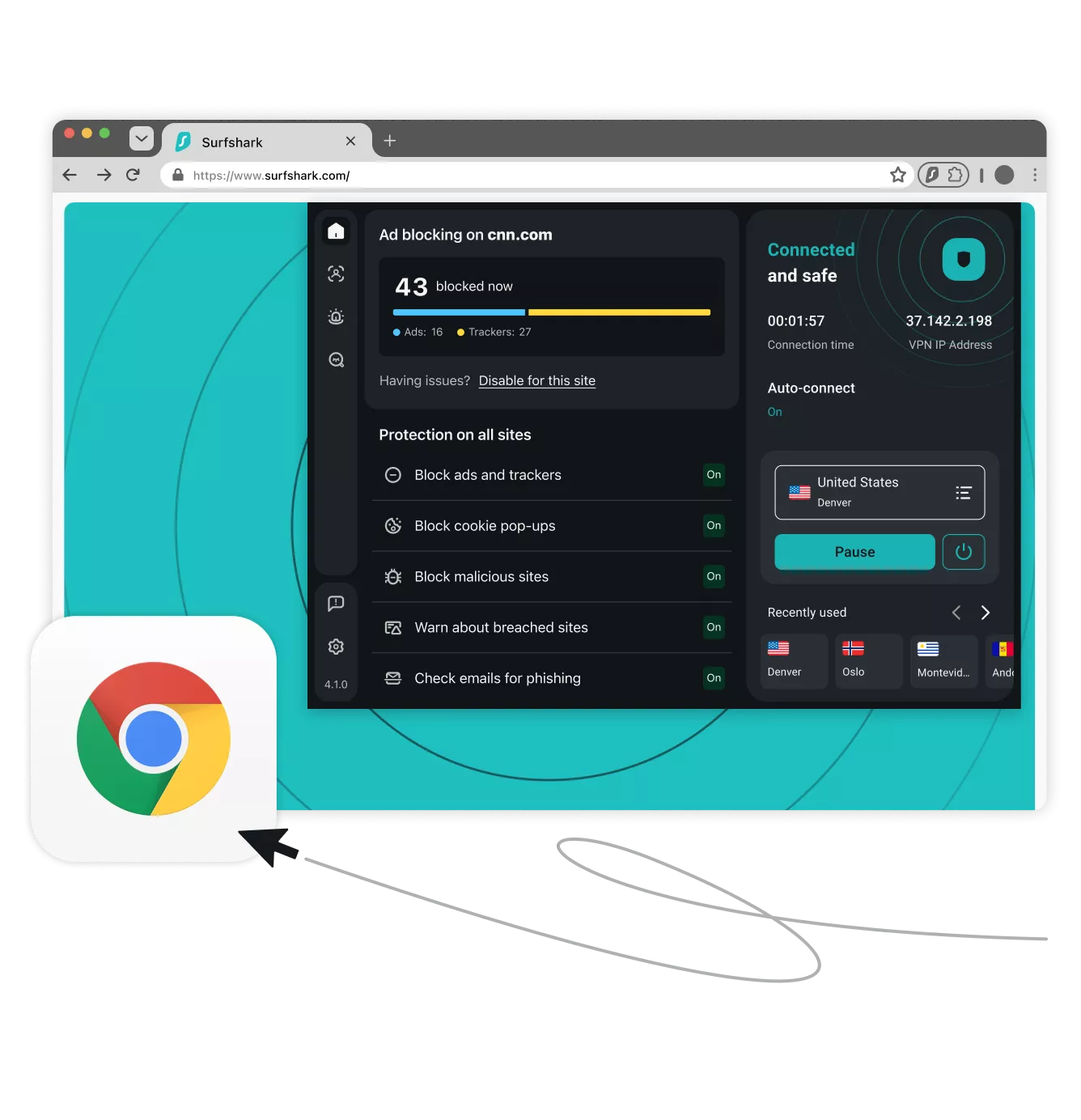
A Surfshark Chrome extension trial gives you a package of essential privacy tools right in your browser:
Get a Surfshark VPN free trial for Chrome
Try Surfshark in your Chrome browser for free. Get full access to all VPN features on up to three devices during the free trial period — and upgrade to unlimited connections once you’re ready to make a commitment.
Pay $0.00 now and start your 7-day Surfshark free trial.
- Hide your IP and browse privately
- Secure your Chrome browsing with top-grade encryption
- Block ads and trackers while you browse
Why choose Surfshark’s Chrome VPN extension free trial?
Proven privacy
Surfshark’s independently verified no-logs policy ensures your online activities remain truly private. Shielding your online traffic on Windows helps prevent hackers, ISPs, and advertisers from tracking and harvesting your data.
Worry-free safety
The kill switch instantly severs your internet connection if the VPN drops, while Everlink ensures an uninterrupted VPN connection. These features help you prevent unencrypted data leaks while browsing on your PC.
Ad and malware blocker
Unlike many browser-based ad blockers, Surfshark’s Clean Web provides protection across your entire Windows PC. It blocks ads, trackers, and malicious sites, cleaning up your browsing experience and securing your desktop apps.
Customizable access
Certain apps and websites require a local IP address to function correctly. With Surfshark’s Bypasser split-tunneling tool, you can set specific traffic to bypass the VPN, allowing you to stream or browse locally while keeping the rest of your connection encrypted and secure.
Double security
You can add an extra layer of security to your Windows with Multi Hop — the double VPN feature that routes traffic through two servers simultaneously. If you’d like to make your VPN connection much more difficult to identify, you can do so with our obfuscated servers when using the OpenVPN protocol.
Multiple device protection
During your trial, you can secure your Windows PC and two other devices simultaneously. Once you subscribe, you’ll unlock unlimited simultaneous connections for your entire household. To start, simply create a Surfshark account, download the Windows app, and enjoy more safety and privacy online.
Start your Chrome VPN free trial in 3 simple steps
Get started with Surfshark’s free trial — it’s fast and easy:
1. See if you qualify
Pick the Surfshark plan that works best for your needs. Then, enter your email and payment details to confirm you’re a first-time user.
2. Create an account
Enter your details and set up your account. The free trial allows you to activate VPN protection on three separate devices.
3. Download Surfshark
You’re all set! Simply download and install the Surfshark Chrome extension, open it, and connect to one of the VPN servers.
The complete suite for digital privacy:
Surfshark One+
Enjoy overall protection online and offline with our suite for next-level privacy and security, Surfshark One+.
Secure your connection
Surfshark VPN encrypts your internet traffic and masks your IP address to offer 24/7 online security. With 4,500+ servers in 100 countries, Surfshark delivers enhanced protection and faster speeds across unlimited devices.
Keep your details private
Surfshark’s personal data masking provides you with an alternative email address for online use. You can sign up for websites and mailing lists without worrying about spam emails or giving away your sensitive data.
Protect your devices
Surfshark Antivirus shields your device from malware and infected files. It scans downloads and attachments before they’re opened, blocks unauthorized apps from accessing your camera, and protects you without disruptions.
Get data leak alerts
Surfshark’s data leak monitoring notifies you whenever your personal information is leaked online. You’re alerted if your email address, passwords, or ID numbers ever pop up in breached databases, letting you spring into action without delay.
Reclaim your privacy
Incogni works around the clock to stop 420+ data brokers from profiling you. From risk-mitigation and recruitment sites to financial, marketing, and people-search databases — Incogni monitors them all to make sure your data stays gone.
Compare Surfshark plans
Starter
Comes with a VPN & Alternative ID — essentials for your daily browsing.
From
/mo.
- VPN: surf safely online
- Alt ID: protect your identity
- Clean Web: block ads & pop-ups
- Antivirus: armor your devices
- Alert: monitor data breaches
- Search: browse privately
- Identity theft coverage: up to $1M
- Incogni: reclaim your data
We had an issue loading prices
We’re having a technical issue with fetching our prices. Try refreshing this page in a few minutes.
One
Perfect if you seek all-round security for your browsing, devices, and identity.
From
/mo.
- VPN: surf safely online
- Alt ID: protect your identity
- Clean Web: block ads & pop-ups
- Antivirus: armor your devices
- Alert: monitor data breaches
- Search: browse privately
- Identity theft coverage: up to $1M
- Incogni: reclaim your data
We had an issue loading prices
We’re having a technical issue with fetching our prices. Try refreshing this page in a few minutes.
One+
Keeps your online activities & devices safe, with extra focus on identity protection.
From
/mo.
- VPN: surf safely online
- Alt ID: protect your identity
- Clean Web: block ads & pop-ups
- Antivirus: armor your devices
- Alert: monitor data breaches
- Search: browse privately
- Identity theft coverage: up to $1M
- Incogni: reclaim your data
We had an issue loading prices
We’re having a technical issue with fetching our prices. Try refreshing this page in a few minutes.
Surfshark vs. free Chrome VPN extensions
Plenty of “free” Chrome VPN extensions exist in the Chrome Web Store. The catch is that these free providers usually don’t match Surfshark in speed, security, and overall service quality.
Surfshark VPN free trial vs. free VPNs
Many free VPN apps for Windows carry significant risks or performance limitations. That’s why a Windows VPN trial by a reputable, trusted provider like Surfshark typically outperforms free alternatives by delivering high-speed, secure, and unrestricted service.
|
Surfshark
|
Free VPNs
|
|
Fast speeds and unlimited bandwidth
|
Often have slow speeds and data caps
|
|
Strong encryption of internet traffic
|
Usually have weak encryption
|
|
4,500+ VPN servers in 100 countries
|
Typically have a small server network
|
|
Independently verified no-logs policy
|
Can log or sell user data
|
|
Unlimited simultaneous connections
|
Often restricted to one connection
|
|
Easy-to-use apps for all major devices and platforms
|
Apps typically limited to computers
|
For quality performance and better Chrome privacy, choose Surfshark’s risk-free VPN trial.
See why millions trust Surfshark
Check out what users and tech experts around the world have to say about Surfshark.

Teshir Jennifer
@memesfordigital
All the VPNs you mentioned are good. But Surfshark is the one I recommend in person for the best overall.
1:08 PM · Jul 28, 2024

Morgan Leggett
@YouBettaLeggett
I’ve had SurfShark for years. It’s amazing.
12:28 AM · Aug 14, 2024

Eakan
@eakangk
Trialling out @surfshark’s IP rotation. It is doing it pretty well. Seamless in the background.
3:20 PM · Oct 26, 2024
The reviews highlighted in this section were selected from publicly available posts on social media platforms. They reflect the opinions of individual users at the time of posting and may not represent the full range of our product features and qualities.
The reviews quoted on this page have been published by media outlets associated with Surfshark through affiliate partnerships. Their recommendations are based on their own independent research and insights to ensure value for the readers.
I have been using Surfshark since I got it and I love it!

MRWHOSETHEBOSS
20.2M subscribers
When I am traveling, I use Surfshark to access the internet quickly and securely, works like a treat in China.

SAM CHUI
3.61M subscribers
We love Surfshark because it is an easy-to-use app that you can download on all your devices.

MAX & OCCY
265K subscribers
The reviews quoted on this page have been published by media outlets associated with Surfshark through affiliate partnerships. Their recommendations are based on their own independent research and insights to ensure value for the readers.
“This is my first year and I absolutely love it. The fact I can have a good antivirus, great VPN, and incognito for like $120 a year is great.”
“I’ve been using Surfshark for 4 years on Android and ChromeOS with zero issues, it’s an absolute bargain”
“I’ve had it for 3 years and just renewed it for the next 2 years. I never have any issues with it and get my full internet speed..”
The reviews highlighted in this section were selected from publicly available posts on social media platforms. They reflect the opinions of individual users at the time of posting and may not represent the full range of our product features and qualities.