
You may have heard about a VPN (Virtual Private Network) passthrough while searching for a VPN. If you still don’t know what it is, you’ve stumbled upon an article that will explain everything you need to know about it. Read ahead to find out what a VPN passthrough is, how it’s tied to router functionality, and how to enable it if needed.
What is a VPN passthrough?
A VPN passthrough is a router feature that allows VPN traffic to pass through your router’s NAT (Network Address Translation) using different VPN protocols, such as PPTP, L2TP, and IPSec.
Nearly all modern routers come with built-in VPN passthrough functionality, which is typically enabled by default. If needed, you can activate or deactivate passthrough for different protocols in your router settings.
A VPN passthrough is sometimes mistaken for having a VPN set up on a router, but the two serve different purposes:
- A VPN router encrypts and protects data on all devices connected to its network;
- A VPN passthrough simply allows VPN traffic to pass through the router.
How does a VPN passthrough work?
A VPN passthrough provides a solution for when a VPN and a router don’t work together. Typically, a VPN connection travels from your device through your router to the World Wide Web and then connects to a VPN server.
However, some VPN protocols don’t provide the router’s NAT system enough information, making a VPN connection impossible.
That’s where a VPN passthrough becomes necessary. It isn’t a single thing, but a set of workarounds that enable older tunneling protocols — like PPTP, IPSec, and L2TP — to work properly with the router.
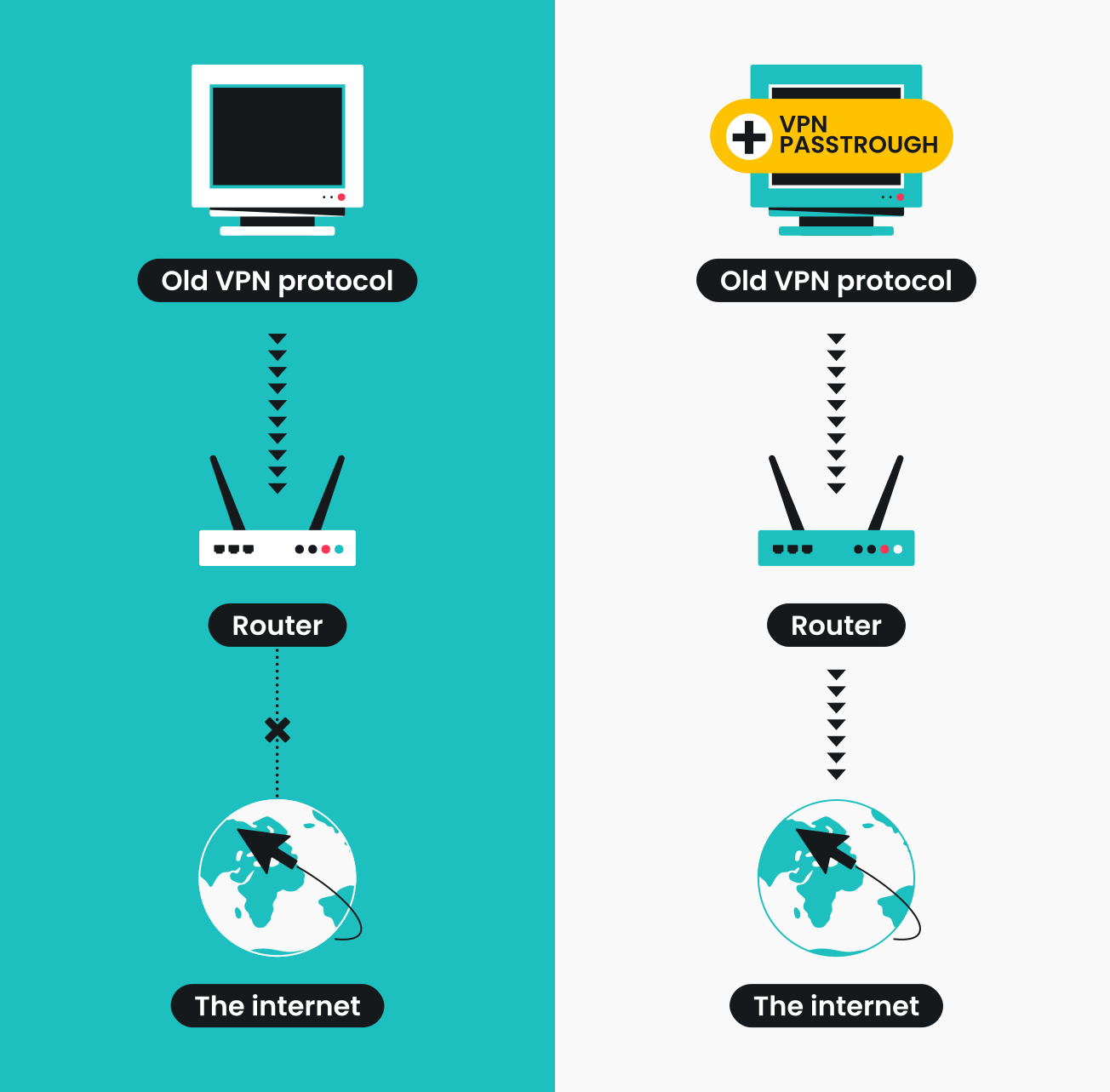
However, Surfshark VPN doesn’t rely on these outdated protocols, as they no longer meet modern security standards. Instead, the app utilizes more advanced and secure protocols like WireGuard, OpenVPN, and IKEv2, all fully compatible with NAT.
Types of VPN passthroughs
The term VPN passthrough is actually used as an umbrella term, covering PPTP, L2TP, and IPSec passthroughs:
- PPTP passthrough. PPTP (Point-to-Point Tunneling Protocol) passthrough replaces GRE — a tunneling protocol used by PPTP — with an enhanced version of GRE to make it compatible with the router;
- L2TP passthrough. L2TP (Layer 2 Tunneling Protocol) passthrough allows L2TP traffic to traverse the router’s NAT by handling UDP ports properly, ensuring that the VPN tunnel can be established and maintained;
- IPSec passthrough. IPSec (Internet Protocol Security) passthrough utilizes a NAT-T (Network Address Translation-Traversal) technique to work with modern routers.
Do you need a VPN passthrough?
Likely, you won’t ever need to worry about a VPN passthrough. Here’s why:
- Modern routers already support passthroughs. Most routers sold today come with a VPN passthrough enabled by default. Unless you’re using very old hardware, you should be good to go.
- Only outdated protocols need it. Protocols like PPTP, L2TP, and IPSec are older technologies. More modern options, such as OpenVPN and IKEv2, can handle NAT on their own without any special configuration.
- Quality VPNs use modern protocols. For instance, Surfshark doesn’t even use PPTP or L2TP, because they don’t meet today’s security standards. Instead, it runs on Wireguard, OpenVPN, or IKEv2 — all of which work seamlessly with routers.
- It only matters for older computers. Even OpenVPN supports operating systems as old as Windows XP. So, unless you’re running something like Windows 98 to keep a vintage industrial machine alive, you probably don’t need to think about VPN passthrough at all.
A VPN passthrough: where does it come from?
A VPN passthrough exists because older internet technologies don’t always work well together. Mainly, it’s because IPv4 came with certain limitations that led to the creation of NAT. Both IPv4 and NAT are still widely used today.
IPv4 is the fourth version of the Internet Protocol (IP), a set of communication rules that allow computers to exchange information over a network, essentially making the internet possible. For a device to have a presence on the internet, it needs a unique IP address — otherwise, there’s no way for data to know where to go.
IP address exhaustion
Here’s the problem: IPv4 uses a 32-bit address space, meaning it can only support about 4.3 billion IP addresses. That might sound like a lot, but even back in 1983, people realized it wouldn’t be enough. Indeed, the central authority, IANA, officially ran out of IPv4 addresses in 2011.
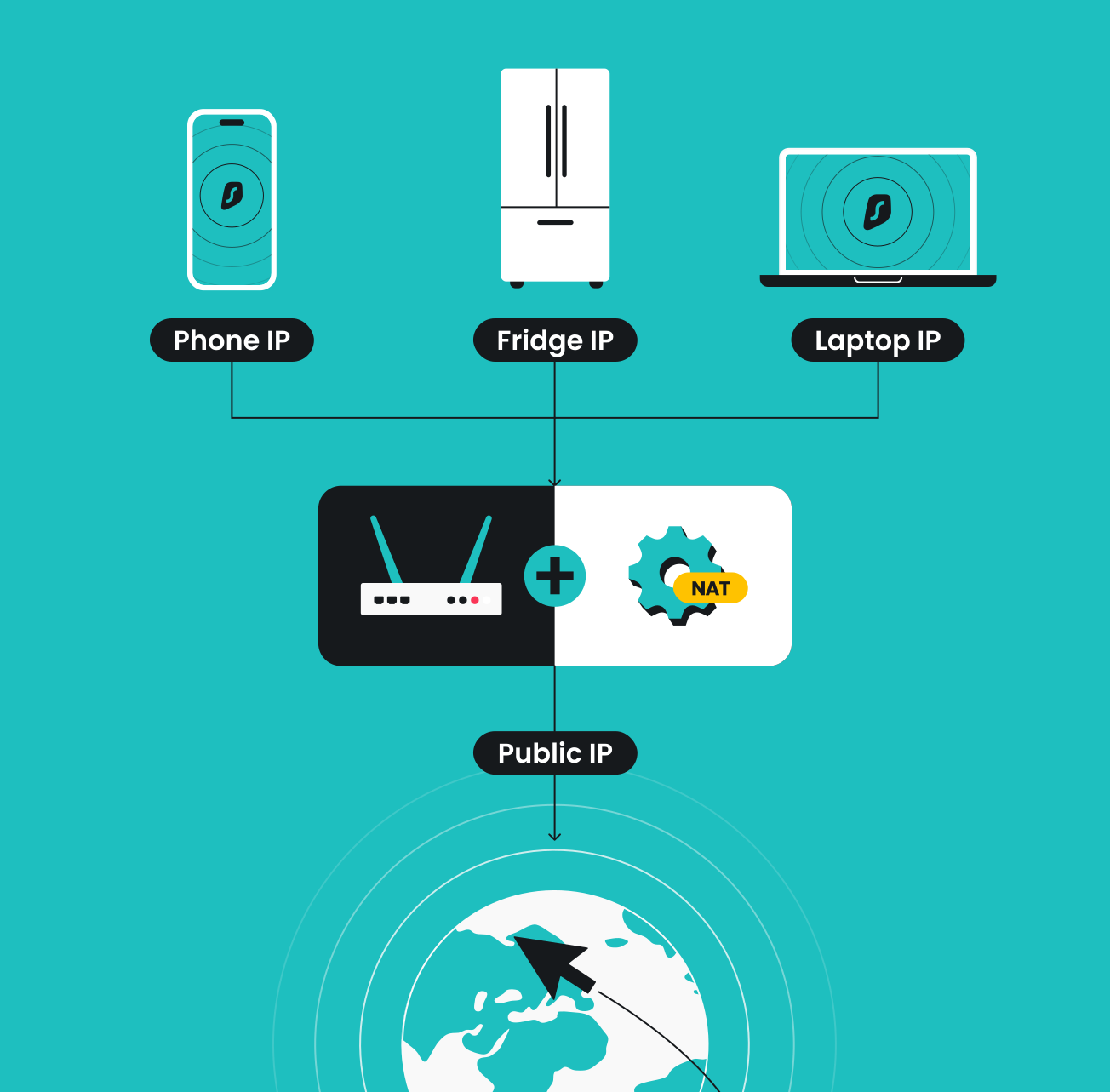
And that’s why NAT was created. Instead of assigning a unique IP address to every device — computers, smartphones, baby cameras, etc. — NAT gives just one public IP to your router. Your devices then get private IPs, which only work within your local network. NAT manages these private and public addresses.
The NAT solution
Think of Network Address Translation as a mailroom inside your router.
It collects data packets from connected devices, notes which private IP sent what, replaces it with the router’s public IP, and forwards it to the internet. When replies come back, NAT sorts them out and delivers each one to the correct device. This clever system prevents address exhaustion — even when every person owns multiple gadgets.
But here’s where things get tricky for VPNs. VPN tunneling protocols are essential when creating a private network that operates over a public one. They wrap and encrypt data to make it private. However, that encryption hides the information NAT needs to forward packets correctly. As a result, the router doesn’t know what to do with the traffic, and the VPN connection fails.
That’s where a VPN passthrough comes in: it acts as a technical workaround that allows older VPN tunneling protocols to traverse NAT without breaking the connection.
How to enable a VPN passthrough
If you need a VPN passthrough on your router, there’s a good chance it’s already supported — most modern routers come with this feature built in. So, you may just need to turn it on. You can do it manually through your router’s settings interface.
Here’s how it looks on a TP-Link Archer 7 router:
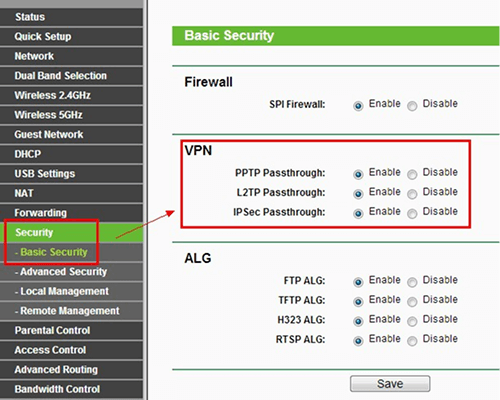
Keep in mind that every router brand has a different interface, so if you can’t find the option right away, check the manufacturer’s website or your router’s manual for specific instructions.
In conclusion: VPN passthroughs — a thing of the past
A VPN passthrough is a feature that was once necessary, as older protocols couldn’t work properly with NAT — the system in your router that resolves data traffic. Today, if not already completely obsolete, it’s becoming less and less relevant, as those protocols are no longer the industry standard. Modern VPNs — like Surfshark — use newer, more secure protocols that are fully compatible with NAT, eliminating the need for a passthrough altogether.
Why not give it a try and see how seamless a modern VPN connection can be?

Get a VPN that doesn’t need any passthroughs
Safe and smooth connection for instantaneous protection
Get SurfsharkFAQ
Should a VPN passthrough be enabled?
Usually no, unless you’re using older VPN protocols like PPTP and L2TP and old routers. You really shouldn’t be using those anymore. Modern VPNs and routers don’t require a passthrough.
What is a VPN passthrough for IPSec?
Older routers and basic IPSec don’t always work well together. A VPN passthrough helps them communicate properly so the connection can be established.
How do I turn on a VPN passthrough?
Modern routers allow you to enable a VPN passthrough via the router settings menu. You can access it by entering your router’s IP address into your web browser.
Should I enable L2TP passthrough?
Only if you really have to — for example, if you’re using a very old router or can’t switch to a newer VPN protocol. L2TP is considered outdated and less secure.
What’s the difference between a VPN passthrough and a VPN router?
They’re completely different. A VPN passthrough simply lets VPN traffic pass through a router, while a VPN router actually has a VPN installed on it, protecting all devices connected to its network.