
IP (Internet Protocol) addresses are unique numbers that identify every device connected to a network. There are several different types of IP addresses, each serving a specific purpose. If you want to learn more, read along as I go into specifics of types, categories, and everything else IP-related.
What is an IP address?
In essence, an IP address is like a digital home address for your device, serving two main purposes: location and communication. It enables devices connected to the same network to locate and communicate with one another.
Similar to how your home address identifies the specific location where you live (country, city, street, etc.), an IP address identifies your device within the network it’s connected to.
And just as you need home addresses to send and receive mail and deliveries, IP addresses allow devices to send and receive data. By differentiating the devices connected to the network, IP addresses allow data packets to be routed to the correct device.
IP address structure: IPv4 vs. IPv6
The structure of an IP address is defined by the Internet Protocol version — IPv4 or IPv6.
IPv4
IPv4 (Internet Protocol version 4) is still the most widely used format.
An IPv4 address is a 32-bit number. A human-readable representation of this consists of four 8-bit groups, separated by dots. Each of the four groups contains a number between 0 and 255.
Example address: 104.124.145.85
For effective address allocation and management, IPv4 addresses are divided into five classes:
|
Class
|
Range
|
Use case
|
|
A
|
0.0.0.0 to 127.255.255.255
|
Large networks
|
|
B
|
128.0.0.0 to 191.255.255.255
|
Medium to large networks
|
|
C
|
192.0.0.0 to 223.255.255.255
|
Small local area networks
|
|
D
|
224.0.0.0 to 239.255.255.255
|
Multicasting
|
|
E
|
240.0.0.0 to 255.255.255.255
|
Experimental/research
|
With this structure, IPv4 provides approximately 4.3 billion unique IP addresses. And while IPv4 still routes the majority of internet traffic today, due to the growth of the internet, this pool has already been exhausted.
IPv6
IPv6 (Internet Protocol version 6), standardized in 1998, was developed to replace IPv4 and solve the address exhaustion problem.
An IPv6 address is 128 bits long. Its human-readable representation consists of eight groups of four hexadecimal digits separated by colons.
Example address: 2001:0db8:0000:0000:0000:8a2e:0370:7334
This allows for the creation of 2128 unique IP addresses — that’s 340 undecillion, or 340 followed by 36 more numbers… if that helps? — about 1029 times more than IPv4.
Types of IP addresses
Besides the IP version, IP addresses are categorized into two types based on their function: private and public.

Private IP address
Private IP addresses are used within a local network, such as your home, office, or enterprise LAN (Local Area Network), and allow secure communication between devices without using the public internet:
- Private IPs cannot be used to access the internet directly;
- Devices outside the local network cannot directly reach private IPs.
This setup reduces external internet threats. However, private IPs still rely on network defenses such as firewalls, NAT (Network Address Translation), and VPNs (Virtual Private Networks) for full protection.
Defined by the IANA (Internet Assigned Numbers Authority), private IP addresses are:
- Class A: 10.0.0.0 to 10.255.255.255;
- Class B: 172.16.0.0 to 172.31.255.255;
- Class C: 192.168.0.0 to 192.168.255.255.
Public IP address
Public IP addresses are the foundation of online communication — they provide global identification for devices like computers, routers, and servers, allowing them to communicate directly over the internet:
- Public IPs are assigned by your ISP (Internet Service Provider);
- All devices you connect to the same network through your router share the same public IP address when accessing the internet;
- Public IPs are necessary for online communication, such as browsing the web, streaming, or accessing online services;
- They can reveal general geographic and network information (e.g., city, country, or ISP).
Tip: If you want to see what info your public IP address reveals, check out our free IP lookup tool.
Public IP types: static vs. dynamic
Now, let’s take a closer look at public IP addresses. They fall into two categories based on their distribution to users: static IPs and dynamic IPs.
Both static and dynamic IP addresses serve the same purpose: to identify your device on the network. However, they differ in how they’re assigned, maintained, and used.
Dynamic IP address
A dynamic IP address is a temporary, automatically assigned IP address that can change from time to time. Most ISPs provide dynamic IPs to their non-business clients.
Here’s how it works:
- Your ISP has a pool of IP addresses and assigns them to its customers as needed;
- You may receive a different IP address each time you connect to the internet, reboot your router, or as part of routine maintenance.
Static IP address
Opposite to dynamic IPs, a static IP address is a fixed IP address assigned by an ISP to a household or a data center server that never changes.
Static IPs are commonly used for tasks that require a consistent IP address, such as hosting websites or remote access to networks and devices. We have an article on how to use a static IP address, if you’d like to learn more.
Typically, ISPs provide static IP addresses with their business packages, but residential users might be able to get one at an additional cost.
Here’s how it works:
- Your ISP assigns an IP address as part of your business-tier plan or upon your request;
- Once set by your ISP, a static IP address remains the same every time you connect, after each reboot — often for years.
Tip: If you don’t want to deal with your ISP, you can get Surfshark’s dedicated IP — a static IP that’s uniquely yours for as long as you’re subscribed. And you get all the security and privacy benefits of a VPN, too.
Other IP address types
IP addresses can also be categorized into special-purpose and communication-type IP addresses.
Special-purpose IP addresses
- Localhost/loopback.
Loopback IP addresses, ranging from 127.0.0.0 to 127.255.255.255, are used for software testing, diagnostics, and verifying that a device’s network stack is functioning properly. This type of IP routes outgoing IP packets back to the same device, allowing developers and system administrators to test network functionality locally without sending traffic to the internet. - Default gateway IP.
A default gateway IP address is typically your router’s IP address. It’s the IP that connects your local network to the internet — when a device in your network needs to reach an external site or service, it first sends the request to the default gateway, which then forwards the data to the appropriate destination.
Communication-type IP addresses
- Unicast IP address.
A unicast IP address identifies a single unique device on a network, used in one-to-one communication (from one sender to one specific receiver). It is the most common form of data transmission on the internet, used in everyday activities like browsing websites, emailing, and file downloads. - Multicast IP address.
Multicast IP addresses (ranging from 224.0.0.0 to 239.255.255.255) allow the simultaneous sending of the same data to multiple devices within a defined group. This one-to-many communication helps reduce network traffic and is perfect for online gaming, live video streaming, and other real-time applications, where many users receive the same content at the same time. - Broadcast IP address.
Broadcast IP addresses are used to send data to all devices on a local network at once. Typically, this one-to-all communication is used for network management, such as device discovery (e.g., finding printers or other connected devices) or sending configuration updates. - Anycast IP address.
An anycast IP address is shared by multiple devices or servers, but data is routed to the nearest one based on network routing. CDNs (Content Delivery Networks) and DNS (Domain Name System) servers commonly use this one-to-nearest communication to improve speed, reliability, and load distribution.
Subnetting and CIDR
Subnetting
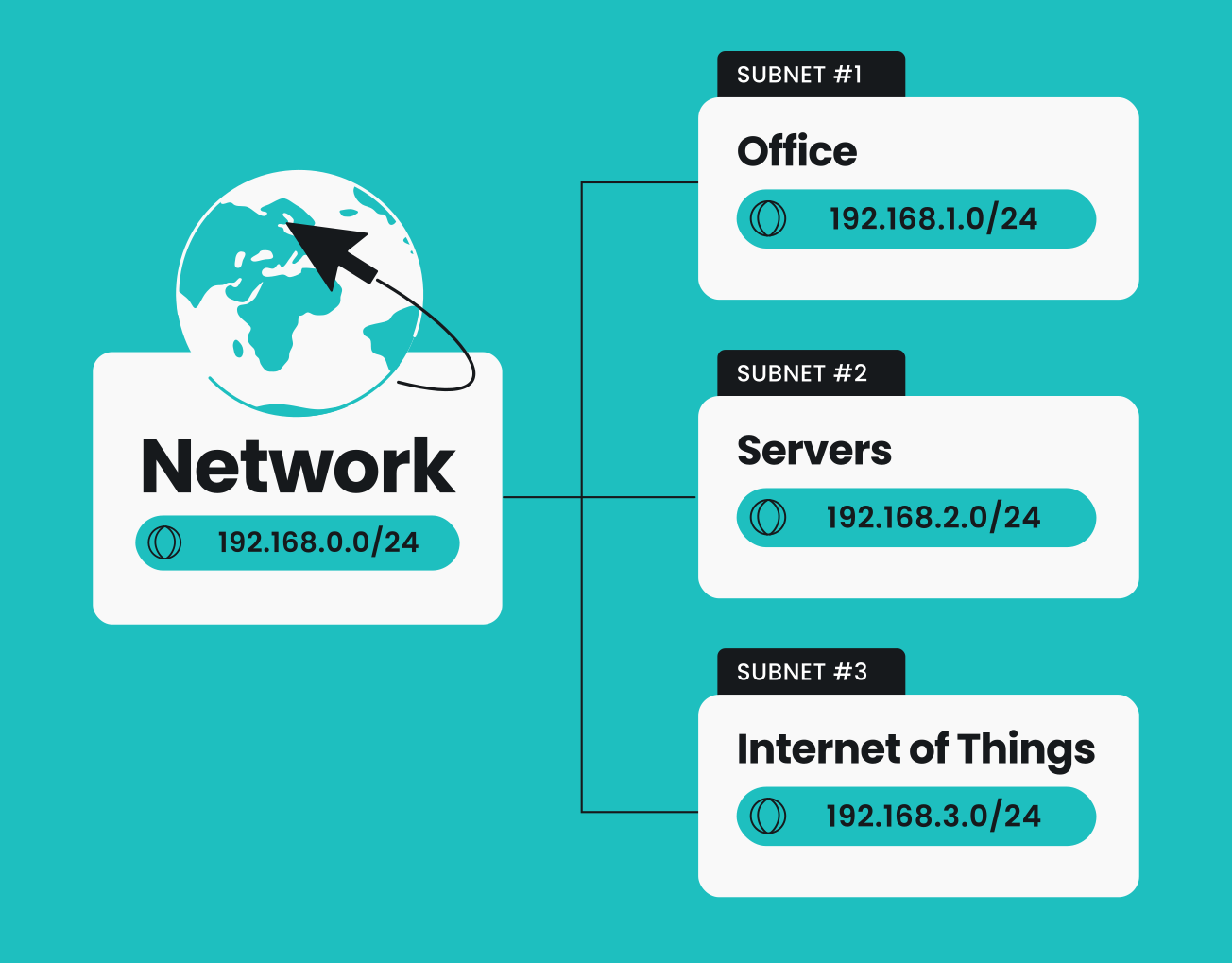
Subnetting is the process of dividing a larger network into smaller, more manageable subnetworks (subnets):
- Allows network administrators to control how traffic flows between groups of devices;
- Helps with efficient IP address allocation;
- Improves security by keeping different parts of a network isolated from one another, protecting sensitive areas of the network from unauthorized access.
Classless Inter-Domain Routing
CIDR (Classless Inter-Domain Routing) is an IP address allocation method that replaced the traditional class-based system, overcoming its limitations. It allows networks to use IP address space efficiently through variable-length subnet masks (VLSM) — meaning that the network portion of an IP address can vary in length.
The main advantages of CIDR include:
- Improved use of available IP addresses (no wasted space);
- Flexible network design and custom subnet sizes;
- Quicker data transmission and routing efficiency.
What IP type do I get when I use a VPN?
To access the internet, your device needs a public IP address. But public IPs expose your location and online activity to websites, advertisers, and even cybercriminals. A VPN solves this by routing your internet traffic through a secure server that can be located anywhere in the world.
Once connected, your actual IP address is masked, and your device appears to use the IP address of the VPN server instead. This allows you to virtually change your location and makes it much harder for anyone to trace the IP address back to you, protecting your identity from websites, advertisers, and cybercriminals.
The exact type of IP address you receive when connected to a VPN varies depending on the VPN service:
Shared IP address
Most VPNs connect you dynamically to a random server in your chosen location. This means multiple users connected to the same server share the same IP address, making it harder to link any online activity back to a particular user. These IPs can change when you reconnect, as you may be connected to a different server the next time, which improves privacy and anonymity.
Some VPNs, including Surfshark, have shared static IP address options, too, which is useful for IP-sensitive services and activities.
On the other hand, one downside to sharing an IP address with strangers online is that malicious activity by just one of them could affect the others sharing that IP address.
Dedicated IP address
Some VPN services like Surfshark also offer a dedicated IP address — a single user is assigned a unique, private IP address that is not used by anyone else. This exclusive IP address is great for activities like online banking, accessing secure business networks, and avoiding human
verification prompts that shared IPs can trigger.
With a VPN’s dedicated IP address, you get the reliability of a consistent IP with the privacy and protection of a VPN connection. So, make sure to check out Surfshark’s dedicated IP.
How to check your IP address
Want to see your current IP address and location? It’s easy.
Use Surfshark’s IP address checker to instantly find out what your public IP looks like to the rest of the internet, including your country, city, and ISP.
Tip: When connected to a VPN, the IP shown by the checker should match your chosen VPN server location — not your real one.
Final thoughts: making the smart choice with IPs and VPNs
Your IP address is like your digital ID — it connects your device to the internet and tells the world where your connection comes from. Understanding how they work helps you make smarter choices about privacy, stability, and security.
Want more privacy? Use a VPN to hide your real IP. Want things to work automatically? Stick with a dynamic IP. Need consistency? Go with a static or dedicated IP. Whatever you choose, a VPN like Surfshark helps keep your connection safe, private, and fully in your control.

FAQ
What is the most common type of IP address?
The most common type of IP address is IPv4. Although IPv6 usage is increasing, IPv4 still makes up the majority of global internet traffic.
What is the best type of IP address?
The best type of IP address depends entirely on specific needs and requirements, as each type has its advantages and disadvantages. However, here are some suggestions:
- For everyday browsing, a VPN with a dynamic IP will hide your actual IP address, which is perfect for privacy and security;
- For hosting or remote access, a static or dedicated IP offers reliability and consistency.
How can I find my IP address?
You can check your IP in your device’s network settings. But the fastest way is to use an online tool like Surfshark’s free IP checker to instantly see your public IP address and location.