


• Get Surfshark
  1. Home
  2. Download
  3. VPN for Chromebook

VPN for Chromebook: secure your browsing

  • Protect your Chromebook with an encrypted connection
  • Browse securely on public Wi-Fi networks
  • Surf privately and without interruptions
Get Surfshark
30-day money-back guarantee
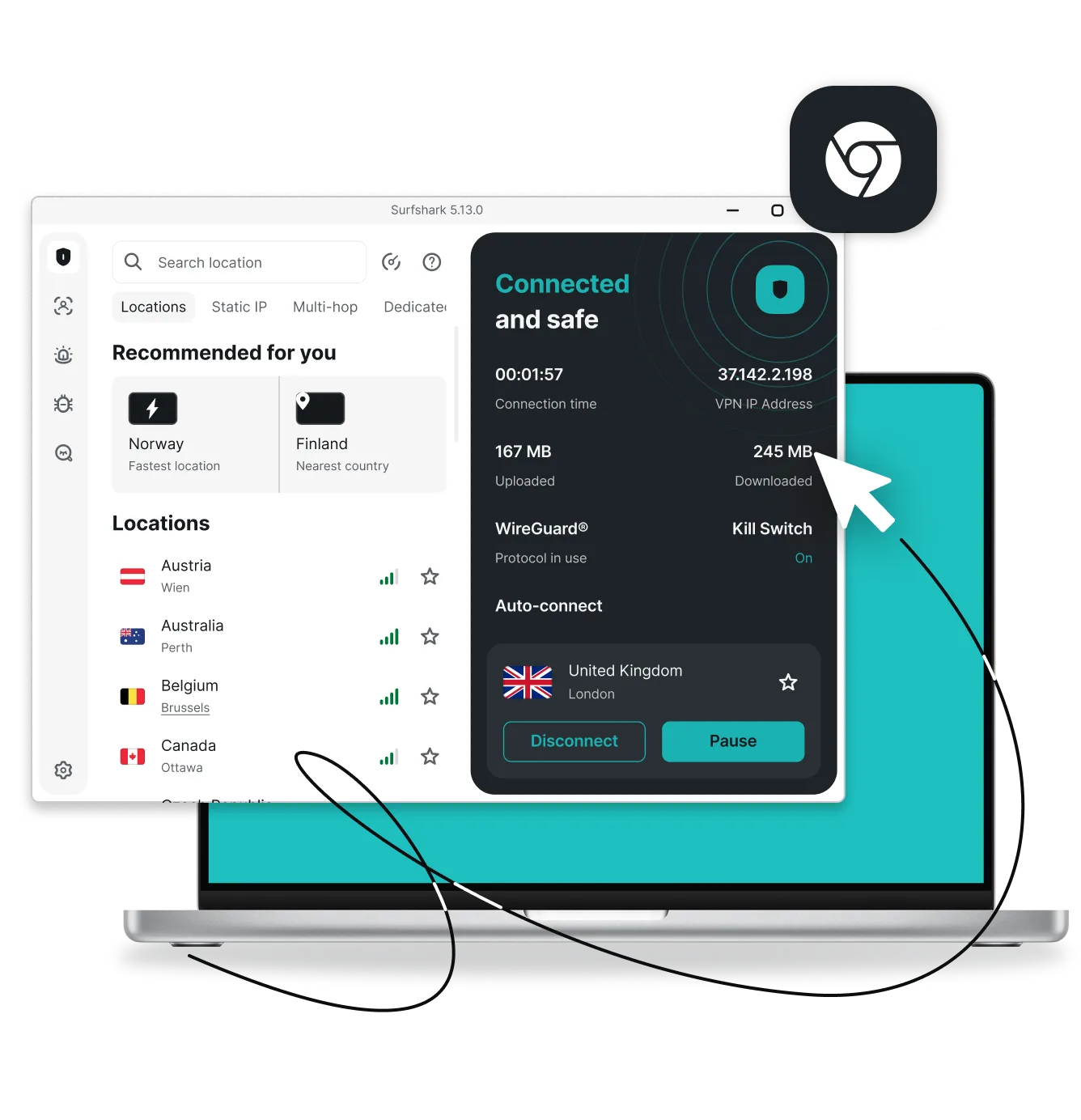
Surfshark VPN app on a laptop showing Connected and safe status, server locations, and Chrome icon
4.3 28K reviews
4.7 109K reviews
4.6 213K reviews

How to connect to a VPN app on your Chromebook

With a user-friendly VPN (Virtual Private Network) service like Surfshark, setting up your Chromebook VPN is hassle-free.

A VPN for all Chromebook devices

Surfshark VPN supports all Chromebooks that run Android apps, including ASUS, Acer, Dell, HP, Lenovo, Samsung, and more. To learn more, check out how to set up Surfshark VPN on a Chromebook.

Why choose Surfshark VPN for Chromebook?

Disclaimer: Please note that using Surfshark services for any illegal activities is strictly forbidden and violates our Terms of Service. Make sure that any use of Surfshark services for your particular activities conforms to all relevant laws and regulations, including those of any service providers and websites you access using Surfshark.

Independently verified Surfshark security:
third-party audits

These independent VPN security audits show that Surfshark’s security claims are backed by evidence. Deloitte provided two assurance reports (in 2023 and again in 2025) verifying that we don’t log user activity, while Cure53 confirmed the security of our server infrastructure. Rather than expecting our users to rely on promises alone, we’ve put our VPN security to the test with the industry’s most respected auditors.

No-logs policy assurance report (2025)

✓ No-activity-logs policy verified

✓ No IP address storage confirmed

✓ Privacy-relevant configuration settings checked

✓ Server infrastructure reviewed

Read the full Deloitte report

(Available only for Surfshark users)

Security assessment (2025)

✓ Web, desktop, and mobile app security validated

✓ Protection against data leaks and unauthorized access verified

✓ Zero critical vulnerabilities found

✓ Browser extension and account security confirmed

Read the full SecuRing report

Infrastructure security penetration test (2025)

✓ No critical vulnerabilities found

✓ No high-risk issues impacting user security identified

✓ Zero tested vulnerabilities leading to serious security threats

✓ Strong infrastructure protection against real-world attack scenarios

Read the full SecuRing report

Surfshark security features

Latest protocols

Choose between the most secure, industry-leading protocolsDausos, WireGuard, OpenVPN, and IKEv2 — to ensure your connection is always optimized for speed and safety.

Encryption

Safeguard your data with AES-256-GCM, ChaCha20 and AEGIS-256X2 encryption, the same standards used by cybersecurity experts and governments worldwide.

Post-quantum protection

Future-proof your security online with Surfshark’s advanced post-quantum implementation on WireGuard, designed to resist potential threats from future quantum computers.

No-logs policy

Your browsing habits are your business, which is why Surfshark never tracks, collects, or shares your activity. Our no-logs policy has been independently verified by Deloitte, ensuring total transparency.

Jurisdiction

Based in the Netherlands, Surfshark operates in a favorable legal environment with no mandatory data retention laws. This jurisdiction allows us to uphold our strict no-logs policy with no interference.

Obfuscation

Obfuscation hides your data and makes it much harder to identify that you’re using a VPN. This technology helps you browse freely even in places that highly restrict internet usage.

RAM-only servers

Surfshark’s entire network runs on diskless, RAM-only servers that automatically wipe all data with every reboot. This hardware-level security ensures that no information can ever be physically retrieved from our servers.

Kill switch

Protect your data from accidental exposure with a kill switch — an automatic safety net that cuts your internet if the VPN connection drops. This ensures no unencrypted data leaves your device.

Double VPN

Boost your protection online by routing your traffic through two different VPN servers at once with Multi Hop. This process encrypts your connection twice, making it virtually impossible for anyone to trace your digital footprint.

Everlink

Experience a self-healing connection with Surfshark’s patented Everlink infrastructure that keeps your VPN stable. If a server requires maintenance, Everlink seamlessly switches you to a new one without interrupting your session.

DNS leak protection

Surfshark routes all your DNS (Domain Name System) requests through private, encrypted tunnels. This prevents Wi-Fi eavesdropping and your ISP from seeing which websites you visit, ensuring your browsing history stays private.

Split tunneling

Use Bypasser, Surfshark’s VPN split tunneling, to choose which apps and websites need VPN protection and which can access the internet directly without encryption — perfect for IP-sensitive services.

Rotating IP

Stay ahead of trackers by automatically changing your IP address every few minutes without disconnecting. This constant IP rotation makes it much harder for advertisers and data brokers to profile your online behavior.

More than a VPN

Get a complete cybersecurity suite including a built-in ad blocker, antivirus, and identity masking tools. From blocking malware to generating an alternative persona, Surfshark takes protecting your digital presence to another level.

Surfshark vs. free VPNs

Free VPNs may compromise on privacy and performance. Surfshark VPN offers a more secure and reliable browsing experience you can trust.

Free VPNs
Surfshark VPN
Data collection risk
High: free options often track your activity and share data with third parties
Low: Surfshark’s strict no-logs policy is independently verified
Speed and bandwidth
Restricted: speed throttling and bandwidth limits are common
Unlimited: no bandwidth or speed caps are in place
Ads and trackers
Common: free tools may inject ads or allow trackers
Blocked: Clean Web offers built-in ad and tracker blocking
Customer support
Limited: often no live help and slow response times
24/7: live chat and email support are available
VPN servers and locations
Few: frequently employ overloaded servers that slow your connection
Thousands: lets you connect to 4,500+ high-speed servers in 100 countries
Encryption
Unreliable: may lack strong encryption standards
Strong: robust encryption for increased data and privacy protection

See why millions trust Surfshark

Check out what users and tech experts around the world have to say about Surfshark.

“Surfshark is a highly polished and powerful VPN that competes with the very best premium providers, all while offering a seriously tempting price point.”
“Surfshark is one of the best VPN services, comes crammed with features, runs on almost anything, and has some of the best download speeds around.”
“Surfshark is an excellent, well-rounded virtual private network that consistently ranks as one of CNET’s best VPNs.”
The reviews quoted on this page have been published by media outlets associated with Surfshark through affiliate partnerships. Their recommendations are based on their own independent research and insights to ensure value for the readers.

I have been using Surfshark since I got it and I love it!

MRWHOSETHEBOSS 20.2M subscribers

When I am traveling, I use Surfshark to access the internet quickly and securely, works like a treat in China.

SAM CHUI 3.61M subscribers

We love Surfshark because it is an easy-to-use app that you can download on all your devices.

MAX & OCCY 265K subscribers
The reviews quoted on this page have been published by media outlets associated with Surfshark through affiliate partnerships. Their recommendations are based on their own independent research and insights to ensure value for the readers.

“This is my first year and I absolutely love it. The fact I can have a good antivirus, great VPN, and incognito for like $120 a year is great.”

Open in Reddit

“I’ve been using Surfshark for 4 years on Android and ChromeOS with zero issues, it’s an absolute bargain”

Open in Reddit

“I’ve had it for 3 years and just renewed it for the next 2 years. I never have any issues with it and get my full internet speed..”

Open in Reddit
The reviews highlighted in this section were selected from publicly available posts on social media platforms. They reflect the opinions of individual users at the time of posting and may not represent the full range of our product features and qualities.
PC Mag Best of 2026 Award Badge
FT 1000: Europe's Fastest Growing Companies 2024, 2025, 2026 Badge
CNET Editors’ Choice 2026 Badge
VPN Trust Initiative certification 2026 Badge
Forbes Technology Council member 2026 Badge

Surfshark supports the open internet

We partner with digital rights organizations to promote online freedom and keep the internet safe and accessible to all.

Try Surfshark VPN worry-free

We offer all our users a 30-day money-back guarantee. If you decide Surfshark isn’t the best Chromebook VPN for you, simply contact our support team within 30 days of purchase and request a full refund.

Try Surfshark
30-day money-back guarantee

Try Surfshark VPN worry-free

FAQ

Yes, you can use a VPN on most Chromebooks either through an Android app, a Chrome extension, or a manual configuration. A VPN helps protect your privacy on public or untrusted networks and allows you to securely access your home content while traveling.

Most major VPN providers support Chromebooks through Android apps or Chrome extensions. Always choose one that offers strong encryption and a clear, transparent privacy policy — just like Surfshark.

You can add a VPN extension by visiting the Chrome Web Store, searching for your provider’s official extension, and selecting Add to Chrome. After installing it, sign in and choose your preferred settings.

The best option depends on what you value most — look for reputable providers that offer strong security, good performance, and dedicated Chromebook support. Avoid free VPNs with unclear data practices, as they may compromise privacy.

School-managed Chromebooks typically restrict installations, so only VPNs approved and enabled by the school’s administrator will function properly. This is to ensure device security and compliance with school policies.

To get a VPN on a school Chromebook, you can download a VPN app like Surfshark from the Google Play Store or install a VPN browser extension from the Chrome Web Store (note that this will only secure your browser traffic). If both options are blocked, you may need to speak with your school’s IT department, as some schools have strict restrictions on VPN usage.