

It’s a common tech assumption that running a VPN will drain your battery in no time. But while encrypting every byte of data you send and receive sounds like a power-hungry process, is that necessarily true?
To find out, we put Surfshark through a series of real-world stress tests to see exactly how modern protocols affect battery life on mobile and laptop devices.
Here’s the full breakdown of our battery drain experiment and why your charging cable might not be as necessary as you think.
Does a VPN drain your battery? Quick overview
To see how VPN (Virtual Private Network) encryption impacts battery life in the real world, we tested Surfshark across multiple protocols on both iOS and macOS while streaming video. Here’s what we found:
- Minimal drain across the board: even the most demanding protocols only increased total battery consumption by 1–3% per hour compared to a standard Wi-Fi connection;
- Protocol efficiency varies: WireGuard and OpenVPN UDP proved to be more power-efficient than IKEv2 and OpenVPN TCP;
- Dausos leads in efficiency: in our macOS testing, Surfshark’s Dausos protocol was exceptionally lightweight, consuming even less power than our baseline non-VPN streaming test.
This information confirms that for most users, the security benefits of a VPN far outweigh the minor impact on battery life.
VPN battery drain experiment
For this experiment, we used an iPhone 12 and a MacBook Air M5. The following steps were carried out:
- Charged both devices to 100%.
- Ran a YouTube video for 60 minutes to find the baseline battery drain.
- Connected to Surfshark using each protocol in sequence:
- WireGuard;
- IKEv2;
- OpenVPN UDP;
- OpenVPN TCP;
- Dausos (for macOS testing).*
- Ran a YouTube video for 60 minutes for each protocol.
- Logged the posted battery percentage after each protocol session.
*At the moment, Dausos is only available on our macOS app. It will soon be accessible on other platforms.
Test results
The results showed a difference of less than 2% in battery consumption across all protocols on both devices, with the MacBook using less power than the iPhone.
Battery drain: iOS
|
No VPN
|
WireGuard
|
IKEv2
|
OpenVPN UDP
|
OpenVPN TCP
|
|
9%
|
10%
|
12%
|
9%
|
10%
|
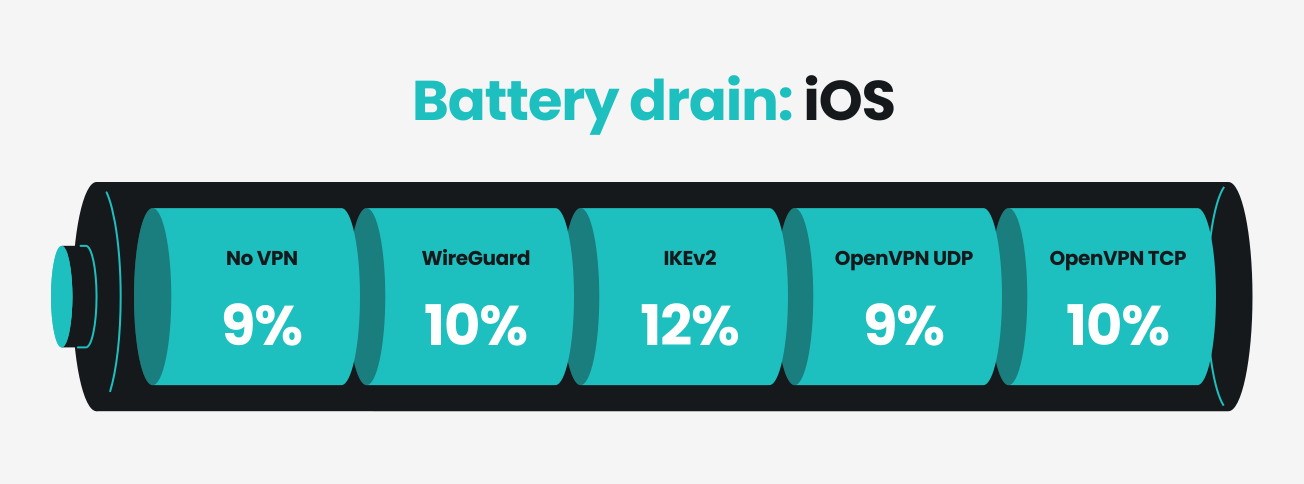
Battery drain on the iPhone 12 ranged from 9% to 12% across all test conditions. The no VPN baseline consumed 9%, establishing a reference point for comparison.
Among the VPN protocols tested, IKEv2 had the greatest impact on battery life at 12%. OpenVPN UDP performed the most efficiently, matching the baseline drain at 9%.
Overall, VPN usage only increased battery consumption by up to 3%. OpenVPN UDP was the most battery-efficient option on iOS.
Battery drain: macOS
|
No VPN
|
WireGuard
|
IKEv2
|
OpenVPN UDP
|
OpenVPN TCP
|
Dausos
|
|
3%
|
4%
|
5%
|
4%
|
5%
|
2%
|
The MacBook Air M5 showed minimal battery use during testing, ranging from 2% to 5% across all conditions. Baseline drain was 3%.
Dausos proved exceptionally efficient, consuming only 2% — and outperforming baseline drain in the process. IKEv2 and OpenVPN TCP were the most power-intensive protocols at 5% each. The difference between the least and most demanding protocols was only 3%.
Battery drain on the MacBook was lower than on the iPhone, suggesting that VPN overhead is less of an issue on laptops compared to phones.
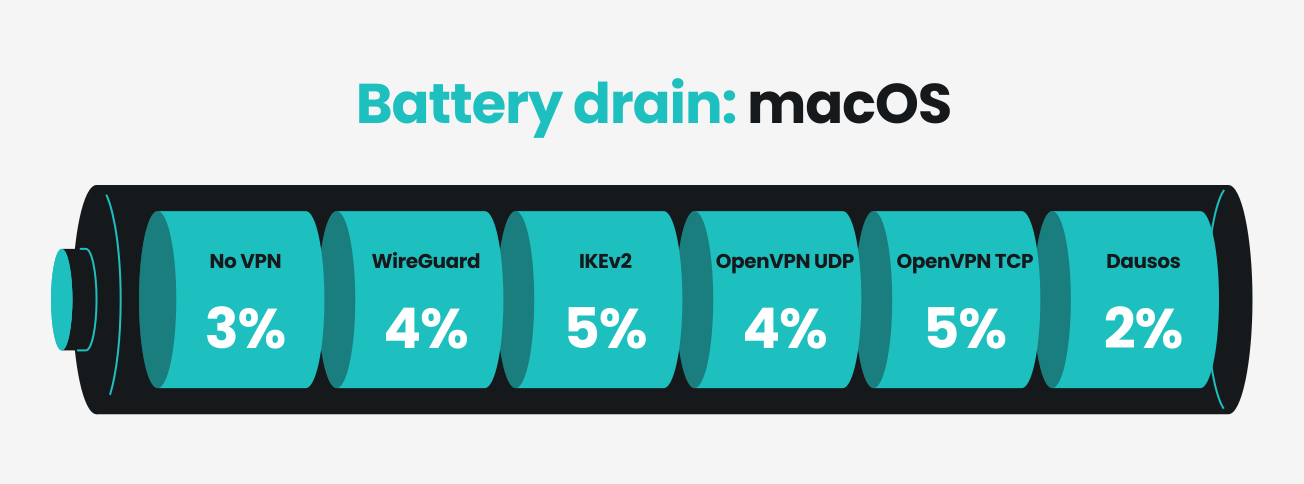
Overall, the testing highlights that using a VPN service has a negligible impact on battery usage. On devices like a MacBook Air M5 where video streaming uses little power without a VPN, the impact of a VPN on power usage is likely to go unnoticed.
Why a VPN might drain your battery
VPN apps may consume more battery power because they perform continuous computational work on your device. Several factors can contribute to any drain:
- Encryption and decryption: every packet of data that you send and receive through your VPN connection must be encrypted before leaving your device and decrypted upon arrival. This is fundamental to how VPNs work and is what differentiates them from proxies. Without encryption, VPNs wouldn’t offer any privacy protection against ISPs (Internet Service Providers), hackers, or malicious actors on public networks;
- Connection maintenance: VPN apps must constantly monitor and maintain your encrypted tunnel, keeping your connection up and running and handling reconnects if the link drops. This ongoing background activity consumes processor resources, even during less active periods;
- Signal strength and network conditions: weak or unstable signals force your device to work harder to maintain the VPN connection, which can increase battery drain. Poor network conditions require more frequent reconnection attempts and data retransmissions, increasing power consumption.
The extent of battery impact depends on your usage patterns, network quality, and VPN protocol. As our test results show, some options are more efficient than others.
Next steps: If you’re wondering what kind of impact a VPN can have on your connection speed, check out our Does a VPN slow down your internet? guide.
What’s actually draining your battery?
While VPNs consume a small amount of power, they’re often not the main culprit behind poor battery life. Several other factors usually have a much more significant impact:
- Screen brightness: your display is typically the biggest battery consumer on any device. High brightness levels, especially on newer OLED screens, can drain your battery far faster than any background app;
- Battery age and degradation: older batteries naturally lose capacity over time. A battery that’s been through hundreds of charging cycles will often drain noticeably faster than a new one, regardless of what apps you’re running;
- Malware and rogue processes: malicious apps or background behavior can consume a lot of CPU and network resources without your knowledge, draining battery much more aggressively than a reliable VPN;
- Weak cellular signal: when your iPhone or Android phone struggles to maintain a connection to cellular networks, it works harder and uses more power to transmit and receive data. This can have a more dramatic effect on battery life than using a VPN;
- Location services and continuous background activity: GPS tracking, frequent app syncing, and constant notifications can all lead to battery drain problems.
Key takeaway: If you’re experiencing rapid battery drain, try resolving each of the above issues before assuming your VPN is the problem.
How to reduce VPN battery drain
If you’re using a VPN and want to minimize its impact on your battery, these strategies can help:
- Switch to a lightweight protocol: among VPN protocols, WireGuard and Dausos are streamlined options optimized for battery efficiency. If your VPN supports them, switching to either one can drastically reduce power consumption compared to older models like IKEv2. With Surfshark, you can change your protocol in the VPN settings;
- Connect over Wi-Fi: mobile data connections require more power to maintain than Wi-Fi. Especially when at home, use your VPN while connected to Wi-Fi rather than cellular networks to reduce overall battery drain on your iPhone or Android;
- Use split tunneling: many users don’t need all their internet traffic to go through a VPN tunnel. Split tunneling tools — like Surfshark’s Bypasser — let you exclude low-risk apps and services from the VPN, reducing the battery impact of your encrypted connection without exposing you to other problems;
- Connect to nearby servers: the closer you are to the VPN server you’re connected to, the stronger and more stable your connection will be. A nearby connection requires less work from your device, resulting in lower battery consumption.
These optimized setups work by reducing either the technical demands on your processor or the stability challenges that force your device to work harder.
Pro tip: The link between VPNs and battery drain is a common misconception. Get the facts straight surrounding other falsehoods with our guide to the top VPN myths.
Wrapping up: a VPN isn’t killing your battery
A VPN consumes some of your device’s power like any other app, but its battery impact is modest compared to the security benefits it provides. Online security is fundamentally more important than a negligible increase in battery consumption. In fact, there are plenty of arguments for keeping your VPN on at all times.
If rapid battery drain is a concern, focus on non-VPN factors that likely have a far greater impact than any cybersecurity app. For more insights into VPN benefits and features, you can check out our Surfshark review.
Frequently asked questions
Should I keep my VPN connected all of the time?
Yes, keeping your VPN active is a good idea for security and privacy reasons. This protects your data on every connection, whether you’re on Wi-Fi, cellular, or switching between networks.
If battery life is an issue, you can use split tunneling to exclude low-risk apps and services from the VPN tunnel, giving you a balance between protection and power consumption without having to turn off the VPN altogether.
How much battery does a VPN use?
VPN battery consumption varies widely depending on several factors: your device type and age, the VPN protocol you’re using, your network conditions, and your activity level. In our iOS and macOS testing, VPN usage added between 1% and 3% per hour, with battery-optimized protocols like WireGuard and Dausos bringing the lowest consumption.
Will a VPN affect the battery life of my device?
A VPN can affect battery life, but the impact is typically modest. A VPN app consumes power because it continuously encrypts and maintains your secure connection. However, this drain is far less significant than other battery culprits like screen brightness, background behavior, and frequent notifications.
With efficient protocols and strong Wi-Fi connections, a VPN’s impact on battery life becomes nearly negligible.
Which VPN protocol uses the least battery?
Based on industry standards, WireGuard is generally the most battery-efficient VPN protocol for most devices. Its streamlined code makes it much lighter on your device’s processor than older protocols like IKEv2.
In our tests, Surfshark’s Dausos protocol also showed exceptional efficiency on macOS.
Does a VPN drain more battery on cellular data than on Wi-Fi?
Yes, using a VPN on cellular data (like 4G or 5G) consumes much more battery than using it over Wi-Fi. Mobile networks require your phone — whether it’s an iPhone or an Android — to use more power to maintain a stable connection, especially in areas with unstable signal strength.
Industry data indicates that a cellular connection can lead to notably higher battery drain compared to Wi-Fi, as the phone must work harder to re-establish the encrypted tunnel whenever the cellular signal wavers.