• Get Surfshark
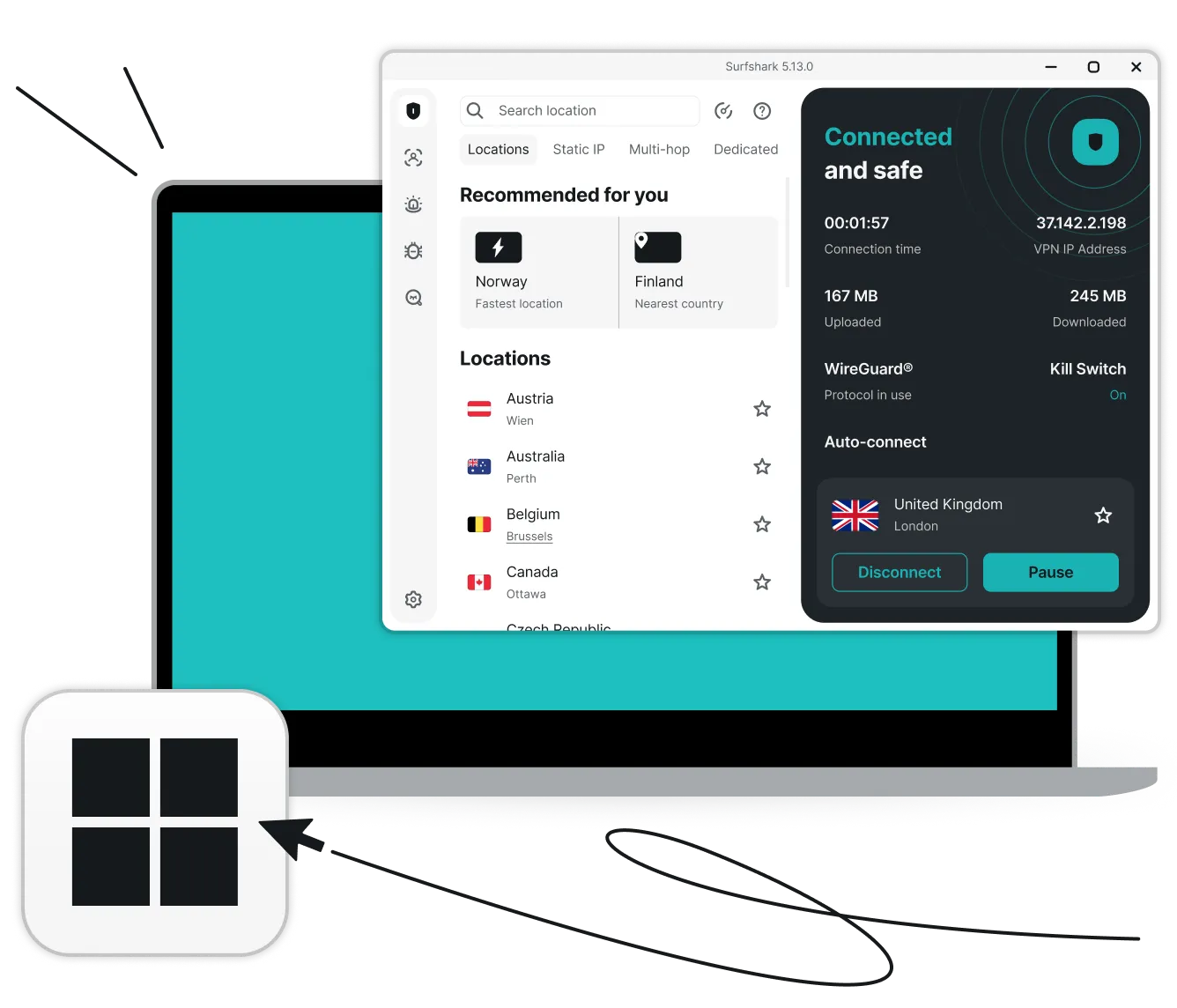
Laptop showing the Surfshark VPN app connected to a UK server in London by the Windows logo and a cursor arrow.

Get Surfshark VPN free trial for Windows

Try Surfshark’s powerful security suite directly on your Windows PC. Get full access to all VPN features on up to three devices during your trial period — and upgrade to unlimited connections once you’re ready to make it permanent.

Pay $0.00 now and start your 7-day Surfshark free trial.

  • Swap your IP address with 4,500+ global servers
  • Stop unwanted data monitoring with advanced encryption
  • Surf the web seamlessly with high-speed connections
Start a free trial
30-day money-back guarantee

Why choose Surfshark VPN free trial for your Windows device?

A Surfshark VPN subscription provides a suite of essential tools and advantages for your Windows device:

Proven privacy

Surfshark’s independently verified no-logs policy ensures your online activities remain truly private. Shielding your online traffic on Windows helps prevent hackers, ISPs, and advertisers from tracking and harvesting your data.

Worry-free safety

The kill switch instantly severs your internet connection if the VPN drops, while Everlink ensures an uninterrupted VPN connection. These features help you prevent unencrypted data leaks while browsing on your PC.

Ad and malware blocker

Unlike many browser-based ad blockers, Surfshark’s Clean Web provides protection across your entire Windows PC. It blocks ads, trackers, and malicious sites, cleaning up your browsing experience and securing your desktop apps.

Customizable access

Certain apps and websites require a local IP address to function correctly. With Surfshark’s Bypasser split-tunneling tool, you can set specific traffic to bypass the VPN, allowing you to stream or browse locally while keeping the rest of your connection encrypted and secure.

Double security

You can add an extra layer of security to your Windows with Multi Hop — the double VPN feature that routes traffic through two servers simultaneously. If you’d like to make your VPN connection much more difficult to identify, you can do so with our obfuscated servers when using the OpenVPN protocol.

Multiple device protection

During your trial, you can secure your Windows PC and two other devices simultaneously. Once you subscribe, you’ll unlock unlimited simultaneous connections for your entire household. To start, simply create a Surfshark account, download the Windows app, and enjoy more safety and privacy online.

Disclaimer: Please note that using Surfshark services for any illegal activities is strictly forbidden and violates our Terms of Service. Make sure that any use of Surfshark services for your particular activities conforms to all relevant laws and regulations, including those of any service providers and websites you access using Surfshark.

How to start your 7-day Surfshark VPN free trial for Windows

Get started with Surfshark’s free trial fast and easy:

See if you qualify

1. See if you qualify

Pick the Surfshark plan that works best for your needs. Then, enter your email and payment details to confirm you’re a first-time user.

Create an account

2. Create an account

Enter your details to set up your account. Your free trial allows you to activate VPN protection on three separate devices — Windows or any other compatible device.

Download Surfshark

3. Download Surfshark

You’re all set! Simply download and install the Surfshark app on your Windows PC, launch it, and connect to one of the VPN servers to start your 7-day trial.

Get a free trial
Note: Our free trial is available on all 12-month and 24-month plans. Accepted payment methods are by credit card or PayPal. After the 7-day trial, you will be charged according to the chosen plan, and the subscription will renew automatically.

All-in-one protection, plus added privacy: Surfshark One+

Enjoy overall protection online and offline with our suite for next-level privacy and security, Surfshark One+.

Secure your connection

Surfshark VPN encrypts your internet traffic and masks your IP address to offer 24/7 online security. With 4,500+ servers in 100 countries, Surfshark gives boosted protection and faster speeds on unlimited devices.

Keep your details private

Surfshark’s Alternative ID provides you with an alternative email address for online use. You can sign up for websites and mailing lists without worrying about spam emails or giving away your sensitive data.

Protect your devices

Surfshark Antivirus shields your device from malware and infected files. It scans downloads and attachments before they’re opened, blocks unauthorized apps from accessing your camera, and protects you without disruptions.

Get data leak alerts

Surfshark Alert notifies you whenever your personal information is leaked online. You’re alerted if your email addresses, passwords, or ID numbers ever pop up in breached databases, letting you spring into action without delay.

Hide your searches

Surfshark Search brings you purely organic results that are free from tracking. Swap between regions to see results based on your preferred location, not your previous searches. You’ll never see a single pop-up, banner, or targeted ad.

Reclaim your privacy

Incogni works around the clock to stop 420+ data brokers from profiling you. From risk-mitigation and recruitment sites to financial, marketing, and people-search databases — Incogni monitors them all to make sure your data stays gone.

Compare Surfshark’s plans

Surfshark VPN free trial vs. free VPNs

Many free VPN apps for Windows carry significant risks or performance limitations. That’s why a Windows VPN trial by a reputable, trusted provider like Surfshark typically outperforms free alternatives by delivering high-speed, secure, and unrestricted service.

Surfshark
Free VPNs
Fast speeds and unlimited bandwidth
Often have slow speeds and data caps
Strong encryption of internet traffic
Usually have weak encryption
4,500+ VPN servers in 100 countries
Typically have a small server network
Independently verified no-logs policy
Can log or sell user data
Unlimited simultaneous connections
Often restricted to one connection
Easy-to-use apps for all major devices and platforms
Apps typically limited to computers

For quality performance and better Windows privacy, choose Surfshark and enjoy your risk-free VPN trial.

See why millions trust Surfshark

Check out what users and tech experts around the world have to say about Surfshark.

“Surfshark is a highly polished and powerful VPN that competes with the very best premium providers, all while offering a seriously tempting price point.”
“Surfshark is one of the best VPN services, comes crammed with features, runs on almost anything, and has some of the best download speeds around.”
“Surfshark is an excellent, well-rounded virtual private network that consistently ranks as one of CNET’s best VPNs.”
The reviews quoted on this page have been published by media outlets associated with Surfshark through affiliate partnerships. Their recommendations are based on their own independent research and insights to ensure value for the readers.

I have been using Surfshark since I got it and I love it!

MRWHOSETHEBOSS 20.2M subscribers

When I am traveling, I use Surfshark to access the internet quickly and securely, works like a treat in China.

SAM CHUI 3.61M subscribers

We love Surfshark because it is an easy-to-use app that you can download on all your devices.

MAX & OCCY 265K subscribers
The reviews quoted on this page have been published by media outlets associated with Surfshark through affiliate partnerships. Their recommendations are based on their own independent research and insights to ensure value for the readers.

“This is my first year and I absolutely love it. The fact I can have a good antivirus, great VPN, and incognito for like $120 a year is great.”

Open in Reddit

“I’ve been using Surfshark for 4 years on Android and ChromeOS with zero issues, it’s an absolute bargain”

Open in Reddit

“I’ve had it for 3 years and just renewed it for the next 2 years. I never have any issues with it and get my full internet speed..”

Open in Reddit
The reviews highlighted in this section were selected from publicly available posts on social media platforms. They reflect the opinions of individual users at the time of posting and may not represent the full range of our product features and qualities.
FT 1000: Europe’s Fastest Growing Companies 2024

FT 1000: Europe’s Fastest Growing Companies 2024

Tech Advisor Editors’ Choice 2024

Tech Advisor Editors’ Choice 2024

TechRadar Recommended 2024

TechRadar Recommended 2024

Surfshark Antivirus AV-TEST Top Product 2024

Surfshark Antivirus AV-TEST Top Product 2024

Independent’s Editor’s Choice Best Value VPN 2023

Independent’s Editor’s Choice Best Value VPN 2023

Surfshark supports the open internet

We partner with digital rights organizations to promote online freedom and keep the internet safe and accessible to all.

Maximize your PC privacy and security

Claim your free VPN trial now

Start a free trial
30-day money-back guarantee
Maximize your PC privacy and security

FAQ

While you can find free VPNs for Windows, they often come at the cost of performance and your privacy. Many free services limit your data, offer fewer server locations, or even sell your browsing habits to third parties. For a secure Windows experience without compromises, it is better to use a trusted service that offers a risk-free trial, such as Surfshark.

Surfshark is a paid service, but we offer a 7-day free trial so you can test our high-speed apps and security suite before committing. If you enjoy the service during the trial, you can transition to a paid subscription; otherwise, you can cancel at any time within that period.

Yes, the Surfshark VPN trial provides full access to every feature. You can try out everything from the Clean Web ad blocker and kill switch to the high-speed 10Gbps servers. The only difference is that the trial is limited to three simultaneous devices, whereas a full subscription unlocks unlimited connections.

Surfshark is fully optimized for Windows 10 and Windows 11, including ARM-based devices. There are legacy apps for older Windows versions like 7 and 8.1,  but we recommend using Windows 10 or higher to ensure you get the latest security updates and the best overall performance.

VPN deal that Rocks

Get % off + mo. EXTRA
Get VPN Deal