Surfshark Antivirus is certified by the leading independent testing firm AV-TEST.
Surfshark Antivirus review
-
Support for up to 5 devices
-
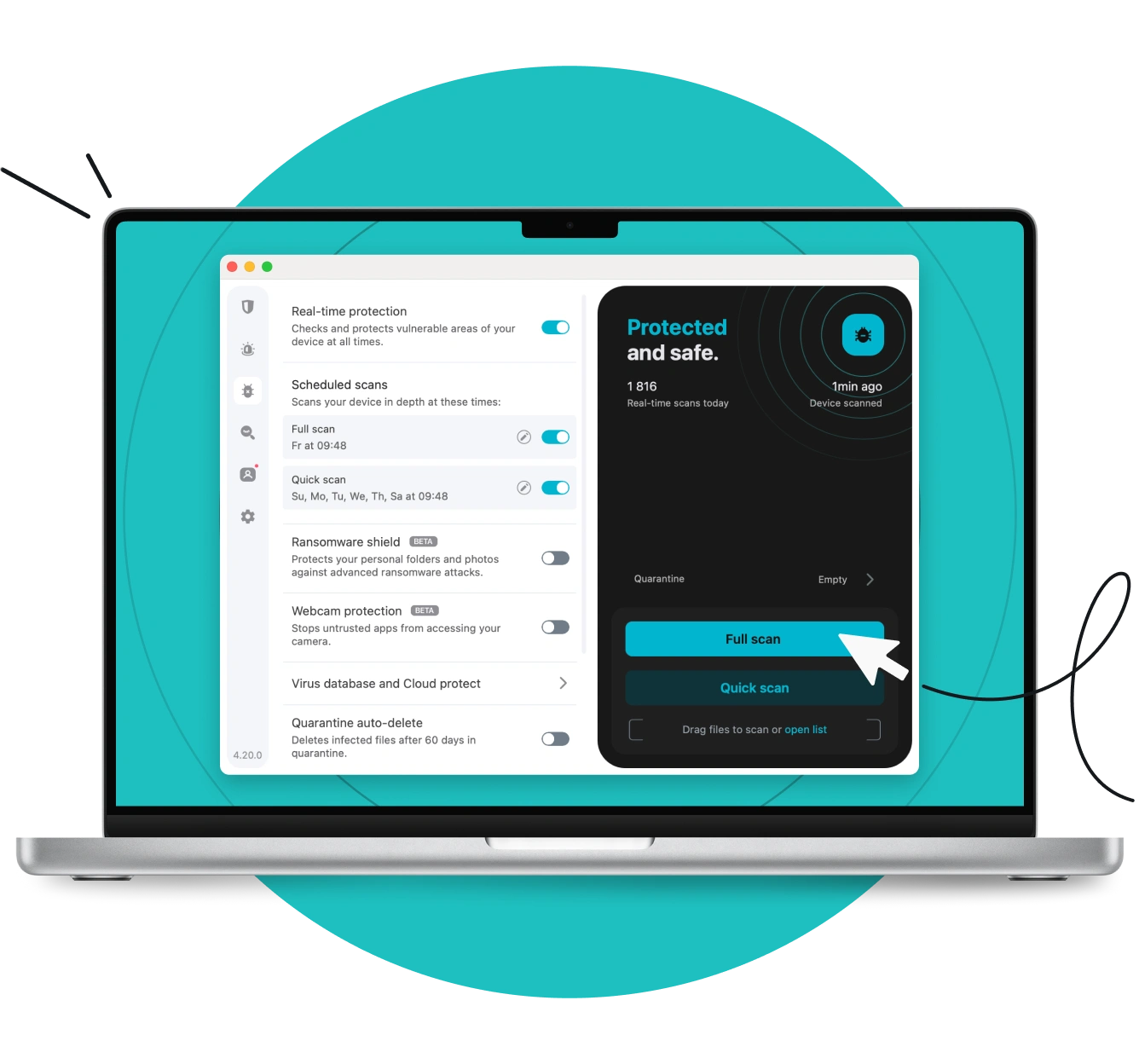
Real-time protection and customizable scans
-
Runs on Windows 10+, Android 10+, and macOS Big Sur 11 or later
Get Surfshark
30-day money-back guarantee

Why Surfshark Antivirus?
Explore key Surfshark Antivirus features that make it a reliable, easy-to-use solution for everyday protection:
Real-time protection
The real-time protection feature watches over your device 24/7 to spot and stop threats as soon as they appear. Our antivirus software provides powerful malware protection, blocking viruses, spyware, and other threats before they can do any damage, keeping your data and device safe at all times.
Lightweight and fast
Runs quietly in the background without slowing down your system or draining your battery. You get full antivirus protection without annoying interruptions or lag.
Web protection
This Windows feature keeps you safe while browsing by blocking dangerous or fake websites. Whether you’re shopping, banking, or just surfing the web, web protection helps protect your personal info and online identity.

Advanced privacy features
Includes built-in webcam protection to stop unwanted access (PC and Mac) and uses cloud-based tools to catch sophisticated, zero-day threats. These features give you an extra layer of real-time privacy and safety.
Customizable scans
You’re in control — with flexible options, you can schedule scans to run when it’s convenient for you, pick which files, folders, or apps to exclude from scanning, and adjust the settings to suit your needs.
Integrated with Surfshark tools
Pairs easily with Surfshark’s other security tools for enhanced online protection in one place: VPN for secure web surfing, Alert for data leak warnings, and Alternative ID for better protection of your personal information.
Quarantine management
Suspicious files are automatically isolated into quarantined folders so they can’t cause harm. You can then safely review and decide whether to keep, delete, or restore them in a few simple, intuitive steps.
Multi-device coverage
Covers up to five devices on one plan and works with Windows, macOS, and Android. Whether you’re on your phone, laptop, or desktop, your antivirus protection comes with you, and your digital life stays protected.
Frequent threat database updates
The database gets updated with the latest virus definitions and threat intelligence every three hours. This means your antivirus program can quickly recognize and deal with the latest malware, keeping you one step ahead of cyberattacks.
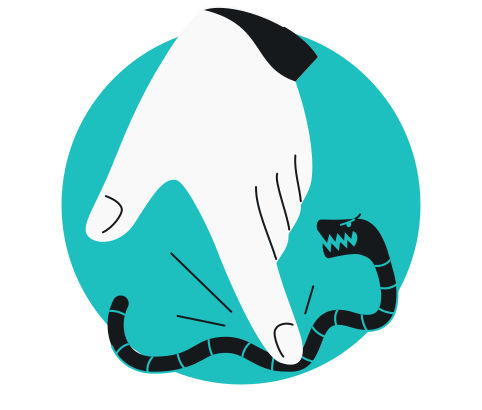
How Surfshark compares to other antivirus providers
We can tell you all about how Surfshark Antivirus keeps your devices safe — but it only really matters if it meets your needs better than the rest. Check out this antivirus comparison and see how Surfshark stacks up against other top antivirus providers to see if it’s the right choice for you.
Want to test it out first? Start with a Surfshark Antivirus free trial and see the app in action on your device.
Compare Surfshark’s plans
Surfshark Starter
Comes with a VPN & Alternative ID — essentials for your daily browsing.
- VPN: surf safely online
- Personal data masking: protect your identity
- Ad blocker: block ads & pop-ups
Surfshark One
Shields you with all-round security for your browsing, devices, and identity.
- VPN: surf safely online
- Personal data masking: protect your identity
- Ad blocker: block ads & pop-ups
- Antivirus: armor your devices
- Data leak monitoring: get notified of leaks
Surfshark One+
Keeps your online activities & devices safe, with extra focus on identity protection.
- VPN: surf safely online
- Personal data masking: protect your identity
- Ad blocker: block ads & pop-ups
- Antivirus: armor your devices
- Data leak monitoring: get notified of leaks
- Incogni: reclaim your data
24/7 customer support
Got questions? Our customer support team is here to help anytime. Reach out via 24/7 live chat or email, or check out our knowledge base for quick answers.
See why millions trust Surfshark
Check out what users and tech experts around the world have to say about Surfshark.



The reviews highlighted in this section were selected from publicly available posts on social media platforms. They reflect the opinions of individual users at the time of posting and may not represent the full range of our product features and qualities.
The reviews quoted on this page have been published by media outlets associated with Surfshark through affiliate partnerships. Their recommendations are based on their own independent research and insights to ensure value for the readers.
I have been using Surfshark since I got it and I love it!

When I am traveling, I use Surfshark to access the internet quickly and securely, works like a treat in China.

We love Surfshark because it is an easy-to-use app that you can download on all your devices.

The reviews quoted on this page have been published by media outlets associated with Surfshark through affiliate partnerships. Their recommendations are based on their own independent research and insights to ensure value for the readers.
“This is my first year and I absolutely love it. The fact I can have a good antivirus, great VPN, and incognito for like $120 a year is great.”
“I’ve been using Surfshark for 4 years on Android and ChromeOS with zero issues, it’s an absolute bargain”
“I’ve had it for 3 years and just renewed it for the next 2 years. I never have any issues with it and get my full internet speed…”
The reviews highlighted in this section were selected from publicly available posts on social media platforms. They reflect the opinions of individual users at the time of posting and may not represent the full range of our product features and qualities.





Frequently asked questions
What are the disadvantages of Surfshark Antivirus?
While Surfshark offers strong antivirus protection, there are a few things to keep in mind. First off, Antivirus is available as part of the Surfshark One bundle, not as a standalone product, which may be seen as a disadvantage by those not seeking a comprehensive cybersecurity solution. Another thing to consider — web protection currently works only on Windows.
Why is Surfshark Antivirus better than other providers?
Every antivirus software has its strengths, and choosing the right one depends on what matters most to you. We’ve put together comparison articles with Microsoft, Bitdefender, and Norton to help you see how Surfshark stacks up in terms of features, privacy, and value:
Is Surfshark’s Antivirus available as a standalone product?
No, Surfshark Antivirus comes as part of the Surfshark One or Surfshark One+ bundle. That means, along with antivirus protection, you also get tools like Surfshark VPN, Surfshark Alert — dark web monitoring and data leak alerts, Surfshark Search — a private search engine, and more — everything to help protect your life online in one go.
Does Surfshark Antivirus work on Mac?
Yes. Surfshark Antivirus works on macOS as well as Windows and Android. However, some features — like web protection — are currently only available on Windows.
How many devices can I use with Surfshark One?
With a single Surfshark One subscription, you can set up antivirus on up to five devices. It works across Windows, macOS, and Android, so you can stay protected whether you’re on your phone, laptop, or desktop. However, you can use the VPN and other bundled products on unlimited devices.