 Surfshark
Surfshark’s FastTrack technology, initially launched in three locations last year, now covers the majority of our server network for macOS users. This real-time VPN route optimization is available across all continents, allowing macOS users to benefit from up to 70% speed improvements when connecting through FastTrack-enabled servers.
What is FastTrack?
FastTrack is Surfshark’s solution for smart VPN routing. Instead of locking you into a single connection path, it continuously monitors network conditions and reroutes your traffic through the most efficient paths in real time. The result? Connection speeds up to 70% faster compared to standard routing.
The technology is built on Surfshark Nexus, our multi-server routing system that connects all our servers into a network. This foundation allows us to test multiple routes simultaneously and choose the one that delivers the best performance at any given moment.
Why it matters to you
Network distance can play a role in performance, especially when traffic needs to cross regions or travel across the world. That’s where this solution may help, and we’re currently evaluating the potential speed benefits it can bring.
Data traveling between two distant points doesn’t have to follow the most obvious route — it can move through less congested pathways, avoid bottlenecks, and arrive faster. By actively managing these routes, we maintain both speed and stability, no matter where you’re connecting from or to.
How FastTrack works behind the scenes
Our system relies on globally distributed probes that measure speed and latency from various points in our network. These probes provide real-time data back to our routing system, which evaluates multiple path combinations and selects the optimal one for your connection.
When network conditions shift — due to congestion, maintenance, or infrastructure changes — FastTrack adapts.
How to use it on macOS
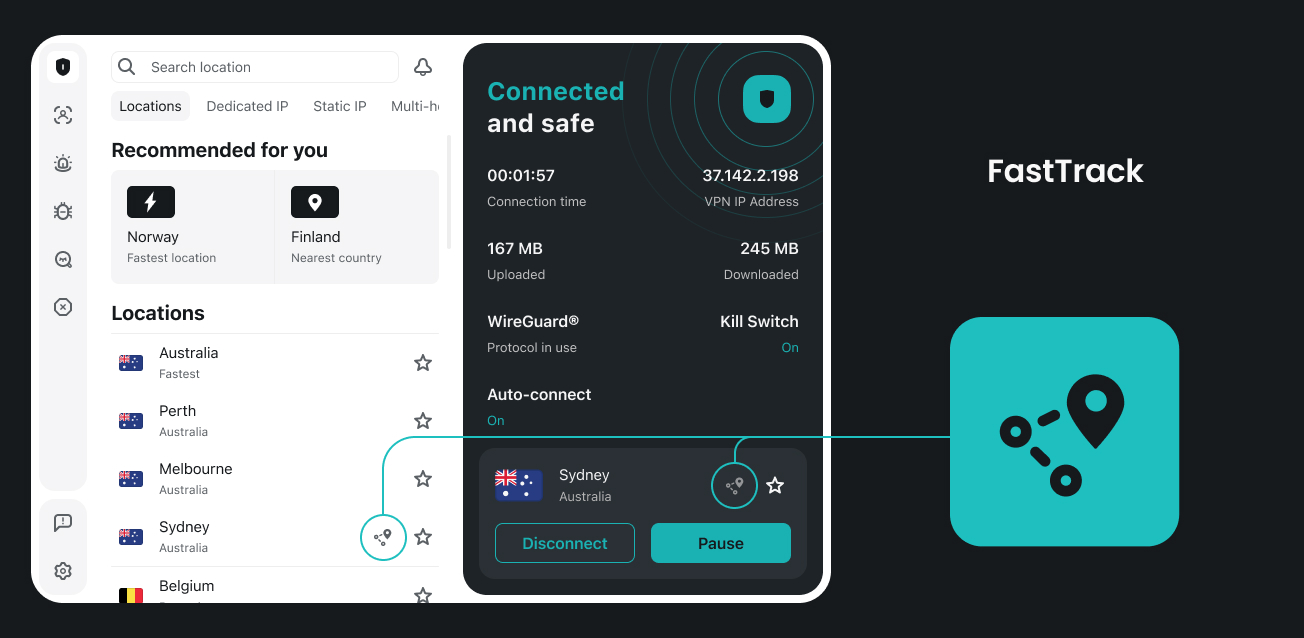
FastTrack is currently available for macOS users. To take advantage of it, simply connect to any FastTrack-enabled location through the Surfshark app. You’ll recognize these servers by the FastTrack icon displayed next to them in the server list.
Once connected, the system works automatically in the background. You don’t need to configure anything or toggle settings — just pick a server with the FastTrack icon, and the optimization happens seamlessly.
Important: If you don’t see the FastTrack icon next to a server at the time of connection, it means the most efficient route for you is a direct connection.
What this expansion means
With FastTrack now available across all continents, more users can experience the speed and stability benefits of real-time route optimization. Whether you’re in North America, Europe, Asia, or beyond, you can connect to a FastTrack-enabled server and enjoy improved VPN performance.
Ready to experience faster VPN speeds? Open the Surfshark app on your Mac, look for the FastTrack icon, and connect.