• Get Surfshark
  1. Home
  2. Download
  3. Vega OS VPN
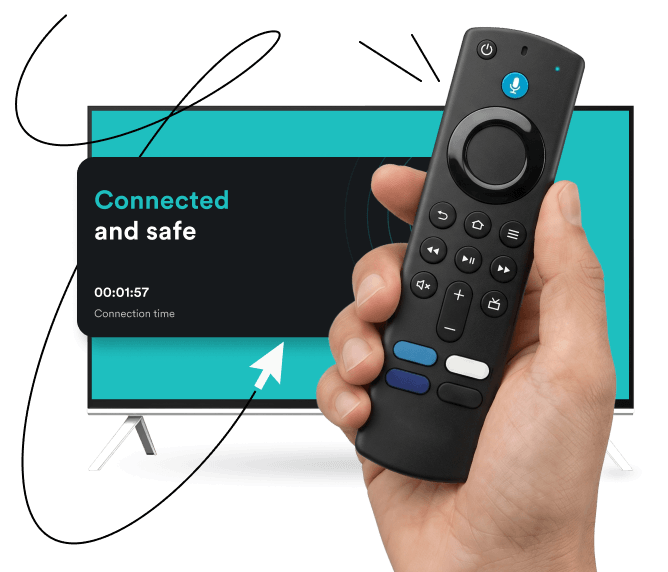
Hand holding a streaming remote in front of a TV displaying a black window with the text connected and safe by motion lines.

Get Surfshark VPN for Vega OS

  • Enjoy a seamless viewing experience with high-speed VPN servers
  • Protect your Vega OS TV, plus every other device in your home
  • Encrypt your internet traffic and keep your streaming habits private
30-day money-back guarantee

What is Vega OS?

Vega OS is Amazon’s brand-new, Linux-based operating system, launched in October 2025. It’s designed to power the next generation of Fire TV devices and smart TVs, and is set to replace the older Android-based infrastructure. This new technology promises a lighter, more streamlined viewing experience for Fire TV users. So, if you recently purchased a new Amazon streaming device, such as Fire TV Stick 4K Select or later, it runs on Vega OS.

Why use a VPN on Vega OS?

Smart TVs are just as vulnerable to online tracking as your computer or smartphone, so a VPN (Virtual Private Network) on Vega OS is a great tool to improve your privacy. But that’s not all — here’s exactly why you need a VPN for Vega OS:

Protecting your privacy

A VPN encrypts your internet traffic, keeping your streaming activity, viewing history, and personal data private from snoops and third parties.

Preventing ISP bandwidth throttling

ISPs (Internet Service Providers) often slow down bandwidth-heavy activities like streaming. A VPN masks your traffic, helping you avoid activity-based throttling.

Traveling with secure access

If you’re taking your Vega OS device on the road, a VPN can help you securely access your home content, no matter where you are.

Reducing data collection

Reducing data collection

Using a VPN on your smart TV masks your IP (Internet Protocol) address, which prevents websites from logging your location and tracking you across the web, helping you minimize the data third parties can harvest.

Disclaimer: Please note that using Surfshark services for any illegal activities is strictly forbidden and violates our Terms of Service. Make sure that any use of Surfshark services for your particular activities conforms to all relevant laws and regulations, including those of any service providers and websites you access using Surfshark.

How to install a VPN on Vega OS

Installing a VPN on Vega OS is very easy and takes just a few minutes:

Create an account

1. Create an account

Grab a Surfshark subscription that fits your needs and create an account.

Download the app

2. Download the app

On your TV, open the Amazon App Store, find Surfshark, and download and install the dedicated app.

Connect and stream

3. Connect and stream

Open the Surfshark app, log in, choose your preferred VPN server, connect, and stream securely.

Note: Our native VPN for Vega OS currently supports core functionality, including server selection, secure connections, and fast speeds via the WireGuard protocol. Advanced features like Clean Web (ad blocker) and kill switch are in development and coming soon.

Vega OS vs. Fire OS: which one should you choose?

Amazon is still using both operating systems across its ecosystem:

Fire OS is the older, Android-based operating system. Vega OS is the new, Linux-based operating system.

How to check your OS: on your device, go to Settings > My Fire TV > About. This will display your software version:

  • For older Fire TV devices that run Fire OS, you will need the traditional Fire TV Android app;
  • If your device runs Linux-based Vega OS (like the new Amazon Fire TV Stick models), you’ll need the new app.

Both systems are fully supported by your Surfshark subscription. The Amazon App Store will automatically show the download for the right app.
Vega OS vs. Fire OS: which one should you choose?

Protect all your devices with one account

Don’t stop at your smart TV. With Surfshark, you aren’t just getting a Vega OS VPN — you get unlimited simultaneous connections to secure your entire household.

With a single Surfshark subscription, you can safeguard your new Vega OS smart TV, smartphones, laptops, and tablets, all at the same time. No bandwidth caps, no device limits, just all-out household protection under one account.

See why millions trust Surfshark

Check out what users and tech experts around the world have to say about Surfshark.

“Surfshark is a highly polished and powerful VPN that competes with the very best premium providers, all while offering a seriously tempting price point.”
“Surfshark is one of the best VPN services, comes crammed with features, runs on almost anything, and has some of the best download speeds around.”
“Surfshark is an excellent, well-rounded virtual private network that consistently ranks as one of CNET’s best VPNs.”
The reviews quoted on this page have been published by media outlets associated with Surfshark through affiliate partnerships. Their recommendations are based on their own independent research and insights to ensure value for the readers.

I have been using Surfshark since I got it and I love it!

MRWHOSETHEBOSS 20.2M subscribers

When I am traveling, I use Surfshark to access the internet quickly and securely, works like a treat in China.

SAM CHUI 3.61M subscribers

We love Surfshark because it is an easy-to-use app that you can download on all your devices.

MAX & OCCY 265K subscribers
The reviews quoted on this page have been published by media outlets associated with Surfshark through affiliate partnerships. Their recommendations are based on their own independent research and insights to ensure value for the readers.

“This is my first year and I absolutely love it. The fact I can have a good antivirus, great VPN, and incognito for like $120 a year is great.”

Open in Reddit

“I’ve been using Surfshark for 4 years on Android and ChromeOS with zero issues, it’s an absolute bargain”

Open in Reddit

“I’ve had it for 3 years and just renewed it for the next 2 years. I never have any issues with it and get my full internet speed..”

Open in Reddit
The reviews highlighted in this section were selected from publicly available posts on social media platforms. They reflect the opinions of individual users at the time of posting and may not represent the full range of our product features and qualities.
FT 1000: Europe’s Fastest Growing Companies 2024

FT 1000: Europe’s Fastest Growing Companies 2024

Tech Advisor Editors’ Choice 2024

Tech Advisor Editors’ Choice 2024

TechRadar Recommended 2024

TechRadar Recommended 2024

Surfshark Antivirus AV-TEST Top Product 2024

Surfshark Antivirus AV-TEST Top Product 2024

Independent’s Editor’s Choice Best Value VPN 2023

Independent’s Editor’s Choice Best Value VPN 2023

Surfshark supports the open internet

We partner with digital rights organizations to promote online freedom and keep the internet safe and accessible to all.

Secure connection. Smooth streaming.

Shield your viewing habits with a VPN for Vega OS

Get Surfshark
30-day money-back guarantee
Secure connection. Smooth streaming.

FAQ

Yes. Vega OS supports VPNs, and you can download the native Surfshark app directly from the Amazon App Store on your device. It provides core functionalities like secure connections and server selection.

Vega OS runs on select Amazon Fire TV devices, including the Fire TV Stick 4K Select, and smart TVs released from October 2025 onward. Since Amazon is gradually rolling out this new Linux-based OS, you can verify your operating system by checking the About section in your device’s settings.

Using a VPN on Vega OS is highly recommended. It prevents your ISP from throttling your streaming speeds, encrypts your internet traffic to prevent third-party tracking, and lets you securely access your favorite content while traveling.

Yes, you can use a VPN on a smart TV. Surfshark offers dedicated apps for a variety of smart TVs, including those running Vega OS, Fire OS, Android TV, and Apple TV. Simply get a subscription, download the app from your TV’s respective app store, log in, and connect.

VPN deal that Rocks

Get % off + mo. EXTRA
Get VPN Deal