
An email address generator creates an alternative email address for you to use instead of your main one, whether for a few minutes or for years. Depending on what you’re trying to do, that could mean a temporary inbox for a single sign-up, an alias that forwards to your real account, or a fully random address with no ties to you. In short, pick Surfshark’s Alternative ID or an alias for lasting privacy, and a temporary or disposable address for a single sign-up.
This guide breaks down the main email generator types in detail and compares Surfshark’s Alternative ID to other popular services like Gmail aliases and Apple’s Hide My Email.
What is an email address generator?
An email address generator is a tool that creates an alternative email address you can use instead of your main one. Depending on your goal, that can mean a short-lived temporary inbox, a personal alias that forwards to your real email, or a fully random address with no personal details attached. It’s important to note that despite sharing similarities, not all email generators are created equal.
Types of email address generators
Temporary email
A temporary email address gives you a single short-lived inbox built to receive one specific message — a verification code or a confirmation link — and then it’s gone for good. Most temporary email address generators delete the inbox automatically within 10 minutes to a few hours.
Disposable email
A disposable email address generator creates the same kind of short-lived inbox, but treats it as a repeatable habit rather than a one-off. Instead of reusing one address, you generate a fresh disposable one every time you sign up for something you don’t fully trust. It’s a simple way to make a fake email for sites you’ll likely never visit again.
Email alias
An email alias is a personal email address generator that forwards messages to your real inbox instead of creating a separate one. It’s the better choice if you want a unique email address generator that protects your main account in the long term, not just for a single sign-up. Surfshark’s Alternative ID takes this a step further by pairing the alias with a full alternate identity, but more on that below.
Random email generator
A random email address generator produces addresses built from random usernames, numbers, and special characters, so there’s no personal information built into the address. Some tools only generate the address itself, handy for filling out a form with placeholder data, while others pair that random address with a working inbox you can actually check, similar to a temporary email — it’s worth checking which type you’re using before relying on it to receive anything real.
Which email address generator should you choose?
Not sure which type fits your situation? Use the table below to match your specific goal to a type.
|
If you want to…
|
Best option
|
|
Avoid spam
|
Alternative ID, temporary email, disposable email
|
|
Sign up for a one-time offer or free trial
|
Temporary email, Alternative ID
|
|
Protect your primary inbox long-term
|
Email alias, Alternative ID
|
|
Create a professional-looking address
|
Personal email address generator
|
|
Test a website or app repeatedly
|
Disposable email
|
Benefits of using an email address generator
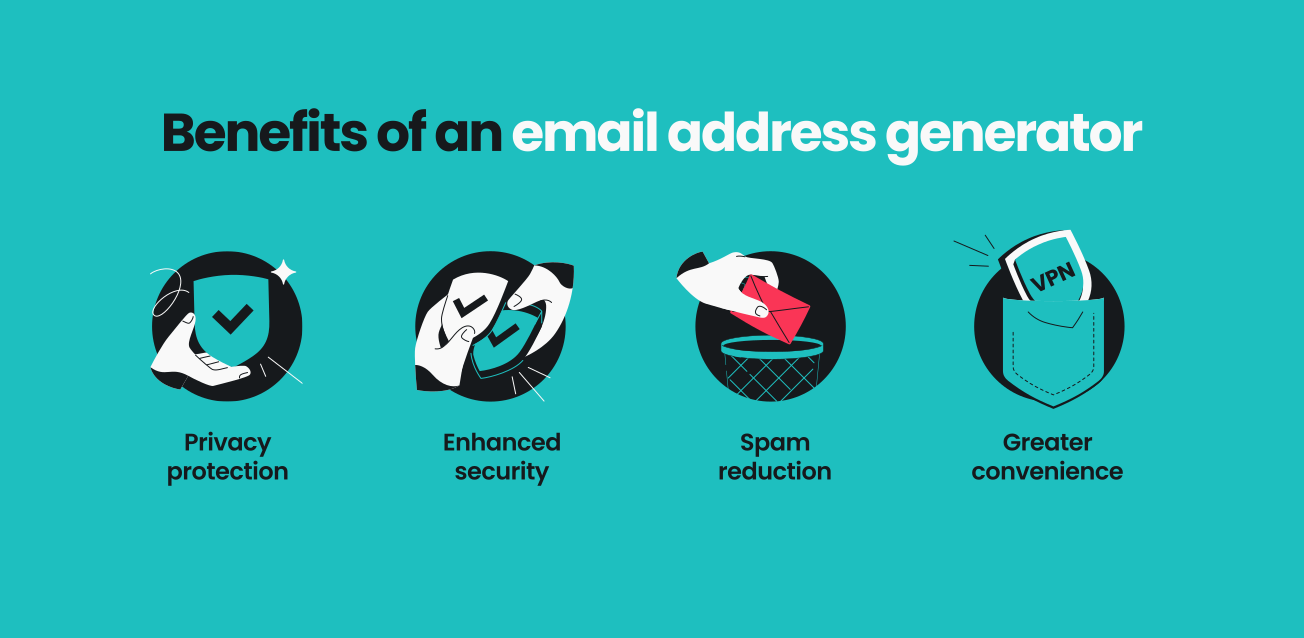
An email generator offers several benefits:
Privacy protection
Using a generated email address keeps your real inbox private on untrusted websites, reducing the risk of data leaks or third-party tracking. This is useful when you’re creating a marketplace account to sell or buy something, since it stops a stranger from linking your listing to your real inbox.
Enhanced security
With approximately 3.4 billion emails sent daily by cybercriminals, using two inboxes — one for spam, one for trusted contacts — significantly reduces phishing and identity theft risks. Disposable addresses are harder to target than known public emails. It’s a useful habit when you’re testing an unfamiliar website or app for the first time and aren’t yet sure if it’s trustworthy.
Spam reduction
Generated email addresses act as barriers between you and unwanted promotional communications. Disposable and temporary addresses keep that clutter out of your primary inbox entirely, while an Alternative ID address still forwards to your main inbox but lets you trace exactly which sign-up is spamming you and pause it before it becomes a bigger problem.
Greater convenience
There’s less to weigh before signing up for something new with a generated address, since it carries no long-term commitment to your real identity or signing up for spam. That makes it easy to download a free resource, grab a one-time discount code while shopping online, or test a new subscription on the spot, without the mental tax of deciding whether it’s “worth” handing over your real email.
What is Surfshark’s Alternative ID?
Alternative ID is a tool that lets you generate a new email address and online identity. You can create a new email address to use on any sites you don’t trust. Email messages are forwarded to your main inbox, keeping you in the loop while staying private.
And Alternative ID isn’t just another temporary email address service. Here’s where it stands out:
- New identity creation: users get much more than a temporary mail address. Alternative ID lets you create a brand-new online persona with a name and physical address to go along with your email, making it easier to sign up for services that require additional info;
- Ease of use: the auto-fill function means you can instantly fill out sign-up forms without having to hunt down your temporary information;
- Multiple emails: your sign-ups might be a one-and-done thing, but Alternative ID isn’t. The tool lets you maintain up to three email addresses at once, each with its own domain;
- Part of Surfshark’s cybersecurity bundles: Alternative ID always comes in a wider cybersecurity package. It’s available in every Surfshark bundle, so you can enjoy it alongside tools like Surfshark VPN (Virtual Private Network), Antivirus, the Alert data leak monitoring tool, and more.
Steps to create an Alternative ID with Surfshark
You can set up Alternative ID — complete with a generated email address — by following these simple steps:
1. Sign up for Surfshark
Set up your Surfshark account and log in to the Surfshark web application.
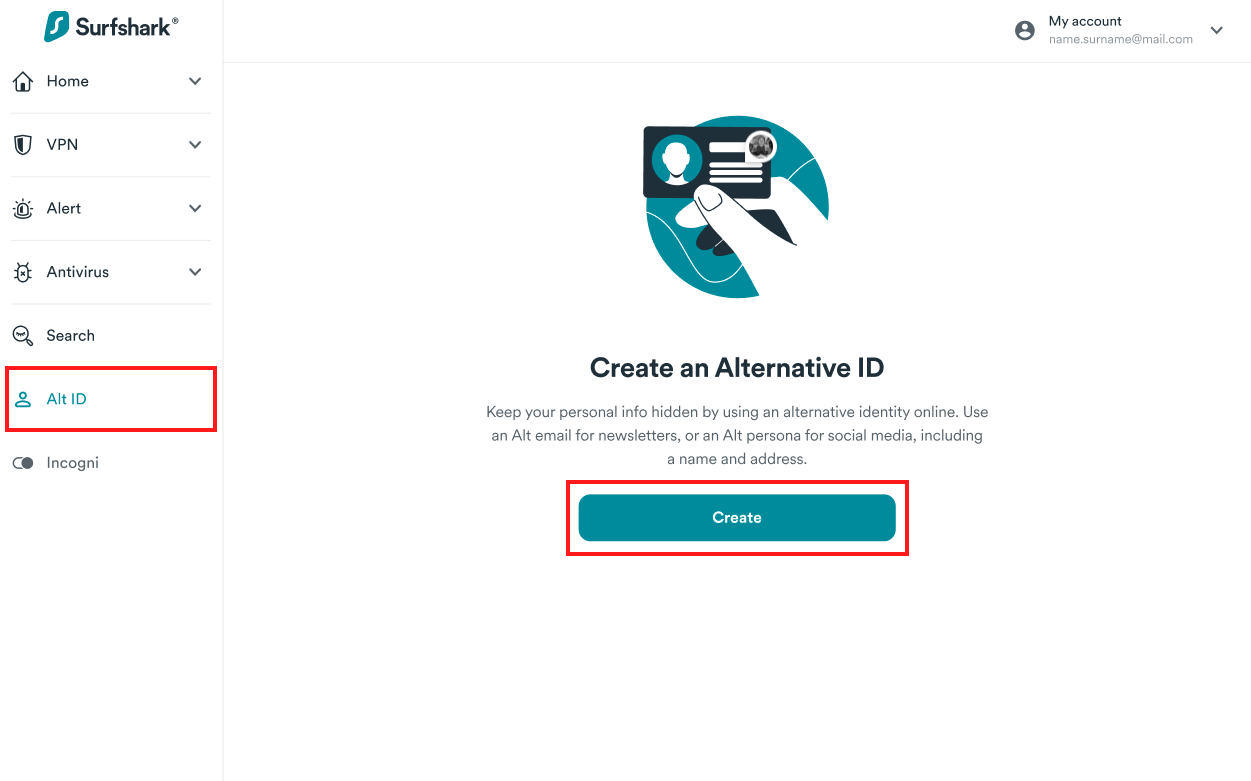
2. Navigate to Alternative ID
Go to the Alt ID tab and click Create.
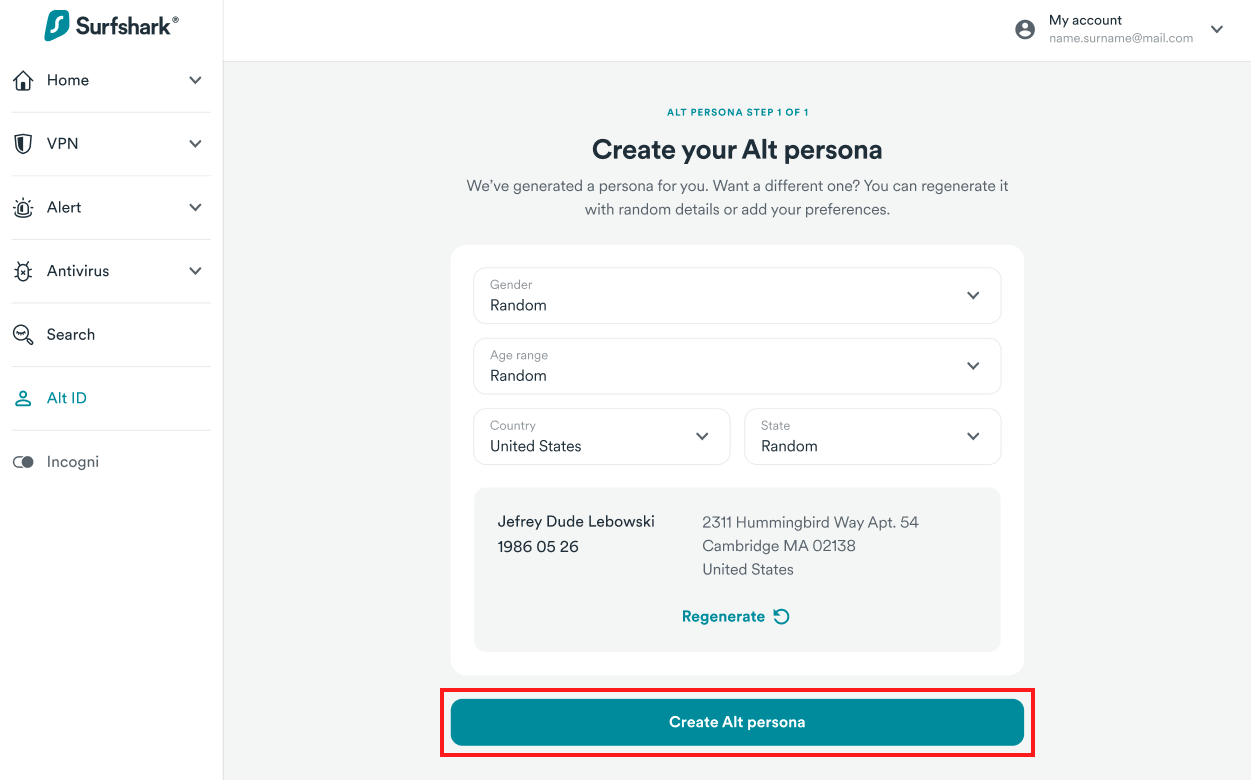
3. Create your Alternative Persona
Fill in fields like Gender, Age range, and Country to create your new online identity. Not sure what you want? Click Regenerate to see new names, addresses, and dates of birth that have been generated based on your preferences. Once you see a persona you like, click Create Alt persona.
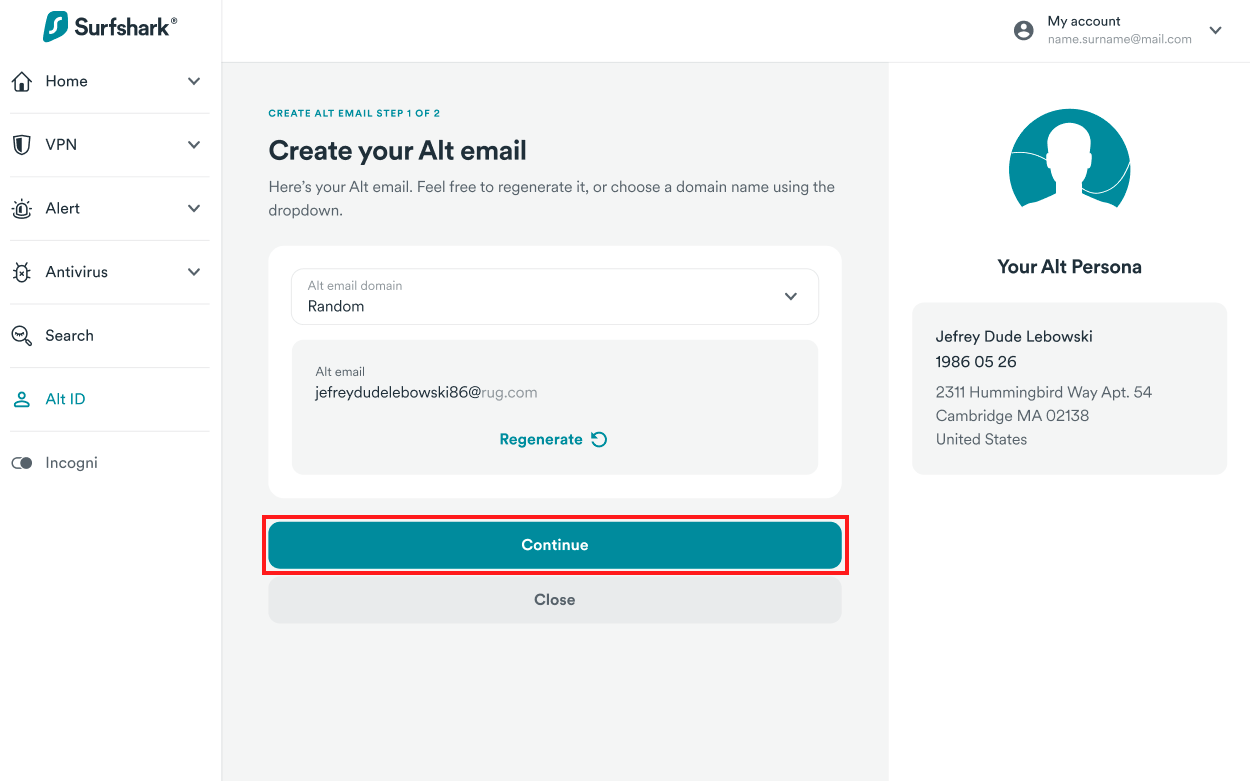
4. Create your Alternative Email
You’ll see an automatically generated address to use as your alternative email. Click Regenerate until you find one you like, and then click Continue.
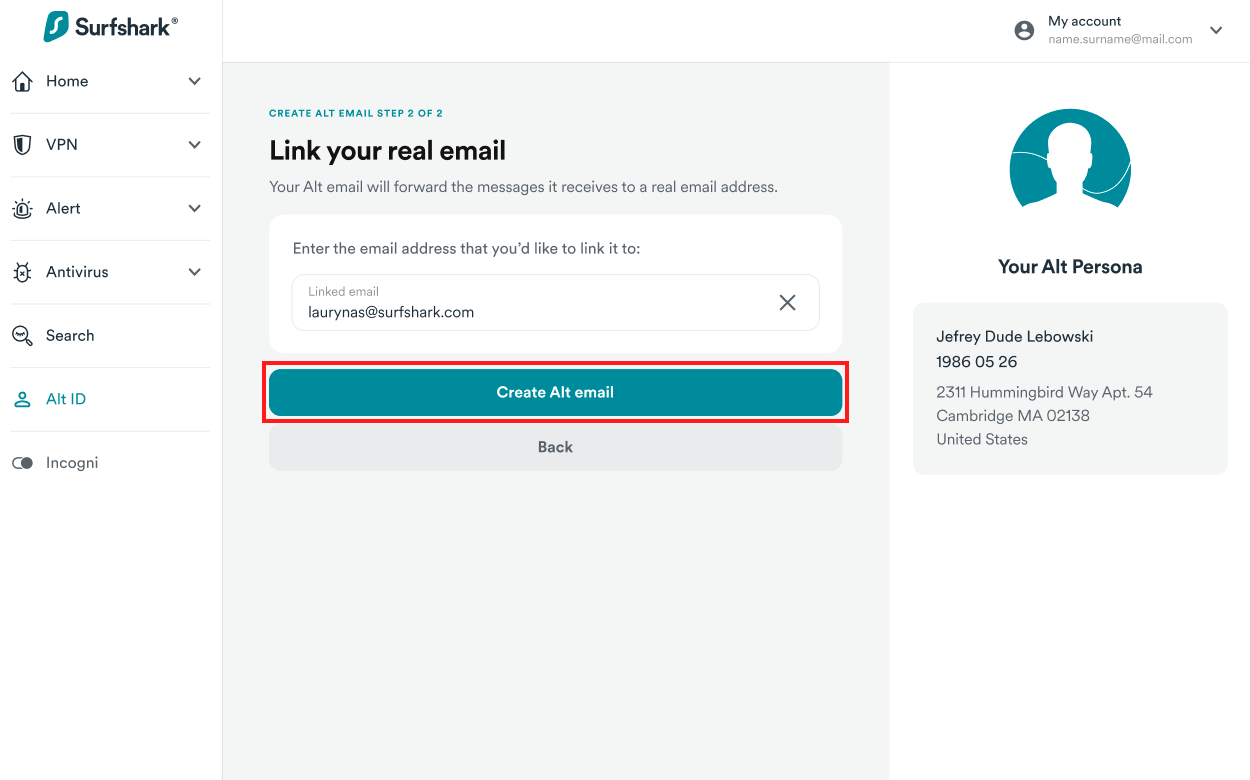
5. Link your real email
Enter your real email address and click Create Alt email.
6. Verify your email
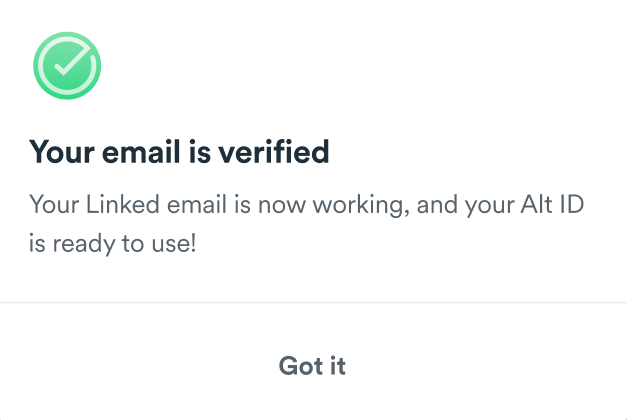
Check your inbox for a verification email and confirm. You’ll get a confirmation message in the Surfshark web app. Your Alternative ID is ready to go, and emails sent to your generated address will be forwarded to your real email inbox.
For complete instructions, including how to set up Alternative ID on our browser extension, check out our Alternative ID helpdesk article.
Use cases for an email address generator
Still wondering why you’d want to use generated email addresses? Here are some everyday situations where they can come in handy:
Newsletter and forum sign-ups
Newsletters, forums, and one-off downloads are the most common sources of unwanted emails. Using a generated address for these from the start means your primary inbox stays free of clutter you’d otherwise have to unsubscribe from later.
Online shopping
Many online retailers require an email address to complete a purchase, access discounts, or get a store loyalty card. Using an email generator helps you keep marketing emails, promotional spam, or even phishing attempts out of your primary account — these mails will go to your alternative inbox instead. Additionally, your personal email stays protected if the shop experiences a data breach.
Subscriptions and free trials
Certain websites offer free trials for services like streaming, software, or online courses, but they often require an email to sign up. An email generator lets you register without using your primary inbox, preventing follow-up emails or renewal reminders from cluttering your account.
Disclaimer: Please note that using Surfshark services for any illegal activities is strictly forbidden and violates our Terms of Service. Make sure that any use of Surfshark services for your particular activities conforms to all relevant laws and regulations, including those of any service providers and websites you access using Surfshark.
Social media accounts
Signing up for a new social media account usually means handing over an email address that can end up tied to your public profile. A generated address keeps that profile disconnected from your real inbox, so ad networks and lookup tools have less to connect back to you.
Job applications
Job boards and applicant-tracking systems often share your email address with third-party recruiters and marketers beyond the company you applied to. A dedicated email address for job hunting keeps that traffic separate from your personal inbox.
Testing websites and services
Developers and QA (Quality Assurance) testers use disposable addresses for repeated software or QA testing without security risks, then discard them after use.
Surfshark’s Alternative ID vs. other email generators
Here’s how Alternative ID stacks up against other email generators on the market:
Alternative ID vs. Temp Mail
Temp Mail provides email addresses that are literally disposable — you set up a temporary inbox that deactivates and disappears after a short period of time. Incoming messages come to a newly created inbox, which you lose access to once the address expires.
In contrast, Alternative ID offers a more comprehensive service. Users get alternative names, birth dates, and physical addresses on top of a new email, and messages are forwarded to your primary inbox — which you naturally won’t lose access to.
Additionally, Alternative ID comes bundled with products like Surfshark VPN, so you can enjoy an all-in-one cybersecurity suite. Temp Mail’s features are specifically focused on its generated email addresses.
|
Alternative ID
|
Temp Mail
|
|
Provides a complete persona (email, name, date of birth, etc.)
|
Offers only a disposable email address
|
|
Forwards messages to your primary inbox
|
Creates a temporary inbox that expires
|
|
Comes with Surfshark cybersecurity suite
|
Not bundled with any complementary tools
|
Alternative ID vs. 10-minute-mail services
A 10-minute-mail service is a type of email name generator that lets you create free, disposable email addresses that expire after 10 minutes. This time can be extended, but it’s still capped at a couple of hours.
When it comes to choosing your generated address, these sites don’t offer many options. You usually have to settle for a random email address consisting of a chain of letters for both the username and domain. This means your addresses will look something like qwerty@html.com. Incoming emails go to your 10-minute-mail inbox and can’t be forwarded to your primary account.
In contrast, Alternative ID can be used over a long period and gives you plenty of domain names to choose from — no random character strings here. While admins are also likely to block 10-minute-mail domains, Alternative ID’s generated emails look like legitimate addresses that rarely raise red flags.
|
Alternative ID
|
10-minute-mail services
|
|
Lets you use generated email addresses that look legitimate
|
Generates addresses with random character chains
|
|
Suitable for use over longer periods
|
Expires after 10 minutes
|
|
Comes with Surfshark cybersecurity suite
|
Not supported by any additional tools
|
Alternative ID vs. Guerrilla Mail
Guerrilla Mail is a no-frills service that creates a disposable email address to avoid spam and stay private online.
Guerrilla Mail provides scrambled and unscrambled usernames and has around a dozen preconfigured domain names you can choose from. Emails are sent to a temporary mailbox that can’t be synced to a real email address. All incoming communication expires after one hour in your inbox, but the address itself does not.
On the other hand, Surfshark Alternative ID forwards messages to your primary inbox, so you don’t have to worry about messages getting automatically deleted. And while Alternative ID comes bundled with Surfshark VPN, Antivirus, or more (depending on the package you choose), Guerrilla Mail only offers a password manager to go alongside its email generator.
|
Alternative ID
|
Guerrilla Mail
|
|
Used to help you create a new online persona
|
Made expressly to avoid spam
|
|
Doesn’t delete emails
|
Deletes emails after one hour
|
|
Comes with Surfshark cybersecurity suite
|
Only complemented by password manager
|
Alternative ID vs. Gmail aliases
Gmail’s plus addressing (also called a Gmail alias) lets you add a “+something” tag to your existing address to create endless variations that all land in the same inbox. It’s built directly into Gmail, so there’s no new tool to set up, and you can create as many tagged variations as you like on the fly. One trade-off: once a tagged alias starts attracting spam, you can’t delete it — the only fix is setting up a filter to catch mail sent to that specific tag.
In contrast, Alternative ID creates a genuinely separate address, along with a new name, date of birth, and physical address, rather than a variation of your real one. Because the address isn’t visibly tied to your Gmail account, it’s harder for anyone to trace it back to you. You can also pause an Alternative ID address at any time, something Gmail’s plus addressing can’t do, since the alias itself can never be switched off.
Alternative ID also comes bundled with products like Surfshark VPN, so you get a full cybersecurity suite alongside your alternative email. Gmail’s plus addressing is a free trick built into an email client, not a privacy tool on its own.
|
Alternative ID
|
Gmail alias (+ addressing)
|
|
Creates a separate address with a new persona
|
Adds a tag to your existing address
|
|
Not visibly tied to your real inbox
|
Anyone can strip the tag to reveal your real address
|
|
Comes with Surfshark’s cybersecurity suite
|
Not bundled with any complementary tools
|
Alternative ID vs. Apple Hide My Email
Hide My Email is an iCloud+ feature that generates random addresses and forwards messages to your real inbox, mainly for sign-ups made through Apple’s own apps, Safari, and Sign in with Apple.
In contrast, Alternative ID works the same way across any browser, device, or operating system, not just Apple’s. It also builds out a full persona, with a name, birth date, and address, rather than masking your email alone.
Alternative ID comes bundled with Surfshark VPN, Antivirus, or more, depending on the package you choose. Hide My Email, meanwhile, requires its own paid iCloud+ subscription and works best if you’re already inside the Apple ecosystem.
|
Alternative ID
|
Apple Hide My Email
|
|
Works across any browser or device
|
Built for Apple apps and services
|
|
Creates a complete online persona
|
Masks your email address only
|
|
Comes with Surfshark’s cybersecurity suite
|
Requires a separate iCloud+ subscription
|
Alternative ID vs. Mailinator
Mailinator offers free public inboxes that anyone can create instantly, with no sign-up required. Messages land in a shared mailbox that anyone who knows, or guesses, the address can also read.
In contrast, Alternative ID’s alternative email is private and forwards messages straight to your primary inbox, so you’re the only one who sees them.
Alternative ID also comes bundled with a cybersecurity suite, while Mailinator is built purely for quick, throwaway tests rather than anything you’d want to keep private.
|
Alternative ID
|
Mailinator
|
|
Keeps your inbox private
|
Inboxes are public and readable by anyone
|
|
Forwards messages to your primary inbox
|
Messages stay in the public inbox and expire after a few hours
|
|
Comes with Surfshark’s cybersecurity suite
|
Not bundled with any complementary tools
|
Alternative ID vs. addy.io
addy.io is an open-source alias service that forwards messages from a generated address to your real inbox. It offers a free plan with unlimited standard aliases, plus paid tiers for extras like custom domains and anonymous replies.
In contrast, Alternative ID builds a complete persona around your alternative email address, including a name, birth date, and physical address, rather than just an alias.
Alternative ID is also bundled with other Surfshark products, so your cybersecurity is covered in full.
|
Alternative ID
|
addy.io
|
|
Creates a complete online persona
|
Offers only an email alias
|
|
Comes with Surfshark’s cybersecurity suite
|
Not bundled with any complementary tools
|
|
Included with every Surfshark plan
|
Free plan available, with paid tiers for extra features
|
Alternative ID vs. Proton
Proton offers email aliasing through Proton Pass and SimpleLogin, generating addresses that forward to your main inbox and can be deactivated if one starts receiving spam.
In contrast, Alternative ID creates a full online persona, not just an alias, complete with a new name, birth date, and physical address alongside your alternative email.
Alternative ID comes bundled with Surfshark VPN, while Proton’s aliasing comes bundled with its own password manager instead.
|
Alternative ID
|
Proton (Proton Pass / SimpleLogin)
|
|
Creates a complete online persona
|
Offers only an email alias
|
|
Comes with Surfshark’s cybersecurity suite
|
Bundled with Proton’s password manager
|
|
Up to three addresses, each with a full persona
|
Free plan allows up to 10 aliases, but email only
|
Prioritize your online privacy with Surfshark
Regardless of your primary goal — dodging spam, securing a new account, or just buying yourself some breathing room online — the right email address generator makes it possible. Alternative ID is built for situations that need more than a quick throwaway address: a long term alias, a full alternate persona, and Surfshark’s cybersecurity suite, all in one place.
Generate email addresses with Alternative ID to stay safe, stay private, and reduce inbox chaos.

FAQ
How do I create a unique email address?
You can create a unique email address using a service like Surfshark’s Alternative ID. It lets you generate custom email aliases that forward to your main inbox, helping you identify which alias received unwanted emails. This keeps your regular email private and gives you better control over potential risks.
What is the best free email?
If you’re not using one of the mainstream providers like Gmail, free email generators often have limited capabilities. Many, for instance, create addresses that expire after a short period, meaning you could lose access to important messages. Paid services from a reputable provider, like Surfshark’s Alternative ID, provide long-term solutions for keeping your personal email private.
How do I create a custom email address?
A custom email address can be created using a tool like Surfshark’s Alternative ID. It lets you generate unique addresses and manage multiple accounts for different online activities, giving you flexibility while keeping your real address protected.
Are disposable emails legal?
A disposable email is a temporary email address designed for one-time or short-term use. It is commonly used for online sign-ups, testing services, and reducing spam. These emails boost privacy and help keep your primary inbox clutter-free.
What is disposable email?
A disposable email is a temporary email address designed for one-time or short-term use. It is commonly used for online sign-ups, testing services, and reducing spam. These emails boost privacy and help keep your primary inbox clutter-free.
What is the best temporary email generator?
No temporary email generator is the best, but Surfshark’s Alternative ID stands out from other choices because it combines privacy, security, and usability. It gives you real email aliases with forwarding capabilities and comes bundled with the Surfshark cybersecurity suite, making it an excellent choice for anyone looking for secure, reliable email.