Use kill switch to prevent accidental exposure in case your VPN shuts off

VPN kill switch: protection that never slips
What is a VPN kill switch?
A VPN kill switch is a security feature that protects your privacy in the event of an unexpected VPN (Virtual Private Network) connection drop. Rather than allowing your device to reconnect to the internet on its own, the kill switch blocks internet traffic until VPN protection is restored.
Using a kill switch reduces the chance of your regular IP address being exposed or of data being sent outside the encrypted VPN tunnel. This is especially important on unstable networks, public Wi-Fi, or during brief connection interruptions.
In short, a kill switch is a built-in safety net that helps protect your connection, even when the VPN encounters problems.

What are the benefits of using a kill switch?
It keeps your data protected
Using the internet over an unsecured network is never 100% reliable, no matter the device. A kill switch feature helps prevent data leaks if your VPN connection suddenly drops.
It ensures your traffic is always encrypted
A VPN filters all your internet traffic through an encrypted tunnel, hiding your regular IP (Internet Protocol) address from prying eyes. A kill switch guarantees you won’t be online without VPN protection.
It shields your identity
Connecting to a VPN server changes your IP address, helping you keep your regular online location private. With a kill switch enabled, your true location won’t get exposed.
It boosts your online security
A VPN’s kill switch is a lifeline for anyone in a country that restricts their online rights. It helps keep your data and IP address from getting exposed by cutting the internet connection when your VPN protection goes down.
It fortifies file sharing
If you’re sharing files with strangers, exposing your IP address is all too easy. A built-in kill switch blocks all traffic the moment your VPN disconnects — helping you keep your identity private from start to finish.
It brings you peace of mind
Worried about Wi-Fi hotspots or mobile data networks acting up? Don’t be. Kill switches keep your connection VPN-protected and minimize the risk of IP leaks — even if your VPN fails.
How a kill switch works
A kill switch checks to see if you’re connected to a VPN server and shuts down your device’s internet connection if you’re not.
1. Your VPN provider’s kill switch checks the status of your VPN connection.
2. The kill switch detects that you’re no longer connected to a VPN server.
3. The kill switch disables your internet connection.
4. Once you reconnect to a VPN server, everything will return to normal.
How to use Surfshark’s kill switch in 3 easy steps

1. Register or log in to your Surfshark account and download the Surfshark app.
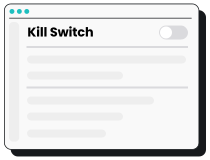
2. Go to Settings, VPN settings, and turn the kill switch button on.
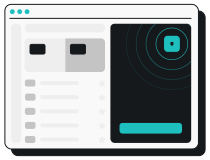
3. All set! If your VPN disconnects, Surfshark’s kill switch will automatically block all internet traffic.

Types of VPN kill switches
VPN kill switches fall into two categories: those that protect specific apps and those that secure your entire system.
Application-level kill switches
Application-level VPN kill switches close certain apps and stop them from sending or receiving data.
These kill switches don’t interrupt your device’s internet connection. The chosen apps won’t leak any private data whenever you lose your VPN connection, but using other apps may still put you at risk.
System-level kill switches
System-level VPN kill switches cut off all internet traffic to and from your device, keeping data across your whole system safe.
To provide the highest level of protection, both of Surfshark’s kill switch modes work on a system level:
- Soft kill switch activates only if the VPN connection drops unexpectedly and blocks all internet traffic until the VPN reconnects;
- Strict kill switch blocks internet access anytime the VPN is off — even if you disconnected manually.
What causes VPN disconnections?
VPN disconnections are quite rare, but they still happen. Here are the most common reasons why:

Unstable internet connection
Spotty internet connectivity is the most common reason VPNs get disconnected. You can’t set up a VPN tunnel without internet access, so your VPN connection shuts down anytime your internet drops.
Firewall and antivirus settings
Your firewall or antivirus software settings may clash with your VPN service. If you frequently lose connection, try adding your VPN app to your firewall’s list of exceptions.

VPN server issues
Some VPNs offer limited server networks, which can lead to more downtime.
Top VPNs like Surfshark boast a solid infrastructure that helps reduce server-related hiccups.

Network congestion
If a network is experiencing heavy traffic, it may be subject to ISP (Internet Service Provider) throttling. This kind of congestion might result in poor connections or VPN app crashes.
When does a VPN kill switch activate?
A kill switch activates when you lose connection to a VPN server. This could happen if:
- You restart your device and don’t reconnect to a VPN server;
- Your device restarts by itself (e.g., an overnight update) and doesn’t auto-connect to a VPN;
- Your connection is unreliable, causing you to disconnect and reconnect to the internet repeatedly;
Your new firewall doesn’t have an exception for your VPN client and blocks your connection.
What can happen if your VPN drops unexpectedly
Here are the top threats you may come across if your connection drops and your VPN isn’t equipped with a kill switch:
- Leaked IP address — with your real IP address visible, you lose your online anonymity and become a bigger target for cyberattacks;
- Leaked location — the website or service you’re using can now detect your country or city, exposing you to privacy violations;
- Traceable online activities — anyone from marketers to censorship-prone governments can monitor you, subjecting you to intrusive ads and legal consequences;
- Greater vulnerability on public Wi-Fi — hackers, snoopers, and data skimmers may be able to access sensitive information on unsecured networks.


Frequently asked questions
Should you turn on a VPN kill switch?
Yes, you should turn on your VPN kill switch — and leave it on. It’s an additional security feature that’ll keep you safer if the VPN connection unexpectedly drops.
How do I turn off a VPN kill switch?
To turn off your Surfshark VPN’s kill switch:
- Go to your Surfshark app.
- Head to Settings and then VPN settings.
- Toggle the kill switch button to the off position.
How do you know if a VPN kill switch is working?
Go to your app’s VPN settings to see if your kill switch is active. In the Surfshark app, the kill switch button will be toggled to the on position — that’s how you know your connection is protected.
What happens when a kill switch is activated?
If your VPN connection is stable, activating your kill switch feature won’t do anything right away. But if your VPN connection drops, the kill switch will block your device’s internet connection to ensure no unprotected data gets leaked.
Which VPN has a built-in kill switch?
Top VPNs like Surfshark have built-in kill switches, offering users enhanced online security from day one.
Can I use a free VPN kill switch?
Yes, some free VPN services offer a kill switch feature. However, they often have limitations like reduced security, slower speeds, and potential data logging. For optimal protection and performance, a paid VPN is a safer choice.